Note
Access to this page requires authorization. You can try signing in or changing directories.
Access to this page requires authorization. You can try changing directories.
Understanding the various Windows 365 connectivity requirements is crucial for ensuring optimal performance and reliability in your organization's environment.
We can break down the service connectivity requirements into three distinct elements:
c. Customer-side Connectivity (This document)
This article describes the customer‑side connectivity requirements for Windows 365. These requirements must be configured correctly to ensure high performance and reliable Cloud PC connectivity.
Customer side connectivity requirements
Regardless of the device or supported method used to connect to your Cloud PC, such as the Windows App, there are a two sets of essential connectivity requirements that must be in place to ensure optimal performance and reliability.
RDP-Specific Traffic: Remote Desktop Protocol (RDP) endpoints require special optimization on the physical device, similar to what is required on the Cloud PC. This optimization ensures a smooth and responsive remote session experience. Detailed guidance for RDP configuration can be found in the optimization of RDP documentation.
General Traffic: Most traffic can be routed through the standard internet path for the user or network, for example via the default proxy with Transport Layer Security (TLS) inspection enabled. These endpoints simply need to be accessible.
These two sets of endpoints are explained separately because they have different behaviors and require different handling within your network configuration. Endpoints which require optimization are clearly marked as such.
Note
Outbound Only: All network requirements listed in the table in this document are outbound. No inbound connectivity is required for Windows 365.
Customer side connectivity - Endpoints
All the endpoints the customer side connectivity requires can be found in the following table.
Important
Microsoft doesn't support Windows 365 deployments where the endpoints listed in this article are blocked.
| ID | FQDN | IP | Protocol/Port | Purpose | Optimization Required? |
|---|---|---|---|---|---|
| 1 | *.wvd.microsoft.com | 40.64.144.0/20 (Covers RDP flow within the FQDN but not everything within the wildcard domain) | TCP/443 | TCP Based RDP Connectivity | Yes |
| 2 | n/a | 51.5.0.0/16 | UDP/3478 | UDP Based RDP via TURN | Yes |
| 3 | windows.cloud.microsoft | n/a | TCP/443 | Connection Center | No |
| 4 | windows365.microsoft.com | n/a | TCP/443 | Service Traffic | No |
| 5 | login.microsoftonline.com | n/a | TCP/443 | Authentication | No |
| 6 | *.servicebus.windows.net | n/a | TCP/443 | Troubleshooting Data | No |
| 7 | go.microsoft.com | n/a | TCP/443 | Microsoft FWLinks | No |
| 8 | aka.ms | n/a | TCP/443 | Microsoft URL shortener | No |
| 9 | learn.microsoft.com | n/a | TCP/443 | Documentation | No |
| 10 | privacy.microsoft.com | n/a | TCP/443 | Privacy statement | No |
| 11 | *.cdn.office.net | n/a | TCP/443 | Automatic Updates | No |
| 12 | graph.microsoft.com | n/a | TCP/443 | Service traffic | No |
| 13 | ecs.office.com | n/a | TCP/443 | Connection center | No |
| 14 | *.events.data.microsoft.com | n/a | TCP/443 | Telemetry | No |
| 15 | *.microsoftaik.azure.net | n/a | TCP/80 | Certificates | No |
| 16 | www.microsoft.com | n/a | TCP/80 | Certificates | No |
| 17 | *.aikcertaia.microsoft.com | n/a | TCP/80 | Certificates | No |
| 18 | azcsprodeusaikpublish.blob.core.windows.net | n/a | TCP/80 | Certificates | No |
Note
Certificate downloads use HTTP on port 80 to avoid circular dependencies. If HTTPS is used, validating the secure connection would require checking the certificate’s revocation status, which depends on the Certificate Revocation List (CRL) itself. CRLs are digitally signed, so integrity is maintained even over HTTP.
Note
If your organization uses a closed network to connect to Windows 365, you may need to allow other endpoints. These endpoints include:
- Azure Certificate Authority endpoints
- Entra Authentication endpoints listed in IDs 46, 56, 59, and 125 in the Microsoft 365 documentation Most networks already allow these endpoints by default, so extra configuration is rarely required.
Corporate network deployment example
For a device connecting to Windows 365 within a corporate network, the connectivity would look similar to the following example:
The dashed green line showing rows 1 & 2 optimized to go direct to the internet via local firewall without inspection. This direct routing ensures RDP provides the highest performance and reliability.
The remainder of the endpoints sent via the standard proxy path the device is configured to use. Ensure this path successfully allows the required endpoints though and include the optimize marked endpoints should the traffic inadvertently take the non-optimized path.
 Diagram 1: Corporate network example with optimized RDP
Remote user deployment example
In this example, a roaming user has VPN software installed, which sends all traffic into the corporate network via the VPN tunnel. RDP endpoints in rows 1 & 2 (Green dashed lines) are optimized and bypassed from this tunnel so traffic to them is sent directly via the user's internet connection. This bypass provides the highest levels of performance and reliability for Windows 365 connectivity, leaving all other connectivity to traverse the corporate network as normal (Solid Blue line).
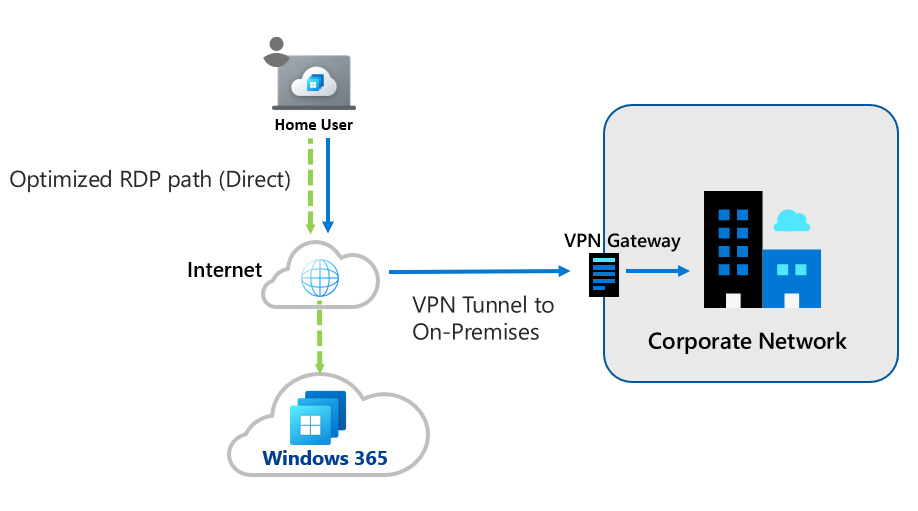 Diagram 2: Optimized RDP for remote users
Summary
To ensure optimal Windows 365 performance, physical devices must meet two key requirements:
Optimize RDP traffic by bypassing VPN/proxy inspection and enabling local breakout.
Allow all listed service endpoints, including certificate and authentication URLs, through standard network paths. Failure to meet these requirements can result in degraded session quality or service disruption.
To read similar detail on how to configure connectivity on the Cloud PC side, see Understanding Windows 365 Connectivity Requirements - Cloud Side Connectivity.