Note
Access to this page requires authorization. You can try signing in or changing directories.
Access to this page requires authorization. You can try changing directories.
Recommended guidance for a simpler, faster, and more secure Cloud PC deployment, with improved reliability and supportability at scale.
These articles present recommended approaches for each deployment decision, the considerations behind them, and a practical path to adoption.
How this guidance fits with the planning guide
Use the Windows 365 planning guide to define objectives, inventory your environment, determine licensing, create a rollout plan, and prepare communications and support. Use this deployment guidance to make the architecture and operating-model decisions that shape that plan.
This guidance doesn't replace planning. It gives you a recommended starting point for the major deployment choices: identity, network, images, updates, management, user data, clients, and supportability. Start with the recommended option for each area, then document any exception that a business, technical, regulatory, security, application, networking, or operational requirement makes necessary.
Cloud-native and Zero Trust principles
These articles recommend deployment choices that align to modern cloud-native and Zero Trust operating models.
Microsoft's Zero Trust guidance is defined as a security strategy. It isn't a product or a service, but an approach to designing and implementing the following set of security principles: verify explicitly, use least privilege access, and assume breach. Rather than relying on implicit trust based on network location, these models prioritize identity, device health, application access, and data protection controls to verify access continuously and reduce security risk.
For more information, see Zero Trust overview.
Deployment guidance structure
These articles consolidate Microsoft's recommended Windows 365 deployment decisions across these critical pillars: identity, network, images, updates, management, user data, clients, and supportability. By bringing these elements together, the guide provides a unified, cloud-native, and Zero Trust-aligned blueprint for successful deployments.
This deployment model is the preferred starting point for most organizations because it aligns with cloud-native and Zero Trust principles, and reduces operational complexity. Organizations should validate this approach against their specific requirements and adopt alternative models only where a documented business or technical dependency exists.
Comparative deployment pillars
For each pillar, these articles contrast the recommended option with its traditional alternative. They also outline a practical adoption path, helping IT and platform technical decision-makers transition with clarity and confidence.
The recommended model requires less configuration and fewer customer-managed components to deploy and operate Windows 365 Cloud PCs. By prioritizing cloud-based identity, Microsoft Hosted Network, Intune management, and cloud data locations, this approach reduces on-premises dependencies, which shortens provisioning time and removes the need to build additional infrastructure.
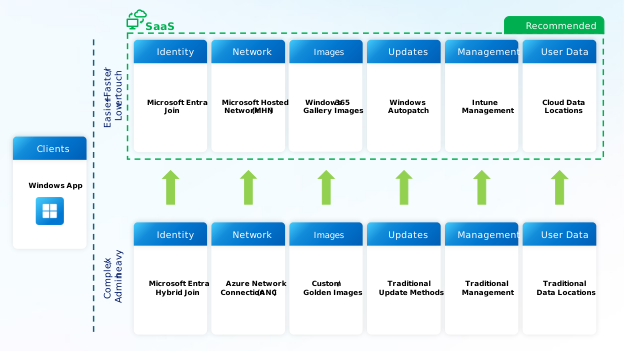
Recommended deployment decisions at a glance
For each pillar, start by evaluating the recommended option against your organization's requirements. Use a traditional alternative only where a documented dependency exists and can't be met by the cloud-native approach (for example, technical, regulatory, compliance, security, application, networking, or operational).
Note
Cloud-native deployment options can still provide access to on-premises resources when required. In this context, cloud-native doesn't mean cloud-only.
| Deployment decision | Recommended option | Traditional alternative |
|---|---|---|
| Identity and device join | Microsoft Entra join | Microsoft Entra hybrid join |
| Network | Microsoft Hosted Network (MHN) | Azure Network Connection (ANC) |
| Images | Gallery images | Custom images |
| Updates | Windows Autopatch | Configuration Manager / WSUS |
| Management | Intune management | Configuration Manager (co-management) / Group Policy |
| User data | Cloud data (OneDrive, Teams, SharePoint, Edge profiles) | Home drives, file shares, folder redirection |
| Clients | Windows App, Windows 365 Link, Windows 365 Boot, Windows 365 Switch | Thin clients and Remote Desktop clients |
Important
Where an alternative may be required, aim to limit its scope only to the affected users or scenarios. The decision should be documented along with the affected users or workloads, the business or technical requirement being addressed, the associated trade-offs, and any future opportunities to move toward the recommended cloud-native model.
Organizations should seek to minimize the scope of exceptions wherever possible. This ensures that the broader deployment can retain the benefits of a cloud-native, Zero Trust approach.
Benefits of the recommended model
- Less configuration — each recommended default requires minimal or no configuration. You can run a cloud-native pilot without an Azure network, an image pipeline, or a directory-sync dependency.
- Fewer on-premises dependencies — removing Microsoft Entra Connect sync, custom-image capture, and network configuration shortens both provisioning time and sign-in time.
- Reduced operational scope — Microsoft manages the network, the base image, patch orchestration, and the underlying infrastructure. Your team manages policy and apps in Intune rather than servers, file shares, and image pipelines.
- Identity-based access control — access is based on identity, device posture, workload, and data signals rather than a trusted network location.
- Scaling without infrastructure changes — Microsoft-managed capacity, service-managed gallery images, and cloud-stored user data let you add or move large numbers of Cloud PCs without first expanding infrastructure.
- Fewer components to troubleshoot — a deployment built on managed services has fewer customer-owned components in the failure path, which narrows the scope of most troubleshooting.
In this section
| Article | Deployment decision covered |
|---|---|
| Identity: Microsoft Entra join for Cloud PCs | How a Cloud PC joins Microsoft Entra ID |
| Network: Microsoft Hosted Network for Cloud PCs | How Cloud PCs connect to the internet, Microsoft services, and organizational resources |
| Images: gallery images for Cloud PCs | The operating system image used at provisioning time |
| Updates: Windows Autopatch for Cloud PCs | How Windows and Microsoft apps are kept current |
| Management: Microsoft Intune as the management plane | Configuration, compliance, security, and app delivery |
| User data: cloud user data for Cloud PCs | Where user files, mail, and settings live |
| Clients: modern connectivity to Cloud PCs | How users connect to their Cloud PCs |
| Supportability: operational benefits of a cloud-native deployment | How the recommended deployment decisions improve day-two operations and support |
Next steps
Start with the identity decision, which determines how each Cloud PC joins Microsoft Entra ID.