Note
Access to this page requires authorization. You can try signing in or changing directories.
Access to this page requires authorization. You can try changing directories.
The following list of ChassisTypes is copied from the latest DMTF SMBIOS specification.
# Set-ExecutionPolicy or Script Signing documentation needs to be reviewed
# Current script is designed to run on individual machines
#

#
$ChassisTypes =
@{
    1='Other'
    2='Unknown'
    3='Desktop'
    4='Low Profile Desktop'
    5='Pizza Box'
    6='Mini Tower'
    7='Tower'
    8='Portable'
    9='Laptop'
    10='Notebook'
    11='Hand Held'
    12='Docking Station'
    13='All in One'
    14='Sub Notebook'
    15='Space-Saving'
    16='Lunch Box'
    17='Main System Chassis'
    18='Expansion Chassis'
    19='SubChassis'
    20='Bus Expansion Chassis'
    21='Peripheral Chassis'
    22='Storage Chassis'
    23='Rack Mount Chassis'
    24='Sealed-Case PC'
    25='Multi-system chassis'
    26='Compact PCI'
    27='Advanced TCA'
    28='Blade'
    29='Blade Enclosure'
    30='Tablet'
    31='Convertible'
    32='Detachable'
    33='IoT Gateway'
    34='Embedded PC'
    35='Mini PC'
    36='Stick PC'
}

$namespace = "root\CIMV2"

$machines = New-Object System.Collections.ArrayList

# TODO: add code to populate the machine list from user input, etc.
#
$machines.Add("LocalHost") | Out-Null

$list = New-Object System.Collections.ArrayList

foreach ($machine in $machines)
{
    $obj = New-Object -Type PSObject | Select-Object SerialNumber, Manufacturer, UUID, BaseBoardProduct, ChassisTypes, Chassis, SystemFamily, SystemSKUNumber

    $obj.SerialNumber = Get-WmiObject -class Win32_Bios -computername $machine -namespace $namespace | Select-Object -ExpandProperty SerialNumber
    $obj.Manufacturer = Get-WmiObject -class Win32_Bios -computername $machine -namespace $namespace | Select-Object -ExpandProperty Manufacturer
    $obj.UUID = Get-WmiObject Win32_ComputerSystemProduct | Select-Object -ExpandProperty UUID
    $obj.BaseBoardProduct = Get-WmiObject Win32_BaseBoard | Select-Object -ExpandProperty Product
    $obj.ChassisTypes = Get-WmiObject Win32_SystemEnclosure | Select-Object -ExpandProperty ChassisTypes
    $obj.Chassis = $ChassisTypes[[int]$obj.ChassisTypes]
    $obj.SystemFamily = Get-WmiObject Win32_ComputerSystem | Select-Object -ExpandProperty SystemFamily
    $obj.SystemSKUNumber = Get-WmiObject Win32_ComputerSystem | Select-Object -ExpandProperty SystemSKUNumber

    $list.Add($obj) | Out-Null
}

# TODO: add code to handle output (save to local file, upload to share, etc.)
#
# to use on single line for each object
# $list | Sort-Object Manufacturer, Chassis | Format-Table Manufacturer, ChassisTypes, Chassis, SystemFamily, BaseBoard_Product, SerialNumber, UUID, SystemSKUNumber -Wrap

# Optional: pipe to Excel:
# $list | Export-Csv c:\path\filename.csv -Encoding Unicode -NoTypeInformation
#
# Optional: pipe to UI
# $list | Out-GridView
#
$list
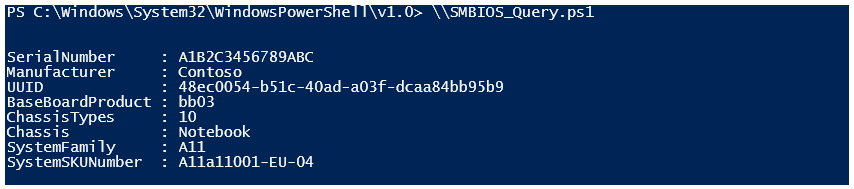
Sample output: