Note
Access to this page requires authorization. You can try signing in or changing directories.
Access to this page requires authorization. You can try changing directories.
Release date: 2 October 2026
Changes and improvements gradually being rolled out*
- This update includes a small set of general improvements and fixes that improve the overall experience for Insiders running this build on their PCs.
[Windows Magnifier]
Magnifier now gives you more control over how you zoom. You can type an exact zoom percentage directly in the Magnifier toolbar to land on precisely the level you need.
We've also added preset step increments (5%, 10%, 25%, 50%, 100%, 150%, 200%, and 400%) to the Settings dropdown, so you can jump to common levels in a single click. Whether you need a subtle boost or a dramatic close-up, Magnifier adapts to how you want to zoom.

Enter an exact percentage or jump to preset steps - 5% up to 400%.

[Windows Recovery]
We're introducing Cloud rebuild, a new recovery option that restores a Windows 11 PC to a clean, known-good state by performing a full OS reinstall, even when Windows won't boot. Unlike Reset this PC, Cloud rebuild downloads both the target Windows image and the device's drivers from Windows Update, so the device comes back fully functional without USB media, without a custom image, and without depending on the health of the currently installed OS.
In this preview, you can try Cloud rebuild today:
- Start it directly from the Windows Recovery Environment (WinRE) by selecting Troubleshoot > Recovery and uninstall > Cloud rebuild.
- Connect over wired Ethernet or a Wi-Fi network from within WinRE.
- Review the target Windows build, edition, and language, then confirm the data-loss warning before the rebuild begins.
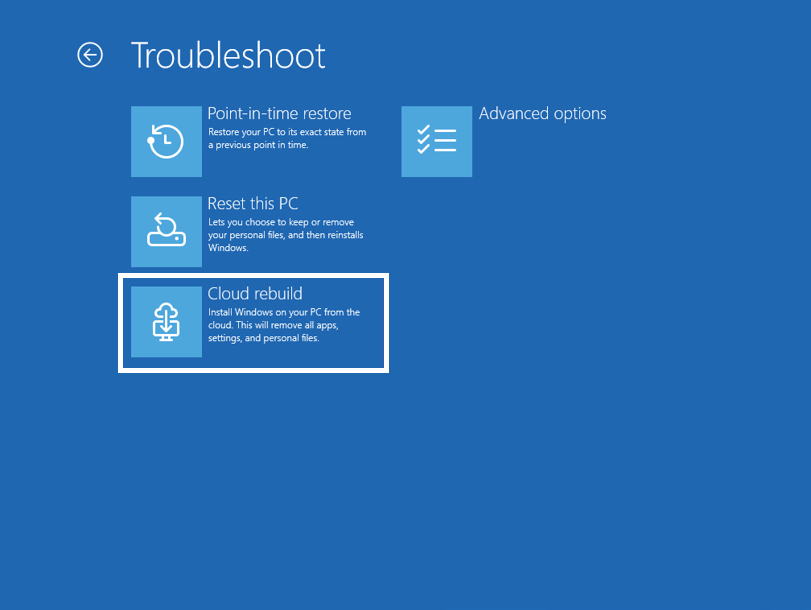
The new Cloud rebuild option in Windows Recovery Environment (WinRE), which enables a full Windows reinstall using files downloaded from Windows Update.
Feedback: Share your thoughts in Feedback Hub (WIN + F) under Recovery > Cloud rebuild.
To learn more, see Cloud rebuild.
[File Explorer]
- Customizations
- Improved File Explorer to keep folder view customizations, such as sorting and icon size preferences, consistent across different access paths and apps.
- Address bar improvements
- The address bar now supports paths containing double backslashes and quotation marks, for example,
C:\Users\useror"C:\Users\user", improving compatibility with a wider range of inputs. - Improved reliability of the address bar suggestion dropdown so it now consistently closes after an item is selected.
- The address bar now supports paths containing double backslashes and quotation marks, for example,
- Refinements to the rename experience
- Fixed an issue where text would be repeatedly selected while renaming items in folder views.
- Fixed an issue where updated names with case-only changes weren't immediately reflected in folder views across local and cloud storage.
Reminders for Windows Insiders in the Beta (26H1) channel
The desktop watermark shown at the lower right corner of the desktop is normal for Windows Insider pre-release builds.
Features and experiences included in these builds might never get released as we try out different concepts and get feedback. Features might change over time, be removed, or replaced and never get released beyond Windows Insiders. Some of these features and experiences could show up in future Windows releases when they're ready.
Some features in active development we preview with Windows Insiders might not be fully localized, and localization will happen over time as features are finalized. As you see issues with localization in your language, report those issues to us via Feedback Hub.
Check out Flight Hub for a complete look at what build is in which Insider channel.