Note
Access to this page requires authorization. You can try signing in or changing directories.
Access to this page requires authorization. You can try changing directories.
Release date: 6 November 2026
Changes and improvements gradually being rolled out*
- This update includes a small set of general improvements and fixes that improve the overall experience for Insiders running this build on their PCs.
[Manage camera, microphone, and location access for desktop apps]
Windows Insiders can now manage camera, microphone, and location permissions for individual desktop apps. Previously, access for traditional desktop applications was managed through a single device-wide setting.
With this update, you can review and control access on an app-by-app basis, giving you greater visibility into which apps are requesting access to sensitive resources and more control over your privacy choices. These controls make privacy permissions easier to understand and manage across the wide range of desktop apps you use every day.
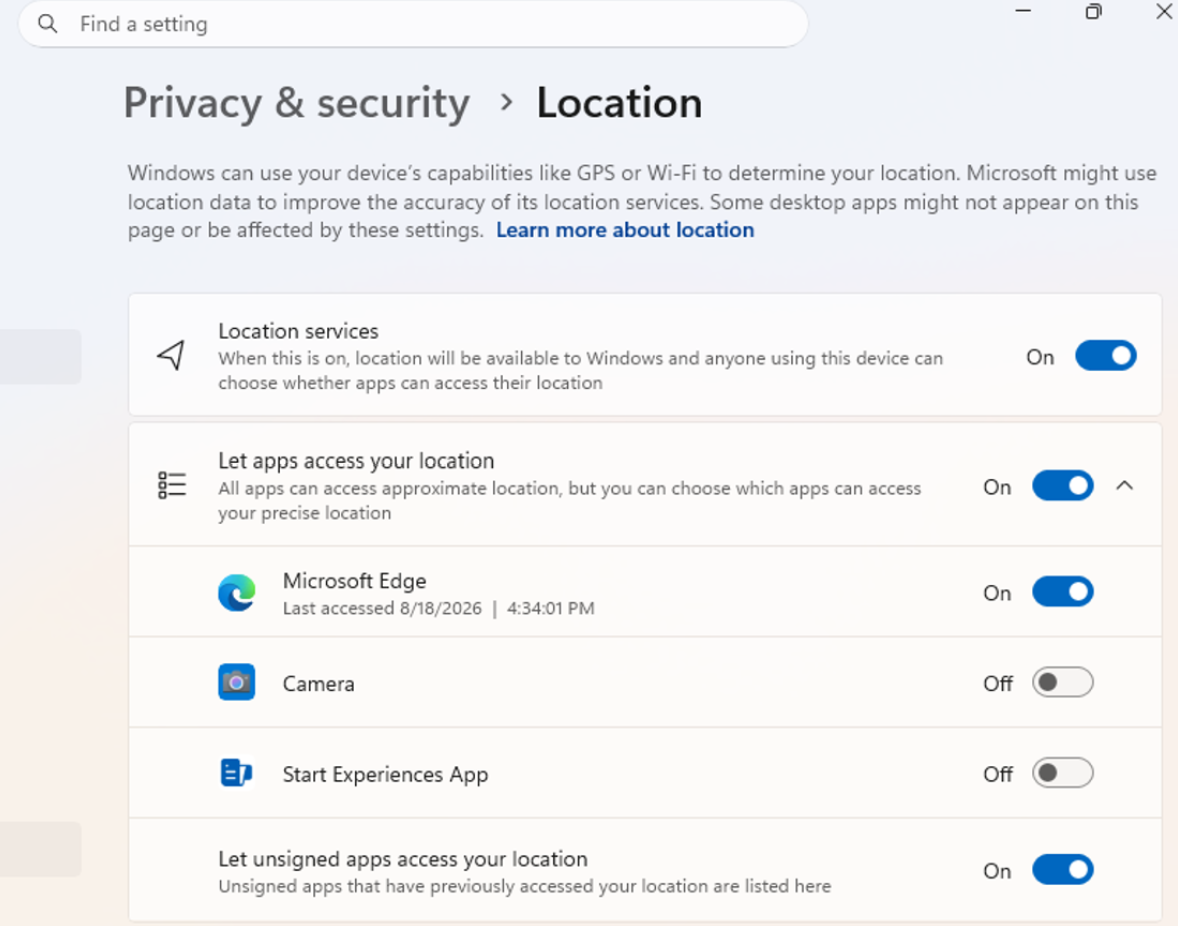
UI showing the new privacy controls for individual desktop apps in Settings.
What's changing
- Allow or deny access for each desktop app individually.
- Go to Settings > Privacy & security > Camera, Microphone, or Location to review and manage permissions.
- Apps that haven't yet accessed a resource prompt for permission the first time access is requested.
What stays the same
- Existing app permission decisions are preserved.
- Apps previously granted access continue to have access.
- Apps previously denied access remain denied.
- No action is required, and no settings are reset.
- Existing enterprise policies continue to function as designed. We're exploring additional management capabilities.
Notes
- Most desktop apps appear with clear app attribution. However, some apps that rely on shared system components, browser-hosted experiences, or similar technologies might appear under a different name than expected.
- Some desktop apps might appear as Unsigned if Windows can't verify publisher information. Only grant access to apps you recognize and trust.
Feedback: Share your thoughts in Feedback Hub (WIN + F) under Settings > Privacy Settings.
[Windows Update]
- Fixed an issue causing some Insiders to see error
0x80070057 - 0x20003, "The installation failed in the SAFE_OS phase with an error during INSTALL_UPDATES operation", when attempting to upgrade to the latest builds.
[Audio]
- Fixed an issue where HDMI and DisplayPort audio playback might fail on certain AMD graphics cards after the latest builds.
Reminder for Windows Insiders in the Experimental (Future Platforms) channel
These builds can be unstable and might be released with limited documentation.
The builds released to these channels represent the latest platform changes early in the development cycle and shouldn't be seen as matched to any specific release of Windows. Features and experiences included in these builds might never get released as we try out different concepts and get feedback. Features might change over time, be removed, or replaced, and never get released beyond Windows Insiders. Some of these features and experiences could show up in future Windows releases when they're ready.
Many features are rolled out using Controlled Feature Rollout technology, starting with a subset of Insiders and ramping up over time. We monitor feedback to see how they land before pushing them out to everyone in this channel.
The desktop watermark shown at the lower right corner of the desktop is normal for Windows Insider pre-release builds.
Some features in active development we preview with Windows Insiders might not be fully localized, and localization will happen over time as features are finalized. As you see issues with localization in your language, report those issues to us via Feedback Hub.