Note
Access to this page requires authorization. You can try signing in or changing directories.
Access to this page requires authorization. You can try changing directories.
Release date: 20 November 2026
Changes and improvements gradually being rolled out
[Bluetooth]
Bluetooth LE Audio devices can now play at full-range stereo fidelity while also using the device's microphone, ensuring you continue to hear great audio quality when in game chat, in a voice call, using voice typing, or using voice chat in Copilot Chat.
When using an LE Audio device with a PC that supports Super Wideband Stereo, choose the new 2 channels, 16 bit, 48000Hz option from Settings > System > Sound > Output > {Bluetooth device} > Output settings > Format when microphone is active. This feature is available for LE Audio devices that support 48kHz playback, like headphones, earbuds, and speakers. If you encounter compatibility issues with the LE Audio device you're using, let us know through Feedback Hub.
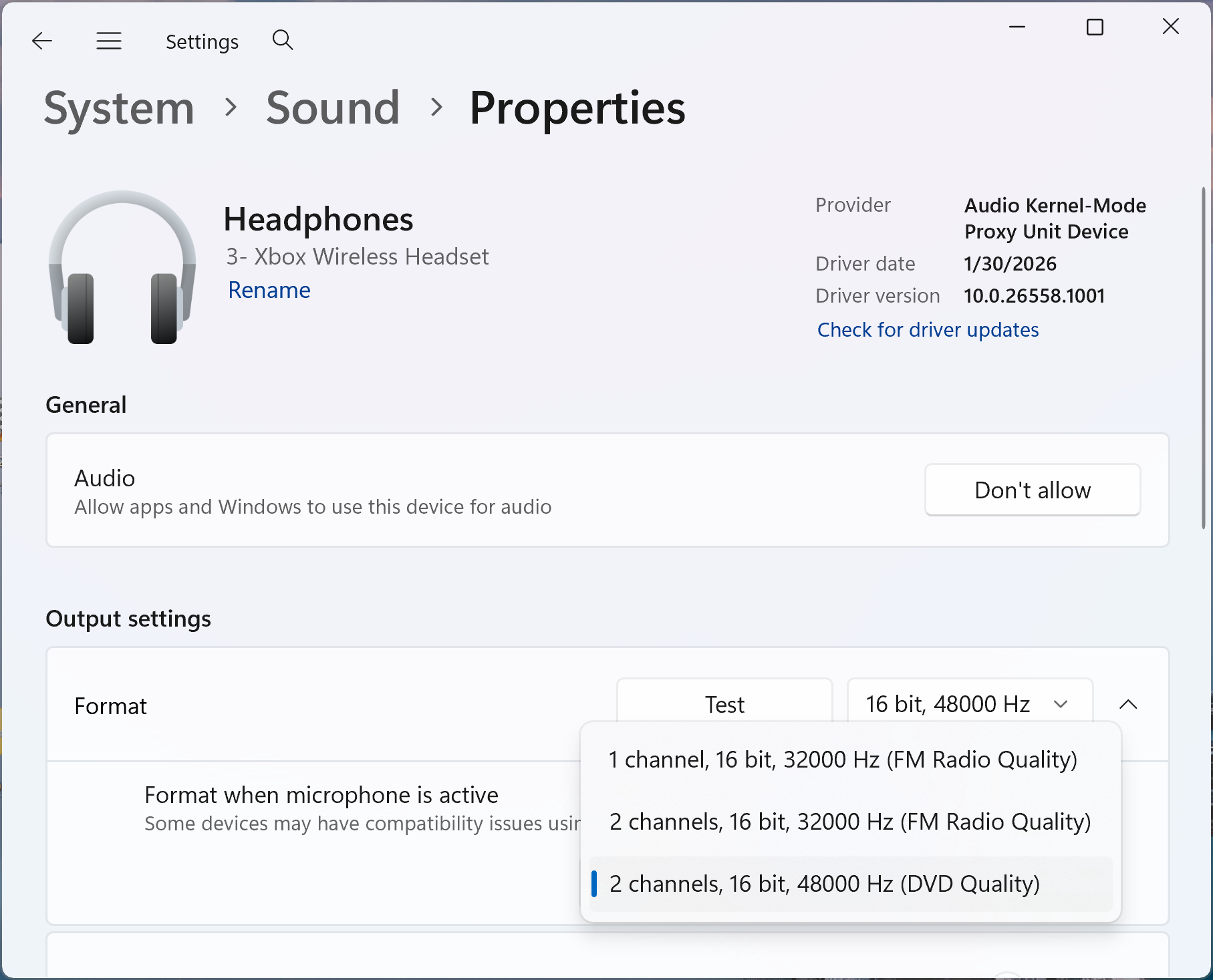
Output settings for a Bluetooth LE Audio device with Format when microphone is active set to 2 channels, 16 bit, 48000Hz.
[People widget]
The new People widget provides a way to quickly get back to the people you communicate with from the Windows Widgets board. The widget brings together relevant contacts from supported communication apps, making it easier to see the people you connect with and quickly continue a conversation.
To try it, open the Widgets board using Windows key + W, select the + button to open the widget picker, and add the People widget. Selecting a contact opens the appropriate conversation in the supported communication app.
Prerequisite: To see contacts in the widget, first set up Phone Link, WhatsApp, or both on your PC.

The People widget with a list of contacts from supported communication apps.

[New Windows Search]
- The new Windows Search experience that began rolling out last month is expanding with additional rich results for definitions, currency conversions, and general web searches.
[Servicing the Windows Recovery Environment]
A new way of servicing the Windows Recovery Environment (WinRE) using Windows cumulative updates is beginning to roll out. When a Windows cumulative update is installed, Windows builds a fresh, updated recovery environment from the serviced Windows OS components. This reduces reliance on separate Safe OS Dynamic Updates and helps make updates more reliable while ensuring recovery tools are ready if Windows can't start.
BitLocker devices require no changes.
Other disk-encryption solutions might require drivers to be integrated into WinRE to access the main OS. Windows uses two existing mechanisms for traditional Windows feature updates to integrate drivers into WinRE. The installation looks for INFs from these locations:
- Windows Setup configuration file (
setupconfig.ini). %windir%\System32\update\run\<GUID>\reflectdrivers.
- Windows Setup configuration file (
[File Explorer]
- Quick filters in search: When a search returns too many files, new file type and date filters make it easier to find the right file.
[Quick settings]
- Improved reliability of the new mobile devices experience in Quick settings.
[Input]
- Improved reliability of the Ctrl + Shift keyboard shortcut for switching input.
[Feature flags]
- If the flags section was missing for you in the last flight, it should be back now.
[Known issues]
- Reports from Insiders that the CPU speed shown in Task Manager no longer updates after the latest flights are under investigation.
Reminders for Windows Insiders in the Experimental channel
Updates are based on Windows 11, version 26H2 via an enablement package (Build 26340.10032).
Many features are rolled out using Controlled Feature Rollout technology, starting with a subset of Insiders and ramping up over time as feedback is monitored before pushing them out to everyone in this channel.
The desktop watermark shown at the lower right corner of the desktop is normal for Windows Insider pre-release builds.
Features and experiences included in these builds might never get released as different concepts are tried out and feedback is gathered. Features might change over time, be removed, or replaced and never get released beyond Windows Insiders. Some of these features and experiences could show up in future Windows releases when they're ready.
Some features in active development previewed with Windows Insiders might not be fully localized, and localization will happen over time as features are finalized. As you see issues with localization in your language, report those issues via Feedback Hub.
Check out Flight Hub for a complete look at what build is in which Insider channel.