Note
Access to this page requires authorization. You can try signing in or changing directories.
Access to this page requires authorization. You can try changing directories.
This article provides an overview of the Domain Name System (DNS) query process and how DNS servers resolve queries. It also explains how DNS servers use recursion and iteration to resolve queries.
How DNS queries work
When a DNS client needs to look up a name, it queries DNS servers to resolve the name. Each query message the client sends contains three pieces of information, specifying a question for the server to answer:
- A specified DNS domain name, stated as a fully qualified domain name (FQDN).
- A specified query type, which can either specify a resource record (RR) by type or a specialized type of query operation.
- A specified class for the DNS domain name. For DNS servers running the Windows operating system, this class should always be specified as the Internet (IN) class.
For example, the name specified could be the FQDN for a computer, such as host-a.example.contoso.com., and the query type specified to look for an address (A) RR by that name. Think of a DNS query as a client asking a server a two-part question, such as "Do you have any A resource records for a computer named hostname.example.contoso.com.?" When the client receives an answer from the server, it reads and interprets the answered A RR, learning the IP address for the computer it asked for by name.
The following table describes common DNS query types and corresponding IDs.
| Type | ID |
|---|---|
| A | 1 |
| AAAA | 28 |
| SOA | 6 |
| SRV | 33 |
DNS queries resolve in many different ways. A client can sometimes answer a query locally using cached information obtained from a previous query. The DNS server can use its own cache of resource record information to answer a query. A DNS server can also query other DNS servers on behalf of the client. This process is known as recursion. The server resolves the name and then sends an answer back to the client.
In addition, the client itself can attempt to contact other DNS servers to resolve a name. When a client does so, it uses separate queries based on referral answers from servers. This process is known as iteration.
In general, the DNS query process occurs in two parts:
- A name query begins at a client computer and is passed to a resolver, the DNS Client service, for resolution.
- When the query can't be resolved locally, DNS servers can be queried as needed to resolve the name.
Each process is explained in more detail in this article.
How iteration works
Iteration is the type of name resolution used between DNS clients and servers when the following conditions are in effect:
- The client requests the use of recursion, but recursion is disabled on the DNS server.
- The client doesn't request the use of recursion when querying the DNS server.
An iterative request from a client tells the DNS server that the client expects the best answer the DNS server can provide immediately, without contacting other DNS servers.
When iteration is used, a DNS server answers a client based on its own specific knowledge about the namespace regarding the names data being queried. For example, if a DNS server on your intranet receives a query from a local client for www.contoso.com, it might return an answer from its names cache. If the queried name isn't currently stored in the names cache of the server, the server might respond by providing a referral. A referral is a list of NS and A RRs for other DNS servers that are closer to the name queried by the client.
When iteration is used, a DNS server can further help a name query resolution beyond giving its own best answer back to the client. For most iterative queries, a client uses its locally configured list of DNS servers to contact other name servers throughout the DNS namespace if its primary DNS server can't resolve the query.
The Windows DNS Client service doesn't perform recursion.
How caching works
As DNS servers process client queries using recursion or iteration, they discover and acquire a significant store of information about the DNS namespace. The server then caches this information.
Caching provides a way to speed up the performance of DNS resolution for subsequent queries of popular names, while substantially reducing DNS-related query traffic on the network.
As DNS servers make recursive queries on behalf of clients, they temporarily cache resource records. Cached resource records contain information obtained from DNS servers. These servers are authoritative for DNS domain names. This information is learned while making iterative queries. These queries help to fully answer a recursive query performed on behalf of a client. Later, when other clients place new queries that request resource record information matching cached records, the DNS server can use the cached information to answer them.
When information is cached, a Time-To-Live (TTL) value applies to all cached resource records. As long as the TTL for a cached resource record doesn't expire, a DNS server can continue to cache. It can use the cached resource record again when answering queries from its clients that match these records. Caching TTL values used by resource records in most zone configurations are assigned the minimum (default) TTL which is set in the zone’s Start of Authority (SOA) resource record. By default, the minimum TTL is 3,600 seconds (one hour) but can be adjusted or, if needed, individual caching TTLs can be set at each resource record.
Note
By default, the DNS Server service uses a root hints file, cache.dns, that is stored in the <systemroot>\System32\Dns folder on the server computer. This file contains the NS and A resource records for the root servers of the DNS namespace (the Internet root servers or intranet root servers). When the DNS Server service is started, the root server list is queried for a current list of all the root servers. The results of the query are used to update the root hints file. This operation is also performed periodically while the service is running. When changes are made to the root hints by an administrator, these changes are written back to the root hints file.
DNS Client service resolver
When a DNS domain name is used in a program on the local computer, the request is then passed to the DNS Client service for resolution which first checks locally cached information. If the queried name can be resolved, the query is answered, and the process is completed.
The following diagram shows a simple example of a DNS client querying the DNS Client service for a name resolution.

The local resolver cache can include name information obtained from two possible sources:
If a Hosts file is configured locally, any host name-to-address mappings from that file are loaded into the cache when the DNS Client service is started.
Resource records obtained in answered responses from previous DNS queries are added to the cache and kept for a time determined by the time-to-live (TTL).
If the query doesn't match an entry in the cache, the resolution process continues with the client querying a DNS server to resolve the name.
The following diagram shows the DNS client service checking the cache for a DNS query.

Configuring DNS clients with more than one DNS Server IP adds fault tolerance to your DNS infrastructure. Adding multiple DNS server IPs ensures DNS names can still be resolved if the primary DNS server, the network link, or the supporting infrastructure fails.
Name failures might cause application or component hangs, resource outages waiting for dependent time-out expirations that directly or indirectly cause operational failures. See DNS client resolution time-outs for more detailed discussion on all possible scenarios.
For these reasons, we recommended you configure any Windows client with more than one DNS server. However, the Windows client resolution process varies depending on the number of DNS servers configured.
DNS server query process
When the DNS server receives a query, it first checks if it can answer the query authoritatively. The DNS server does checks by using resource record information that is contained in a locally configured zone on the server.
If the queried name matches a corresponding RR in local zone information, the server answers authoritatively, using this information to resolve the queried name.
If no zone information exists for the queried name, the server then checks to see if it can resolve the name using locally cached information from previous queries. If a match is found here, the server answers with this information. Again, if the preferred server can answer with a positive matched response from its cache to the requesting client, the query is completed.
If the queried name doesn't find a matched answer at its preferred server, either from its cache or zone information, the query process can continue, using recursion to fully resolve the name. This process involves assistance from other DNS servers to help resolve the name. By default, the DNS Client service asks the server to use a process of recursion to fully resolve names on behalf of the client before returning an answer.
In order for the DNS server to do recursion properly, it first needs some helpful contact information about other DNS servers in the DNS domain namespace. This information is provided as root hints. Root hints are a list of preliminary resource records. The DNS service uses these records to locate other DNS servers that are authoritative for the root of the DNS domain namespace tree. Root servers are authoritative for the domain root and top-level domains in the DNS domain namespace tree.
By using root hints to find root servers, a DNS server is able to complete the use of recursion. In theory, this process enables any DNS server to locate the servers that are authoritative for any other DNS domain name used at any level in the namespace tree.
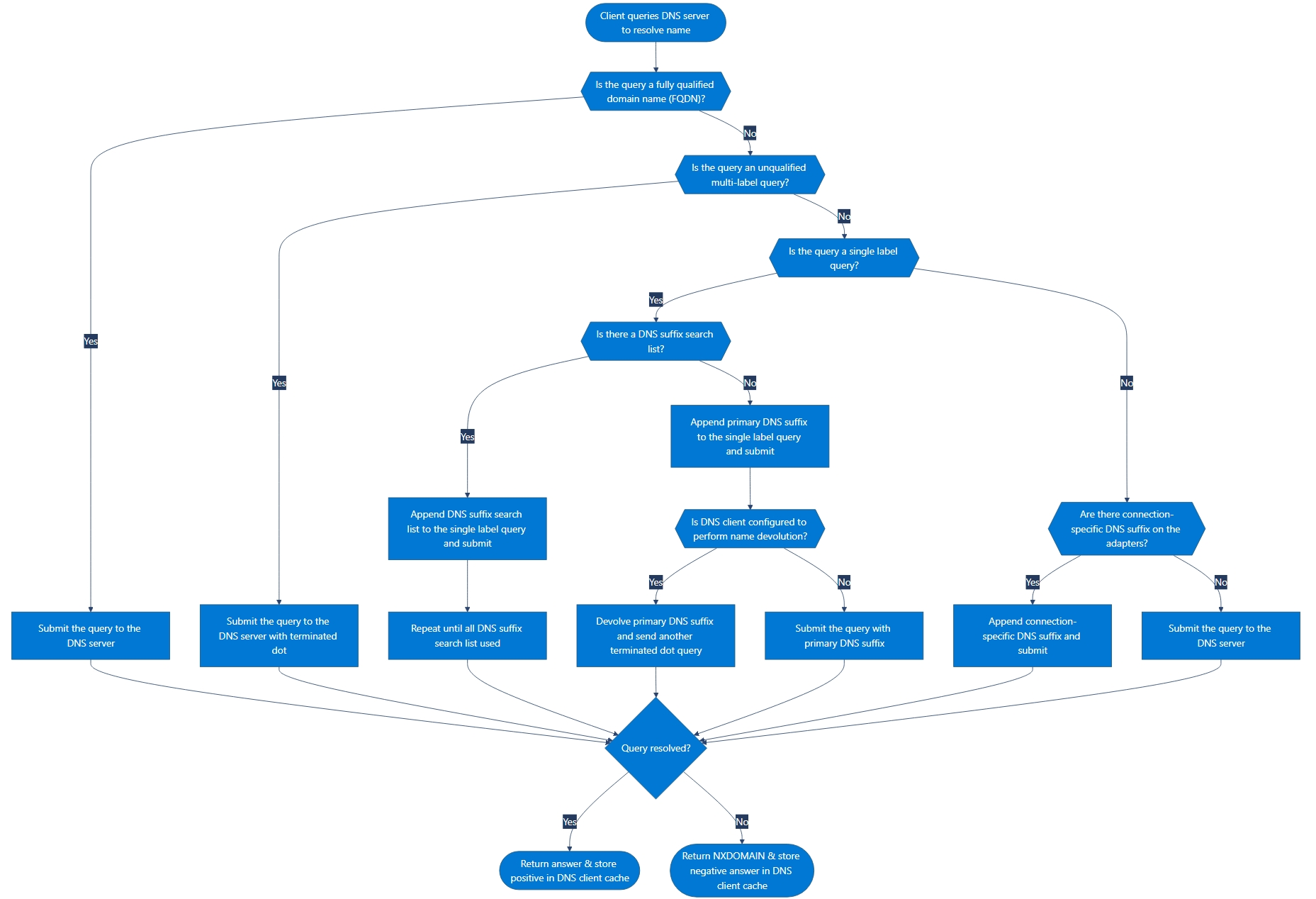
The following steps describe the process of querying a DNS server:
If the query is a fully qualified domain name (FQDN), meaning it ends with a terminating dot (
.) then the query is submitted to the DNS server. For example,www.contoso.com.If the query is an unqualified multi-label query, meaning it doesn't end with a terminating dot (
.), the DNS client submits it to the DNS server with a terminating dot (.). For example,www.contoso.com.If the unqualified is single label query such as
www. Then the behavior is different based on the DNS settings on the NIC.If there a DNS suffix search list then the DNS client service appends them in order from first to last to the single label query and submit the query with terminated dot (
.) to the DNS server. This process is a repeated process until all DNS suffix search list used.If no DNS suffix search list is configured, then the DNS client service appends primary DNS suffix to the single label query with terminated dot (
.) and submit to the DNS server.When the DNS client is configured to perform name devolution, it devolves the primary DNS suffix and send another query with a terminating dot (
.) if the primary DNS suffix fails. For example, if resolvewww.test.contoso.comfails the client devolves towww.contoso.comIf there's a connections-specific DNS suffix configured on the adapters, it appends the query with terminated dot (
.) and submitted to the DNS server.
In all cases, the response is stored in the DNS client cache, regardless of whether the response is positive or negative.
The following flowchart illustrates the described process of querying a DNS server.
DNS recursion
Consider the use of the recursion process to locate the name host-b.example.contoso.com. when the client queries a single DNS server. The process occurs when a DNS server and client are first started and have no locally cached information available to help resolve a name query. It assumes that the name queried by the client is for a domain name of which the server has no local knowledge, based on its configured zones.
First, the preferred server parses the full name and determines that it needs the location of the server that is authoritative for the top-level domain, com. It then uses an iterative query to the com DNS server to obtain a referral to the contoso.com server. Next, a referral answer comes from the contoso.com server to the DNS server for example.contoso.com.
Finally, the example.contoso.com. server is contacted. Because this server contains the queried name as part of its configured zones, it responds authoritatively back to the original server that initiated recursion. When the original server receives the response, it checks if the answer is authoritative. If it is, the server forwards this answer back to the requesting client, completing the recursive query process.
Although the recursive query process can be resource-intensive when performed as described, it has some performance advantages for the DNS server. For example, during the recursion process, the DNS server performing the recursive lookup obtains information about the DNS domain namespace. The server caches the information, which can be used again to help speedup answering of subsequent queries that use or match it. Over time, this cached information can grow to occupy a significant portion of server memory resources. The cache is cleared whenever the DNS service is restarted.
DNS query adaptive time-out
The DNS query adaptive time-out feature enables the time-out for DNS queries to adapt based on the time required for previous queries, reducing the time out for most queries. Time-outs can also be increased for high-latency links, such as satellite links. Windows Store apps can optimize the configuration of DNS time-outs on a per network interface basis.
Instead of waiting for 1,000 ms before timing out a DNS query, the first time out is adjusted to be between 25 ms and 1,000 ms, based on past performance of the network.
DNS server nonresponsive cache
Nonresponsive DNS servers are cached and periodically retried. This retirement enables the DNS client to use the best available server consistently, and to spend less time waiting for unresponsive DNS servers.
The following figure shows example DNS client queries each server on each adapter using the process in this section.

The DNS Client service queries the DNS servers in the following sequence:
The DNS Client service sends the name query to the first DNS server on the preferred adapter’s list of DNS servers and waits one second for a response.
If the DNS Client service doesn't receive a response from the first DNS server within one second, it sends the name query to the first DNS servers on all adapters that are still under consideration and waits two seconds for a response.
If the DNS Client service doesn't receive a response from any DNS server within two seconds, it sends the query to all DNS servers on all adapters that are still under consideration. The DNS Client service then waits another two seconds for a response.
If the DNS Client service still doesn't receive a response from any DNS server, it sends the name query to all DNS servers on all adapters that are still under consideration and waits four seconds for a response.
If the DNS Client service doesn't receive a response from any DNS server, the DNS client sends the query to all DNS servers on all adapters that are still under consideration and waits eight seconds for a response.
If the DNS Client service doesn't receive a response from any server within eight seconds, the DNS Client service responds with a time out. If the DNS Client service doesn't receive a response from any DNS server on specific adapter, it times out all queries to those servers for the next 30 seconds on that adapter.
If at any point the DNS Client service receives a negative response from a server, it removes every server on that adapter from consideration during this search. For example, if the first server on Alternate Adapter A gives a negative response in step 2, the DNS Client service doesn't query any other server on the list for Alternate Adapter A.
If the DNS Client service receives a positive response, it stops querying for the name, adds the response to the cache, and returns the response to the client.
The DNS Client service keeps track of which servers answer name queries more quickly, and it moves servers up or down on the list based on how quickly they reply to name queries.
Alternate query responses
The preceding description of DNS queries assumes that the process ends with a positive response returned to the client. However, queries can return other answers as well. The following are the most common query answers:
- An authoritative answer
- A positive answer
- A referral answer
- A negative answer
An authoritative answer is a positive response from a DNS server that has direct authority over the queried name. This answer includes the authority bit set in the DNS message to indicate its authenticity.
A positive response can consist of the queried RR or a list of RRs (also known as a RR set) that fits the queried DNS domain name and record type specified in the query message.
A referral answer contains other RRs not specified by name or type in the query. This type of answer is returned to the client if the recursion process isn't supported. The records are meant to act as helpful reference answers that the client can use to continue the query using iteration. A referral answer contains more data such as RRs that are other than the type queried. For example, if the DNS server doesn't find any A RRs for the queried host name www in this zone, but it finds a CNAME RR for www instead, it can include that information in its response to the client. If the client is able to use iteration, it can make more queries using the referral information in an attempt to fully resolve the name for itself.
A negative response from the server can indicate one of two possible results:
- The authoritative server couldn't find the queried name in the DNS namespace.
- The authoritative server found the queried name, but no records of the specified type exist for that name.
The resolver processes the query and returns the results to the requesting program. The response can be either positive or negative. Additionally, the resolver caches the response for future use.
If the resultant answer to a query is too long to be sent and resolved in a single UDP message packet, the DNS server can initiate a failover response over TCP port 53 to answer the client fully in a TCP connected session.
Disabling the use of recursion on a DNS server is done when DNS clients are being limited to resolving names to a specific DNS server, such as one located on your intranet. Recursion might also be disabled when the DNS server can't resolve external DNS names. In this case, clients are expected to fail over to another DNS server for name resolution. If you disable recursion on the DNS server, you can't use forwarders on the same server.
By default, DNS servers use several default timings when performing a recursive query and contacting other DNS servers. These defaults include:
- A recursion retries interval of 3 seconds. This interval is the length of time the DNS service waits before retrying a query made during a recursive lookup.
- A recursion time-out interval of 8 seconds. This interval is the length of time the DNS service waits before failing a recursive lookup that has been retried.
Under most circumstances, these parameters don't need adjustment. However, if you're using recursive lookups over a slow-speed wide area network (WAN) link, you might be able to improve server performance and query completion by making slight adjustments to the settings.
Related content
To learn more about the reverse lookup process, see Reverse lookup.