Note
Access to this page requires authorization. You can try signing in or changing directories.
Access to this page requires authorization. You can try changing directories.
Non-Uniform Memory Access (NUMA) is a memory architecture for multiprocessor systems in which a processor can access some regions of memory faster than others, depending on how physically close the memory is to that processor. Workloads that are sensitive to memory access latency, such as databases and high-performance computing applications, perform better when they use memory that's local to the processor running them.
Hyper-V supports NUMA by projecting a virtual NUMA topology into virtual machines (VMs). Virtual NUMA lets a VM and its NUMA-aware applications take advantage of the host's memory architecture, so they can access memory that's physically closer to the CPU cores they use.
This article explains the concepts of NUMA in Hyper-V, including virtual NUMA topology, NUMA spanning, and how NUMA interacts with Dynamic Memory. NUMA settings apply only to multiprocessor systems; single-processor systems don't have multiple NUMA nodes.
What is NUMA?
Non-Uniform Memory Access (NUMA) is a computer system architecture for multiprocessor designs in which some regions of memory have greater access latencies. This latency difference comes from how the system interconnects its memory and processors. Some memory regions connect directly to one or more processors, and all processors connect to each other through various types of interconnection fabric. For large multiprocessor systems, this arrangement results in less contention for memory and increased system performance.
A NUMA architecture divides memory and processors into groups, called NUMA nodes. From the perspective of any single processor in the system, memory in the same NUMA node as that processor is local, and memory in another NUMA node is remote. Processors can access local memory faster than remote memory.
Most modern operating systems and many high-performance applications that typically scale to use many processors and large amounts of memory, such as Microsoft SQL Server, include optimizations that recognize and adapt to a computer's NUMA topology. To avoid remote access penalties, a NUMA-aware application attempts to allocate storage for data and schedule processor threads to access that data in the same NUMA node. These optimizations minimize memory access latencies and reduce memory interconnect traffic.
NUMA in virtual machines
Hyper-V supports NUMA to optimize memory access for VMs running on NUMA-enabled hardware. When you create a VM, Hyper-V automatically detects the NUMA topology of the host and projects a virtual NUMA topology into the VM. By default, Hyper-V optimizes this virtual NUMA topology to match the NUMA topology of the underlying host computer.
Exposing a virtual NUMA topology into a VM allows the guest operating system and any NUMA-aware applications running within it to take advantage of the NUMA performance optimizations, just as they would when running on a physical computer. Workloads that aren't NUMA-aware don't take advantage of virtual NUMA. However, the guest operating system might perform some NUMA optimization.
There's no distinction between a virtual and a physical NUMA from the workload's perspective. Inside a virtual machine, when a workload allocates local memory for data, and accesses that data in the same NUMA node, fast local memory access results on the underlying physical system. This approach avoids the performance penalties of remote memory access.
NUMA spanning
When you start a VM, Hyper-V attempts to allocate all the memory for that VM from a single physical NUMA node, if sufficient memory is available. By default, if a single node can't satisfy the memory requirements for the VM, Hyper-V allocates memory from another physical NUMA node, known as NUMA spanning. Spanning NUMA nodes can help you run more VMs on a Hyper-V host. It can also provide a VM with more memory than what's available on a single NUMA node, but it can also decrease overall performance. To get more predictable performance, you can constrain a VM to a single NUMA node, but you might not be able to use all the memory that's available on the Hyper-V host for VMs.
How NUMA spanning behavior changed in Windows Server 2025
Without NUMA spanning, a VM can only use up to the number of logical cores available on a single NUMA node. For example, a 16-core VM starts on a 16-core NUMA node, but a 24-core VM doesn't start on that single NUMA node. This behavior aligns with VMs on non-NUMA hardware. It impacts start, restore, and live migration operations. This behavior changed with Windows Server 2025 and Windows 11 24H2.
Starting with Windows Server 2025 and Windows 11 24H2, if you want to run a VM that needs more virtual cores than the number of physical cores on a NUMA node, you must configure the Hyper-V host and the VM to use NUMA spanning. You should benchmark your workload to determine if NUMA spanning is appropriate for your requirements.
The following diagram shows how two virtual machines map to physical NUMA nodes on a Hyper-V host, where one has more virtual cores than the number of physical cores on the NUMA node and so requires NUMA spanning:
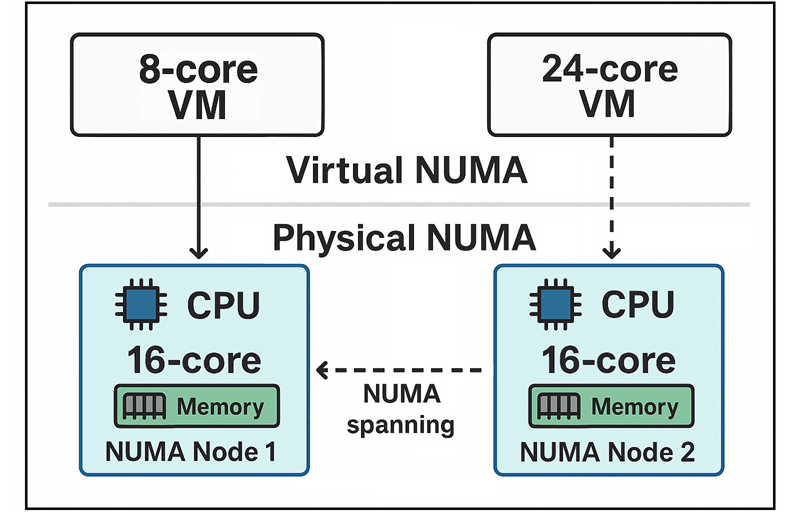
The diagram shows a Hyper-V host with two physical NUMA nodes. The first virtual machine has fewer virtual cores than the physical cores available in a single NUMA node, so Hyper-V allocates all of its virtual cores and memory within one NUMA node. The second virtual machine requires more virtual cores than are available on a single NUMA node, so Hyper-V distributes its virtual cores and memory across both physical NUMA nodes. This distribution across nodes is NUMA spanning.
Before Windows Server 2025 and Windows 11 24H2, if you configure a VM with more virtual cores than physical cores on the NUMA node, but it doesn't exceed the total number of logical cores on the Hyper-V host, it can start. Depending on how Hyper-V schedules the virtual core threads across logical cores, the VM could have unpredictable performance. For example, a 24-core VM can start on a 16-core NUMA node by sharing logical cores of the NUMA node; the virtual cores share different logical cores over time.
Dynamic Memory and NUMA
You can't use Virtual NUMA and Dynamic Memory at the same time. A VM that has Dynamic Memory enabled effectively has only one virtual NUMA node, and the VM has no NUMA topology regardless of the virtual NUMA settings. For VM workloads that aren't NUMA aware or large enough to consume resources from multiple physical NUMA nodes, enabling Dynamic Memory shouldn't cause performance degradation. You should benchmark your workload to determine if Dynamic Memory is appropriate for your requirements.
Next step
Learn how to Configure NUMA in Hyper-V to optimize memory access and performance of virtual machines running on NUMA-enabled hardware.