Note
Access to this page requires authorization. You can try signing in or changing directories.
Access to this page requires authorization. You can try changing directories.
The Microsoft Store on Windows is open to Win32 PC games. [Flighted markets only]
This guidance describes a simplified, self‑service publishing path that lets you publish Win32 PC games to the Microsoft Store using the Microsoft Game Development Kit (GDK), without requiring managed partner enrollment or concept approval.
You continue building a standard Win32 PC game, with full access to Win32 APIs, third‑party engines, and extension libraries. Using GDK adds a Store‑native packaging and servicing model that aligns your game with modern Microsoft gaming workflows.
Note
If you want to publish to Xbox or PC with Xbox services (including concept approval), please visit Xbox Developer Programs | Onboarding Hub.
Who does this apply to?
This path is designed for developers who want to publish PC‑only games to the Microsoft Store using the same core tools and packaging model used across Microsoft’s gaming ecosystem, while remaining focused on Windows distribution.
This publishing path is a good fit for your game if you:
- Are building a PC‑only game for Windows
- Use (or plan to use) Win32‑based engines and toolchains
- Want a self‑service publishing experience that does not require concept approval
- Prefer modern Microsoft gaming tooling aligned with future expansion paths
- Are not currently enrolled in managed Xbox programs
This includes independent developers, small and mid‑size studios, and teams already publishing on other open PC storefronts who want to reach Windows players through the Microsoft Store.
What’s new and why this path exists
This path introduces a clearer and more accessible way to publish Win32 PC games to the Microsoft Store:
- Self-service publishing: Submit and manage releases in Partner Center without joining ID@Xbox or completing concept approval.
- Modern packaging with MSIXVC: Use the Store-native packaging model that supports secure installs, streaming installation, and smart updates.
- Aligned with Microsoft gaming workflows: Build with GDK and stay consistent with tooling and packaging used across Microsoft’s gaming ecosystem.
- Windows-wide discovery: Benefit from Microsoft Store discovery and merchandising, plus surfaces like Windows Search and Bing.
- Clear path forward: Start with PC-only publishing today while keeping options open for future expansion into additional Microsoft gaming programs.
How the publishing flow works
This path follows a straightforward, self‑service workflow:
- Develop your game using the publicly available GDK toolchain.
- Prepare your game package using the MSIXVC format for Store distribution.
- Submit through Partner Center to configure product details, upload packages, manage releases, and complete certification.
- Publish and service your game through ongoing updates and submissions in Partner Center.
Choose your publishing path
Use the quick guide below to choose the right option based on the type of game you have today (or plan to build next).
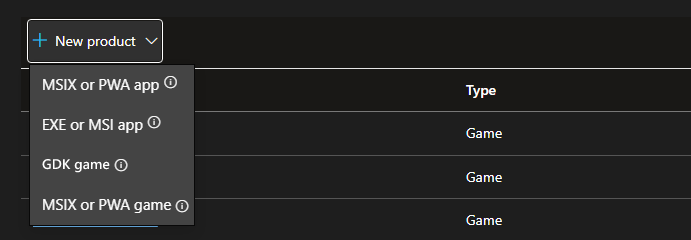
- Win32 game (existing) or starting a new PC game: Microsoft recommends using the GDK Game option.
- UWP game (existing) that you want to publish: choose the MSIX or PWA game option.
- Web-based game (PWA): choose the MSIX or PWA game option.
Getting started
To begin publishing your PC game using this path:
- Create your developer account.
- Create a new product and select GDK game.
- Reserve your app name.
- Review identity details required for packaging your game.
- Build and package your GDK game.
- Publish your game to the Microsoft Store.
Frequently asked questions
Do I need to be an ID@Xbox developer to publish a PC game using this path?
No. This publishing path does not require ID@Xbox enrollment or managed partner status. It is a self‑service option for publishing PC‑only games to the Microsoft Store on Windows using GDK.
If you plan to publish to Xbox consoles in the future, you’ll need to enroll in the appropriate managed Xbox program at that time.
Can I publish Win32 PC games to the Microsoft Store using GDK?
Yes. This path is designed for Win32‑based PC games built using GDK for Windows. It supports modern PC game engines and toolchains and packages games using the MSIXVC format for Store distribution.
Is this the recommended path for new PC games on Windows?
For developers building new PC‑only games and targeting the Microsoft Store on Windows, this is the recommended publishing path. It provides modern tooling, streamlined onboarding, and a Store‑native packaging and servicing model.
Do I need Xbox services to publish my PC game?
No. Xbox services are not required to publish a PC‑only game using this path. You can choose to integrate Xbox services based on your game’s design and feature needs, but they are optional for publishing.
Can I start with PC‑only publishing and move to ID@Xbox later?
Yes. You can begin by publishing your PC game through this self‑service path and pursue managed Xbox programs later if you decide to expand to console or additional platforms.
Migration or onboarding into managed programs follows the requirements of those programs and is handled separately.
Does this path support future expansion beyond PC?
Yes. This path uses the same GDK tooling and MSIXVC packaging model used across Microsoft’s gaming ecosystem. While it focuses on PC‑only distribution today, it keeps your game aligned with workflows used by other Microsoft gaming programs.
When should I not use this path?
This path may not be the right fit if:
- You are publishing a UWP‑based game or a PWA
- You are already enrolled in a managed Xbox program and publishing to consoles
- Your game targets non‑PC platforms only
Collaborate with us on GitHub
The source for this content can be found on GitHub, where you can also create and review issues and pull requests. For more information, see our contributor guide.

Windows developer