Note
Access to this page requires authorization. You can try signing in or changing directories.
Access to this page requires authorization. You can try changing directories.
The FocusTracker Control can be used to display information about the current focused XAML element (if any).
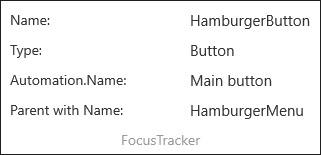
FocusTracker will display the following information (when available) about the current focused XAML element:
- Name
- Type
- AutomationProperties.Name
- Name of the first parent in hierarchy with a name
Syntax
<developerTools:FocusTracker IsActive="True"/>
Sample Output
Properties
| Property | Type | Description |
|---|---|---|
| IsActive | bool | Gets or sets a boolean indicating whether the tracker is running or not |
Sample Project
FocusTracker Sample Page Source. You can see this in action in the Windows Community Toolkit Sample App.
Requirements
| Device family | Universal, 10.0.16299.0 or higher |
|---|---|
| Namespace | Microsoft.Toolkit.Uwp.DeveloperTools |
| NuGet package | Microsoft.Toolkit.Uwp.DeveloperTools |