Note
Access to this page requires authorization. You can try signing in or changing directories.
Access to this page requires authorization. You can try changing directories.
This article outlines how to configure HTTPS support your Connected Cache for Enterprise and Education cache nodes.
Overview
With the General Availability (GA) release of Microsoft Connected Cache for Enterprise, organizations can now configure their cache nodes to deliver content over HTTPS. This enhancement enables Connected Cache to support secure delivery of Intune-managed Win32 applications and, for the first time, Microsoft Teams content—both of which require HTTPS transport. All other content types will continue to be delivered via HTTP.
As more Microsoft services and third-party publishers adopt HTTPS-only delivery models, enabling HTTPS on your cache node ensures continued compatibility and optimal performance. Without HTTPS support, clients requesting secure URLs bypass Connected Cache and fallback to content delivery via the cloud-based Content Delivery Networks (CDN), resulting in increased bandwidth usage and reduced caching efficiency.
To enable HTTPS delivery, administrators must generate a Certificate Signing Request (CSR) from the host machine, sign it using a trusted Certificate Authority (CA), and import the signed certificate back to the host machine. In the following pages, there are guided setup instructions and scripts for both Windows and Linux environments to streamline this process.
Benefits of enabling HTTPS support
Enabling HTTPS support on your Connected Cache node ensures your organization remains compatible with evolving Microsoft content delivery requirements and benefits from enhanced security and performance. Key advantages include:
Access to Microsoft Teams content: Microsoft Teams content is only available over HTTPS. Without HTTPS support, Connected Cache can't cache or deliver this content, resulting in direct downloads from the cloud.
Continued delivery of Intune-managed Win32 apps: Microsoft Intune will soon enforce HTTPS-only delivery for all managed Win32 applications. Cache nodes without HTTPS support will be bypassed, and clients will fall back to CDN delivery. The enforcement date is TBD, but once set, customers will be notified well in advance and be given sufficient time to adapt.
Reduced bandwidth consumption and improved cost efficiency: By caching HTTPS content locally, Connected Cache minimizes reliance on cloud-based CDNs, reducing egress costs and preserving network bandwidth—especially critical in bandwidth-constrained environments.
Improved security and compliance posture: HTTPS ensures encrypted, authenticated delivery of content, aligning with enterprise security policies and regulatory requirements. It protects against tampering, eavesdropping, and impersonation.
Seamless fallback and dual-protocol support: Connected Cache supports both HTTP and HTTPS delivery. If HTTPS isn't configured or fails, clients will automatically fall back to CDN delivery. This dual-protocol capability ensures uninterrupted content access without impacting download performance or peer-to-peer (P2P) delivery via Delivery Optimization (DO).
From HTTP-only to HTTPS support
Previously, if a client requested content via an HTTPS URL, Connected Cache couldn't process the request because it didn't support TLS certificate handling or listen on port 443. As a result, the client would immediately bypass the cache and retrieve the content directly from the CDN.
While Connected Cache previously ensured secure delivery through mechanisms like hash validation and container hardening, these methods couldn't satisfy the requirements of publishers transitioning to HTTPS-only delivery. As a result, Connected Cache now supports HTTPS to maintain compatibility with evolving publisher standards and to ensure continued access to both existing and new content types.
Important
Microsoft Intune will soon enforce (date TBD) HTTPS-only delivery for all managed Win32 applications.
To continue Connected Cache for Intune content delivery, all Intune customers must complete the HTTPS setup on their cache nodes before this date.
Customers using Configuration Manager (SCCM) or hybrid environments will follow a different process. Additional guidance for these scenarios will be published soon.
TLS certificate setup
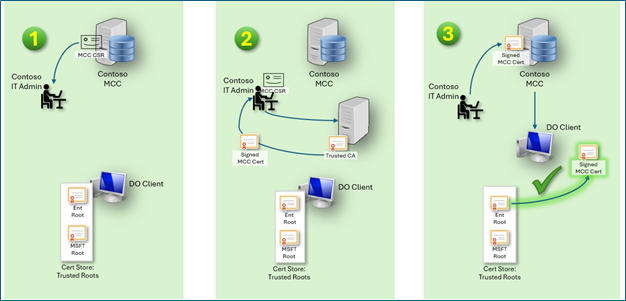
To establish a secure HTTPS connection, Connected Cache must present a valid TLS certificate to client devices. Rather than generating and distributing certificates internally or relying on self-signed certificates—which pose security and operational risks—Connected Cache uses a CSR-based model for the following reasons:
Security and Trust: The CSR method allows Connected Cache to generate a public/private key pair locally and import a certificate signed by a trusted Certificate Authority (CA). Deferring the CA signing to the customer ensures that the certificate is verifiable by client devices using their preinstalled CA trust stores.
Enterprise Compatibility: Many organizations already manage their own PKI infrastructure. The CSR model allows IT administrators to sign certificates using their existing trusted CAs, ensuring seamless integration with enterprise security policies.
Avoiding Private Key Exposure: By generating the key pair on the cache node and never exporting the private key, the CSR model ensures that sensitive cryptographic material remains secure and local to the cache node.
TLS certificate maintenance
TLS certificates used by Microsoft Connected Cache nodes require ongoing maintenance to ensure uninterrupted secure delivery of content. This includes monitoring certificate validity, renewing expiring certificates, and revoking or disabling certificates when necessary.
Renew expiring certificates
To renew a certificate, you don't have to regenerate your CSR (step 1). We recommend re-signing your existing CSR (step 2) and importing the resultant certificate using the import command (step 3). If your signing process can be automated, create a script that signs and imports on a regular cadence.
Disable HTTPS support
If HTTPS delivery is no longer required or a certificate is revoked, run the provided disable script on the Connected Cache host machine.
The script will remove HTTPS configuration on the container, but it will not delete the certificate, key pair, or CSR from the cache node.
This action reverts Connected Cache to HTTP-only delivery. Content requiring HTTPS (for example, Microsoft Teams, Intune Win32 apps) will no longer be cached and will fall back to CDN delivery.
Certificate retention policy
- Active certificates are retained for the duration of their validity.
- Inactive certificates (expired or revoked) are retained for 18 months post-deactivation for audit and compliance purposes.
This policy aligns with Microsoft's internal security and privacy standards and ensures traceability of certificate usage across enterprise deployments.
Future enhancements
Monitor certificate status
Connected Cache provides visibility into all active and inactive TLS certificates via the Azure portal. Each certificate entry includes:
- Domain name
- Issuing Certificate Authority (CA)
- Issue and expiration dates
- Thumbprint ID
Administrators should regularly review this list to ensure certificates remain valid and trusted. Connected Cache will surface alerts when a certificate is approaching expiration.
Automation of certificate signing
While automation might seem ideal, Connected Cache can't yet securely perform certificate signing on behalf of the enterprise due to the following constraints:
Credential Management: Automating certificate signing would require Connected Cache to store and manage credentials for accessing enterprise or public CAs. This introduces significant security risks, especially since Connected Cache runs in a containerized Linux environment.
Diverse Enterprise PKI Models: Enterprises use a wide range of CA configurations, including on-premises, cloud-based, and hybrid models. Automating signing would require Connected Cache to support all variations, which is impractical and error-prone.
Security Principle of Least Privilege: Delegating signing to the IT administrator ensures that only authorized personnel can approve and distribute certificates, reducing the attack surface.
Next steps
To enable HTTPS support on your Microsoft Connected Cache node, follow the appropriate setup guide based on your host environment. These guides walk you through generating a Certificate Signing Request (CSR), signing it with a trusted Certificate Authority (CA), and importing the signed certificate back into Connected Cache.
To set up HTTPS support on a Linux host machine, see
To set up HTTPS support on a Windows host machine, see
- CLI/Proxy Guidance: Coming soon.