Note
Access to this page requires authorization. You can try signing in or changing directories.
Access to this page requires authorization. You can try changing directories.
Azure virtual network TAP (Terminal Access Point) allows you to continuously stream your virtual machine network traffic to a network packet collector or analytics tool. The collector or analytics tool is provided by a network virtual appliance partner. For a list of partner solutions that are validated to work with virtual network TAP, see partner solutions.
Important
Virtual network TAP is now in public preview in select Azure regions. For more information, see the Supported Region section in this article.
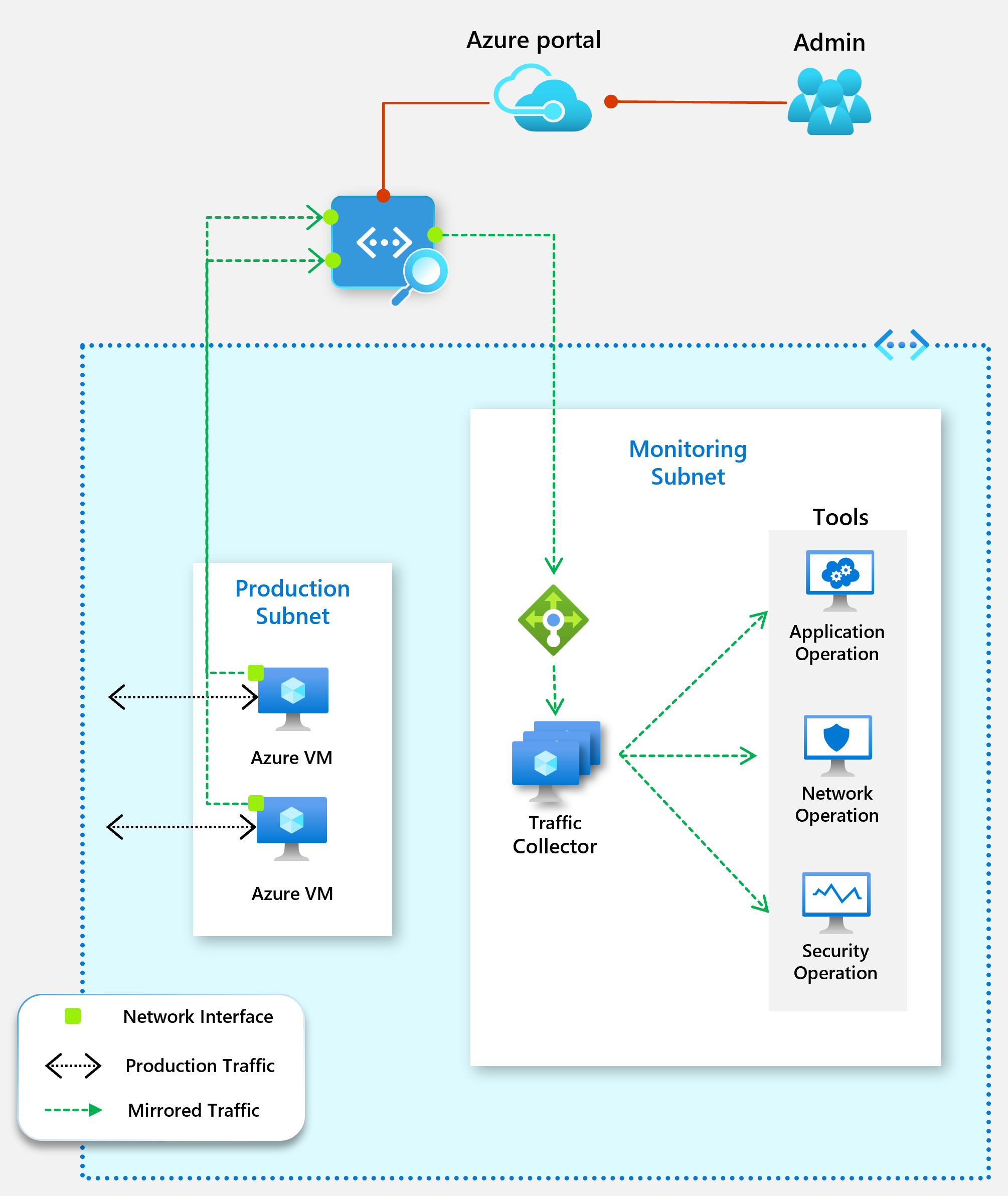
The following diagram shows how virtual network TAP works. You can add a TAP configuration on a network interface that is attached to a virtual machine deployed in your virtual network. The destination is a virtual network IP address in the same virtual network as the monitored network interface or a peered virtual network. The collector solution for virtual network TAP can be deployed behind an Azure Internal Load balancer for high availability.
Prerequisites
You must have one or more virtual machines created with Azure Resource Manager, and a partner solution for aggregating the TAP traffic in the same Azure region. If you don't have a partner solution in your virtual network, see partner solutions to deploy one.
You can use the same virtual network TAP resource to aggregate traffic from multiple network interfaces in the same or different subscriptions. If the monitored network interfaces are in different subscriptions, the subscriptions must be associated to the same Microsoft Entra tenant. Additionally, the monitored network interfaces, and the destination endpoint for aggregating the TAP traffic can be in peered virtual networks in the same region. If you're using this deployment model, ensure that the virtual network peering is enabled before you configure virtual network TAP.
Permissions
The accounts you use to apply TAP configuration on network interfaces must be assigned to the network contributor role or a custom role that is assigned as the necessary actions from the following table:
| Action | Name |
|---|---|
| Microsoft.Network/virtualNetworkTaps/* | Required to create, update, read, and delete a virtual network TAP resource |
| Microsoft.Network/networkInterfaces/read | Required to read the network interface resource on which the TAP is configured |
| Microsoft.Network/tapConfigurations/* | Required to create, update, read, and delete the TAP configuration on a network interface |
Limitations
- Virtual Network TAP supports only virtual machine (VM) network interfaces as traffic mirroring sources.
- Mirrored traffic can be sent only to a load balancer or a VM network interface.
- VMs behind a Basic Load Balancer cannot be configured as a mirroring source. Basic Load Balancer is being deprecated.
- Inbound traffic from Private Link Service is not supported for mirroring.
- VMs in a virtual network with encryption enabled cannot be configured as mirroring sources.
- Virtual Network TAP does not support IPv6 or SWIFT.
- Virtual WAN (vWAN) peering is not supported between the source and destination virtual networks used with VTAP. Direct virtual network peering must be used instead.
Public Preview limitations
- v6 VM SKUs are not supported as source VMs.
- Before adding a VM as a source, you must first deploy a Virtual Network TAP resource, and then stop (deallocate) and start the source VM. This is required only once per VM that will be used as a source. If this step is not completed, you may receive an error indicating that the NIC is not on fastpath.
- When a VM is added or removed as a source, the VM may experience network downtime of up to 60 seconds.
- Live Migration is not supported for source VMs. Live Migration will be disabled for any VM configured as a source.
Supported Regions
- Asia East
- Southeast Asia
- Canada Central
- West Europe
- Germany West Central
- Central India
- Korea Central
- UAE North
- UK South
- Central US
- Central US EUAP
- East US
- East US 2
- East US 2 EUAP
- West US 3
Virtual network TAP partner solutions
Network packet brokers
| Partner | Product |
|---|---|
| Gigamon | GigaVUE Cloud Suite for Azure |
| Keysight | CloudLens |
Security analytics, network/application performance management
| Partner | Product |
|---|---|
| Darktrace | Darktrace /NETWORK |
| Netscout | Omnis Cyber Intelligence NDR |
| Corelight | Corelight Open NDR Platform |
| Vectra | Vectra NDR |
| Fortinet | FortiNDR Cloud |
| FortiGate VM | |
| cPacket | cPacket Cloud Suite |
| TrendMicro | Trend Vision One™ Network Security |
| Extrahop | Reveal(x) |
| Progress | Flowmon |
| Bitdefender | GravityZone Extended Detection and Response for Network |
| eSentire | eSentire MDR |
| LinkShadow | LinkShadow NDR |
| AttackFence | AttackFence NDR |
| Arista Networks | Arista NDR |
Next Steps
Learn how to Create a virtual network TAP using CLI or the Azure portal.