Note
Access to this page requires authorization. You can try signing in or changing directories.
Access to this page requires authorization. You can try changing directories.
An event domain in Azure Event Grid provides a single publishing endpoint for thousands of individual topics related to the same application. You can think of an event domain as a meta-topic that contains many individual topics. When publishing an event, the publisher must specify the target topic in the event domain to which it wants to publish. The publisher can send an array or a batch of events where events are sent to different topics in the event domain. For details, see Publishing to an event domain.
Event domains also give you authentication and authorization control over each topic so you can partition your tenants. This article describes how to use event domains to manage the flow of custom events to your various business organizations, customers, or applications. Use event domains to:
- Manage multitenant event-driven architectures at scale.
- Manage your authentication and authorization.
- Partition your topics without managing each individually.
- Avoid individually publishing to each of your topic endpoints.
Event domain example use case
Event domains are most easily explained using an example. Let's say you run Contoso Construction Machinery, where you manufacture tractors, digging equipment, and other heavy machinery. As a part of running the business, you push real-time information to customers about equipment maintenance, systems health, and contract updates. All of this information goes to various endpoints including your app, customer endpoints, and other infrastructure that your customers have set up.
Event domains allow you to model Contoso Construction Machinery as a single Event Grid entity. Each of your customers is represented as a topic within the domain. Authentication and authorization are handled using Microsoft Entra ID. Each of your customers can subscribe to their topic and get their events delivered to them. Managed access through the event domain ensures they can only access their topic.
It also gives you a single endpoint, which you can publish all of your customer events to. Event Grid will take care of making sure each topic is only aware of events scoped to its tenant.
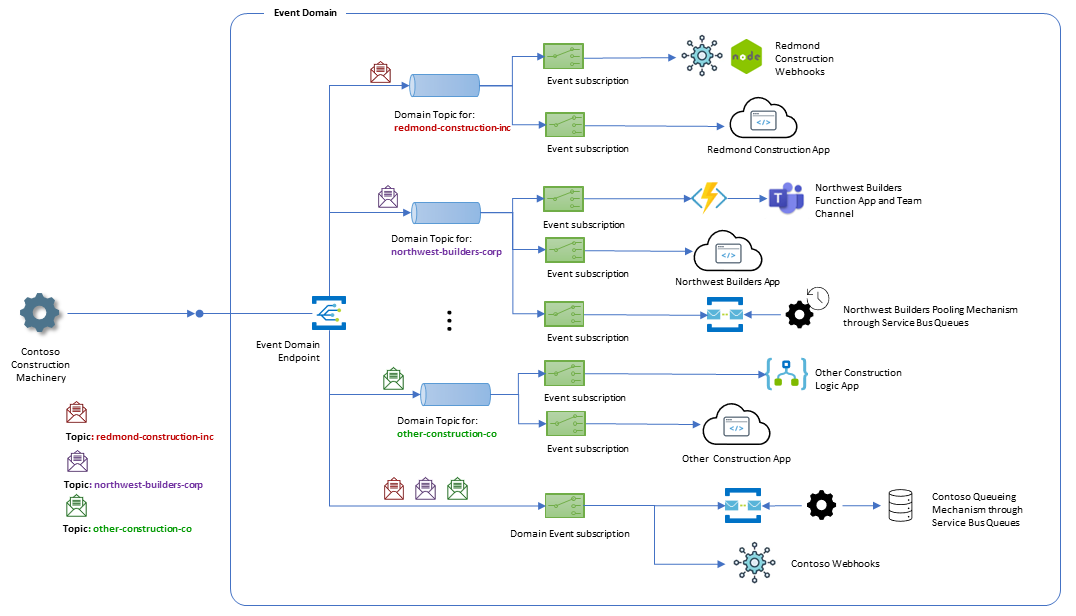
Access management for event domains
Event domains provide fine-grained authorization and authentication control over each topic through Azure role-based access control (Azure RBAC). Use Azure RBAC roles to restrict each tenant in your application to only the topics you want to grant them access to. Azure RBAC in event domains works the same way managed access control works in the rest of Event Grid and Azure. Use Azure RBAC to create and enforce custom role definitions in event domains.
Built-in roles for event domains
Event Grid has two built-in role definitions that make Azure RBAC easier for working with event domains:
- EventGrid EventSubscription Contributor
- EventGrid EventSubscription Reader
Assign these roles to users who need to subscribe to topics in your event domain. Scope each role assignment to only the topic that the user needs to subscribe to. For information about these roles, see Built-in roles for Event Grid.
Subscribe to topics in an event domain
Subscribing to events for a topic within an event domain is the same as creating an event subscription on a custom topic or subscribing to an event from an Azure service.
Important
A domain topic is an auto-managed resource in Event Grid. You can create an event subscription at the domain scope without creating the domain topic first. In that case, Event Grid automatically creates the domain topic on your behalf. You can also choose to create the domain topic manually. This behavior reduces the number of resources you have to manage when working with a large number of domain topics. When the last subscription to a domain topic is deleted, the domain topic is also deleted, regardless of whether the domain topic was manually created or auto-created.
Domain-scope subscriptions
Event domains also support domain-scope subscriptions. An event subscription at the event domain scope receives all events sent to the event domain, regardless of which topic the events are sent to. Domain-scope subscriptions are useful for management and auditing scenarios.
Publishing to an event domain
When you create an event domain, Event Grid provides a publishing endpoint similar to the endpoint for a custom topic. To publish events to any topic in an event domain, push the events to the event domain endpoint the same way you would for a custom topic. The only difference is that you must specify the topic that the event should be delivered to. For example, publishing the following array of events sends the event with "id": "1111" to topic foo and the event with "id": "2222" to topic bar.
Note
Event domains don't support broadcast scenarios where an event is sent to an event domain and each topic in the domain receives a copy of the event. When publishing events, the publisher must specify the target topic in the event domain to which it wants to publish. To publish the same event payload to multiple topics in the event domain, the publisher must duplicate the event payload, change the topic name for each copy, and publish them to Event Grid using the event domain endpoint, either individually or as a batch.
When using the cloud event schema, specify the name of the Event Grid topic in the event domain as the value of the source property. In the following example, the source property is set to foo for the first event and to bar for the second event.
To use a different field to specify the target topic in the event domain, configure input schema mapping when creating the event domain. For the REST API, use the properties.inputSchemaMapping property to map that field to properties.topic. For the .NET SDK, use EventGridJsonInputSchemaMapping. Other SDKs also support schema mapping.
[{
  "source": "foo",
  "id": "1111",
  "type": "maintenanceRequested",
  "subject": "myapp/vehicles/diggers",
  "time": "2018-10-30T21:03:07+00:00",
  "data": {
    "make": "Contoso",
    "model": "Small Digger"
  },
  "specversion": "1.0"
},
{
  "source": "bar",
  "id": "2222",
  "type": "maintenanceCompleted",
  "subject": "myapp/vehicles/tractors",
  "time": "2018-10-30T21:04:12+00:00",
  "data": {
    "make": "Contoso",
    "model": "Big Tractor"
  },
  "specversion": "1.0"
}]
Event domains handle publishing to topics for you. Instead of publishing events to each topic individually, you publish all events to the event domain endpoint, and Event Grid routes each event to the correct topic.
Event domain pricing
Event domains use the same operations pricing as other features in Event Grid. Operations work the same in event domains as they do in custom topics:
- Each ingress of an event to an event domain is one operation.
- Each delivery attempt for an event is one operation.
Related content
To learn about setting up event domains, creating topics, creating event subscriptions, and publishing events, see Manage event domains.