Note
Access to this page requires authorization. You can try signing in or changing directories.
Access to this page requires authorization. You can try changing directories.
Azure Communication Services Call Automation enables developers to create applications that can make and receive calls. It uses Event Grid subscriptions to deliver IncomingCall events, making it crucial to configure your environment to receive these notifications for your application to redirect or answer a call effectively. Therefore, understanding the fundamentals of incoming calls is essential for using the full potential of Azure Communication Services Call Automation.
Calling scenarios
Before setting up your environment, it's important to understand the scenarios that can trigger an IncomingCall event. To trigger an IncomingCall event, a call must be made to either an Azure Communication Services identity or a Public Switched Telephone Network (PSTN) number associated with your Azure Communication Services resource. The following are examples of these resources:
- An Azure Communication Services identity
- A PSTN phone number owned by your Azure Communication Services resource
Given these examples, the following scenarios trigger an IncomingCall event sent to Event Grid:
| Source | Destination | Scenarios |
|---|---|---|
| Azure Communication Services identity | Azure Communication Services identity | Call, Redirect, Add Participant, Transfer |
| Azure Communication Services identity | PSTN number owned by your Azure Communication Services resource | Call, Redirect, Add Participant, Transfer |
| Public PSTN | PSTN number owned by your Azure Communication Services resource | Call, Redirect, Add Participant, Transfer |
Note
It's important to understand that an Azure Communication Services identity can represent either a user or an application. While the platform doesn't have a built-in feature to explicitly assign an identity to a user or application, your application or supporting infrastructure can accomplish this assignment. To learn more, see the identity concepts guide.
Register an Event Grid resource provider
If you haven't previously used Event Grid in your Azure subscription, you might need to register your Event Grid resource provider. To register the provider, follow these steps:
- Go to the Azure portal.
- On the left menu, select Subscriptions.
- Select the subscription that you use for Event Grid.
- On the left menu, under Settings, select Resource providers.
- Find Microsoft.EventGrid.
- If your resource provider isn't registered, select Register.
Receiving an incoming call notification from Event Grid
In Azure Communication Services, receiving an IncomingCall notification is made possible through an Event Grid subscription. As the receiver of the notification, you have the flexibility to choose how to handle it. Since the Call Automation API uses Webhook callbacks for events, it's common to use a 'Webhook' Event Grid subscription. However, the service offers various subscription types, and you have the liberty to choose the most suitable one for your needs.
This architecture has the following benefits:
- Using Event Grid subscription filters, you can route the
IncomingCallnotification to specific applications. - PSTN number assignment and routing logic can exist in your application versus being statically configured online.
- As identified in the calling scenarios section, your application can be notified even when users make calls between each other. You can then combine this scenario together with the Call Recording APIs to meet compliance needs.
For a sample payload of the event and more information on other calling events published to Event Grid, see this guide.
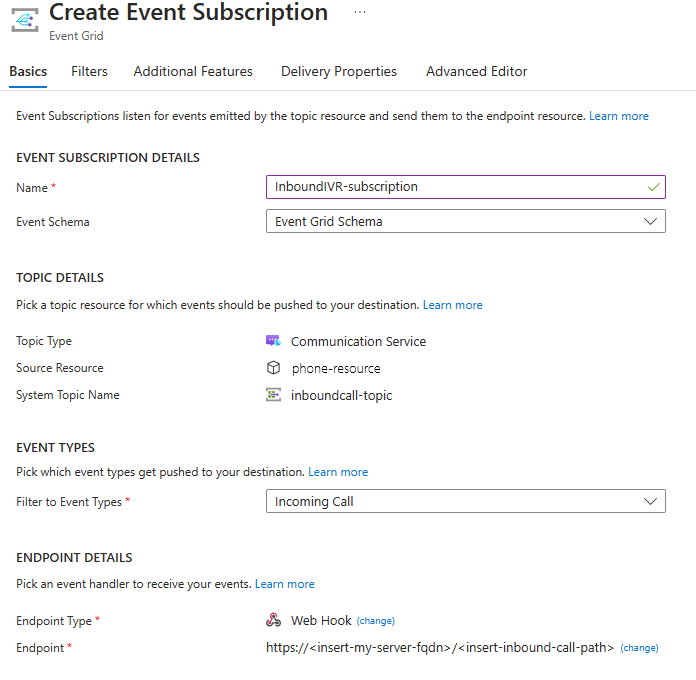
Here's an example of an Event Grid Webhook subscription where the event type filter is listening only to the IncomingCall event.
Call routing options with Call Automation and Event Grid
In Call Automation and Event Grid, call routing can be tailored to your specific needs. By using advanced filters within your Event Grid subscription, you can subscribe to an IncomingCall notification that pertains to a specific source/destination phone number or an Azure Communication Services identity. This notification can then be directed to an endpoint, such as a Webhook subscription. Using the Call Automation SDK, your endpoint application can then decide to redirect the call to another Azure Communication Services identity or to the PSTN.
Note
To ensure that your application receives only the necessary events, we recommend that you configure filtering in Event Grid. Filtering is crucial in scenarios that generate IncomingCall events, such as redirecting an inbound PSTN call to an Azure Communication Services endpoint. If a filter isn't used, your Event Grid subscription receives two IncomingCall events - one for the PSTN call and one for the Azure Communication Services user - even though you intended to receive only the first notification. Neglecting to handle such scenarios using filters or other mechanisms in your application can result in infinite loops and other undesirable behavior.
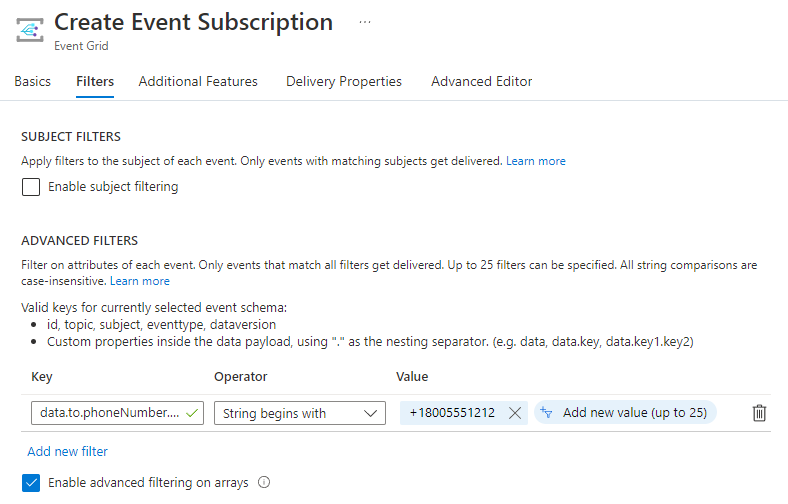
Here's an example of an advanced filter on an Event Grid subscription watching for the data.to.PhoneNumber.Value string starting with a PSTN phone number of +18005551212.
Number assignment
When using the IncomingCall notification in Azure Communication Services, you have the freedom to associate any particular number with any endpoint. For example, if you obtained a PSTN phone number of +14255551212 and wish to assign it to a user with an identity of 375f0e2f-e8db-4449-9bf7-2054b02e42b4 in your application, you should maintain a mapping of that number to the identity. When an IncomingCall notification is sent that matches the phone number in the to field, you can invoke the Redirect API and provide the user's identity. In other words, you can manage the number assignment within your application and route or answer calls at runtime.
Best Practices
You need to prove ownership of your endpoint. Proving ownership lets Event Grid deliver events to your Webhook endpoint and prevents malicious users from flooding your endpoint with events. To address any issues with receiving events, confirm that the Webhook you configured is verified by handling
SubscriptionValidationEvent. For more information, see this guide.If your application fails to respond with a 200 OK status code to Event Grid within the required time frame, Event Grid uses exponential backoff retry to send the event again. However, an incoming call only rings for 30 seconds, so responding to a call after that time isn't effective. To prevent retries for expired or stale calls, we recommend setting the retry policy as Max Event Delivery Attempts to 2 and Event Time to Live to 1 minute. You can find these settings under the Additional Features tab of the event subscription. Learn more about retries here.
We recommend that you enable logging for your Event Grid resource to monitor events that fail to deliver. To enable logging, go to the system topic under the Events tab of your Communication resource, and then turn on logging from the Diagnostic settings. You can find failure logs in the 'AegDeliveryFailureLogs' table.
AegDeliveryFailureLogs
| limit 10
| where Message has "incomingCall"
Host the application that answers calls on compute that can respond immediately. Answering a call is a real-time operation: the endpoint that receives the
IncomingCallevent has only the duration of the ring (30 seconds) to process the notification and call theAnswerCallorRedirectAPI. Avoid hosting this endpoint on compute that scales to zero or has cold-start latency. For example, a serverless function app on a consumption-based plan can become dormant when there's no recent traffic. When anIncomingCallevent then arrives at a cold instance, the time spent starting the host can consume the answer window, and the call goes unanswered. A burst of concurrent calls poses another risk. Compute that scales out reactively can lag behind demand, so your endpoint might not acknowledge Event Grid in time. Timeouts or error responses on this path then cause missed calls.To answer calls reliably:
- To absorb expected bursts until scale-out catches up, run the webhook handler on always-on, pre-provisioned compute with enough warm capacity. Examples include Azure App Service with Always On enabled, Azure Functions on a plan that keeps always-ready (prewarmed) instances, Azure Container Apps with a minimum replica count greater than zero, or Azure Kubernetes Service with sufficient baseline capacity.
- Keep the path between the
IncomingCallevent and theAnswerCallAPI short and direct. Minimize intermediary hops on the answer path, such as gateways or web application firewalls. Move noncritical work, such as database lookups or business logic, off the answer path so that you can respond quickly. - Design your handler to process duplicate events safely. Event Grid delivers events at least once, so your application can receive the same
IncomingCallevent more than once.
Next steps
- Try out the quickstart to place an outbound call.