Note
Access to this page requires authorization. You can try signing in or changing directories.
Access to this page requires authorization. You can try changing directories.
Important
Items marked (preview) in this article are currently in public preview. This preview is provided without a service-level agreement, and we don't recommend it for production workloads. Certain features might not be supported or might have constrained capabilities. For more information, see Supplemental Terms of Use for Microsoft Azure Previews.
The reminder_preview tool enables a hosted agent to schedule itself to run again at a future time. Use this pattern when the agent decides during a run that it needs to follow up later, such as to check back on a long-running task or to prompt the user for a status update.
When the agent calls the reminder tool, it specifies a delay in minutes. After that delay, Foundry re-invokes the same agent on the same conversation. The agent can then continue its work, check on external systems, or prompt the user.
Important
The reminder tool is available only for hosted agents. You can't use the reminder tool with prompt agents. To use the reminder tool, create a toolbox that includes the reminder_preview tool, then attach the toolbox to a hosted agent.
Prerequisites
- A Foundry project with a deployed model.
- A hosted agent. See Create your first hosted agent.
- Azure Developer CLI (
azd) installed and authenticated. See Install the Azure Developer CLI.
How the reminder tool works
The reminder tool takes the following arguments:
| Argument | Type | Range | Description |
|---|---|---|---|
minutes |
integer | 1–43,200 | The number of minutes to wait before re-invoking the agent. |
input |
string | — | Instructions for what the agent needs to do when it's invoked by the reminder. |
When the agent calls the tool, it decides how long to delay based on its reasoning. Foundry then creates a scheduled routine that fires after the specified delay and re-invokes the same hosted agent on the same conversation. This approach preserves context across invocations, unlike regular routines that start new conversations.
Add the reminder tool to a toolbox
The reminder tool is connectionless. You don't need to configure any external service or authentication.
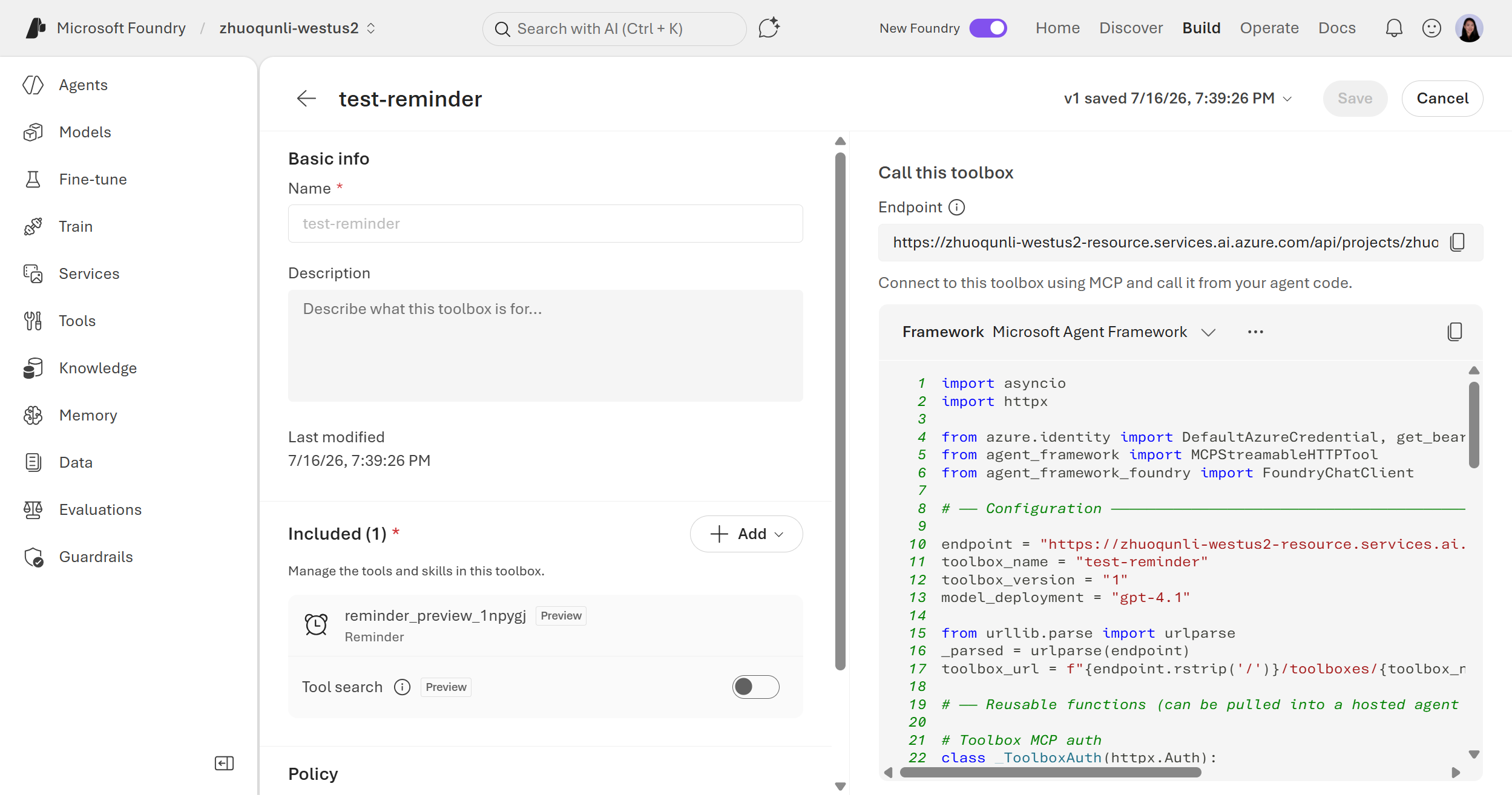
- In the Foundry portal, go to your project.
- In the left pane, select Build & customize > Toolboxes.
- Select + New to create a toolbox, or select an existing toolbox to edit.
- In the toolbox editor, select + Add tool.
- Under Built-in tools, select Reminder (preview).
- Configure the tool name and description, and then select Add.
- Select Save to save the toolbox.
The toolbox details page shows the MCP endpoint. Copy this endpoint to connect your hosted agent.
from azure.identity import DefaultAzureCredential
from azure.ai.projects import AIProjectClient
from azure.ai.projects.models import ReminderPreviewToolboxTool

# Create Foundry project client
endpoint = "https://<your-foundry-account>.services.ai.azure.com/api/projects/<your-project>"
project = AIProjectClient(
    endpoint=endpoint,
    credential=DefaultAzureCredential(),
)

# Create toolbox version with reminder tool
toolbox_version = project.toolboxes.create_version(
    name="reminder-toolbox",
    description="Built-in reminder tool for a self-scheduling agent",
    tools=[
        ReminderPreviewToolboxTool(
            name="schedule_reminder",
            description="Schedule a reminder that re-invokes this agent at a future time.",
        ),
    ],
)
print(f"Created toolbox: {toolbox_version.name}, version: {toolbox_version.version}")
print(f"MCP endpoint: {toolbox_version.mcp_endpoint}")
using Azure.Identity;
using Azure.AI.Projects;

// Create Foundry project client
var projectEndpoint = "https://<your-foundry-account>.services.ai.azure.com/api/projects/<your-project>";
AIProjectClient projectClient = new(new Uri(projectEndpoint), new DefaultAzureCredential());

// Create toolbox version with reminder tool
var reminderTool = new ReminderPreviewToolboxTool
{
    Name = "schedule_reminder",
    Description = "Schedule a reminder that re-invokes this agent at a future time."
};

ToolboxVersionObject toolboxVersion = await projectClient.Toolboxes.CreateVersionAsync(
    name: "reminder-toolbox",
    tools: [reminderTool],
    description: "Built-in reminder tool for a self-scheduling agent"
);
Console.WriteLine($"Created toolbox: {toolboxVersion.Name}, version: {toolboxVersion.Version}");
Console.WriteLine($"MCP endpoint: {toolboxVersion.McpEndpoint}");
import { DefaultAzureCredential } from "@azure/identity";
import { AIProjectClient } from "@azure/ai-projects";

// Create Foundry project client
const projectEndpoint = "https://<your-foundry-account>.services.ai.azure.com/api/projects/<your-project>";
const project = new AIProjectClient(projectEndpoint, new DefaultAzureCredential());

const toolboxVersion = await project.toolboxes.createVersion(
  "reminder-toolbox",
  [
    {
      type: "reminder_preview",
      name: "schedule_reminder",
      description: "Schedule a reminder that re-invokes this agent at a future time.",
    },
  ],
  {
    description: "Built-in reminder tool for a self-scheduling agent",
  },
);
console.log(`Created toolbox: ${toolboxVersion.name}, version: ${toolboxVersion.version}`);
console.log(`MCP endpoint: ${toolboxVersion.mcpEndpoint}`);
POST https://{project_endpoint}/toolboxes/reminder-toolbox/versions?api-version=v1
Authorization: Bearer {token}
Content-Type: application/json

{
  "description": "Built-in reminder tool for a self-scheduling agent",
  "tools": [
    {
      "type": "reminder_preview",
      "name": "schedule_reminder",
      "description": "Schedule a reminder that re-invokes this agent at a future time."
    }
  ]
}
Note
Use token scope https://ai.azure.com/.default when getting the bearer token.
The response includes the mcp_endpoint. Connect your hosted agent to this endpoint.
Create a toolbox manifest file:
# reminder-toolbox.yaml
description: Built-in reminder tool for a self-scheduling agent
tools:
  - type: reminder_preview
    name: schedule_reminder
    description: Schedule a reminder that re-invokes this agent at a future time.
Create the toolbox:
azd ai toolbox create reminder-toolbox --from-file reminder-toolbox.yaml
The command prints the toolbox MCP endpoint. Connect your hosted agent to this endpoint.
Configure the hosted agent
After you create the toolbox, configure your hosted agent to use it. In the agent manifest, add the toolbox endpoint under resources:
# agent.yaml
name: reminder-agent
model_deployment: gpt-4.1
instructions: |
  You are a helpful assistant. When the user asks you to follow up later,
  use the schedule_reminder tool to re-invoke yourself after the specified time.
resources:
  - kind: toolbox
    url: https://{project-endpoint}/agents/toolboxes/reminder-toolbox/mcp?version=1
Example scenario: Polling for task completion
A common scenario is polling an external system for task completion. In this pattern, the agent:
- Receives a user request to start a long-running task.
- Calls an external API to start the task and receives a task ID.
- Uses the reminder tool to schedule a follow-up in 15 minutes.
- When the reminder fires, the agent checks the task status.
- If the task is still running, the agent schedules another reminder.
- When the task completes, the agent notifies the user.
To enable this behavior, include instructions in your agent manifest:
# agent.yaml
name: task-monitor
model_deployment: gpt-4.1
instructions: |
  You help users monitor long-running tasks.

  When a user asks you to start a task:
  1. Call the start_task tool with the user's parameters.
  2. Note the task_id in your response.
  3. Use the schedule_reminder tool to check back in 15 minutes.

  When you're re-invoked by a reminder:
  1. Call the check_status tool with the task_id.
  2. If the task is still running, schedule another reminder for 10 minutes.
  3. If the task is complete, summarize the results for the user.
resources:
  - kind: toolbox
    url: https://{project-endpoint}/agents/toolboxes/my-toolbox/mcp?version=1
The model decides when and how to use the reminder tool based on these instructions. You don't need to write code to handle the reminder invocation.
Limitations
- Hosted agents only. The reminder tool is available only for hosted agents. You can't use it with prompt agents.
- Same conversation. Reminders re-invoke the agent on the same conversation. They don't start new conversations.
- Minimum delay. The minimum delay is 1 minute.
- Maximum delay. The maximum delay is 43,200 minutes (30 days).