Note
Access to this page requires authorization. You can try signing in or changing directories.
Access to this page requires authorization. You can try changing directories.
This article describes Microsoft Entra passkey on Windows. It covers how they work, how they differ from Windows Hello for Business, and how to configure passkey profiles to allow Windows Hello as a passkey provider.
Overview
Microsoft Entra passkey on Windows allows users to register passkeys (FIDO2) directly into their device's local Windows Hello container and use them to sign in to Microsoft Entra ID. Microsoft Entra passkey on Windows enables phishing-resistant sign-in by using a Windows Hello biometric or PIN without requiring the device to be Microsoft Entra joined or registered.
By using Microsoft Entra passkey on Windows:
- Users can register passkeys (FIDO2) in the local Windows Hello container.
- Devices don't need to be joined or registered to Microsoft Entra to use a local Windows passkey.
- A single Windows PC can store multiple passkeys for multiple Microsoft Entra accounts.
- Passkeys (FIDO2) registered in Windows Hello are governed by Microsoft Entra passkey (FIDO2) policies and passkey profiles.
How Microsoft Entra passkey on Windows works
Windows Hello acts as a secure local credential container on Windows devices. The container is protected by user-presence verification such as:
- PIN
- Fingerprint
- Facial recognition
Microsoft Entra passkey on Windows allows passkeys (FIDO2) to be created and stored inside this Windows Hello container and used for authentication to Microsoft Entra ID.
This behavior also applies when the device is governed by Windows Hello for Business policies configured through Microsoft Intune. However, passkeys (FIDO2) are distinct from the Windows Hello for Business credentials that may be automatically registered during device registration to Microsoft Entra ID.
How Microsoft Entra passkey on Windows compares with Windows Hello for Business
Although both features use Windows Hello, Microsoft Entra passkey on Windows and Windows Hello for Business have different purposes and behavior.
Windows Hello for Business
- Windows Hello for Business credentials are automatically provisioned on some Microsoft Entra joined or registered devices during device registration.
- The credential is tied only to the Microsoft Entra account used to register the device.
- Windows Hello for Business credentials are passkeys using a first-party (1P) protocol, but not FIDO2 passkeys.
- Windows Hello for Business enables device sign-in using facial recognition, fingerprint, or PIN protected by Windows Hello.
- Windows Hello for Business provides single sign-on (SSO) to Microsoft Entra-integrated resources after device sign-in.
- Windows Hello for Business is primarily a device-bound sign-in method linked to device trust.
- Registration and authentication aren't controlled by the Microsoft Entra Authentication Methods Passkey (FIDO2) policy.
Microsoft Entra passkey on Windows
- Microsoft Entra passkey on Windows is a FIDO2 passkey.
- They can be registered without device join or registration.
- Users can register multiple passkeys for multiple Microsoft Entra accounts on the same device.
- Registration and authentication are managed by the Passkey (FIDO2) policy in Microsoft Entra ID Authentication methods.
- They can't be used for device sign-in.
Note
If you're on a Microsoft Entra joined or Microsoft Entra registered device, setting up Windows Hello might automatically register a Windows Hello for Business credential for the device's linked account. If you then attempt to register a passkey on Windows for that same account, registration fails because the Windows Hello for Business credential already exists. On retry, you'll see an error indicating the passkey is already registered.
| Feature | Microsoft Entra passkey on Windows | Windows Hello for Business |
|---|---|---|
| Standard base | FIDO2 | FIDO2 for authentication, first-party (1P) protocol for device sign-in |
| Registration | User-initiated, doesn't require device join or registration | Automatically provisioned on some Microsoft Entra joined or registered devices during device registration |
| Device sign-in and single sign-on (SSO) | N/A | Enables device sign-in and SSO to Microsoft Entra-integrated resources after device sign-in |
| Passkey type | Device-bound | Device-bound |
| Credential binding | Bound to the device and stored in the local Windows Hello container. Users can register multiple passkeys for multiple work or school accounts on the same device. | Primarily a device-bound sign-in method linked to device trust. The credential is tied only to the work or school account used to register the device. |
| Management | Microsoft Entra ID Authentication methods policy | Microsoft Intune Group Policy |
Attestation support
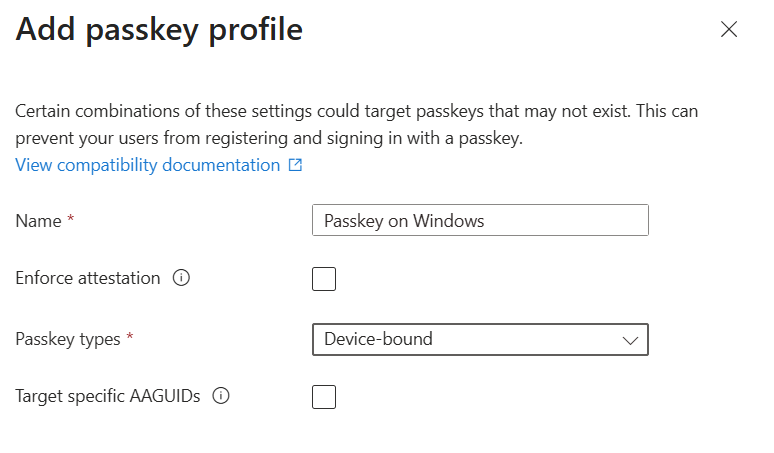
Attestation isn't supported for Microsoft Entra passkey on Windows. As a result, if Enforce attestation is selected in a passkey profile, passkey registration attempts to Windows Hello will fail.
How to configure passkeys on Windows
To enable registration, you need to meet all of the following prerequisites and configuration requirements.
Prerequisites
- Windows 10 or Windows 11
- Device must support Windows Hello
Required configuration
- Enforce attestation can't be selected.
- Passkey types must include Device-bound.
FAQ
Question: What is the use case for Microsoft Entra passkey on Windows?
Answer: Use Microsoft Entra passkey on Windows when:
- You want passkeys (FIDO2) stored locally on Windows.
- Users access multiple Microsoft Entra accounts from a single PC.
- You want standards-based, phishing-resistant sign-in to Microsoft Entra on unregistered, personal, or shared devices.
Question: Does Microsoft Entra passkey on Windows replace Windows Hello for Business?
Answer: No. Microsoft Entra passkey on Windows doesn't replace Windows Hello for Business. Windows Hello for Business remains the recommended solution for signing into corporate managed, Microsoft Entra joined or registered devices. Microsoft Entra passkey on Windows complements Windows Hello for Business by enabling passkeys (FIDO2) on Windows in scenarios where devices aren't joined or registered. Microsoft Entra passkey on Windows doesn't support device sign-in.
Note
Users can't register a passkey on Windows if a Windows Hello for Business credential already exists for the same account and container. This block may not apply once the user exceeds 50 total platform credentials.
Question: Are Microsoft Entra passkeys synced?
Answer: No. Microsoft Entra passkey on Windows is device-bound and stored in the local Windows Hello container. It isn't synced across devices. Each device requires a separate passkey registration for each Microsoft Entra account.