Microsoft Security | Intune | Enrollment
Registering devices with Intune for management and policy enforcement

This browser is no longer supported.
Upgrade to Microsoft Edge to take advantage of the latest features, security updates, and technical support.
' cx='32' cy='32' r='32' /%3E%3Ctext x='50%25' y='55%25' dominant-baseline='middle' text-anchor='middle' fill='%23FFF' %3EDS%3C/text%3E%3C/svg%3E)
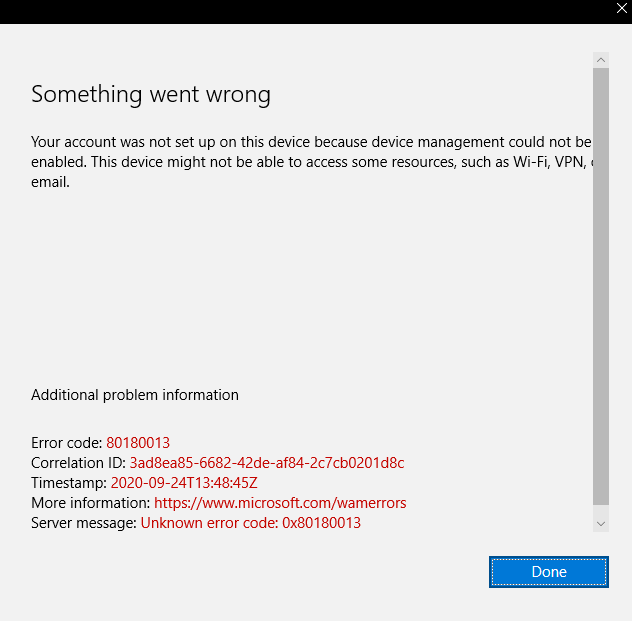
I have done a clean install on my device recently which is synchronize to Intune. Now I cannot sync my account and I'm getting this error.
Registering devices with Intune for management and policy enforcement
Answer accepted by question author
' cx='32' cy='32' r='32' /%3E%3Ctext x='50%25' y='55%25' dominant-baseline='middle' text-anchor='middle' fill='%23FFF' %3EN%3C/text%3E%3C/svg%3E)
That error means:
DeviceCapReached
MENROLL_E_DEVICECAPREACHED
User already enrolled in too many devices. Delete or unenroll old ones to fix this error. The user can fix it without admin help.
Do you have any Device Limits set? https://learn.microsoft.com/en-us/mem/intune/enrollment/enrollment-restrictions-set#create-a-device-limit-restriction
' cx='32' cy='32' r='32' /%3E%3Ctext x='50%25' y='55%25' dominant-baseline='middle' text-anchor='middle' fill='%23FFF' %3ECM%3C/text%3E%3C/svg%3E)
@Dahrel Salud , Agree with Nick, For this error code "0x80180013", it means the device enroll limit has reached. We can see more error code description during MDM registration from the following link:
https://learn.microsoft.com/en-us/windows/win32/mdmreg/mdm-registration-constants
To fix this issue, we can delete , unenroll old devices or increase the Device limit which Nick mentioned.
Hope it can help.
If the response is helpful, please click "Accept Answer" and upvote it.
Note: Please follow the steps in our documentation to enable e-mail notifications if you want to receive the related email notification for this thread.