Microsoft Security | Microsoft Entra | Microsoft Entra ID
A cloud-based identity and access management service for securing user authentication and resource access

This browser is no longer supported.
Upgrade to Microsoft Edge to take advantage of the latest features, security updates, and technical support.
' cx='32' cy='32' r='32' /%3E%3Ctext x='50%25' y='55%25' dominant-baseline='middle' text-anchor='middle' fill='%23FFF' %3EJG%3C/text%3E%3C/svg%3E)
Thank you for your time and attention. I am interested in locating where to view the categories list for a shared mailbox. I have an app registered, it has permissions MailboxSettings.ReadWrite, and my app is using https://learn.microsoft.com/en-us/graph/api/outlookuser-list-mastercategories?view=graph-rest-1.0&tabs=http as a reference for how view all existing categories, but the response shows the default category list, instead of the ones I see if I click on a message in my outlook client and then click on the "categories" menu button. The end goal is to dynamically manage categories (create/update/remove) associated with messages. I have tested the "update message api" https://learn.microsoft.com/en-us/graph/api/message-update?view=graph-rest-1.0&tabs=http and it will update the categories attribute as expected, however I wish for the categories to have a corresponding color scheme beyond just the default "grey" that gets assigned if a category does not already exist. It is my assumption then, that in order for these categories to have the appropriate color scheme ("preset#"), I need to modify the known categories for the mailbox, which is why I want to list the currently known ones, so I may apply modifications (creating new ones, updating color of existing ones, removing ones that are no longer necessary). I would appreciate a reference point on where I am able to get the necessary education to complete this workflow. Best!
A cloud-based identity and access management service for securing user authentication and resource access

Outlook for developers issues, so we modified the Outlook tag. Thanks for your understanding.
Answer accepted by question author
If you're interested in the solution, it was because the account needs at least "editor" permissions. https://support.microsoft.com/en-us/office/options-for-sharing-and-delegating-folders-in-outlook-for-mac-480d8054-68ce-4150-ba1e-b9b7f2fc4ce5
@JeffYang-MSFT I suggest that you do not reference anyone to that site. It's been over a week and there has been no replies.
This is perfect documentation,Thank you. I am looking for a user that is not "me" (it is a shared mailbox); pardon if I was not clear.
from: https://learn.microsoft.com/en-us/graph/api/outlookuser-list-mastercategories?view=graph-rest-1.0&tabs=http
GET /users/{id|userPrincipalName}/outlook/masterCategories
I was using the "id" from /users to locate the shared mailbox, which from this appears as if it is appropriate.
//EDIT
Trying to find ms graph auth token
performing GET https://graph.microsoft.com/v1.0/users/SHARED_MAILBOX_USER_ID/outlook/masterCategories
{"@odata.context": "https://graph.microsoft.com/v1.0/$metadata#users('...')/outlook/masterCategories", "value": [{"id": "...", "displayName": "Red category", "color": "preset0"}, {"id": "...", "displayName": "Orange category", "color": "preset1"}, {"id": "...", "displayName": "Yellow category", "color": "preset3"}, {"id": "...", "displayName": "Green category", "color": "preset4"}, {"id": "...", "displayName": "Blue category", "color": "preset7"}, {"id": "...", "displayName": "Purple category", "color": "preset8"}]}
When I click on an email letter within the Inbox of the SharedMailbox, and select from one of the top menus "categories > manage categories", I see the following.
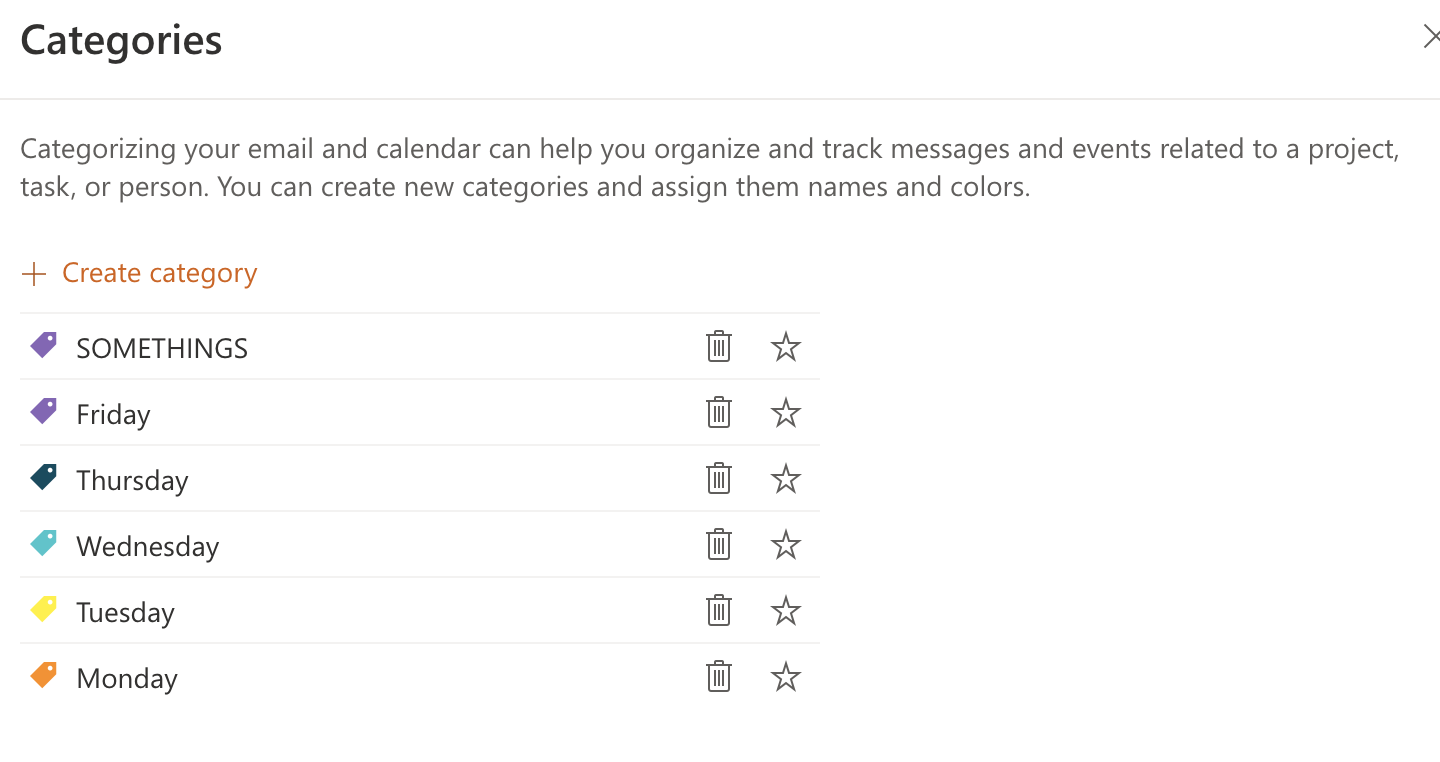
Hi @Joshua Gentes ,
Thanks for your update. Seems that you still need more information related to Outlook API. Since here I mainly focus on general issues about Outlook desktop client and may only know few about Outlook API. If the information @JamesTran-MSFT offered above could not help solve your issue, it is suggested to post a new thread to the dedicated forum for Outlook for developers.
https://social.msdn.microsoft.com/Forums/office/en-US/home?forum=outlookdev
The reason why we recommend posting appropriately is you will get the most qualified pool of respondents, and other partners who read the forums regularly can either share their knowledge or learn from your interaction with us. Thanks for your understanding and hope your question will be resolved soon.
Thank you for the reference. I have migrated the discussion to
https://social.msdn.microsoft.com/Forums/office/en-US/a2162696-154f-495f-a6ab-e03d1ced0810/microsoft-graph-api-for-outlook-shared-mailbox?forum=outlookdev
Ok, hope your question will be resolved soon.

@Joshua Gentes
I was able to create, update, and remove categories within Outlook using the below API calls.
I retrieved the whole list of categories using the below GET call and highlight my test category. For more info.
GET https://graph.microsoft.com/v1.0/me/outlook/masterCategories/
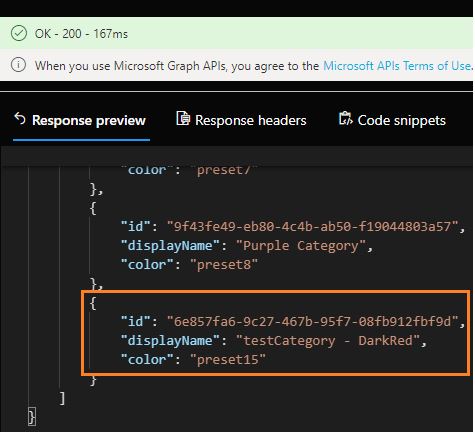
I updated the existing category preset, however, you can't modify the displayName property once you have created the category. For more info.
PATCH https://graph.microsoft.com/v1.0/me/outlook/masterCategories/6e857fa6-9c27-467b-95f7-08fb912fbf9d
Request Body:
{
    "color": "preset9"
}
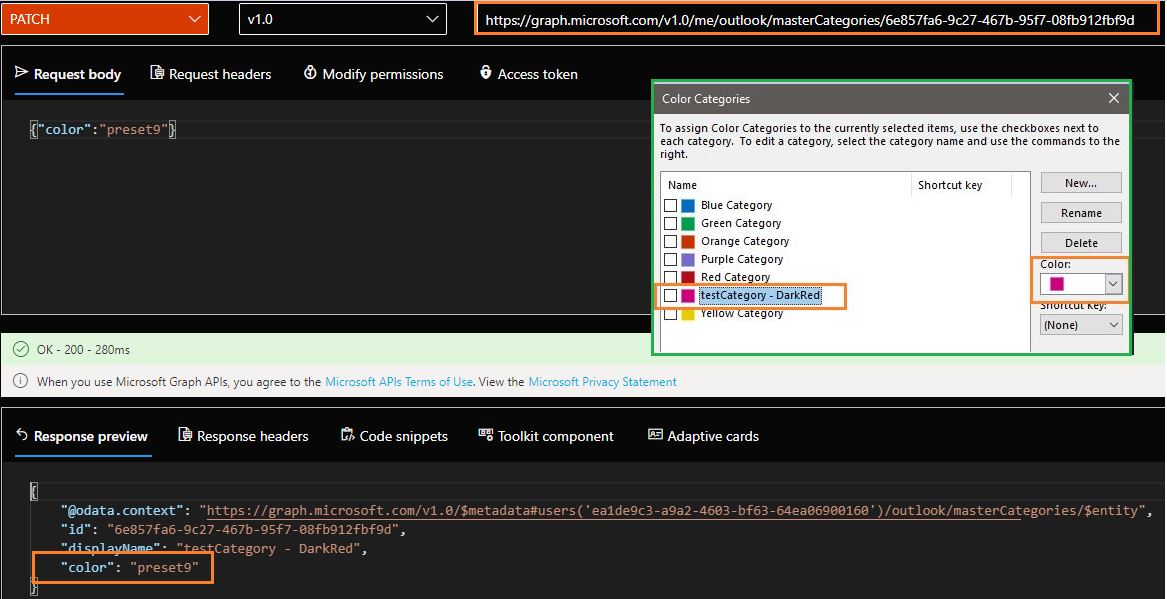
I created a new category and deleted my existing test categories:
Create a new category
POST https://graph.microsoft.com/v1.0/me/outlook/masterCategories

Delete categories:
DELETE /me/outlook/masterCategories/{id}
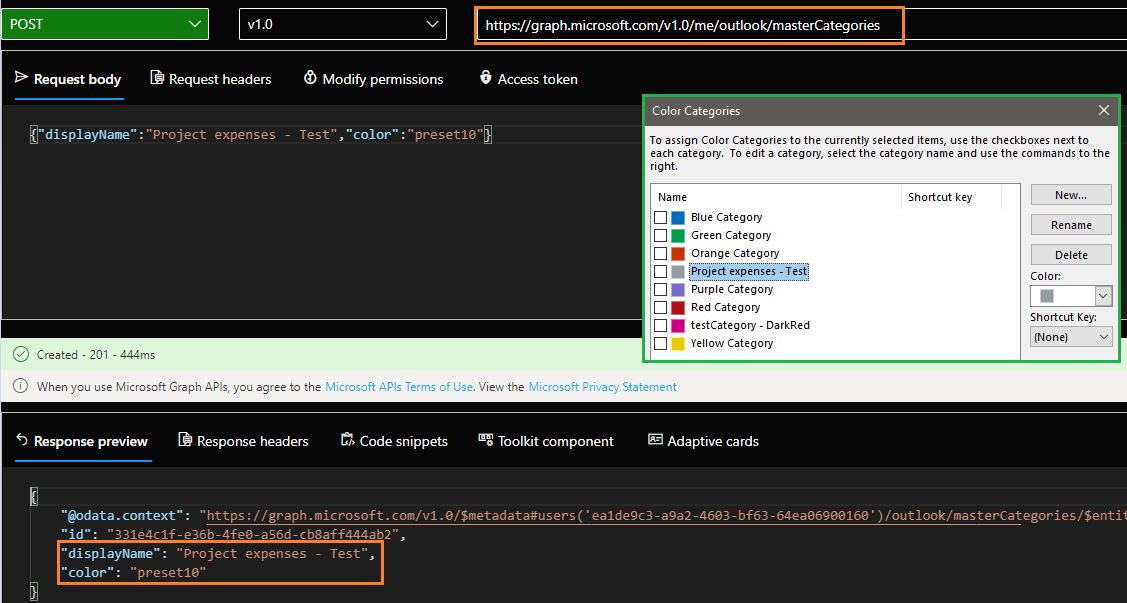
Create Outlook Category
Delete Outlook category
I hope this helps! If you have any other questions, please let me know.
Thank you again for your time and patience throughout this issue.
Hi @Joshua Gentes ,
Just checking in to see if above information mentioned by @JamesTran-MSFT was helpful. If you have any further updates on this issue, please feel free to post back.
By the way, if you think this reply is helpful to you, please remember to mark it as an answer. Thanks for your understanding and support.