Share via

AppLocker executable rule exception version setting won't stick

Anonymous
2024-04-18T15:13:30+00:00

I'm trying to add an exception to the default AppLocker executable rule that allows Everyone to run "All files located in the Program Files folder". The exception is to disallow older versions of Google Chrome. Here are the steps I'm taking.

  1. Open the rule, select the Exceptions tab > make sure the type is Publisher> Add > browse to and select the reference file
  2. Check "Use custom values"
  3. Change the dropdown next to "File version" to "And below", and click OK.

At this point I see the exception in the list. However, when I edit it, it shows that the version dropdown has reverted to "And above".

I've tried this repeatedly in different ways, and the setting always reverts. The only explanations I can think of are that this is either a bug or a limitation of AppLocker that I've been unable to find mentioned anywhere. I would appreciate any assistance.

Windows for business | Windows Server | Directory services | Deploy group policy objects

Locked Question. This question was migrated from the Microsoft Support Community. You can vote on whether it's helpful, but you can't add comments or replies or follow the question.

0 comments No comments

Answer accepted by question author

Anonymous
2024-04-19T09:15:49+00:00

Hello TigerTech94,

Good day!

Thank you for your update and sharing.

I have done a similar test in my lab.

It seems no matter what I select (And above, And below and Exactly)t, it will display "And above" when I edit it.

I suggest you can feedback it via "Feedback Hub" on one client machine.

Thank you again for your time.

Best Regards,
Daisy Zhou

Was this answer helpful?

1 person found this answer helpful.
0 comments No comments

3 additional answers

Sort by: Most helpful
  1. Anonymous
    2024-04-19T14:38:19+00:00

    Thank you for your suggestion, but from what I know of the Feedback Hub, posting there would be unlikely to result in a resolution. I think this thread will be more helpful to other Windows admins who have this problem in the future. Because I cannot mark my own reply as the solution, which it was, I have marked your reply so that this thread will be marked solved.

    Was this answer helpful?

    0 comments No comments
  2. Anonymous
    2024-04-18T19:04:45+00:00

    Thank you for your reply. I had attempted to edit the policy both on my domain joined workstation with RSAT as well as on a domain controller.

    Since my original post earlier today I believe I have found the answer. Here's a screenshot of the Exceptions list. (The program versions here are different than in my original post, but that's irrelevant.)
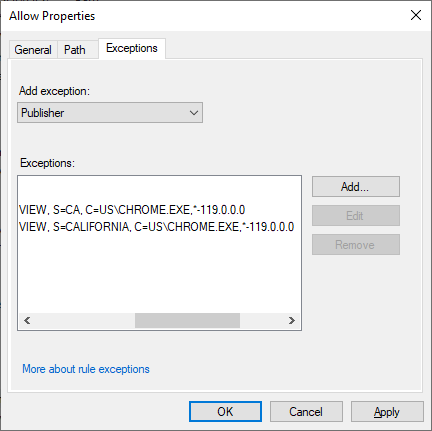
    Note how at the end of the line it shows the versions affected. In these cases they correctly show that versions 119 and lower (*-119.0.0.0) will have exceptions. Testing verifies that the exceptions work as I entered them. However, when I edit either of the exceptions, the GUI still indicates that the exception will affect the specified version "And above". What I've discovered, then, is a problem with the group policy GUI. If it's not a bug then it is definitely a very poor design decision.

    Daisy Zhou123, if you are in a position to verify my findings and report this issue to Microsoft for resolution, please do so. Getting this resolved is very likely to help others with the same problem in the future. Thank you.

    Was this answer helpful?

    0 comments No comments
  3. Anonymous
    2024-04-18T16:05:37+00:00

    Hello TigerTech94,

    Thank you for posting in Microsoft Community forum.

    Do you set Applocker on Domain Controller or on member server in the domain or on one server in the workgroup?

    I will do such a test in lab, if there is any update, I will update here.

    If you have any question or concern, please feel free to let us know.

    Best Regards,

    Daisy Zhou

    Was this answer helpful?

    0 comments No comments
