Share via

Kernel power error.... (again) (win7)

Anonymous
2020-01-29T18:17:55+00:00

My computer keeps getting kernel power errors, and how do I stop them?

One suggestion i found was changing processor % and HDD turn off to never, but it still happens... how and why does that keep happening? what am i missing? and could it just be a faulty fan in my pc? but the thing is, this PC as at least 2 or 3 days before it has this again. 3 days is more likely now cuz (i guess the other two options helped a bit)

but it still keeps happening, and though my drives are all fine (for now) it's still concerning, if this keeps happening if i can even upgrade to win10

(side note: i cannot get a new PC as of yet.... i need this PC to be working so i have contact to what i'm going to be doing to earn money. it's basically an online job, my other main device is having its own problems, and my secondary is fine but slower)

Edit1: i will find a replacement powerbar (to see if that might be causing problems, because the powerbar is technically older than the pc itself)

Windows for home | Previous Windows versions | Windows update

Locked Question. This question was migrated from the Microsoft Support Community. You can vote on whether it's helpful, but you can't add comments or replies or follow the question.

0 comments No comments

20 answers

Sort by: Most helpful
  1. Anonymous
    2020-01-30T09:10:39+00:00

    I don't have an XP example but if the events look like this Windows 7 example:

    That is really not an error message - it is more of an informational message.

    There is nothing in the event that tells you what happened of why it happened - just that something happened.

    Things like power outages, plug pulling, using the power button and windows crashes (like Blue Screens of Death) will always result in an event 41 being logged the next time Windows starts.

    You can't look at them and tell what happened...  just that something happened.

    Is your system crashing/restarting with a Blue Screen of Death (BSOD)?

    If you are getting BSODs you need to troubleshoot the cause of the BSOD and you will not figure it out by looking at event 41s. 

    You are also not likely to figure out the cause of the BSOD from looking at the Event Logs.

    You are likely to figure out the cause of the BSOD by examining the crash dump files generated from the crash.

    Was this answer helpful?

    1 person found this answer helpful.
    0 comments No comments
  2. Anonymous
    2020-01-30T10:13:55+00:00

    Windows is designed to automatically restart when it crashes.

    ...and you will see Event 41s but you will not figure out why the system crashed by looking at them or anything else in the Event Log.

    If you have not made the adjustments to not do that you will not see (except maybe a brief flash) the BSoD.

    Make this safe adjustment, restart your system and do whatever it is you have to do to initiate the crash - then provide the requested information and a link to the crash dump files you've uploaded.

    On your Desktop right click Computer, Properties, Advanced system settings and make it look like this:
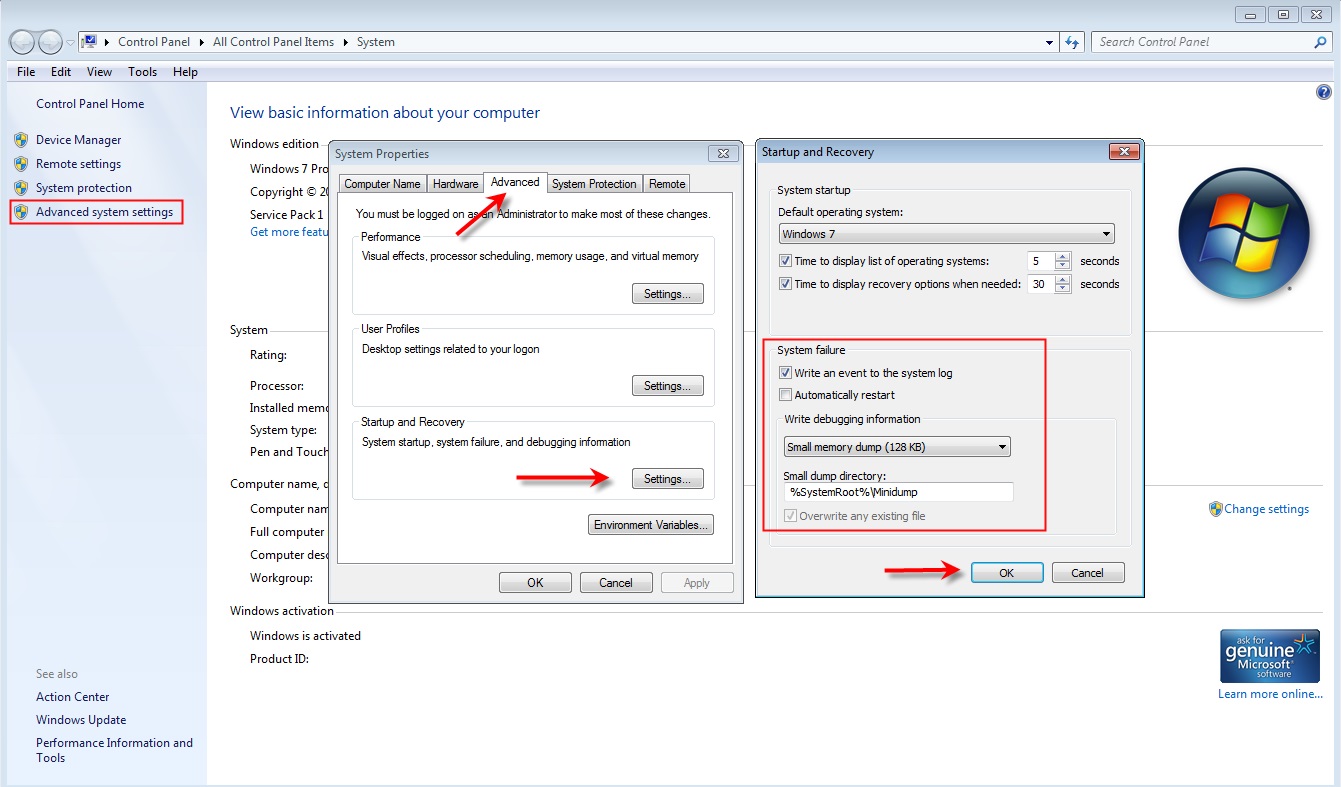
    There is no need to create the Minidump folder as Windows will create one if it needs to.

    Then click OK enough times to close all the dialog boxes and restart your system for the changes to take effect.  After rebooting you can go back and check the settings again to be sure the adjustments "stick".

    In your next reply you can supply more information that will reduce the number of question asking message cycles if you will do this:

    Do this so we can see what you have:

    What is your system make and model or is it something assembled from separately purchased components?

    If the system is a Dell what is the Service Tag Number?

    If the system is an HP what is the serial number?

    If the system is a Toshiba what is the serial number?

    If the system is a Lenovo what is the serial number?

    Describe your antivirus/antimalware environment.

    Click Start, Run and in the box enter:

    In the box enter:

    msinfo32

    Select/click msinfo32.exe and the System Information dialog box will open.

    Click on System Summary, click Edit, Select All (Ctrl-A), Copy (Ctrl-C) and then paste (Ctrl-V) the information back here in your next reply.

    For video driver information, expand the Components, click Display, click Edit, Select All (Ctrl-A), Copy (Ctrl-C) and then paste (Ctrl-V) the information back here.

    There will be some personal information (like System Name and User Name), and whatever appears to be private information to you, just delete it from the pasted information.

    Then do whatever you have to do get the system to crash again and you should have a crash dump file to upload for analysis.

    Sometimes more than one crash dump is needed to pinpoint the cause so upload some of the most recent ones to OneDrive or any popular sharing site and reply with the links.

    Was this answer helpful?

    0 comments No comments
  3. Anonymous
    2020-01-30T09:28:26+00:00

    This has been happening randomly, not due to power outages

    when it happens audio kinda glitches and like, repeats, but no blue screen, just *blip* then restart

    to extend this, it pretty much started on the 12th with a supposid "video card error" then after the last updates, it happens every so often :\ (but as i said, it had a 2-3 days grace till it happened again)

    Was this answer helpful?

    0 comments No comments
  4. Anonymous
    2020-01-30T09:22:37+00:00

    (uh actually the 'XP' bit was just 'an expression thing')

    it says in the side "applies to win7" (that might confuse people so imma change)

    anyway

    my computer (though 10+ years old) in its current set, is about 9 years old, HDD is the same im sure

    and its an Intel Pentium G640 (2 core) @2.8GHz, 6GB ram, intel HD graphics (side note: it has a fair bit of dust build up. if thats one reason why this is happening)

    I will try the backup thing in the morning

    Was this answer helpful?

    0 comments No comments
  5. Anonymous
    2020-01-30T06:00:04+00:00

    Considering its XP it may not be able to run anything higher up in Operating Systems dependent on its age and hardware.

    • How old is your computer ?
    • How old is its Hard Drive ?
    • Can you tell us the computers specifications ?

    Kernel Power can relate to a multitude of issues related to Hard Ware and Software.

    If you can i would suggest you make a back up of all your important information on 2 forms of Media.

    • DVD +R Disc if you have a burner.
    • External Hard Drive.
    • The lesser a USB Flash Drive as these do fail over time.

    Was this answer helpful?

    0 comments No comments
