Developer technologies | Transact-SQL
A Microsoft extension to the ANSI SQL language that includes procedural programming, local variables, and various support functions.
This browser is no longer supported.
Upgrade to Microsoft Edge to take advantage of the latest features, security updates, and technical support.
' cx='32' cy='32' r='32' /%3E%3Ctext x='50%25' y='55%25' dominant-baseline='middle' text-anchor='middle' fill='%23FFF' %3ES%3C/text%3E%3C/svg%3E)
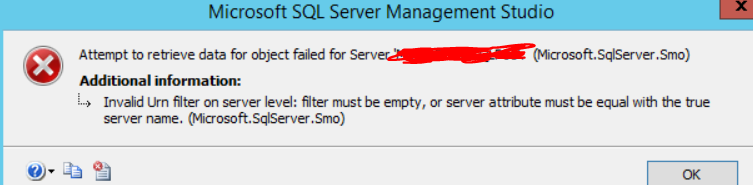
I am trying to alter permissions to some of my users using GUI. When I press Script Out or OK, I am receiving this error attached. Has anyone experienced this error and what did you to resolve this issue?
A Microsoft extension to the ANSI SQL language that includes procedural programming, local variables, and various support functions.
Additional SQL Server features and topics not covered by specific categories
Answer accepted by question author
' cx='32' cy='32' r='32' /%3E%3Ctext x='50%25' y='55%25' dominant-baseline='middle' text-anchor='middle' fill='%23FFF' %3EYM%3C/text%3E%3C/svg%3E)
Hi @SQLLover21 ,
According to my test, this error occurs when the computer name is inconsistent with the server name stored in the SQL server instance.
SQL Server Setup sets the server name to the computer name during the installation, it seems the Hostname of the computer has been changed in your environment.
To check this, you can use the following script:
select host_name()
select @@servername
If the result is different, you can use the following script to change it:
EXEC sp_dropserver '<old_name>';
GO
EXEC sp_addserver '<new_name>', local;
GO
After executing the above command, please restart the instance of SQL Server.
See below for more information:
https://learn.microsoft.com/en-us/sql/database-engine/install-windows/rename-a-computer-that-hosts-a-stand-alone-instance-of-sql-server?view=sql-server-ver15