Microsoft 365 and Office | SharePoint Server | For business
A family of Microsoft on-premises document management and storage systems.

This browser is no longer supported.
Upgrade to Microsoft Edge to take advantage of the latest features, security updates, and technical support.
' cx='32' cy='32' r='32' /%3E%3Ctext x='50%25' y='55%25' dominant-baseline='middle' text-anchor='middle' fill='%23FFF' %3ERB%3C/text%3E%3C/svg%3E)
Hi ,
There is a AD security group which is added to the Visitors group in the SharePoint site . however, the users of this Ad security group don't seem to have the access to the site and the site owners are getting the requests from users and have to manually add users to the Visitors group. Please advise.
' cx='32' cy='32' r='32' /%3E%3Ctext x='50%25' y='55%25' dominant-baseline='middle' text-anchor='middle' fill='%23FFF' %3ECM%3C/text%3E%3C/svg%3E)
Hi @Romila baretto ,
Whether this issue happens to all users in this AD security group?
1.Please make sure this AD group is security group, because you are not able to add distribution groups to SharePoint groups.
2.Please check whether these users have permissions or not.
Settings > Site settings > Site permissions > Check Permissions

3.These users could try to sign out and sign in again to have their security token updated with the new groups.
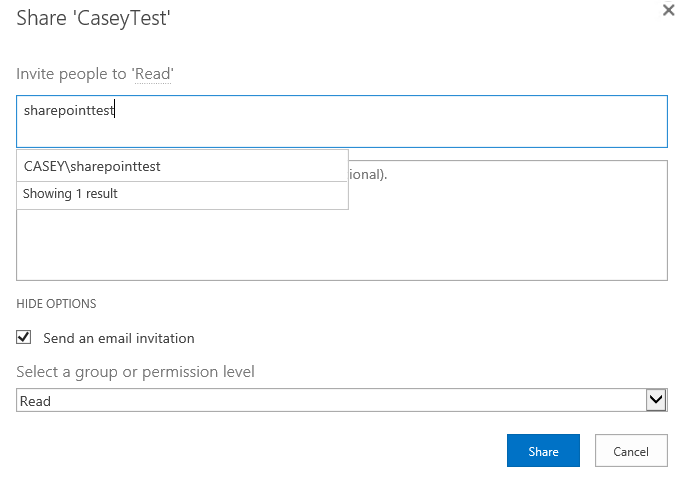
4.And you could try to add this AD group to SharePoint site directly as a workaround.
Settings > Site settings > Site permissions > Grant Permissions > Show options > Select "Read" permission level
If the answer is helpful, please click "Accept Answer" and kindly upvote it. If you have extra questions about this answer, please click "Comment".
Note: Please follow the steps in our documentation to enable e-mail notifications if you want to receive the related email notification for this thread.
@CaseyYang-MSFT : Below is the response:
This issue is mostly with the new joiners
Thanks for your response. will keep you posted.
@CaseyYang-MSFT : About your third point , These users could try to sign out and sign in again to have their security token updated with the new groups: -
The users are getting access denied . Not sure how they can sign out without getting access to the site.
I also checked the farm level configuration of the property:token-timeout for the AD group membership sync and is set to 24hours currently and think this can be the cause that the new joiners are not getting immediate access to the site.
Let me know your thoughts.
Hi @Romila baretto ,
About the third point, these users could try to clean browsing data then sign in again. Does these users could login without assess denied error after 24h?
Have asked the owner to check once she gets any new request.
Will let you know about the outcome
Hi @Romila baretto ,
Thanks for reply