Azure Monitor
An Azure service that is used to collect, analyze, and act on telemetry data from Azure and on-premises environments.
This browser is no longer supported.
Upgrade to Microsoft Edge to take advantage of the latest features, security updates, and technical support.
' cx='32' cy='32' r='32' /%3E%3Ctext x='50%25' y='55%25' dominant-baseline='middle' text-anchor='middle' fill='%23FFF' %3EAS%3C/text%3E%3C/svg%3E)
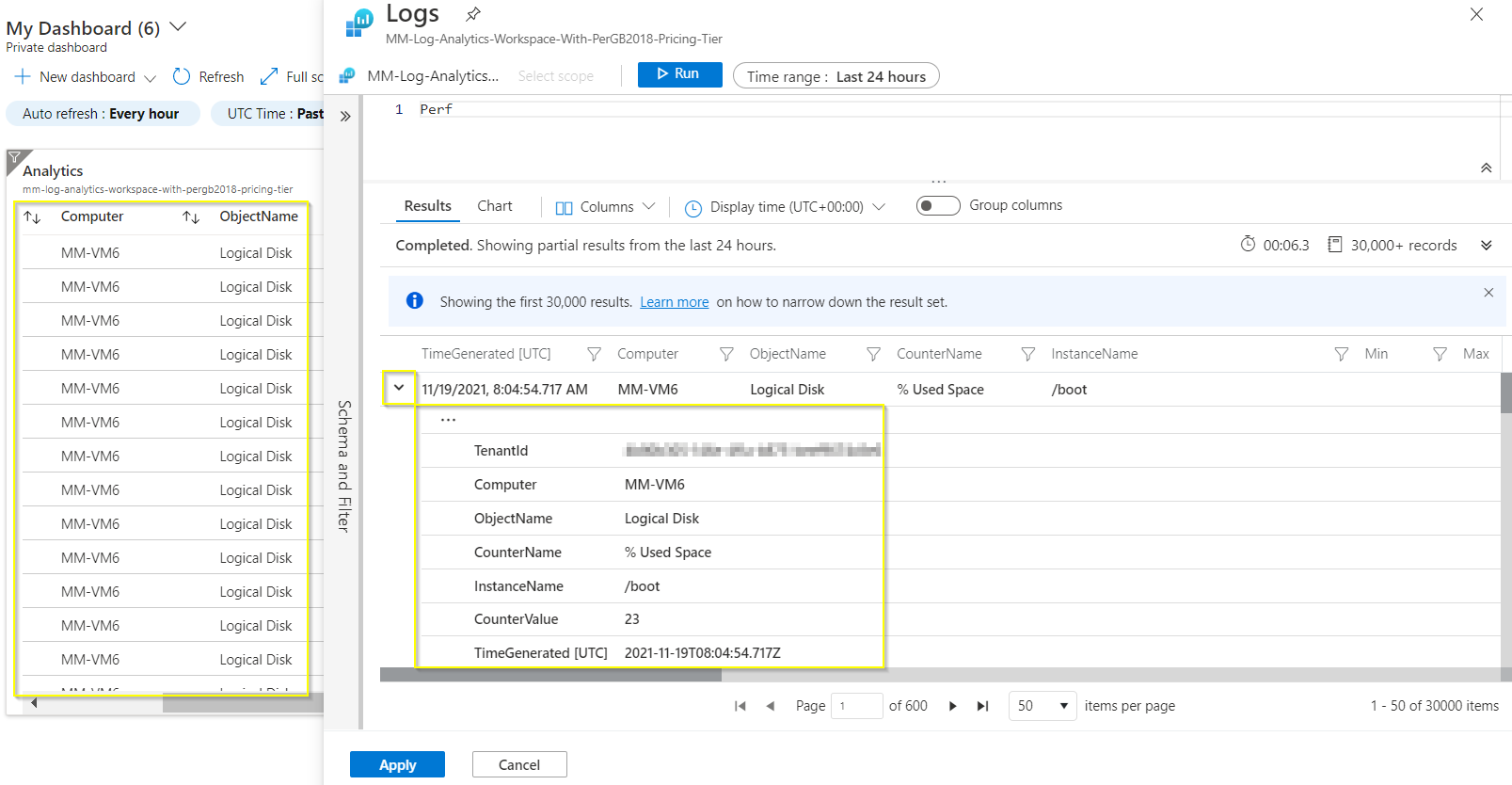
I have data in a table that I am displaying using KQL.
While I'm in editing mode, rows in the result table are expandable.
But after pinning this element to dashboard the rows in table are not expandable anymore.
Is there any KQL keyword which helps to make table with such rows, or any settings which help to keep the table view the same as in editing mode?

Hi @Angelina Selitskaya ,
AFAIK currently the expandable rows view is not supported in the dashboard view. Adding a screenshot below for illustration of the same.
So I would recommend you to raise this requirement as a feature request in this feedback forum. In general, Azure feature or product team would check feasibility of a feature request, triage it, prioritize against existing feature backlog, add in roadmap as appropriate and would announce and/or update the related Azure document once a feature request is addressed.