Azure Internet of Things
A category of Azure services for internet of things devices.
This browser is no longer supported.
Upgrade to Microsoft Edge to take advantage of the latest features, security updates, and technical support.
' cx='32' cy='32' r='32' /%3E%3Ctext x='50%25' y='55%25' dominant-baseline='middle' text-anchor='middle' fill='%23FFF' %3EMA%3C/text%3E%3C/svg%3E)
Hello All,
We are developing a solution to collect PLC OPC tags(100 tage/data points every 5 minutes) and publish to Azure Cloud via IOT Hub.
Data Flow : OPC UA -> Custom Data Acquisition Service--> IOT Hub--> Stream Analytics--> SQL Database--> Web Application
Q1-Is there a way to stream data from stream analytics to Web Application directly for real time data visualization(No Power BI).
How Azure Functions can be used in this context.
Thanks in advance
Muhammad Asad
A category of Azure services for internet of things devices.
An Azure real-time analytics service designed for mission-critical workloads.
' cx='32' cy='32' r='32' /%3E%3Ctext x='50%25' y='55%25' dominant-baseline='middle' text-anchor='middle' fill='%23FFF' %3EAM%3C/text%3E%3C/svg%3E)
@Muhammad Asad Ilyas Wanted to follow up with you to understand whether the below information helped. Please let us know if there are any other queries.
If below suggestions answers your query, do click Accept Answer and Up-Vote for the same. And, if you have any further query do let us know.

Hi,
Basically, there are two patterns how to deliver an event from the ASA to the web app, such as the PUSH Pattern and the PULL Pattern. The following screen snippets show their pipeline:
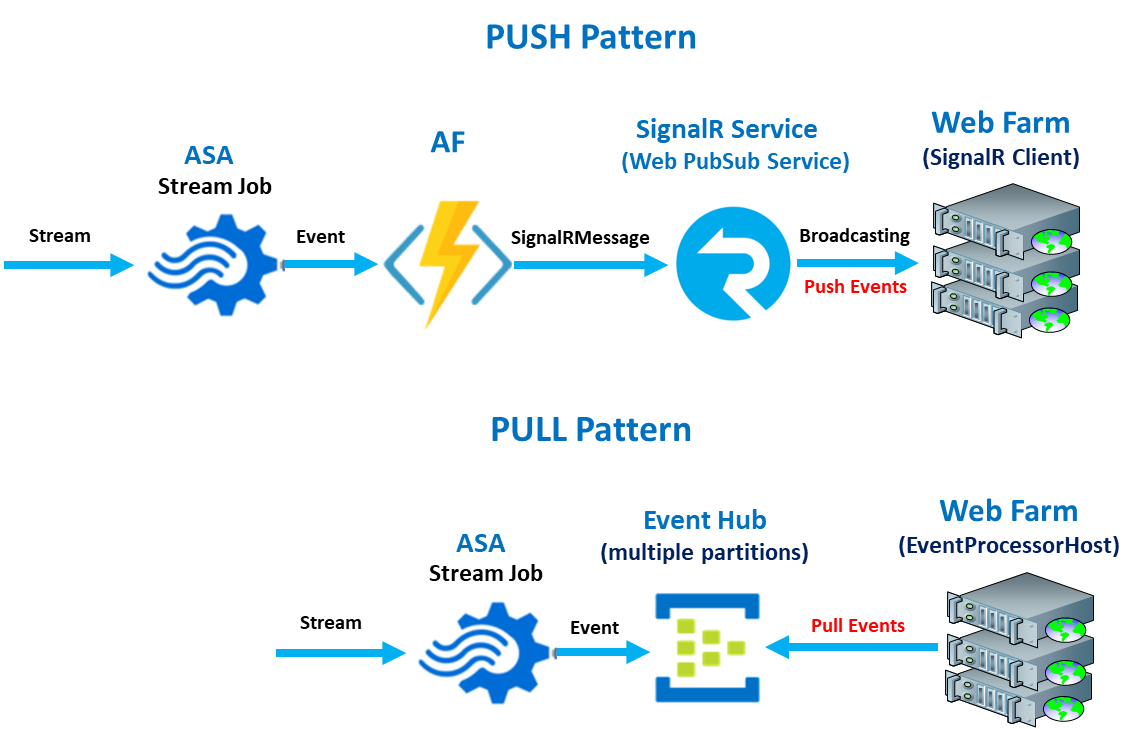
The Push pattern is based on the broadcasting events using the Azure SignalR Service (Azure Web PubSub Service) and the other one is based on the pulling (consuming) the events from the Event Hub by EventProcessorHost (EPH) consumer agent.
Thanks
Roman

Hello @Muhammad Asad Ilyas ,
Azure Stream Analytics can output messages to several kinds of outputs.
There are a few options you can investigate.
First, you can make use of WebSockets (SignalR is a more mature wrapper around this protocol) to send these messages to eg. browser clients. For this, you use an Azure Function between Stream Analytics and the browsers. Here is an example regarding connecting an Azure Function with SignalR Services.
Calling an Azure Function from Stream Analytics is simple, just expose an HTTP trigger and use the output creation wizard in Stream Analytics.
If your web application has a backend, you can also expose a Rest API on your web application and call that API for each incoming Azure Function call.
Last but not least, another solution is putting the messages in some persisted storage. From there, your web application can 'poll' for updates (pull mechanism). This is how Grafana works.
Next to using a database, a new eventing (push) mechanism like an EventHub or Messagebus could be used to. This is a common solution to e.g. connect logic apps to Azure Stream Analytics. This example with an Azure Function can be the bridge between an event mechanism and SignalR.
Extra, you could combine this. Put your message in a persisted storage and then send an update trigger to the dashboard.