Developer technologies | C#
An object-oriented and type-safe programming language that has its roots in the C family of languages and includes support for component-oriented programming.
This browser is no longer supported.
Upgrade to Microsoft Edge to take advantage of the latest features, security updates, and technical support.
' cx='32' cy='32' r='32' /%3E%3Ctext x='50%25' y='55%25' dominant-baseline='middle' text-anchor='middle' fill='%23FFF' %3ENK%3C/text%3E%3C/svg%3E)
To clarify some details: I'm building a Windows Setup app that can be used with Windows-To-Go USB sticks, to make it able to install Windows straight from that session onto a local storage unit, like Linux's Live CD's.
I automatically had these classes made using the mgmtclassgen.exe
Now i'm trying to create a partition on a disk, and make it return a MSFT_Partition class object through the OUT parameters.
This is the code for the app:
        private async Task<(Partition Boot, Partition Data)> PrepareDisk(Disk disk)
        {
            lbStatus.Text = "Clearing disk";
            var cleared = await Task.Run(() => disk.Clear(
                 RemoveData: true,
                 RemoveOEM: true,
                 RunAsJob: true,
                 Sanitize: false,
                 ZeroOutEntireDisk: false,
                 out ManagementBaseObject statusClear));

            await Task.Run(() => disk.ConvertStyle(2, out ManagementBaseObject status));

            lbStatus.Text = "Creating boot partition";

            var ptBoot = new Partition();
            var ptData = new Partition();

            await Task.Run(() =>
            {
                disk.CreatePartition(
                        Alignment: 0,
                        AssignDriveLetter: true,
                        DriveLetter: char.MinValue,
                        GptType: "System Partition",
                        IsActive: true,
                        IsHidden: true,
                        MbrType: 6,
                        Offset: 0,
                        Size: Convert.ToUint64(128 * 1048576),
                        UseMaximumSize: false,
                        out ManagementBaseObject partBoot,
                        out ManagementBaseObject statusBoot);

                Task.WaitAll();
                ptBoot = new Partition(partBoot);
            });

            lbStatus.Text = "Creating data partition";

            await Task.Run(() =>
            {
                disk.CreatePartition(
                        Alignment: 0,
                        AssignDriveLetter: true,
                        DriveLetter: default,
                        GptType: "Basic data",
                        IsActive: true,
                        IsHidden: true,
                        MbrType: 7,
                        Offset: Convert.ToUInt64(128 * 1048576),
                        Size: disk.LargestFreeExtent,
                        UseMaximumSize: false,
                        out ManagementBaseObject partData,
                        out ManagementBaseObject statusData);

                Task.WaitAll();
                ptData = new Partition(partData);
            });

            return (ptBoot, ptData);
        }
This is the code that was generated through mgmtclassgen.exe:
   public uint CreatePartition(uint Alignment, bool AssignDriveLetter, char DriveLetter, string GptType, bool IsActive, bool IsHidden, ushort MbrType, ulong Offset, ulong Size, bool UseMaximumSize, out System.Management.ManagementBaseObject CreatedPartition, out System.Management.ManagementBaseObject ExtendedStatus)
        {
            if ((isEmbedded == false))
            {
                System.Management.ManagementBaseObject inParams = null;
                inParams = PrivateLateBoundObject.GetMethodParameters("CreatePartition");
                inParams["Alignment"] = ((uint)(Alignment));
                inParams["AssignDriveLetter"] = ((bool)(AssignDriveLetter));
                inParams["DriveLetter"] = ((char)(DriveLetter));
                inParams["GptType"] = ((string)(GptType));
                inParams["IsActive"] = ((bool)(IsActive));
                inParams["IsHidden"] = ((bool)(IsHidden));
                inParams["MbrType"] = ((ushort)(MbrType));
                inParams["Offset"] = ((ulong)(Offset));
                inParams["Size"] = ((ulong)(Size));
                inParams["UseMaximumSize"] = ((bool)(UseMaximumSize));
                System.Management.ManagementBaseObject outParams = PrivateLateBoundObject.InvokeMethod("CreatePartition", inParams, null);
                CreatedPartition = ((System.Management.ManagementBaseObject)(outParams.Properties["CreatedPartition"].Value));
                ExtendedStatus = ((System.Management.ManagementBaseObject)(outParams.Properties["ExtendedStatus"].Value));
                return System.Convert.ToUInt32(outParams.Properties["ReturnValue"].Value);
            }
            else
            {
                CreatedPartition = null;
                ExtendedStatus = null;
                return System.Convert.ToUInt32(0);
            }
        }
Now I found out that AssignDriveLetter, and DriveLetter don't work in coallition with each other. If I assign both at the same time, I get a 'Access Path Not Valid' error.
My question is: how can I NOT assign (or use/specify) the DriveLetter property in the parameters used for CreatePartition?
' cx='32' cy='32' r='32' /%3E%3Ctext x='50%25' y='55%25' dominant-baseline='middle' text-anchor='middle' fill='%23FFF' %3EMT%3C/text%3E%3C/svg%3E)
The documentation for CreatePartition says this.
DriveLetter [in]
The drive letter to be assigned to the partition at the time of creation. This parameter cannot be used with AssignDriveLetter. If both parameters are specified, an Invalid Parameter error will be returned. If the drive letter is not available, the partition will be created, but error '42002' will be returned.
AssignDriveLetter [in]
If TRUE, the next available drive letter will be assigned to the created partition. If no more drive letters are available, the partition will be created with no drive letter. This parameter cannot be used with DriveLetter. If both parameters are specified, an Invalid Parameter error will be returned.
So if you want to assign a drive letter using DriveLetter then set AssignDriveLetter to false. Setting it to true indicates that you want the next available drive letter to be auto-assigned to it. Since you also specify the actual letter you want previously this would conflict. Set this parameter to true if you aren't assigning an explicit driver letter.
So I accidentally removed my comment, oopsie daisies.
Thanks for the kind answer. I did have a look at the documentation before I made this topic, but it looks really messy to me and I get easily confused.
Now I'm a bit stuck though. I know that I can specify a GptType as to what kind of partition I want to create, and I basically followed this by passing on the name and the GUID of the System Partition variant, but I keep on getting a "The specified partition type is not valid. (41010)" error in the autos when going through a breakpoint I set in the CreatePartition function itself. I don't really know what to pass on to that parameter, is it the GUID? Name? both?
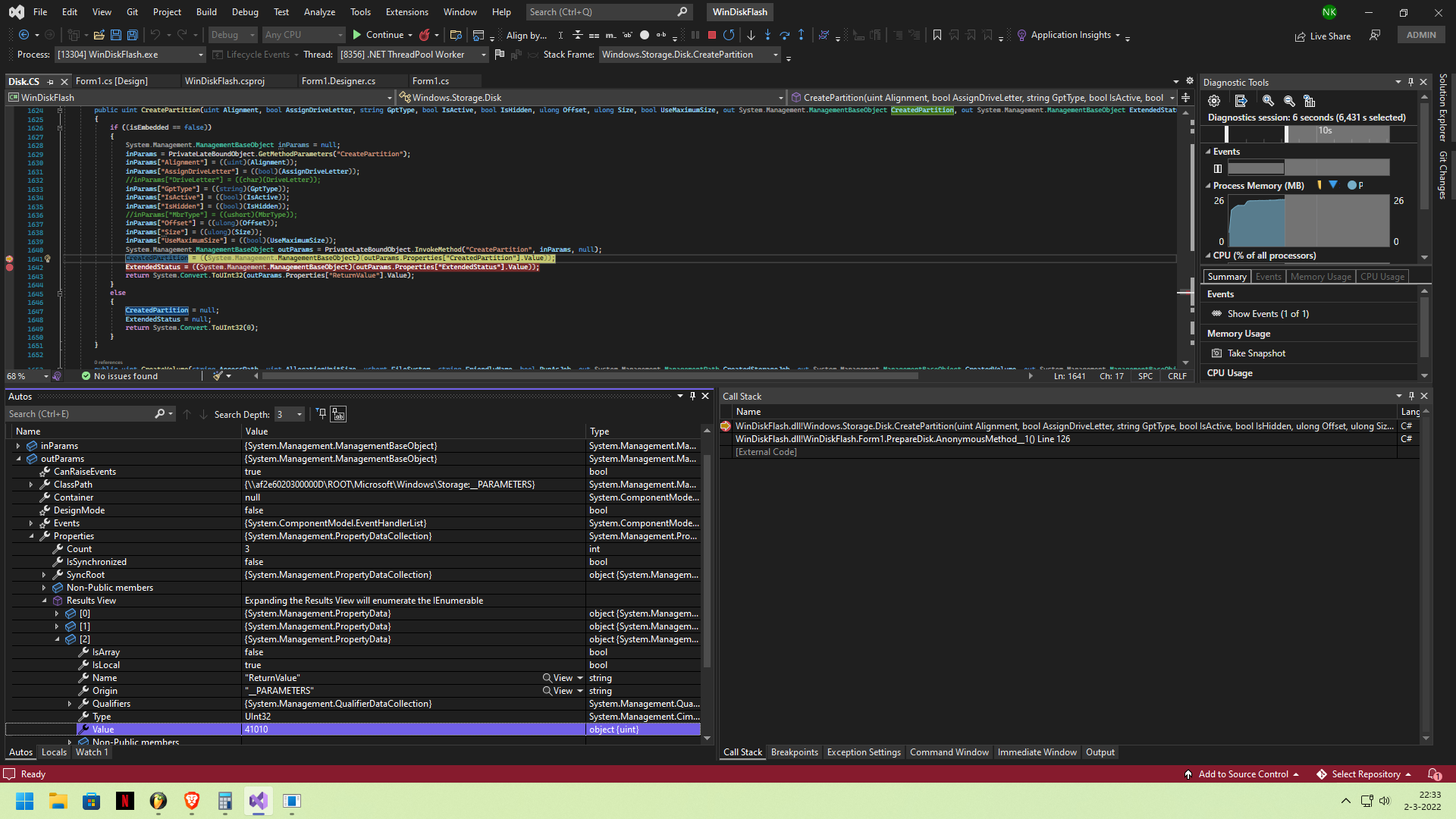
Pass just the GUID. So if you wanted to create a system partition you'd set the parameter to c12a7328-f81f-11d2-ba4b-00a0c93ec93b. However the partition must already be a GPT to use this parameter. It looks like you're creating the disk that way so it should be good.
I'm still running into the same problem. The disk is GPT style, and I pass on the GUID as parameter to GptStyle, but the return code is still 41010. I tried this with different USB sticks as well. Is the conversion still in progress when creating a partition or am I doing something wrong?

Just a guess -- if the disk has been initialized as GPT perhaps the MbrType parameter passed to CreatePartition should be 0. The docs say "Specifies the MBR partition type. This parameter can only be set if the disk's PartitionStyle property is MBR, otherwise an error will be returned."
Nope, I'm sorry. I still get the same return code, unfortunately. I even tried to initialize the disk first after converting it, which gives me basically the same result. I'm also running VS in admin mode, so that shouldn't be an issue either.
I think @RLWA32 point, as was mine, is that this may have nothing to do with the GPT. This particular WMI method is not the best designed as it requires you to set some parameters and not others so you should review all the parameters you're passing to make sure they are valid for the disk. Ultimately though we're assuming that the disk you're targeting is valid and hence the issue is with parameters and not actually with the path.
I was going to ask you to try a different GPT type and then I read what system partition really means. Based upon how I read Basic Data it sounds like you cannot assign a drive leter (or auto-assign) system partition. If you create a Basic Data partition instead, does it work?
Some other thoughts
Size and UseMaximumSize. IsActive for GPT I would go so far as to not even assign them values if they aren't needed.