Azure Cosmos DB
An Azure NoSQL database service for app development.
This browser is no longer supported.
Upgrade to Microsoft Edge to take advantage of the latest features, security updates, and technical support.
' cx='32' cy='32' r='32' /%3E%3Ctext x='50%25' y='55%25' dominant-baseline='middle' text-anchor='middle' fill='%23FFF' %3ETA%3C/text%3E%3C/svg%3E)
Hi,
It is possible to convert “service_code” array to a normal comma-separated string using cosmos dB SQL API query?
Select c.tin, c.service_code from c
[
{"tin": "111-121212","service_code": [ “01",03"]},
{"tin": "222-121212","service_code": [ “01",03"]}
{"tin": "3333-121212","service_code": [ “01",03"]}
]
Expected output
[
{"tin": "111-121212","service_code": “01,03”},
{"tin": "222-121212","service_code": “01,03”},
{"tin": "3333-121212","service_code": “01,03”}
]
An Azure NoSQL database service for app development.

Easiest way to create one will be from the portal.
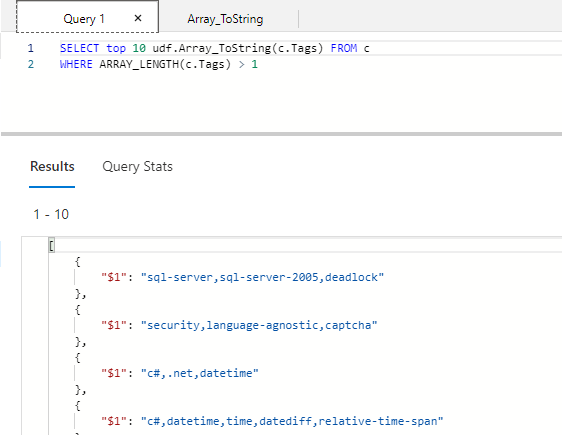
In the following example, I gave Array_ToString name to this function.
All it does is, it takes the input and returns it as string.

In the following picture, you can see how to run and see its results.
@Tomar, Abhishek
I hope this helped to solve your problem.
If it did, please mark as accept answer.
Thank you.
ToString() function can handle this.
SELECT ToString(c.service_code) from c
If you like to change delimeter, you can create your own UDF function to handle it too.
ToString is only converting in string like this "[\"01\",\"03\"]".
Can you please share the document or sample code for UDF?
dose UDF work with huge data something line 80M documents.