Microsoft 365 and Office | SharePoint Server | For business
A family of Microsoft on-premises document management and storage systems.

This browser is no longer supported.
Upgrade to Microsoft Edge to take advantage of the latest features, security updates, and technical support.
' cx='32' cy='32' r='32' /%3E%3Ctext x='50%25' y='55%25' dominant-baseline='middle' text-anchor='middle' fill='%23FFF' %3EB%3C/text%3E%3C/svg%3E)
I created a public sharepoint site, which anyone in my organization should be able to access.
But i do not want to keep getting email requests every time someone is trying to get in the site.
Anybody knows how i can set it so that anyone can access without my approval through email?
A family of Microsoft on-premises document management and storage systems.
A group of Microsoft Products and technologies used for sharing and managing content, knowledge, and applications.
The process of building custom solutions for SharePoint Server.
' cx='32' cy='32' r='32' /%3E%3Ctext x='50%25' y='55%25' dominant-baseline='middle' text-anchor='middle' fill='%23FFF' %3EYJ%3C/text%3E%3C/svg%3E)
Hi @bronny8 ,
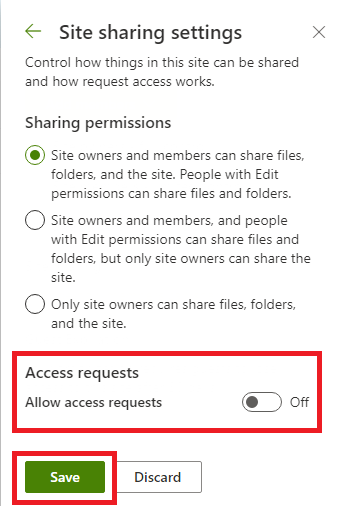
According to your description, it can be achieved by turning off the "Access request" function.
Click gear in the upper right corner, then click Site permissions-->Change how members can share, turn "Allow access requests" off, click "Save".
Thanks,
Yanli Jiang
===========================================
If the answer is helpful, please click "Accept Answer" and kindly upvote it. If you have extra questions about this answer, please click "Comment".
Note: Please follow the steps in our documentation to enable e-mail notifications if you want to receive the related email notification for this thread.
Hi @bronny8 ,
I am checking to see if the problem has been resolved . If you have any questions you can feel free to contact me.

In the top right of your Sharepoint site there should be a Share button.
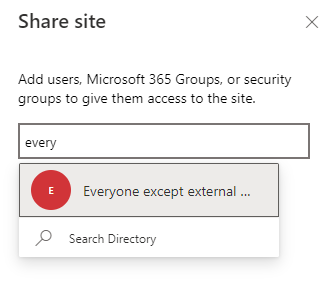
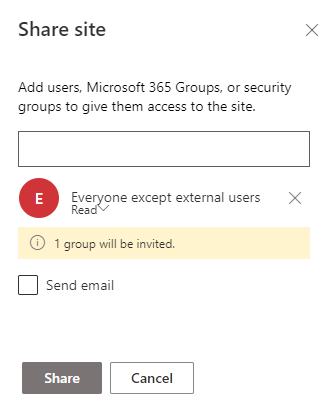
You should then be able to type in everyone except external users > ensure Read is chosen as the permission level > uncheck the Send email (if you don't want people to get a notification) > Share.
This will add everyone with Read permissions.