Note
Access to this page requires authorization. You can try signing in or changing directories.
Access to this page requires authorization. You can try changing directories.
In the default general development settings, the keyboard shortcut to invoke statement completion is Ctrl+J. The keyboard shortcut is bound to Edit.ListMembers, so you may need to confirm what your keyboard shortcut is.

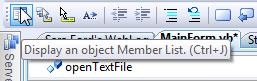
In the Text Editor Toolbar, you can invoke statement completion via the Show Member List button.
Technorati tags: VS2005Tip, VS2008Tip
Comments
Anonymous
October 08, 2007
PingBack from http://www.artofbam.com/wordpress/?p=6368Anonymous
October 09, 2007
This is something diffrent from Ctrl + Space ? Mmm...Anonymous
October 09, 2007
How does this differ from Edit.CompleteWord (Ctrl-Space)? Is there any occasion where Ctrl-J would help that Ctrl-Space would not?Anonymous
October 09, 2007
Type out your variable name, then before the . hit ctrl-space,it doesn't pop up (well on mine) but when you hit Ctrl-J it pop's up with the options to replace that variable name with.Anonymous
November 18, 2008
В настройках по умолчанию (General settings) клавиатурной комбинацией для завершения ввода выраженияAnonymous
December 10, 2008
本篇包括tip51-tip60http://www.watch-life.net/visual-studio/visual-studio-2008-tip-day-6.html#051、循环使用剪...