Note
Access to this page requires authorization. You can try signing in or changing directories.
Access to this page requires authorization. You can try changing directories.
I only found this feature of DB Pro the other day - must remember to spend more time exploring menus - so thought I should share.
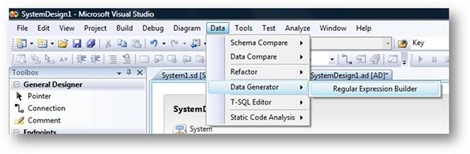
When you are creating a Data generation Plan, one of the options on how to control the shape of the data is to use a Regular Expression. To help you develop these, the Reg Ex builder dialog is a great tool to use. This is on the Data Generator menu on the Data menu.
When you enter your Reg Ex, it quickly generates a preview of the data that will be created - a great way to play with your Reg Ex. Once you have created your master piece, you can save it for later use. There are also some pre-built Reg Exs that you might find useful (URL, email address, Zip Code, ...).
![clip_image001[4]](https://msdntnarchive.z22.web.core.windows.net/media/TNBlogsFS/BlogFileStorage/blogs_msdn/ukvsts/WindowsLiveWriter/RegularExpressionBuilder_C45F/clip_image001%5B4%5D_ca3310ec-f29f-4083-948b-c2ce1e9efc85.jpg)
I've been showing this tool off as part of my demo at the MSDN Roadshows in the UK and have a couple of useful Reg Exs, that are probably worth sharing:
For a persons title: Mr|(Mrs|Miss|Mz)
50% of the rows will be Mr, then the other 50% will be an even split of Mrs, Miss or Mz - ok so not 100% accurate, but probably good enough for a decent test.
UK Street Address: ([1-9]|[1-9][0-9]) [A-W][aeiou][b-y][aeiou][b-y]{2} (Street|Road|Avenue|Close)
Will give strange sounding street names, but again close enough to real data for most purposes
UK Post code: [A-Y]{2}([1-9]|[1-9]{2}) ([1-9]|[1-9]{2})[A-Z]{2}
Doesn't really account for London Post Codes, but if you aren't actually validating addresses against post codes could save you lots of typing.
Hope this helps,
Neil Kidd