Note
Access to this page requires authorization. You can try signing in or changing directories.
Access to this page requires authorization. You can try changing directories.
 Here are some great registry settings that you may want to know about when dealing with 4.5 beta and the clients that you are trying to manage. In 4.5 we will support Autoload. Essentially, you can configure the client to ensure after the application launches (FB1 downloaded) the client will continue to stream FB2 (in the background) until the application is 100% in cache. Please note the autoloading is occuring over RTSP and is set as a lower priority process so not to impact or degrade performance for the user.
This will be a great and certainly an important feature for Laptop/Mobilel! But can be applied to many different areas in your business.
AutoLoadTriggers
Registry Key:
HKEY_LOCAL_MACHINE\SOFTWARE\Microsoft\SoftGrid\Client\CurrentVersion
\Configuration\AutoLoadTriggers
AutoLoadTriggers REG_DWORD
0x0 = Never
0x1 = OnLaunch
0x2 = OnRefresh
0x4 = OnLogin
0x5 = On Launch & Login (DEFAULT)
These flags Indicate the events that initiate AutoLoading of applications. AutoLoad implicitly uses background streaming to enable the app to be fully loaded into cache. Feature block 1 will be loaded as quickly as possible. Feature block 2 will be loaded in the background to enable foreground operations (i.e. user interaction with applications) to take priority and provide optimal performance.
Bit mask values:
Never No bits are set (value is 0), no auto loading will be performed, as there are no triggers set
OnLogin Perform auto load for any application when a user logs in.
OnLaunch Perform autoload when a user launches an application
OnRefresh Perform autoload anytime a DC Refresh occurs.
AutoLoad Target
Registry Keys:
HKEY_LOCAL_MACHINE\SOFTWARE\Microsoft\SoftGrid\Client\CurrentVersion
\Configuration\AutoLoadTarget
AutoLoadTarget REG_DWORD
0x0 = None
0x1 = PreviouslyUsed (Default)
0x2 = All
This parameter indicates what will be autoloaded when any given AutoLoadTriggers occur.
Bit mask values:
None No autoloading, regardless of what triggers may be set
All If any AutoLoad trigger is enabled, all package will be automatically loaded
PreviouslyUsed If any AutoLoad trigger is enabled, load only the packages where at least one app in the package has been previously used by a user (i.e. launched or precached,). This targets ‘important’ apps, meaning apps that have been used before are likely to be more important to a user than apps that have never been launched.
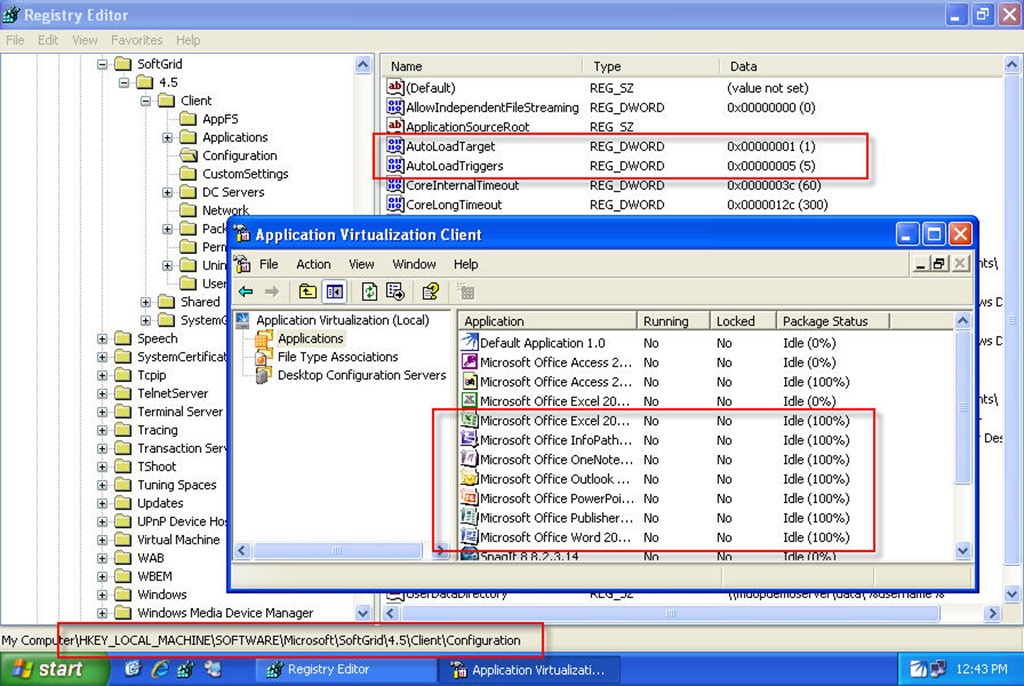 As you can see the Values that I have set are the defaults which will load my previously used applications at Launch & Login in the local clients cache. All in all one very cool method to making sure your users have the applications on and off the network! Background streaming is implemented by lowering the streaming thread’s priority to idle priority. Thus, background streaming is controlled by the OS scheduler based on CPU utilization.
Comments
Anonymous
January 01, 2003
AutoLoad will work for File:// and http://Anonymous
April 29, 2008
This is an excellent feature! I just want to confirm - this is for RTSP (SMB streaming using SCCM R2 is hopefully in the future). Thanks!Anonymous
October 28, 2009
Hi, I have the following registry keys and values set... Windows Registry Editor Version 5.00 [HKEY_LOCAL_MACHINESOFTWAREMicrosoftSoftGrid4.5ClientConfiguration] "AutoLoadTriggers"=dword:00000004 "AutoLoadTarget"=dword:00000002 My understanding therefore on my 4.5CU1 clients is that ALL of the apps ("AutoLoadTarget"=dword:00000002) should automatically load FB1 and FB2 at Logon ("AutoLoadTriggers"=dword:00000004). However this is not happening even after numerous reboots. Is there any client/server side troubleshooting I can perform? Thanks