Note
Access to this page requires authorization. You can try signing in or changing directories.
Access to this page requires authorization. You can try changing directories.
Budgets help you monitor and control monthly Unity AI Gateway spend using filters applied to billing records. You can scope a budget specifically to the Unity AI Gateway product to track only Unity AI Gateway spending, or include Unity AI Gateway in an account-wide budget.
Account and workspace admins can view a summary of AI budget status and spend on the AI page in Governance Hub.
Note
Unity AI Gateway budgets also track Genie product usage. To set budgets for Genie specifically, see Manage budgets and cost controls for Genie.
For details on creating and monitoring budgets, see Create and monitor budgets.
Requirements
- Unity AI Gateway enabled for your account.
How budgets work with Unity AI Gateway
When creating a budget, select Unity AI Gateway as the resource type to track only Unity AI Gateway spending (pay-per-token and ai_query inference).
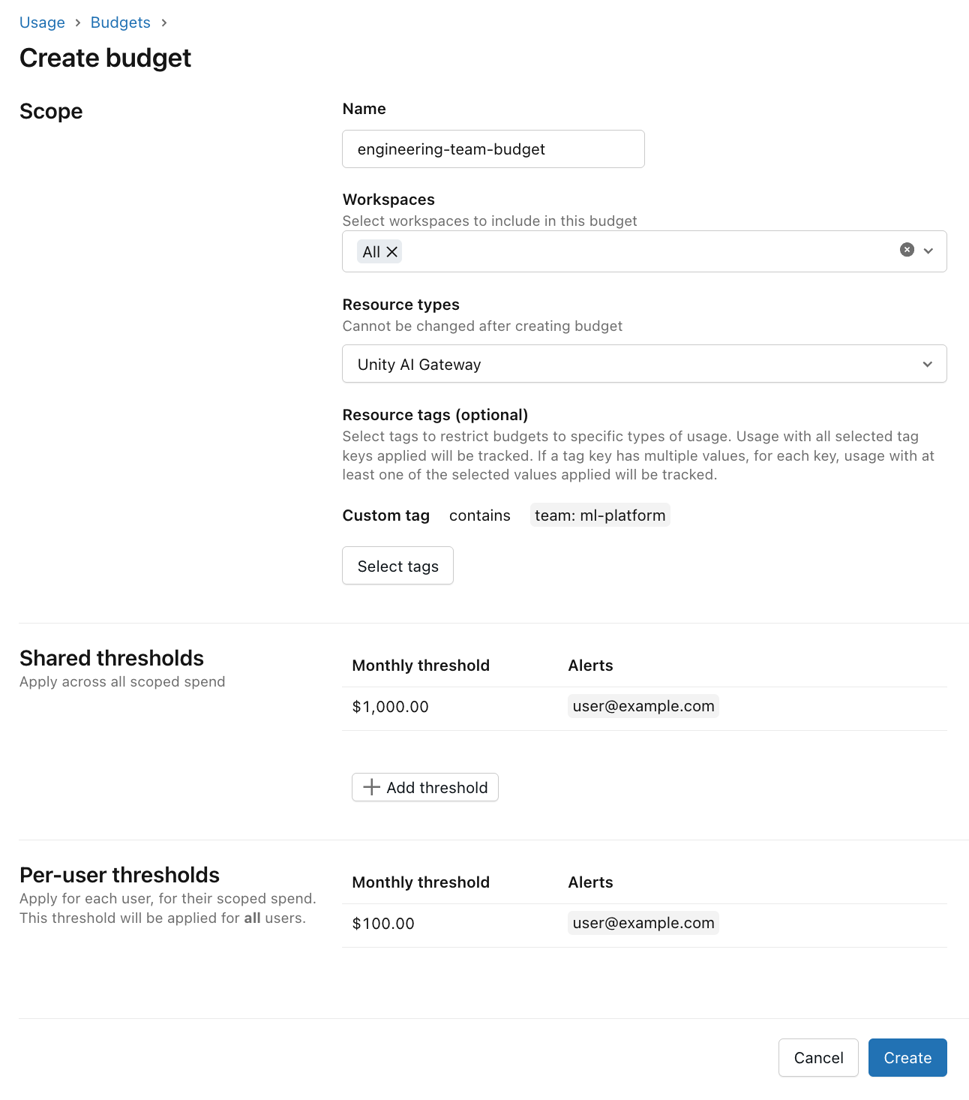
Threshold types: For budgets scoped to Unity AI Gateway, you can configure:
- Shared thresholds: A collective spending limit for all users within the budget scope.
- Per-user thresholds: A monthly limit that applies to each individual user.
- Per-user overrides: Grant specific users or groups a higher spending limit than the default per-user threshold. Users covered by an override can spend up to the override amount rather than the default per-user limit. If a user belongs to multiple override groups, the highest threshold applies.
For shared and per-user thresholds, you can configure one or both of the following actions when a threshold is reached:
- Send alert: Sends an email notification to configured addresses. Users retain access to Unity AI Gateway.
- Block usage: Prevents the user from making further requests through Unity AI Gateway. The user sees a message that their budget is exhausted. Access resumes after the budget resets or an admin increases the threshold.
Limitations
Unity AI Gateway budgets currently track pay-per-token and ai_query (batch) inference. Provisioned throughput and external-model inference are not currently tracked.
Each budget supports a maximum of four shared thresholds and 20 per-user overrides.
Your account can have a maximum of 1,000 budgets.
Block usage thresholds are enforced approximately. Enforcement uses a near-real-time estimate of cost, so actual spend may vary within a limited range above or below the configured threshold. This means:
- A user may occasionally be blocked slightly before their actual spend reaches the threshold.
- A small amount of spend over the threshold may occur before enforcement takes effect. Active requests in progress when the threshold is reached are not interrupted.
system.billing.usageremains the source of truth for actual billable usage. For material discrepancies, Databricks adjusts budget estimates to align with final billing.Spend amounts in the budget alert emails, budget details page, and
system.billing.usagemay differ when compared at the same point in time. This is expected, because each source updates at a different rate:- Budget alert emails: Reflect spend at the moment the alert was triggered.
- Budget details page: Updates frequently but may show a lower amount than a recent alert email when viewed shortly after.
system.billing.usage: Updates every few hours. Querying system tables shortly after receiving an alert may return a lower spend figure than the budget details page or alert emails.
Budget enforcement, including usage blocking and alert thresholds, is based on near real-time spend tracking and is not affected by system table refresh timing.