Note
Access to this page requires authorization. You can try signing in or changing directories.
Access to this page requires authorization. You can try changing directories.
Important
The unified trace table is in Beta. Unity Gateway is generally available, but its beta capabilities are enabled separately. An account admin must turn on the Enhanced Unity Gateway beta features from the account console Previews page. See Manage Azure Databricks previews.
The unified trace table gives you a single place to monitor, debug, secure, and audit all activity across your Unity Gateway services.
A metastore admin sets up unified tracing once. After that, all Unity Gateway traffic is automatically logged with no per-endpoint setup.
Important
By default, only the metastore admin who creates the trace table can read it. No other users — including endpoint owners and security teams — can query the table until the owner explicitly grants access via Unity Catalog. See Permissions and access control.
Requirements
- Enhanced Unity Gateway preview enabled for your account. See Manage Azure Databricks previews.
- Unity Catalog enabled for your workspace.
- Zerobus Ingest available for your workspace. The unified trace table writes spans to Unity Catalog through Zerobus Ingest. For supported regions, see Ingestion availability.
- Metastore admin role to set up unified tracing.
CREATE TABLE,USE CATALOG, andUSE SCHEMApermissions in the target Unity Catalog catalog and schema.- To query the table:
SELECTprivilege on the trace table. By default, only the metastore admin can query it. To grant access to others, see Permissions and access control.
To use a catalog backed by default storage, a workspace admin must also enable Zerobus Ingest Default Storage in Settings > Previews. See Manage Databricks previews.
What is the unified trace table?
The unified trace table captures every request and response across all Unity Gateway services into one Unity Catalog table in OpenTelemetry ("OTel") format. It provides three advantages over inference tables:
- Complete. All activity across every service lands in one place, with no per-endpoint setup required.
- Enforceable. A metastore admin creates the table once, and logging is applied across all services with no blind spots from services that have logging disabled.
- Open. Built on the OpenTelemetry standard, so any tool can consume the data directly without custom post-processing.
Common uses:
- Debugging: Filter by
trace_idto replay every step of a failed agent run. Filter byservice_nameandstatus.codeto find all errors on a specific endpoint. - Analytics for AI usage: Use AI functions to analyze interactions with LLMs (including coding assistants) to capture patterns across callers and understand the value AI provides in your org.
- Reduce token usage: Use AI functions to analyze common error patterns in calls to LLMs or MCPs and understand how to improve the effectiveness of agents and coding assistants.
- Security and compliance: Every span records the requester identity, endpoint name, and full request payload, so you can feed it into your security tooling for threat detection and investigation.
- Auditability: Review AI activity for a user, endpoint, or time range.
Note
Trace delivery is best-effort (see Limitations), so the unified trace table complements rather than replaces the Azure Databricks audit logs. Continue to use audit logs as the system of record for compliance.
Unified trace table vs. inference tables
The unified trace table is the recommended approach for new deployments. Inference tables remain available but are designed for single model-service endpoint, request/response monitoring only. For more on inference tables, see Log requests and responses to inference tables.
| Unified trace table | Inference tables | |
|---|---|---|
| Scope | All Unity Gateway model services and MCP services, in one table | Per model serving endpoint, one table each |
| Setup | One-time setup by metastore admin; applies to all services across all workspaces attached to the metastore | Must be enabled per endpoint |
| Schema | OpenTelemetry spans | Databricks-specific (requires post-processing) |
| Agentic workflows | All hops land in one table; shared trace IDs to reconstruct a full multi-hop trace are coming soon | Fragmented across per-endpoint tables |
| MLflow compatibility | Spans use MLflow-compatible OTel schema that MLflow tools can read directly | Requires manual trace extraction |
| Owner | Metastore admin who creates the table | Endpoint owner |
| Access control | Default: metastore admins only. Grant others access with Unity Catalog permissions plus ABAC row filter policies | Separate Unity Catalog ACLs per endpoint |
Enable the unified trace table
This is a one-time operation performed by a metastore admin. The table lives at a Unity Catalog path you choose (for example, <catalog>.<schema>.unity_gateway_otel_spans).
Tip
Store the trace table in a dedicated catalog or schema. Isolation prevents permissions from other catalogs or schemas from unintentionally exposing trace data. The metastore admin who creates the table becomes its owner and controls who can access it. To grant query access to other users, we recommend setting up ABAC as documented at Permissions and access control.
- In the workspace sidebar, click AI Gateway.
- Click Govern > Traces > Set up tracing.
- Select the catalog and schema where the trace table will be created.
- Click Save to create the trace table.
Consume the unified trace table
Important
By default, only the metastore admin can query the trace table. Before sharing it, set up an ABAC row filter policy so each user sees only the traces they should. See Permissions and access control below.
View traces in the UI
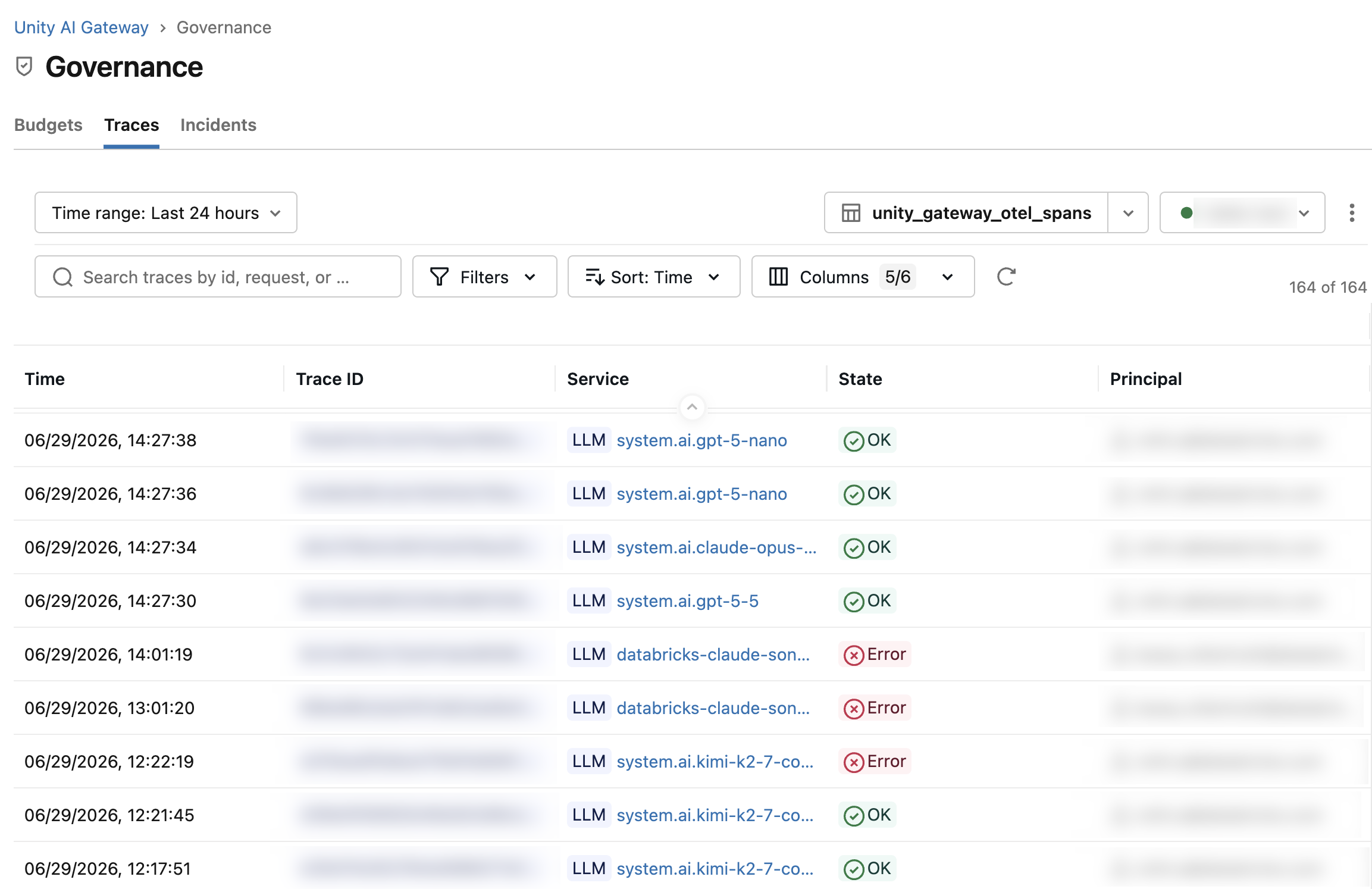
- In the workspace sidebar, click AI Gateway > Govern > Traces tab.
The Traces view provides the following controls:
- Search: Full-text search across the content in the current screen.
- Time range: Filter traces by time window (default: last 24 hours).
- Filters: Filter by Service (endpoint name), Principal (requester), Service type, State, or Execution time.
- Columns: Show or hide columns.
- Warehouse: Select the SQL warehouse used to run queries against the trace table.
Write queries with Genie Code
Genie Code is available throughout the workspace. Open Genie Code from the sidebar and ask it to write SQL queries against your trace table. Genie Code understands Unity Catalog table schemas automatically.
Example prompts:
- "Show me all rate limit errors on the customer-support-bot endpoint in the last 24 hours"
- "Which users had the longest p99 response times last week?"
- "Find all traces where the agent made more than three downstream calls"
Genie Code generates the SQL, which you can run directly in a notebook or the SQL editor.
Query with SQL or a notebook
The table is clustered by time. Include this column in your WHERE clause for best performance.
Replace <catalog>.<schema>.<table_name> with your trace table path.
-- All spans for a specific trace
SELECT * FROM <catalog>.<schema>.<table_name>
WHERE trace_id = 'afdd29f3a069482f8b102380ba0fb3c8'
ORDER BY start_time_unix_nano;

-- All errors on a specific endpoint in the last 24 hours
SELECT trace_id, name, status, attributes
FROM <catalog>.<schema>.<table_name>
WHERE service_name = '<catalog>.<schema>.<model>'
  AND status.code = 'STATUS_CODE_ERROR'
  AND time >= current_timestamp() - INTERVAL 1 DAY;

-- Root spans only (one row per request), with requester and HTTP status
SELECT trace_id, name,
  attributes:`enduser.id`::string AS requester
  attributes:`http.response.status_code`::int AS status_code,
  status.code
FROM <catalog>.<schema>.<table_name>
WHERE parent_span_id IS NULL
  AND service_name = '<catalog>.<schema>.<model>';
Send client-side traces from your application
Your applications can send client-side OpenTelemetry spans to Unity Gateway through its OTLP ingestion endpoint, from any OpenTelemetry SDK. The Claude SDK also has built-in support for tracing its API requests. Application spans land in the same unified trace table as gateway request spans (<catalog>.<schema>.<table_name>, chosen at setup), so you monitor what your application did and what the gateway served in one place.
Important
Client-side span ingestion is in Beta and is enabled per workspace. To enable it for your workspace, contact your Azure Databricks account team.
Requirements
- The unified trace table is set up for your workspace. See Enable the unified trace table.
- Client-side span ingestion is enabled for your workspace.
- A Azure Databricks token, for example a personal access token. Ingested spans are attributed to the token's principal. Identity attributes in the payload, such as
enduser.id, are ignored. - The token's principal has access to the workspace. Requests are rejected otherwise.
Send spans with an OpenTelemetry SDK
Point an OTLP exporter at https://<workspace-url>/ai-gateway/otel/v1/traces. The endpoint accepts OTLP over HTTP with binary protobuf encoding (http/protobuf) only. JSON and gRPC are not supported. Send the payload uncompressed: don't enable compression on the exporter (for example, leave OTEL_EXPORTER_OTLP_COMPRESSION unset).
The following examples send spans from any application:
Python
Install the OpenTelemetry SDK and OTLP exporter packages:
opentelemetry-sdkandopentelemetry-exporter-otlp-proto-http.Register a tracer provider with an OTLP span exporter pointed at the ingest endpoint:
import os

from opentelemetry import trace
from opentelemetry.exporter.otlp.proto.http.trace_exporter import OTLPSpanExporter
from opentelemetry.sdk.resources import Resource
from opentelemetry.sdk.trace import TracerProvider
from opentelemetry.sdk.trace.export import BatchSpanProcessor

DATABRICKS_TOKEN = os.environ.get('DATABRICKS_TOKEN')

# service.name becomes the service_name of these spans in the trace table.
provider = TracerProvider(
    resource=Resource.create({"service.name": "<your-application-name>"})
)
exporter = OTLPSpanExporter(
    endpoint="https://<workspace-url>/ai-gateway/otel/v1/traces",
    headers={"Authorization": f"Bearer {DATABRICKS_TOKEN}"},
)
provider.add_span_processor(BatchSpanProcessor(exporter))
trace.set_tracer_provider(provider)
Create spans in your application code:
tracer = trace.get_tracer(__name__)

with tracer.start_as_current_span("<span-name>"):
    # Your application code
    ...
BatchSpanProcessor exports spans asynchronously. In short-lived scripts, call provider.shutdown() (or provider.force_flush()) before the process exits so that buffered spans are sent.
TypeScript
Install the OpenTelemetry SDK and OTLP exporter packages:
npm install @opentelemetry/api @opentelemetry/sdk-trace-node @opentelemetry/exporter-trace-otlp-proto @opentelemetry/resources.Register a tracer provider with an OTLP span exporter pointed at the ingest endpoint:
import { trace } from '@opentelemetry/api';
import { OTLPTraceExporter } from '@opentelemetry/exporter-trace-otlp-proto';
import { resourceFromAttributes } from '@opentelemetry/resources';
import { BatchSpanProcessor, NodeTracerProvider } from '@opentelemetry/sdk-trace-node';

// service.name becomes the service_name of these spans in the trace table.
const provider = new NodeTracerProvider({
  resource: resourceFromAttributes({ 'service.name': '<your-application-name>' }),
  spanProcessors: [
    new BatchSpanProcessor(
      new OTLPTraceExporter({
        url: 'https://<workspace-url>/ai-gateway/otel/v1/traces',
        headers: { Authorization: `Bearer ${process.env.DATABRICKS_TOKEN}` },
      }),
    ),
  ],
});
provider.register();
Create spans in your application code:
const tracer = trace.getTracer('<your-application-name>');

tracer.startActiveSpan('<span-name>', (span) => {
  // Your application code
  span.end();
});
BatchSpanProcessor exports spans asynchronously. In short-lived scripts, call await provider.shutdown() before the process exits so that buffered spans are sent.
To configure the exporter without code, use the standard OpenTelemetry exporter environment variables. OpenTelemetry SDKs that implement the OTLP exporter specification read them, for example when you create OTLPSpanExporter() in Python without arguments. The header value is percent-encoded, so the space after Bearer is written as %20:
export OTEL_EXPORTER_OTLP_TRACES_ENDPOINT="https://<workspace-url>/ai-gateway/otel/v1/traces"
export OTEL_EXPORTER_OTLP_TRACES_PROTOCOL="http/protobuf"
export OTEL_EXPORTER_OTLP_TRACES_HEADERS="Authorization=Bearer%20<token>"
export OTEL_SERVICE_NAME="<your-application-name>"
Keep the following behavior in mind:
- Set the
service.nameresource attribute on every tracer provider. Spans without it appear in the trace table underunknown_external_service. - Spans must have a 16-byte trace ID, 8-byte span and parent span IDs, and a start time. Spans that fail validation are rejected and counted in the response's
partial_successfield.
Correlate client-side and gateway traces
When your application propagates W3C trace context (the traceparent header) on its requests to Unity Gateway, the gateway's request spans join the propagated trace context, so they can appear in the same trace as your application's spans. With a generic OpenTelemetry SDK, propagate the context by using OpenTelemetry instrumentation for your HTTP client or by injecting the context into the request headers. W3C TraceContext is the default propagator.
Gateway trace linking is in Beta and is enabled per workspace, separately from client-side span ingestion. To enable it for your workspace, contact your Azure Databricks account team. When trace linking is enabled, the gateway adopts the incoming trace context for Unity Catalog model services and MCP requests. The gateway doesn't forward trace context to the upstream model provider.
Response behavior and limits
- The endpoint returns an OTLP
ExportTraceServiceResponse. HTTP 200 means the batch was accepted for delivery, not that the spans are durably stored. Writes are asynchronous. - Rejected spans, for example spans with malformed IDs or spans sent before tracing is enabled for the workspace, are reported in the response's
partial_successfield. Inspectpartial_successinstead of retrying entire batches. - The endpoint returns HTTP 404 if client-side span ingestion is not enabled for the workspace, HTTP 403 if the token's principal does not have access to the workspace, and HTTP 400 if the request body is not valid OTLP protobuf, for example a JSON or compressed body.
- The endpoint accepts up to 32 MiB per request and 100 requests per second per organization. String attribute values over 3 MiB (3,145,728 bytes) are truncated. Array and map attributes are not truncated, and spans that exceed the record size limit can be dropped. See Limitations.
Trace Claude requests
Unity Gateway integrates with Claude's OpenTelemetry support to record Claude Messages API requests and Claude Managed Agents sessions as spans in the unified trace table. There are two sources of Claude spans: the Claude SDK emits client-side spans from your application, and the Claude Console exports server-side spans for Messages API requests and Managed Agents sessions. You can use either source, or both.
You can trace the following:
- Messages API requests: Each request with its model, latency, and token usage. If you enable content capture, spans also include prompts and responses.
- Claude Managed Agents sessions: Each agent turn with its model requests, tool use, and token usage, so you can follow what an agent did step by step.
For details about what each source records, see Anthropic's OpenTelemetry documentation.
Claude SDK
The SDK emits client-side spans for the API requests that your application makes. The SDK uses your application's registered tracer provider, so after you set up the tracer provider in Send spans with an OpenTelemetry SDK, no SDK-specific exporter is required. The Azure Databricks token in that setup authenticates only the span exporter. Your Anthropic requests go directly to Anthropic and use your Anthropic API key.
Python
Install or upgrade to the latest
anthropicpackage, for examplepip install --upgrade anthropic.Install the OpenTelemetry packages and register the tracer provider as described in Send spans with an OpenTelemetry SDK.
Create a Claude SDK client and send a request:
import anthropic

# Uses your Anthropic API key from the ANTHROPIC_API_KEY environment variable.
client = anthropic.Anthropic()

message = client.messages.create(
    model="claude-opus-5-5",
    max_tokens=256,
    messages=[
        {"role": "user", "content": "What is a mixture of experts model?"},
    ],
)
TypeScript
Install or upgrade to the latest
@anthropic-ai/sdkpackage, for examplenpm install @anthropic-ai/sdk@latest.Install the OpenTelemetry packages and register the tracer provider as described in Send spans with an OpenTelemetry SDK.
Create a Claude SDK client and send a request:
import Anthropic from '@anthropic-ai/sdk';

// Uses your Anthropic API key from the ANTHROPIC_API_KEY environment variable.
const client = new Anthropic();

const message = await client.messages.create({
  model: 'claude-opus-5-5',
  max_tokens: 256,
  messages: [{ role: 'user', content: 'What is a mixture of experts model?' }],
});
What the Claude SDK records
Spans follow the OpenTelemetry GenAI semantic conventions: one span per API request (for example, anthropic.messages.create), with token usage recorded in gen_ai.usage.* attributes. For streaming responses, the request span ends when the stream is fully read or closed.
The SDK supports the following additional options. The examples use the Python SDK:
- Content mode: By default, spans carry metadata only (
metadata_only). To include prompts and responses in spans, settraces.content_modetocontent(for example,Anthropic(open_telemetry={"tracer_provider": provider, "traces": {"content_mode": "content"}})). Thetracer_providerkey is only needed to send this client's spans to a different provider than the globally registered one. Prompt and response content lands in the trace table, so scope access to it with ABAC policies or PII redaction as described in Permissions and access control. Content that exceeds the SDK's per-span content limit is truncated, with older input messages truncated first. Images and documents contribute their type only, not their data. - Conversation ID: To group requests into a conversation, pass a per-request conversation ID:
client.with_options(open_telemetry={**client.open_telemetry, "conversation_id": "<conversation-id>"}).with_optionsreplaces the wholeopen_telemetrysetting, so merge in the client's existing settings to keep options such as the content mode. - Disable tracing: Pass
open_telemetry=Falseto disable tracing for one client. TheANTHROPIC_OPEN_TELEMETRYenvironment variable controls tracing for all clients, andANTHROPIC_OPEN_TELEMETRY_TRACES_CONTENT_MODEsets the content mode, for exampleANTHROPIC_OPEN_TELEMETRY_TRACES_CONTENT_MODE=content.
Claude Console
To send the Console's server-side spans to the unified trace table, add a Azure Databricks telemetry destination. Client-side spans from your application, such as SDK calls and the tools your app runs, come from Claude SDK tracing.
In the Claude Console, go to Telemetry destinations.
Add a Azure Databricks destination, then enter your workspace URL and a Azure Databricks personal access token.
The Requirements above, including token-principal attribution, also apply to Console spans.
Count tokens
If you send spans from both the Claude SDK and the Claude Console to the same trace table, each request produces two anthropic.messages.create spans with the same token counts: a SPAN_KIND_CLIENT span from the SDK and a SPAN_KIND_SERVER span from the API. To count each request a single time, sum gen_ai.usage.* attributes over one span kind only. The following query uses the SDK's client spans. If you send spans only from the Claude Console, use kind = 'SPAN_KIND_SERVER' instead.
SELECT
  sum(attributes:`gen_ai.usage.input_tokens`::bigint) AS input_tokens,
  sum(attributes:`gen_ai.usage.output_tokens`::bigint) AS output_tokens
FROM <catalog>.<schema>.<table_name>
WHERE name = 'anthropic.messages.create'
  AND kind = 'SPAN_KIND_CLIENT';
Permissions and access control
Because all Unity Gateway traffic lands in one table, you manage access in one place instead of maintaining separate permissions per endpoint.
By default, only metastore admins can query the trace table. The metastore admin who created the table is its owner. To give other users query access, the table owner must grant SELECT on the table, USE SCHEMA on the schema, and USE CATALOG on the catalog. Without a row filter, any user with these privileges can see traces for all services in the workspace, so Databricks recommends applying an ABAC row filter policy before granting access.
Scope access with ABAC policies
Databricks recommends attribute-based access control (ABAC) to give each user or team access to only the rows they should see. An ABAC row filter policy attaches a SQL function to the trace table (or its parent catalog or schema) that runs at query time. When a user runs SELECT *, they automatically get back only their rows, with no manual WHERE clause and no risk of reading another team's traces.
The following example implements a common policy: admins see all traces; endpoint owners see only their own service; everyone else sees nothing.
This example follows a convention where each service has a matching account group named <service_name>-owners. These groups are not created automatically. As part of setting up access, an admin must create each group and add the appropriate members, and must repeat this whenever a new endpoint is added. The filter function and policy do not change as groups are added.
Create the filter function. It receives a service name for each row and returns
TRUEif the current user is allowed to see it.CREATE OR REPLACE FUNCTION <catalog>.<schema>.ai_traces_filter(svc STRING) RETURNS BOOLEAN RETURN is_account_group_member('admins') OR is_account_group_member(svc || '-owners');Tag the
service_namecolumn so the policy can bind to it. ABAC policies pass columns to the filter function by governed tag.ALTER TABLE <catalog>.<schema>.<table_name> ALTER COLUMN service_name SET TAGS ('ai_trace_service' = '');Create the row filter policy on the trace table.
CREATE POLICY ai_traces_filter
ON TABLE <catalog>.<schema>.<table_name>
COMMENT 'Restrict trace visibility to service owners and admins'
ROW FILTER <catalog>.<schema>.ai_traces_filter
TO `account users`
FOR TABLES
MATCH COLUMNS has_tag('ai_trace_service') AS svc
USING COLUMNS (svc);
Create the
<service_name>-ownersaccount group for each service (if it does not already exist), add its members, and grant it the privileges required to query the table:USE CATALOGon the catalog,USE SCHEMAon the schema, andSELECTon the table.GRANT USE CATALOG ON CATALOG <catalog> TO `customer-support-bot-owners`; GRANT USE SCHEMA ON SCHEMA <catalog>.<schema> TO `customer-support-bot-owners`; GRANT SELECT ON TABLE <catalog>.<schema>.<table_name> TO `customer-support-bot-owners`;
With this policy in place, results are automatically filtered based on who runs the query:
- A member of
customer-support-bot-ownerswho runsSELECT * FROM <table>sees only rows whereservice_name = 'customer-support-bot'. - A member of the
adminsgroup sees all rows. - Any other user sees no rows.
When a new endpoint is added, repeat the last step: create the matching <service_name>-owners group and grant it SELECT. The policy and filter function do not change.
See Attribute-based access control in Unity Catalog for the full ABAC reference and Common patterns for row filtering and column masking for more row filter patterns.
Scope access with PII redaction
Another approach to opening up access is to materialize a version of the table with PII redacted. The redacted table can carry a wider SELECT grant that covers more users. The tradeoff is that traces are materialized twice: once in their unredacted form in the original table, which keeps strict access requirements, and once in their redacted form in a separate table that is open to more consumers.
For a reference solution that redacts PII from OpenTelemetry traces in Unity Catalog, see Govern and redact traces in Unity Catalog.
Schema
Each row in the unified trace table is one OpenTelemetry span. For the full column list, attribute keys, and policy evaluation event fields, see Unified trace table schema reference.
Limitations
- The maximum attribute size that is logged is 3 MiB (3,145,728 bytes). Attributes that exceed this are truncated. The span is marked with
databricks.trace.payload_truncatedand itsdropped_attributes_countis incremented. - Trace log delivery is best-effort. Most traces will arrive within seconds, however for new tables, traces may take up to an hour to arrive.
- Trace logs are not guaranteed for 401, 403, 429, or 500 errors.
- The trace table may stop receiving logs or become corrupted if you change the table schema, rename the table, or delete the table.
- Databricks does not manage the lifecycle of the trace table; without a retention policy, it grows indefinitely. To delete rows automatically after a set period, enable auto time-to-live (Auto-TTL) on the table, which runs
DELETEandVACUUMin the background. To manage retention yourself, schedule a periodicDELETEto remove expired rows, followed byVACUUMto reclaim their storage. RunningVACUUMalone only removes files that are already unreferenced; it does not delete any rows. Define a retention policy before enabling tracing in production. - By default, only metastore admins can query the trace table. A metastore admin must configure ABAC row filter policies and grant
SELECT,USE SCHEMA, andUSE CATALOGbefore endpoint creators or security teams can access their own traces.