Note
Access to this page requires authorization. You can try signing in or changing directories.
Access to this page requires authorization. You can try changing directories.
Gateway Load Balancer is a SKU of the Azure Load Balancer portfolio designed for high performance and high availability scenarios with third-party Network Virtual Appliances (NVAs). By using Gateway Load Balancer, you can easily deploy, scale, and manage NVAs. Chaining a Gateway Load Balancer to your public endpoint only requires one selection.
You can insert appliances transparently for different kinds of scenarios such as:
- Firewalls
- Advanced packet analytics
- Intrusion detection and prevention systems
- Traffic mirroring
- DDoS protection
- Custom appliances
By using Gateway Load Balancer, you can easily add or remove advanced network functionality without extra management overhead. It provides the bump-in-the-wire technology you need to ensure all traffic to and from a public endpoint is first sent to the appliance before your application. In scenarios with NVAs, it's especially important that flows are symmetrical. Gateway Load Balancer maintains flow stickiness to a specific instance in the backend pool along with flow symmetry. As a result, a consistent route to your network virtual appliance is ensured – without further manual configuration. As a result, packets traverse the same network path in both directions and appliances that need this key capability are able to function seamlessly.
The health probe listens across all ports and routes traffic to the backend instances by using the HA ports rule. Traffic sent to and from Gateway Load Balancer uses the VXLAN protocol.
Benefits
Gateway Load Balancer offers the following benefits:
Integrate virtual appliances transparently into the network path.
Easily add or remove network virtual appliances in the network path.
Scale with ease while managing costs.
Improve network virtual appliance availability.
Chain applications across tenants and subscriptions.
Configuration and supported scenarios
You can chain a Standard Public Load Balancer or a Standard IP configuration of a virtual machine to a Gateway Load Balancer. "Chaining" means the load balancer frontend or NIC IP configuration contains a reference to a Gateway Load Balancer frontend IP configuration. After you chain the Gateway Load Balancer to a consumer resource, you don't need any other configuration, such as UDRs, to ensure traffic to and from the application endpoint is sent to the Gateway Load Balancer.
Gateway Load Balancer supports both inbound and outbound traffic inspection. To insert NVAs in the path of outbound traffic by using Standard Load Balancer, you must chain the Gateway Load Balancer to the frontend IP configurations selected in the configured outbound rules.
Note
You can't configure a Gateway Load Balancer's frontend IP as the next hop in user-defined routes (UDRs). A supported consumer resource, such as a Standard Public Load Balancer or Standard NIC IP configuration, must chain or reference Gateway Load Balancer resources.
Data path diagram
When you use Gateway Load Balancer, traffic intended for the consumer application through a Standard Load Balancer is encapsulated with VXLAN headers. The Gateway Load Balancer forwards this traffic first to itself and its configured NVAs in the backend pool. The traffic then returns to the consumer resource (in this case a Standard Load Balancer) and arrives at the consumer application virtual machines with its source IP preserved. The consumer virtual network and provider virtual network can be in different subscriptions or tenants, reducing management overhead.
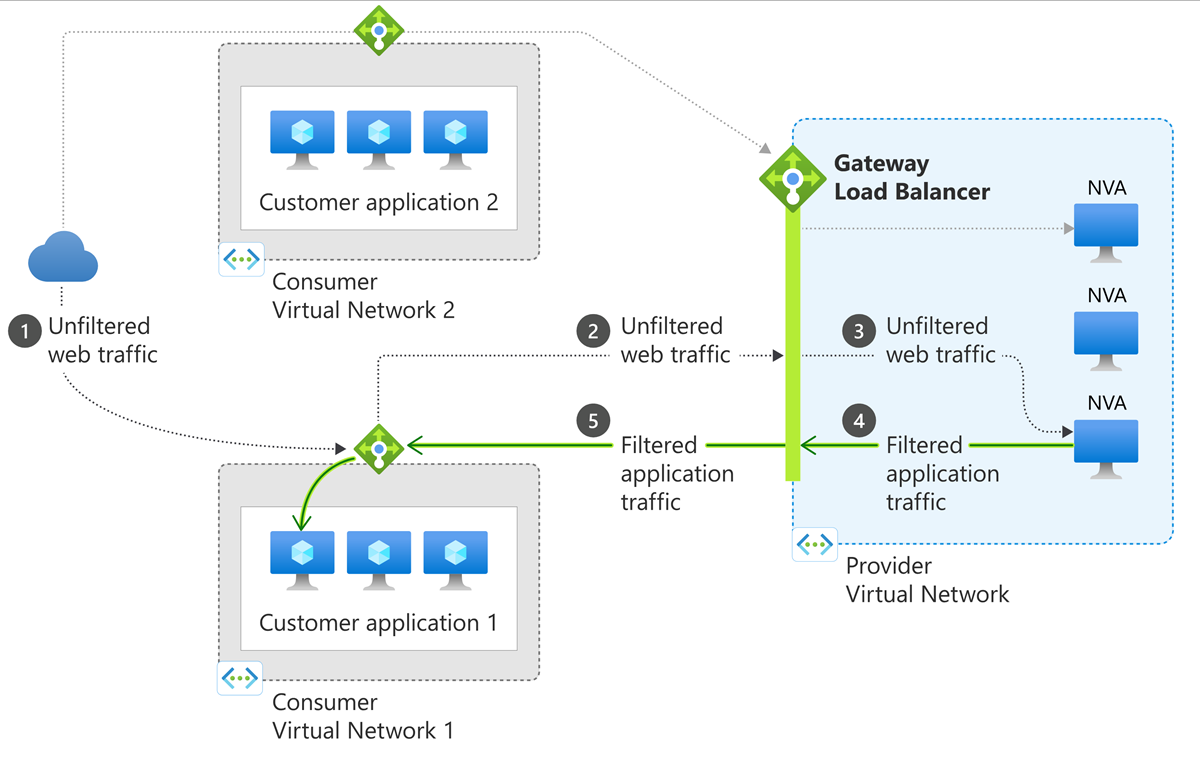
Figure: Diagram of gateway load balancer.
Components
Gateway Load Balancer consists of the following components:
Frontend IP configuration - The IP address of your Gateway Load Balancer. This IP is private only.
Load-balancing rules - A load balancer rule is used to define how incoming traffic is distributed to all the instances within the backend pool. A load-balancing rule maps a given frontend IP configuration and port to multiple backend IP addresses and ports.
Gateway Load Balancer rules can only be HA port rules.
A Gateway Load Balancer rule can be associated with up to two backend pools.
Backend pools - The group of virtual machines or instances in a Virtual Machine Scale Set that's serving the incoming request. To scale cost-effectively to meet high volumes of incoming traffic, computing guidelines generally recommend adding more instances to the backend pool. Load Balancer instantly reconfigures itself via automatic reconfiguration when you scale instances up or down. Adding or removing VMs from the backend pool reconfigures the load balancer without extra operations. The scope of the backend pool is any virtual machine in a single virtual network.
Tunnel interfaces - Gateway Load balancer backend pools have another component called the tunnel interfaces. The tunnel interface enables the appliances in the backend to ensure network flows are handled as expected. Each backend pool can have up to two tunnel interfaces. Tunnel interfaces can be either internal or external. For traffic coming to your backend pool, use the external type. For traffic going from your appliance to the application, use the internal type.
Chain - A Standard Public Load Balancer frontend or a Standard Public IP configuration on a virtual machine can reference a Gateway Load Balancer. The addition of advanced networking capabilities in a specific sequence is known as service chaining. As a result, this reference is called a chain. A Cross tenant chain involves chaining a Load Balancer frontend or Public IP configuration to a Gateway Load Balancer that is in another subscription. For cross tenant chaining, users need:
- Permission for the resource provider operation
Microsoft.Network/loadBalancers/frontendIPConfigurations/join/action. - Guest access to the subscription of the Gateway Load Balancer.
- Permission for the resource provider operation
Pricing
For pricing, see Load Balancer pricing.
Limitations
- Gateway Load Balancer doesn't work with the Global Load Balancer tier.
- Cross-tenant chaining isn't supported through the Azure portal.
Next steps
- See Create a Gateway Load Balancer using the Azure portal to create a gateway load balancer.
- Learn how to use Gateway Load Balancer for outbound connectivity scenarios.
- Learn more about Azure Load Balancer.