Note
Access to this page requires authorization. You can try signing in or changing directories.
Access to this page requires authorization. You can try changing directories.
This article describes how to run Microsoft Defender Antivirus in a sandbox environment for enhanced protection against tampering.
Microsoft Defender Antivirus can run within a sandbox on Windows. This feature has been available since October 26, 2018. It was the first full antivirus solution to offer this option. It continues to lead the industry in raising security standards.
Prerequisites
Before you enable sandboxing, make sure the following requirements are met:
- Microsoft Defender Antivirus (active mode)
- Windows 11 or Windows 10 version 1703 or later (client devices)
- Windows Server 2016 or later
- Azure Stack HCI OS, version 23H2 or later
Why run Microsoft Defender Antivirus in a sandbox?
Security researchers, both inside and outside of Microsoft, have found ways that an attacker can exploit vulnerabilities in Microsoft Defender Antivirus's content parsers. These vulnerabilities could allow arbitrary code execution. The antivirus runs with high privileges (Local System, NT Authority\SYSTEM) to inspect the whole system for malicious content. This makes it a target for attacks.
Escaping a sandbox to gain higher privileges is much harder on Windows 10 and newer versions. Running Microsoft Defender Antivirus in a sandbox means that even if a compromise occurs, harmful actions stay in the isolated environment. The rest of the system remains safe. This approach is part of Microsoft's ongoing effort to stay ahead of attackers.
How sandboxing works in Microsoft Defender Antivirus
Modern anti-malware products inspect many inputs. Examples include files on disk, data streams in memory, and behavioral events in real time. Many of these tasks require full access to system resources. The first major sandboxing effort split Microsoft Defender Antivirus into two layers: components that must run with full privileges, and components that can be sandboxed. The sandboxed components handle the highest risk tasks, like scanning untrusted input and expanding containers. At the same time, the design minimizes interactions between the two layers to avoid a large performance cost.
Resource usage is another challenge. Both the privileged process and the sandbox process need access to Security Intelligence updates, detection data, and remediation metadata. To avoid duplication and keep strong security guarantees, the design avoids unsafe state sharing and costly data passing between processes. Instead, most protection data is stored in memory-mapped files that are read-only at runtime. This read-only, memory-mapped model lets multiple processes access the same data without extra overhead.
Enable sandboxing for Microsoft Defender Antivirus
To enable sandboxing, set a machine-wide environment variable:
Run the following command as an admin in PowerShell or CMD:
setx /M MP_FORCE_USE_SANDBOX 1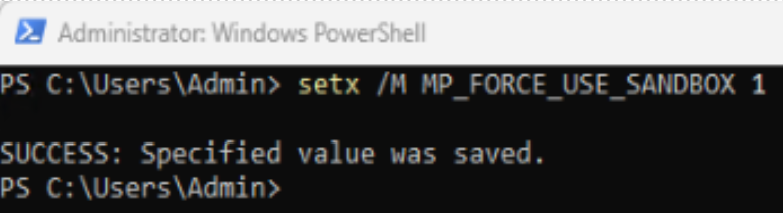
Restart the device. After the restart, a new process named
MsMpEngCP.exeappears alongside MsMpEng.exe in these folders:Path Process Description C:\ProgramData\Microsoft\Windows Defender\Scans MsMpEngCP.exe Anti-malware Service Executable Content Process C:\Users\All Users\Microsoft\Windows Defender\Scans MsMpEngCP.exe Anti-malware Service Executable Content Process Note
CP in
MsMpEngCP.exeis the content process.
Disable sandboxing
To disable Microsoft Defender Antivirus sandboxing system-wide (for example, during troubleshooting), set the MP_FORCE_USE_SANDBOX environment variable to 0. Run the following command as an admin in PowerShell or CMD:
setx /M MP_FORCE_USE_SANDBOX 0
FAQ
The following questions address common concerns about Microsoft Defender Antivirus sandboxing.
What happens when sandbox is disabled?
Microsoft Defender Antivirus performs an in-proc fallback that hosts content scanning in the privileged/parent process to provide protection.
How is the content process strengthened?
The content processes, which run with low privileges, also aggressively use all available mitigation policies to reduce the surface attack. They enable and prevent runtime changes for modern exploit mitigation techniques such as Data Execution Prevention (DEP), Address space layout randomization (ASLR), and Control Flow Guard (CFG). They also disable Win32K system calls and all extensibility points, as well as enforce that only signed and trusted code is loaded.
Performance of MDAV with sandbox enabled
Performance is a common concern with sandboxing. Anti-malware products sit in many critical paths, such as inspecting file operations and matching runtime events. To keep performance stable, the design minimizes interactions between the sandbox and the privileged process. These interactions only happen at key moments when their cost is low, such as during I/O operations.
Microsoft Defender Antivirus makes an orchestrated effort to avoid unnecessary I/O, for example, minimizing the amount of data read for every inspected file is paramount in maintaining good performance, especially on older hardware (rotational disk, remote resources). Thus, it was crucial to maintain a model where the sandbox can request data for inspection as needed, instead of passing the entire content.
Reliability of MDAV with sandbox enabled
Note
Passing handles to the sandbox (to avoid the cost of passing the actual content) isn't an option because there are many scenarios, such as real-time inspection, AMSI, etc., where there's no 'sharable' handle that can be used by the sandbox without granting significant privileges, which decreases the security.
Another key concern is the inter-process communication (IPC) mechanism. The IPC design must avoid deadlocks and priority inversions. It must not create bottlenecks by throttling the caller or limiting concurrent requests. The sandbox process must not trigger scans on its own. All inspections must occur without starting more scans. Low-privilege AppContainers help enforce these rules. Their capabilities-based model provides fine-grained control over what the sandbox process can do.
Remediation of MDAV with sandbox enabled
Lastly, a significant challenge from the security perspective is related to content remediation or disinfection. Remediation attempts to restore a binary to its original preinfection content. Given the sensitive nature of this operation, remediation must run with high privileges to mitigate cases where the content process (sandbox) could be compromised and used to modify the detected binary in unexpected ways.
What to do while troubleshooting the MsMpEng.CP.exe process, if it starts and stops after a few minutes?
Collect the support diagnostic logs and any relevant dump or crash information. Check for Windows Error Reporting (WER) events around the time the process stops, and include those details as well.