Note
Access to this page requires authorization. You can try signing in or changing directories.
Access to this page requires authorization. You can try changing directories.
Note
Community interest groups have now moved from Yammer to Microsoft Viva Engage. To join a Viva Engage community and take part in the latest discussions, fill out the Request access to Finance and Operations Viva Engage Community form and choose the community you want to join.
When you post accounting entries to the general ledger, use the Description field to store internal notes or documentation. If the information is incorrect, it can cause confusion and make period-end closing more difficult. This feature helps the accounting manager or accounting supervisor fix mistakes by editing the Description field on posted vouchers in the general ledger.
Changes to posted vouchers in the general ledger are limited to data that's internal in nature. This feature will never allow you to edit data such as amounts, posting dates, ledger accounts, and the transaction currency. Changes to that data affect the external reporting of financial statements and must be done only through new general ledger vouchers.
Edit internal data on general ledger vouchers
Before internal data on general ledger vouchers can be edited, the user who edits posted vouchers must be assigned to the Accounting manager or Accounting supervisor role. You can add permissions to other roles too, by customizing the security roles.
You can edit data only from the Voucher transactions page.
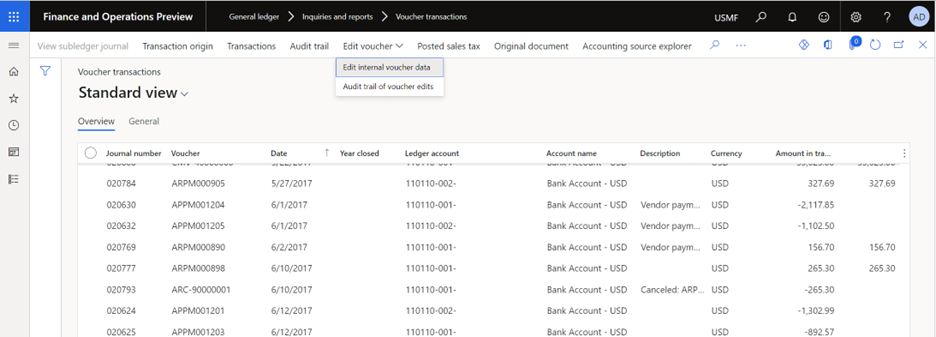
Go to General ledger > Inquiries and reports > Voucher transactions.
In the SysQuery dialog box, enter search criteria to select vouchers.
Select the lines for the vouchers that you want to edit, and then select Edit voucher > Edit internal voucher data.
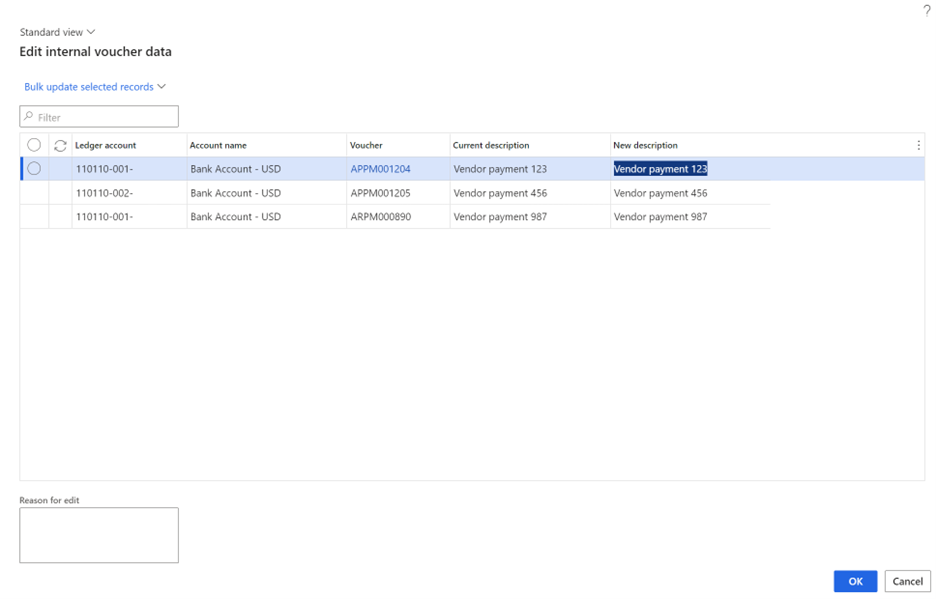
On the Edit internal voucher data page, you see the following data for each line that you selected:
Ledger account
Account name
Voucher
Current description
New description
Note
You can edit only the New description field. By default, the value matches the value of the Current description field, so that you can quickly fix minor mistakes in the description.
Modify the New description field on each row, or delete the description from each row.
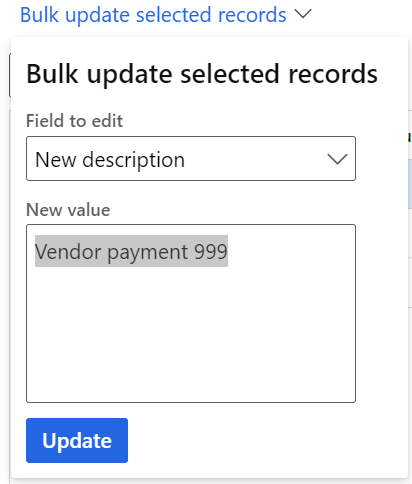
Alternatively, if you need to update multiple rows with the same value, follow these steps:
- Select the rows to edit, and then select Bulk update selected records.
- In the Field to edit field, select the field to edit. Currently, the lookup includes only the New description field.
- In the New value field, enter a new description.
- Select Update. All the selected records are updated with the new value.
In the Reason for edit field, enter a note to explain why you made the edit. This note appears on the Audit trail of voucher edits page.
You can make multiple edits to the same voucher, and each edit is tracked.
Audit trail of voucher edits
The system maintains an audit trail to track changes made through this feature. You can access the audit trail of voucher edits in two ways:
Go to General ledger > Inquiries and reports > Voucher transactions. On Voucher inquiries, select Edit voucher > Audit trail of voucher edits. The audit trail shows only the selected voucher record.
By opening the inquiry in this way, you can focus on all edits that were made to a single voucher record.
Go to General ledger > Periodic tasks > Audit trail of voucher edits. In the dialog box, enter criteria to specify the vouchers that you want to view the audit trail of edits for. To view the audit trail for all vouchers, leave the criteria blank, and select OK.
By opening the inquiry in this way, you can filter for edits that were made on a specific date or by a specific user.
The Audit trail of edits page shows the following information:
- Created date and time – The date and time of the edit.
- Reason for edit – The reason that the user entered for the edit.
- Created by – The user who made the edit.
To view the details of each audit trail, drill down on the Created date and time value. The View edited voucher properties page shows the same information as the original edit page, including the previous description and the updated description.