Note
Access to this page requires authorization. You can try signing in or changing directories.
Access to this page requires authorization. You can try changing directories.
Note
Dynamics 365 Guides and Remote Assist will no longer be available after December 31, 2026. Learn more at Dynamics 365 Guides and Remote Assist reaching end of support.
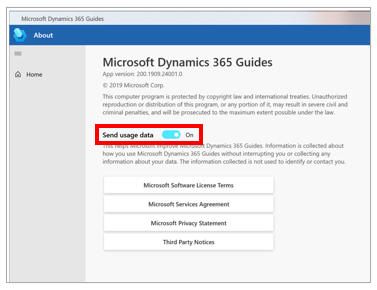
For privacy reasons, you can turn off the ability to send telemetry data to Microsoft when you use the Microsoft Dynamics 365 Guides PC app. Microsoft uses this data to improve the product. By opting out, you prevent Microsoft from collecting any data about your activity.
To turn off telemetry data for the PC app, follow these steps.
On the File menu, select About.
In the About dialog box, set the Send usage data option to Off.
Note
This option applies only to the device where it's set. If you use Dynamics 365 Guides on more than one device, you must change the setting on the other devices too. For information about how to turn off this setting for HoloLens, see Author in the HoloLens application. Database admins can also prevent usage data from appearing on Microsoft Power BI dashboards for Guides Analytics. For more information, see Opting out of storing Dynamics 365 Guides events data in Common Data Service.