Note
Access to this page requires authorization. You can try signing in or changing directories.
Access to this page requires authorization. You can try changing directories.
The Sales Opportunity Agent in Dynamics 365 Sales helps you focus on the most important opportunities. By identifying high-value and at-risk opportunities, the agent helps you prioritize your efforts. With critical insights and recommendations, you can quickly ramp up on opportunities, engage the right stakeholders, and mitigate risks effectively.
Prerequisites
You need the following prerequisites:
Your admin has configured the Sales Opportunity Agent for your organization.
You're part of the sales team that works on the opportunity segment that the agent is configured for.
You have the necessary permissions to view and work on the opportunities researched by the agent.
Your mailbox is configured to allow tracking of email messages. This setting is required for the agent to gather insights from your emails and meetings. See the personalization setting explained in Configure server-side synchronization.
Your admin has configured the Sales Opportunity Agent for your organization.
View opportunities researched by the Sales Opportunity Agent
In the Sales Hub app, select Opportunities.
From the views drop-down, select My top opportunities from AI agent.
The view lists all the opportunities that the agent researched and includes the importance and risk for each opportunity. The list includes only opportunities with high and medium importance.Note
The agent uses the estimated revenue, estimated close date, predictive score, and other factors to calculate the importance and risk of the opportunities.
Open an opportunity.
After a few seconds, you see a Summary section at the top of the page, displaying a quick summary of the research outcome and actionable recommendation, if any.
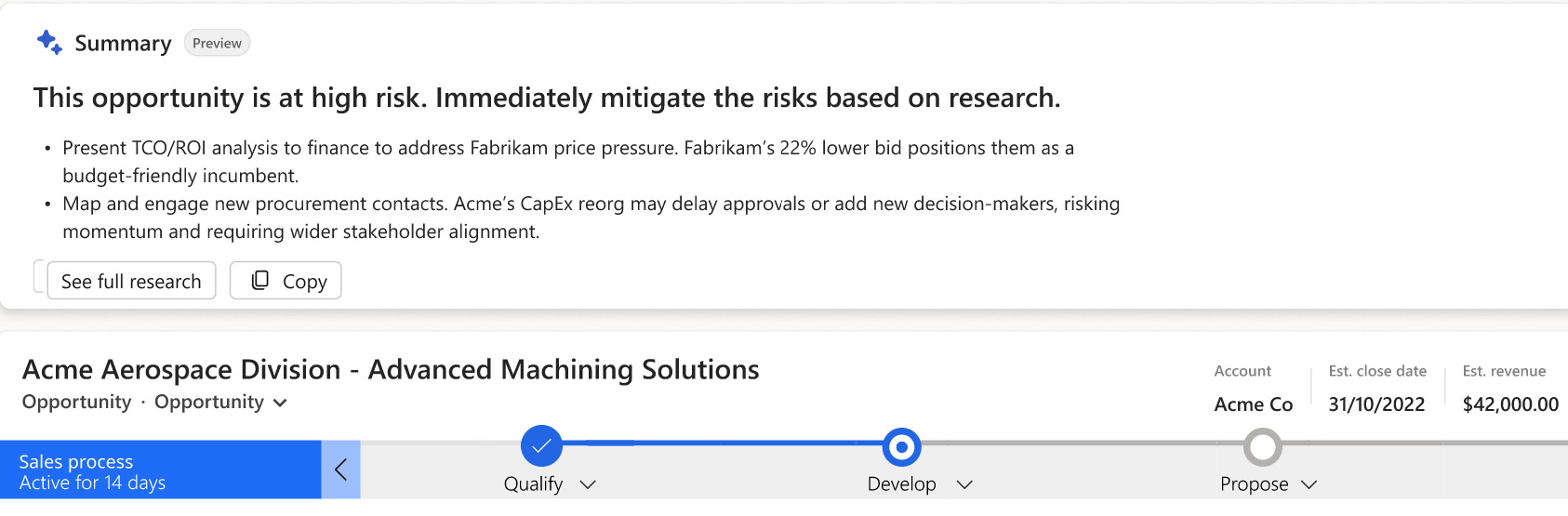
Select See full research.
The Opportunity research page opens with the complete research insights and recommendations. Learn more about the insights in the section Opportunity research page.
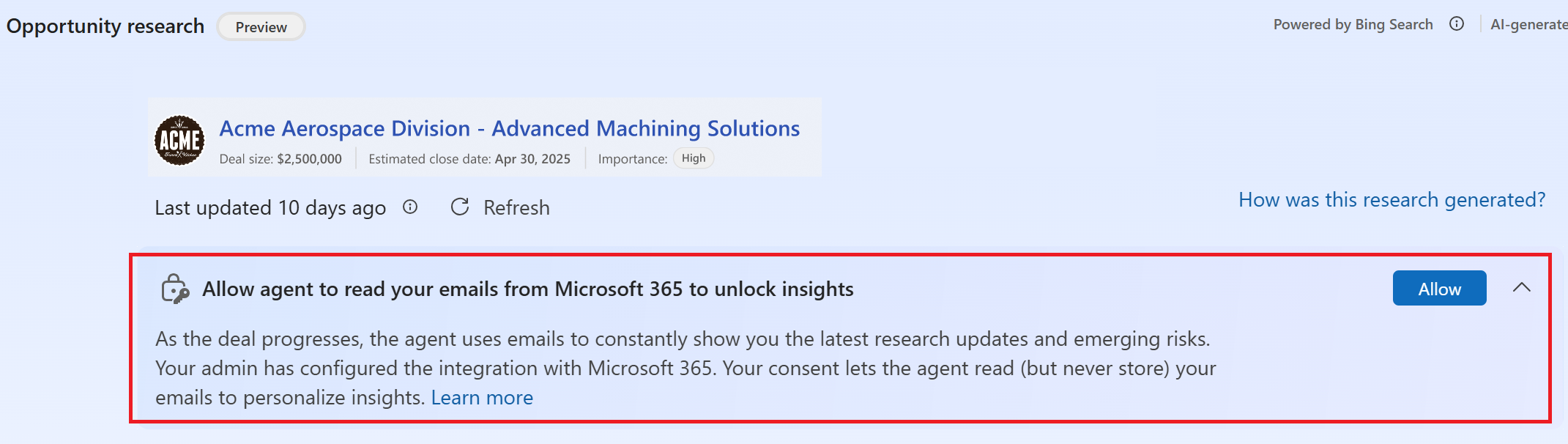
If you see a banner prompting you to provide consent for Microsoft 365 Services, read the section Provide consent for Microsoft 365 Services.
Note
The research insights refresh based on the refresh frequency configured by your admin and when specific fields in the opportunity record are updated. Learn more in How often does the Sales Opportunity Agent refresh research data?.
Provide consent for Microsoft 365 Services
If your admin enables Microsoft 365 Services for the agent, a banner prompts you to grant permission for the agent to access your emails in Microsoft 365. The agent uses your emails to gather insights only for the opportunities you own.
If your admin configures the agent to use server-side synchronization instead, you won't see this banner. In that case, the agent reads only the emails and meetings that are already synced to Dynamics 365 Sales.
Consider the following information:
- The agent reads your emails directly from Microsoft 365 without storing them.
- After you grant consent, the agent analyzes emails received in the last 30 days to gather opportunity insights, provided the requirements for generating insights are met. This consent can't be revoked.
- The agent processes emails every six hours to keep research insights current.
- The agent reads emails of the opportunity owner to generate insights for an opportunity. However, the insights are visible to all users who can access the opportunity.
Requirements for generating insights based on your emails
For generating insights based on your emails, the following conditions must be met:
- The opportunity must have at least one email received from an external contact.
- The sender's email address must map to a contact who is associated with the opportunity (for example, as the primary contact, a stakeholder, or the primary contact of the parent account).
- There can be a delay in Outlook-to-Graph synchronization. Learn more about expected latency.
- Email insight generation runs as a background process, so enrichment suggestions might take some time to appear.
Opportunity research page
Note
If the research insights appear in a language different from your preferred language in Dynamics 365 Sales, it means the agent is configured to use another language. For details, see What happens when the agent's language is different from user's preferred language?
The Opportunity research page includes the following sections:
Opportunity summary:

The opportunity research page provides a snapshot of the opportunity's current state. It highlights key deal information, including opportunity value, estimated close date, and AI-generated assessments for deal importance and risk. Use this information to quickly understand the significance of the opportunity and prioritize your efforts accordingly. The agent evaluates signals from CRM data, communications, and external research to help identify high-value opportunities and potential risks.
Deal importance indicator:

The agent evaluates how critical the opportunity is by analyzing factors like account win history, Fortune 500 status, deal size, and so on. It looks at CRM data such as estimated revenue and public info about the account (whether it's a Fortune 500 or key industry player) to label the deal High, Medium, or Low importance. Your administrator can configure the importance criteria and add custom criteria specific to your business. Learn more in Configure the importance criteria.
How this insight helps you: Instantly know why the deal matters. You can quickly see which deals are high-value or strategically important and prioritize those. This information lets you focus your time on the most impactful opportunities, ensuring critical deals get the attention they need.
Updates since last research:
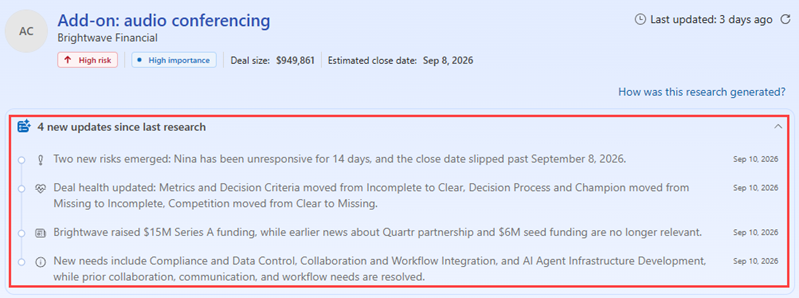
Updates since last research highlight significant changes detected after the previous research cycle. These updates help you stay informed about developments that might affect deal progression without reviewing all recent activities manually. Updates can include:
- Changes in opportunity health
- Newly detected risks
- Changes in stakeholder engagement
- Account or company developments
- New business or market signals
Use these updates to quickly understand what changed and determine whether follow-up actions are required. This delta-first view surfaces material changes before the detailed analysis.
Opportunity overview:
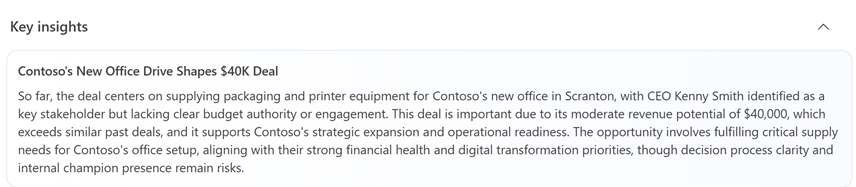
The opportunity overview provides an AI-generated summary of the deal by combining information from Dynamics 365 Sales, customer interactions, and external research. The summary highlights the customer's goals, business context, opportunity status, positive signals, and potential challenges.
Use this overview to quickly ramp up on an opportunity, prepare for customer conversations, and understand the factors influencing deal progression. The agent is designed to provide a comprehensive deal view without requiring you to gather information from multiple systems. Learn more in Configure the risk criteria.How this insight helps you: You get early warnings about what could derail the deal and advice on how to counter each risk. For example, if no decision-maker is engaged, it might recommend "loop in an executive sponsor now." Acting on these tips helps you course-correct in real time.
Recommended actions:
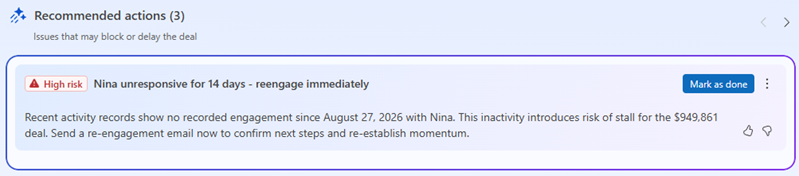
Recommended actions identify the top three important actions you can take to advance the opportunity or mitigate a risk. The agent analyzes deal signals, communication patterns, opportunity activity, and customer context to determine which actions require immediate attention. Each recommendation includes:
- A description of the identified issue or opportunity
- Supporting rationale
- A suggested action to address the situation
Use recommended actions to focus on the activities that are most likely to improve deal outcomes. These recommendations are clear, execution-oriented, and directly tied to deal blockers and risks. To view the Recommended Actions section within the opportunity record, the Recommended Actions Agent must be enabled in your organization.
Additional actions:
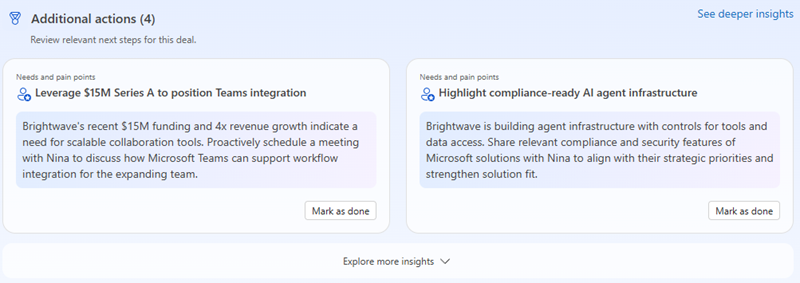
Additional actions provide other recommended next steps that can help strengthen the opportunity. These recommendations complement the primary action and focus on areas such as stakeholder engagement, customer priorities, competitive positioning, or solution alignment. Use these actions to:
- Build broader stakeholder relationships
- Address customer pain points
- Improve solution positioning
- Maintain opportunity momentum
These recommendations help you turn opportunity insights into concrete actions that support deal progression.
Deeper insights:
Deeper insights provide detailed research organized into specific categories. These insights help you understand the customer, evaluate opportunity health, and develop a more effective engagement strategy.
Use deeper insights to validate assumptions, prepare for meetings, and uncover factors that might influence the outcome of the deal.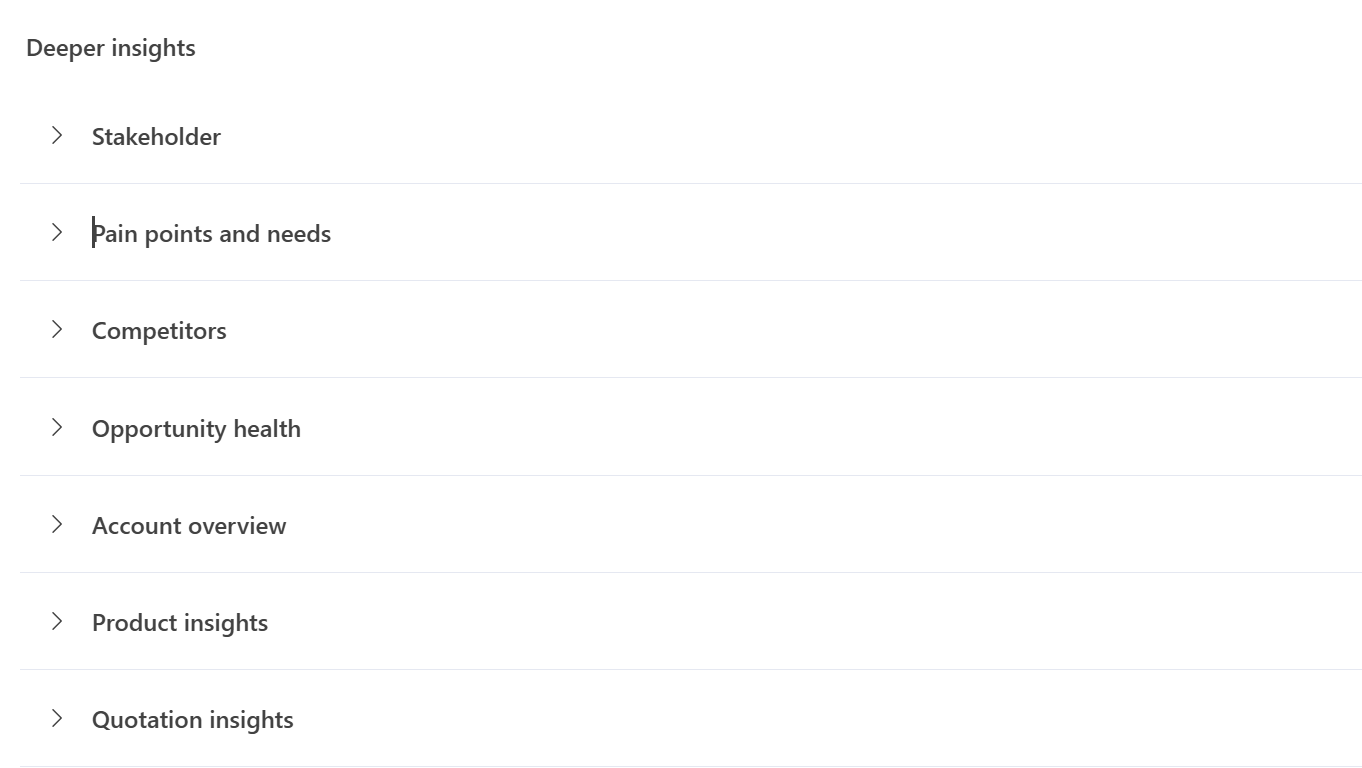
Stakeholders:
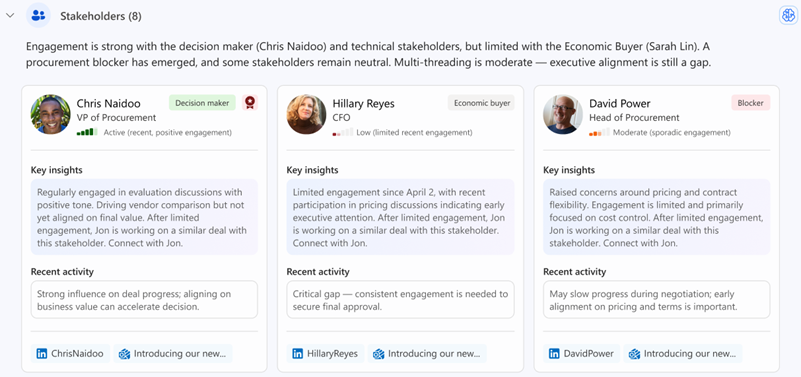
The Stakeholders insight identifies individuals involved in the buying process and summarizes their influence, engagement, and relationship to the opportunity. Use stakeholder insights to:
- Identify decision-makers and influencers
- Discover engagement gaps
- Expand contact coverage across the buying group
- Build stronger relationships with key stakeholders
The agent combines CRM information, communications, and research signals to help sellers engage the right people at the right time.
How this insight helps you: Know your buyer group. You instantly see who the key players are and their roles, without manual research. For example, you might learn that Jane Doe – CFO is the final approver and John Smith, the Project Lead is the day-to-day contact. This helps you focus on building the right relationships with the right people and tailor your approach to each role. It saves you time piecing together org charts and ensures no important stakeholder is overlooked.Competitors:
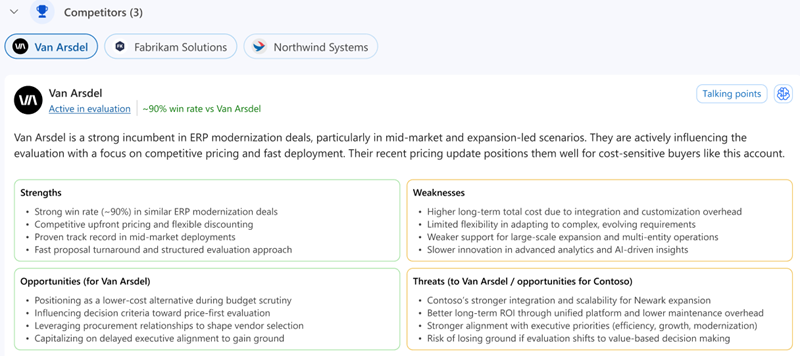
The Competitors insight identifies competing vendors or solutions associated with the opportunity and provides context to help you position your offering more effectively. Use competitor insights to:
- Understand competitive threats
- Refine differentiation strategies
- Anticipate customer objections
- Highlight unique business value
Competitor intelligence is generated from research and opportunity context to help sellers build more effective sales strategies.
How this insight helps you: Stay ahead of the competition. Gives you immediate insight into who you're up against so you can strategize accordingly. You know if the customer is also talking to, say, Competitor X, and you might see a note like "Competitor X is known for lower price, but lacks feature Y that we offer." This information lets you proactively address the competition in your sales pitch, emphasizing your strengths. It saves you time on competitive research and helps you avoid being blindsided by a rival in late stages.Account overview:
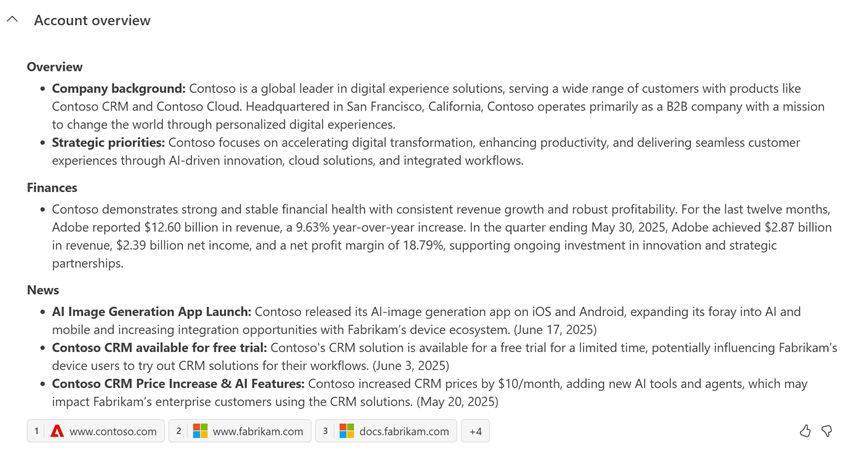
The Account overview summarizes important information about the customer organization, including business priorities, company developments, and relevant organizational context. Use account insights to:
- Understand the customer's business goals
- Align conversations with strategic priorities
- Identify opportunities for business value discussions
- Prepare for executive-level engagements
The agent incorporates public company information and organizational context to provide a more complete understanding of the customer.
How this insight helps you: Know the customer's context. In a snapshot, you learn important background on the customer's business – for example, "HQ in Seattle, 5,000 employees, recently announced a new product line" or "Major initiative: digital transformation of supply chain in 2025." This information helps you tailor your sales approach to align with the customer's reality. You can validate that your deal's value proposition fits the customer's current needs and reference recent developments in your conversation, showing that you're informed and invested in their success.Opportunity health:
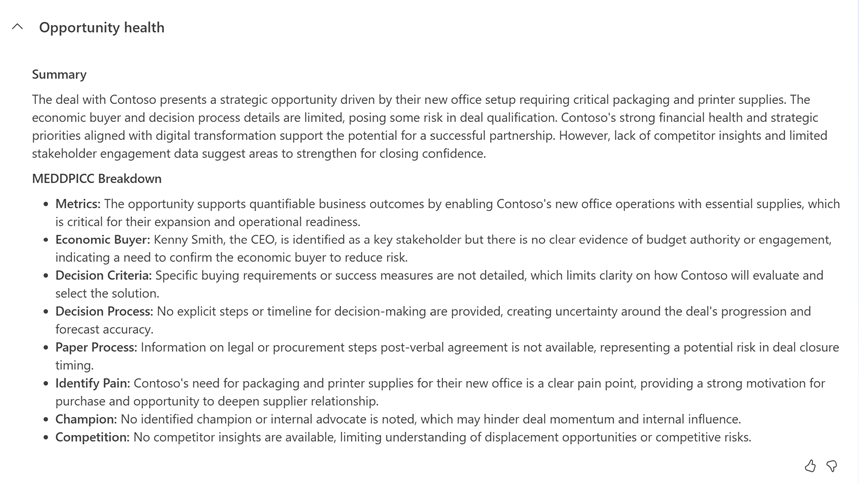
Opportunity health evaluates signals that indicate the overall condition and momentum of the deal. The agent analyzes engagement patterns, activity trends, stakeholder interactions, timeline changes, and other factors to assess opportunity progress. Use opportunity health insights to:
- Monitor deal momentum
- Identify risks early
- Understand factors affecting progress
- Prioritize mitigation activities
The agent continuously evaluates opportunity signals and surfaces risks that might delay or prevent a successful close.
How this insight helps you: Get a snapshot of the deal viability. You get an expert-like assessment of how ready this deal is to close, without manually analyzing every MEDDPICC element yourself. The overview calls out strengths (for example, "strong champion in place") and gaps (such as "no identified economic buyer"), giving you a quick sense of whether the deal is on track. This helps you prioritize actions.Pain points and needs:
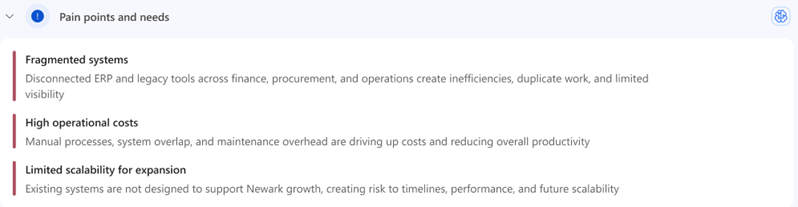
Pain points and needs summarize the business challenges, goals, and requirements identified through customer interactions and research. Use these insights to:
- Align your solution with customer priorities
- Tailor conversations and demonstrations
- Build more relevant value propositions
- Address customer challenges more effectively
Understanding customer needs helps sellers position solutions in a way that resonates with business objectives and desired outcomes.
How this insight helps you: Know what the customer cares about. Clearly highlights why the customer is interested in this deal – for instance, it might show "Pain Point: High maintenance costs with current system; Need: a more efficient, automated solution." With this insight, you can directly address these issues in your discussions and proposals. It helps you ask the right questions rather than starting from scratch or asking obvious questions.Product insights:
Product insights connect customer requirements with relevant solutions, capabilities, and value propositions. These insights help sellers understand how their offerings address the customer's needs and business goals. Use product insights to:
- Strengthen solution positioning
- Demonstrate business value
- Align capabilities with customer requirements
- Support competitive differentiation
The agent uses configured company information, value propositions, and opportunity context to generate relevant product guidance.
How this insight helps you: Be more product savvy. Equips you with quick facts about what you're selling in this deal. For example, the insight might remind you “Product A is a new module for the customer, offering advanced analytics,” or “This product was mentioned as a top priority in the customer’s RFP.” This ensures you can confidently speak about the product’s value and address any product-specific questions. It saves you from having to dig through product manuals or recall feature lists, so you can focus on aligning the product’s benefits to the customer’s requirements.
Opportunity research insights examples
The agent refreshes the research insights based on the refresh frequency your admin configures. The insights you see vary based on the recent activities and communications related to the opportunity. Here are some examples of insights you might see:
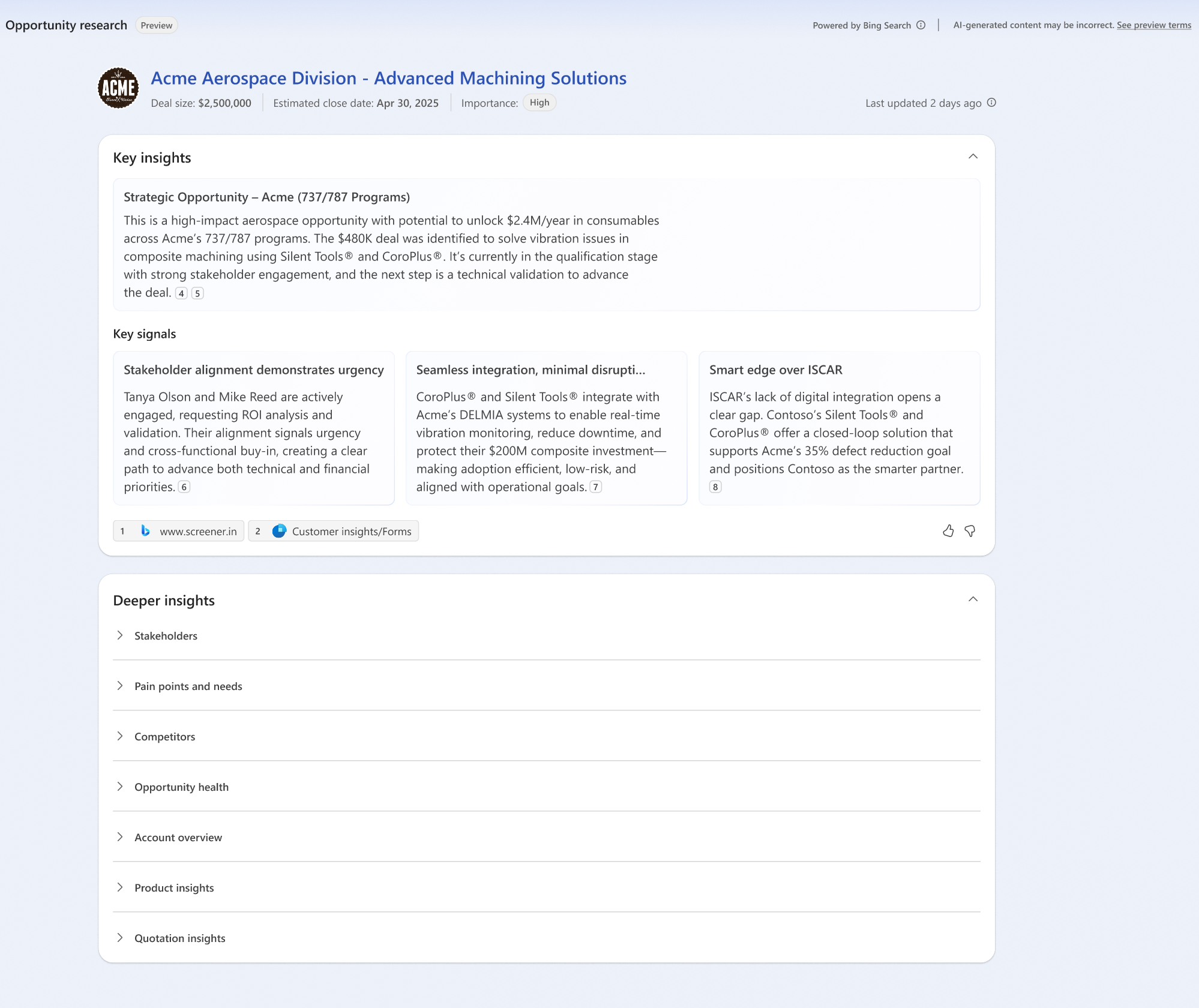
- Day 1: You have a strategic opportunity with a high estimated revenue, a close date in the next quarter, and no immediate risks. The Opportunity research page might look something like this:
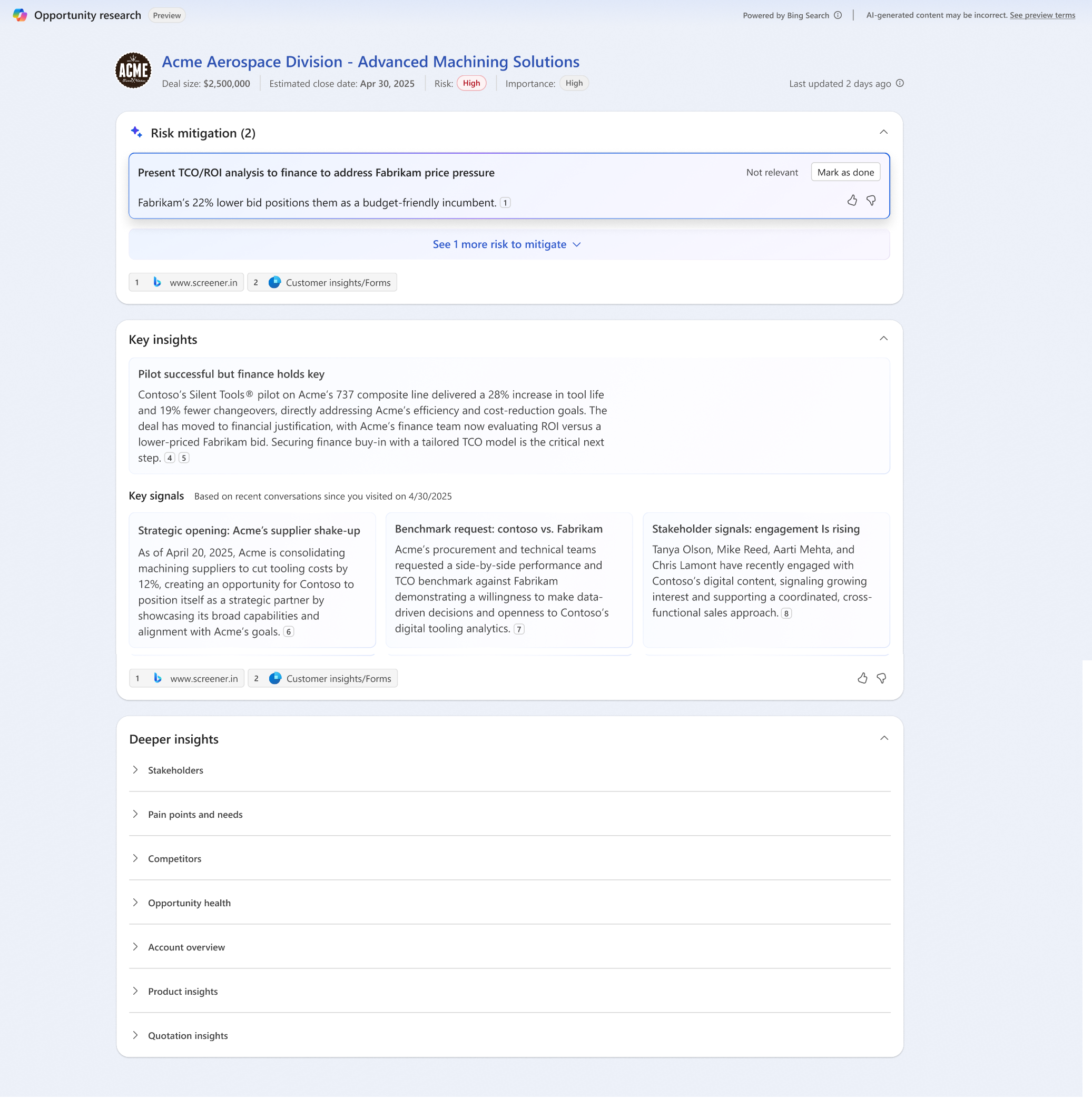
- Day N: As the opportunity progresses, the agent continues to gather insights and discover risks. For example, if the agent identifies a risk related to a competitor's proposal, it might look like this: