Note
Access to this page requires authorization. You can try signing in or changing directories.
Access to this page requires authorization. You can try changing directories.
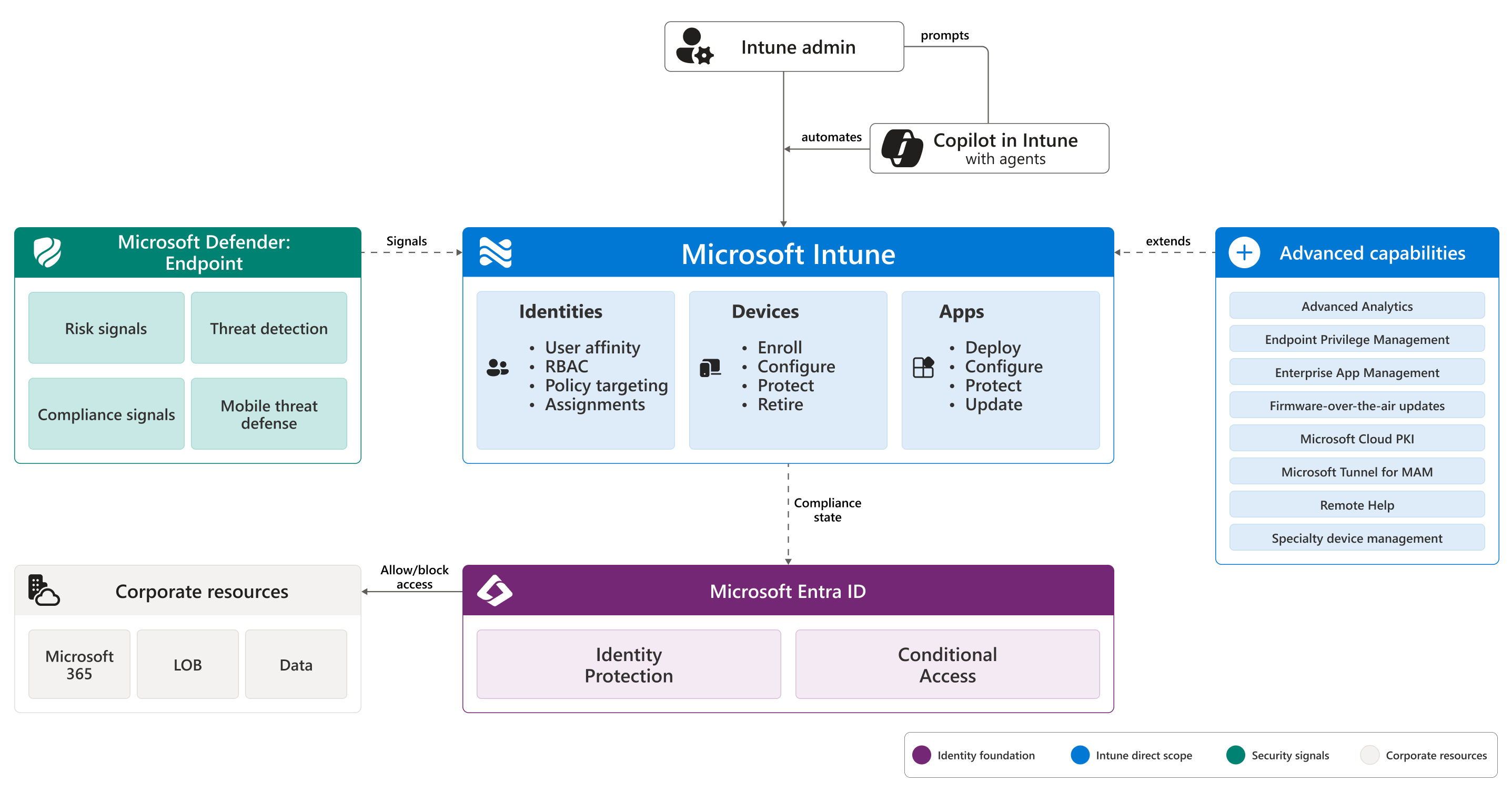
Microsoft Intune is a cloud-based endpoint management service that secures and manages your organization's devices and apps. Use Intune to enroll, configure, secure, and update devices, deploy and protect apps, and control which users and devices can access organization resources.
Supported platforms include Android, iOS/iPadOS, Linux, macOS, tvOS, visionOS, and Windows. The service runs entirely in the cloud, with no on-premises infrastructure required, and supports the Zero Trust security model.
What Intune does
Intune covers the full lifecycle of a managed device and the apps that run on it: enrolling devices, configuring settings, securing endpoints, deploying and protecting apps, and keeping everything up to date. You manage all of it from the Microsoft Intune admin center, a web-based console. Every admin center action is backed by a Microsoft Graph API call, so you can automate the same operations through a public programming interface.
Intune is built around three pillars: the identities that sign in, the devices they sign in from, and the apps they use to get work done. Identity runs on Microsoft Entra ID. Device and app posture flow back to Microsoft Entra Conditional Access, which gates access to corporate resources based on real, up-to-date signals.
For a deeper walkthrough of how the pillars fit together, see Microsoft Intune core concepts. For a guided tour of the admin center, see Walkthrough: Microsoft Intune admin center.
How Intune is used: MDM, MAM, or both
Intune supports two management modes that you can use independently or together.
- Mobile device management (MDM): Devices are enrolled, either by a user through the Company Portal or automatically through Windows Autopilot, Apple Automated Device Enrollment, or Android Enterprise. Intune then manages the whole device, including settings, security, and apps. If a device is lost or stolen, you can wipe it.
- Mobile application management (MAM): Intune manages only the work apps and the data inside them, not the rest of the device. MAM is typical for personal devices in bring-your-own-device (BYOD) scenarios, but it also runs alongside MDM on corporate-owned devices. The user keeps control of personal apps and content, while you protect the data inside Outlook, Microsoft Teams, and other managed apps. When the user leaves, you can selectively wipe organization data without touching personal content.
You can combine the two. For example, an enrolled corporate phone (MDM) can also have app protection policies (MAM) on apps that handle especially sensitive data.
For details, see Device enrollment in Microsoft Intune and App protection policies overview.
How Intune works with Microsoft Entra
Intune doesn't store user identities or perform authentication. It relies on Microsoft Entra ID for three things:
- Authentication: Users sign in to managed devices using Entra credentials, with single sign-on, multifactor authentication, or passwordless options.
- Users and groups: Entra security groups are the foundation for assigning policies, profiles, and apps in Intune. You target a group of users, devices, or both, and Intune applies the configuration on check-in.
- Entra users and groups are also used to assign Intune licenses. Each managed user or device needs an Intune license, but administrators can manage Intune without one.
- Conditional Access: Intune sends device compliance state to Entra, and Conditional Access combines it with the user, app, location, and Defender risk signals to allow or block access to corporate resources.
This approach closes the Zero Trust loop: access decisions are based on real, up-to-date device posture, not on whether the device is on the corporate network.
For the end-to-end access flow and how the pieces fit together, see Microsoft Intune core concepts. For details about Conditional Access, see Use Conditional Access with Microsoft Intune.
Advanced capabilities
Beyond the core service, Intune offers advanced capabilities that add depth across endpoint security, app management, certificates, remote support, analytics, device updates, secure remote access, and specialty-device management. You can access these capabilities through Microsoft 365 plans, Microsoft Intune Suite, or as standalone subscriptions.
For details, see Microsoft Intune advanced capabilities.
Copilot in Intune
Copilot in Intune is an AI assistant built into the admin center, powered by Microsoft Security Copilot. Copilot can:
- Summarize what an existing policy does and flag conflicts.
- Explain what a setting controls and recommend values.
- Surface device details and help triage problems.
- Run specialized AI agents that triage Multi Admin Approval requests, generate policy from baselines, and prioritize vulnerability remediation.
For details, see Microsoft Copilot in Intune.
Try Intune
- Sign up for a free 30-day trial to evaluate Intune in your environment.
- Compare plans and pricing in Microsoft Intune licensing.
- After your trial, see Sign up or sign in to Intune to set up your organization's subscription.