Note
Access to this page requires authorization. You can try signing in or changing directories.
Access to this page requires authorization. You can try changing directories.
As an administrator, you can disable anonymous access. This setting prohibits unauthenticated users from accessing Dataverse data displayed on websites in your tenant, preventing accidental exposure of sensitive data.
Admin experience
You can disable and enable anonymous access to your websites using the Power Platform admin center.
Go to the Power Platform admin center.
In the left navigation pane, select Manage.
Under Products, select Power Pages.
Select the Settings tab.
Under Security, select Anonymous access to Dataverse.
A slide-out panel appears. Configure anonymous access for the following options:
Option Description None of the sites Selecting None of the sites disables anonymous access in none of the sites, meaning anonymous access is allowed to view data when corresponding table permissions are configured for anonymous users. This configuration is the default behavior. Specific sites Selecting Specific sites allows you to block anonymous access in specific sites that you choose in the tenant. Select the option overrides any maker configurations and prevents end users from accessing Dataverse data anonymously even if corresponding table permissions are configured for anonymous users. All sites except specific sites Selecting All sites except specific sites blocks anonymous access in all the websites in the tenant EXCEPT the sites that you choose. This selection also overrides any maker configurations and prevents end users from accessing Dataverse data anonymously even if corresponding table permissions are configured for anonymous users. All sites Selecting All sites blocks anonymous access in all the websites in the tenant, overriding any maker configurations that provide access to anonymous users. Note
If admins block external authentication providers, anonymous access is automatically disabled.
Select the sites and choose OK.
Select Save. A message confirms that your changes are saved.
Note
- While unauthenticated users will be prevented from viewing Dataverse data when this setting is enabled, these users can still write data to Dataverse. This is helpful in use cases where users wish to submit anonymous feedback.
Maker experience
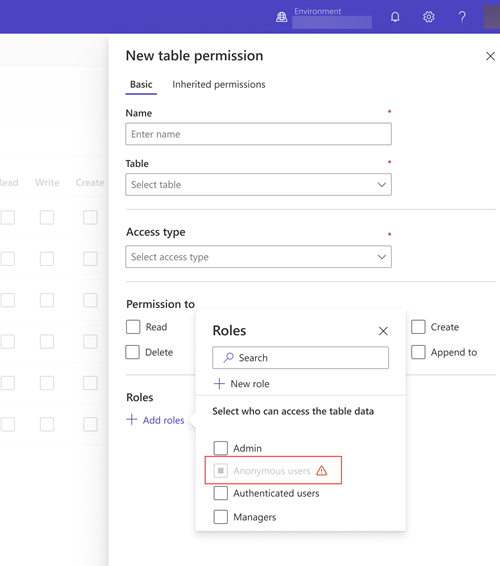
Once an admin completes the steps in the previous section, anonymous users are disabled for new table permissions.
For existing sites where anonymous access is given, a banner error message is displayed indicating a Data protection policy update has been applied.
End user experience
End users see a message explaining that they don't have permission to view records and prompting them to sign in:
You don't have permission to view these records. Please sign in to continue.