Assess blast radius and attack paths
Discovering AI agents is only the first step in securing your environment. The real risk lies in understanding what an agent identity can access and what damage it could cause if compromised. At Contoso Financial Services, the security team identified 34 agents—now they need to assess which ones represent the greatest risk to sensitive data and critical systems. Here, you learn how to assess the blast radius of agent identities and analyze attack paths to prioritize remediation.
| Blast Radius Component | What It Measures | Risk Indicator |
|---|---|---|
| Permissions | API scopes and resource access granted to the agent's service principal | Broad permissions like Mail.ReadWrite.All or Sites.FullControl.All |
| Knowledge sources | SharePoint sites, databases, or files configured as grounding data | Access to sites with sensitive labels or broad organizational content |
| Blueprint configuration | Actions the agent is designed to take (send email, create records, execute code) | Actions that can move or modify data externally |
Understand blast radius
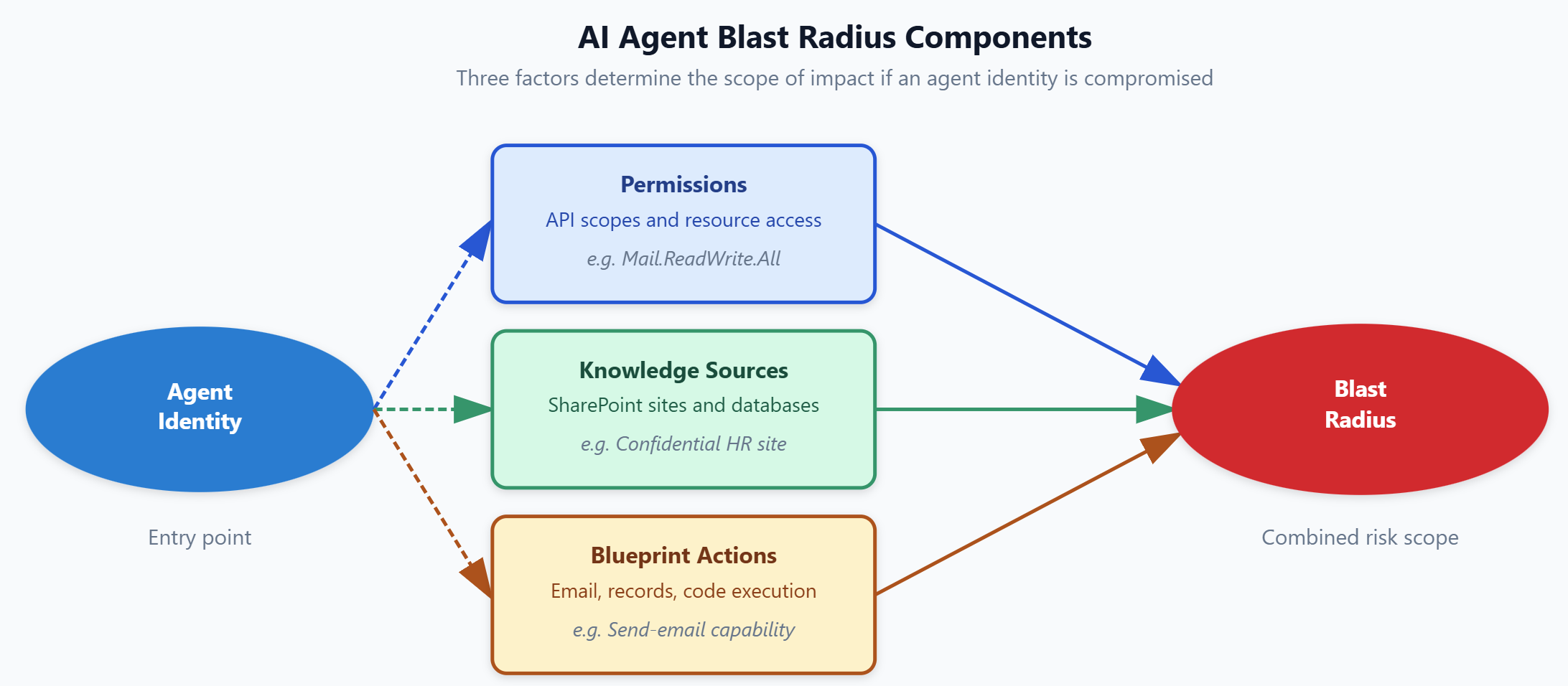
The blast radius of an agent identity is the scope of resources, data, and capabilities accessible to that identity if compromised. Unlike traditional application identities that typically access a single service, AI agents often combine broad data access (for grounding and retrieval) with action capabilities (for task execution). This combination creates larger blast radiuses than many organizations initially recognize.
Three components determine an agent's blast radius. First, permissions define what APIs and resources the agent's service principal can access. An agent with Microsoft Graph permissions to read all mail, files, and calendars across the tenant has a larger blast radius than one with delegated access to a single SharePoint folder. Second, knowledge sources specify which content repositories are available for grounding—the data the agent uses to generate responses. An agent connected to a SharePoint site containing employee performance reviews has access to sensitive HR data. Third, blueprint configuration determines what actions the agent can take. An agent configured to send emails, create records in external systems, or execute code can exfiltrate or modify data, expanding its blast radius beyond read-only access.
Why does blast radius matter? Consider two agents: Agent A has read-access to a single SharePoint folder containing public product documentation. Agent B has Mail.ReadWrite.All, Files.ReadWrite.All, and access to SharePoint sites labeled "Confidential" containing financial records. If both agents are compromised, Agent A's potential exploitation is minimal—public documentation is already accessible. Agent B's compromised identity could read, modify, or exfiltrate confidential financial data across the entire organization. Blast radius assessment lets you prioritize securing Agent B while accepting the lower risk of Agent A.
Assess blast radius in Defender XDR
Defender XDR provides detailed visibility into each agent's blast radius. How you access this data depends on the agent's platform.
Note
For agents built with Microsoft Foundry, AWS Bedrock, or GCP Vertex AI, select the agent in the Assets > AI Agents inventory to open the agent detail pane. The detail pane displays posture insights, risk factors, and security recommendations—including permissions, knowledge sources, and capabilities.
For Microsoft Copilot Studio agents, the AI agent inventory supports discovery only—not security posture management in the UI. To assess blast radius for Copilot Studio agents, use Advanced Hunting in the Defender portal. Navigate to Investigation & response > Hunting > Advanced hunting, select the Queries tab, and choose AI Agents to access the prebuilt security queries that surface permission breadth, knowledge source configuration, and risky settings.
For Foundry agents, the detail pane displays three critical sections: permissions assigned to the agent's service principal, knowledge sources configured for grounding, and capabilities enabled in the agent's blueprint.
The permissions list shows all API scopes granted to the agent identity. Look for broad, tenant-wide permissions rather than scoped or delegated permissions. Permissions like Mail.ReadWrite.All, Files.ReadWrite.All, or Sites.FullControl.All grant access to resources across the entire organization. In contrast, permissions like Mail.Send (restricted to sending only) or Files.Read.Selected (restricted to specific files the user has access to) represent smaller blast radiuses. The presence of multiple broad permissions significantly increases risk—an agent with both Mail.ReadWrite.All and Files.ReadWrite.All can access and exfiltrate nearly any content in the tenant.
Knowledge source assessment requires understanding both the quantity and sensitivity of connected data. The detail pane lists all SharePoint sites, databases, or file shares configured as grounding sources. For SharePoint sites, check how many sites are connected and whether they contain sensitivity labels. An agent connected to five SharePoint sites labeled "Highly Confidential" has a larger blast radius than one connected to 50 sites containing public content. Also assess whether the sites are broadly accessible or restricted—an agent accessing a restricted HR site effectively bypasses the site's access controls.
Defender XDR assigns a risk score to each agent based on permission breadth and knowledge source sensitivity. This score helps you prioritize your assessment. Agents with high risk scores warrant immediate deep-dive analysis. Agents with low scores can still require review, but they represent less urgent risk. At Contoso, the security team sorts agents by risk score and focuses first on the top 10—these agents have combinations of broad permissions and access to confidential content.
Tip
When assessing permissions, distinguish between application permissions (granted at the tenant level) and delegated permissions (granted on behalf of a user). Application permissions typically create larger blast radiuses because they don't require user context.
Analyze attack paths
Attack paths show how an attacker could move from a compromised agent identity to sensitive resources or privileged operations. Unlike blast radius, which describes static access scope, attack paths map dynamic exploitation scenarios—the step-by-step process an attacker follows to achieve their objectives.
You access attack paths from the agent detail pane by selecting View on map. Defender XDR generates attack paths using its knowledge of resource relationships, permission chains, and access patterns. An attack path typically starts with the agent identity as the entry point, shows intermediate steps where the attacker pivots through connected resources, and ends at a target—sensitive data, privileged accounts, or critical systems.
Reading an attack path requires understanding each step's significance. For example, an attack path might show: (1) attacker compromises agent identity, (2) uses agent's Mail.ReadWrite.All permission to access executive mailboxes, (3) extracts credentials from email attachments, (4) uses credentials to access financial database. This four-step path demonstrates how broad permissions enable lateral movement beyond the agent's intended function.
Prioritize attack paths by criticality, not complexity. A three-step path to customer financial records is higher priority than a seven-step path to internal meeting notes. Focus on paths that end at sensitive data stores (databases with personal data, SharePoint sites with trade secrets), privileged operations (creating admin accounts, modifying security policies), or external exfiltration points (email, file uploads).
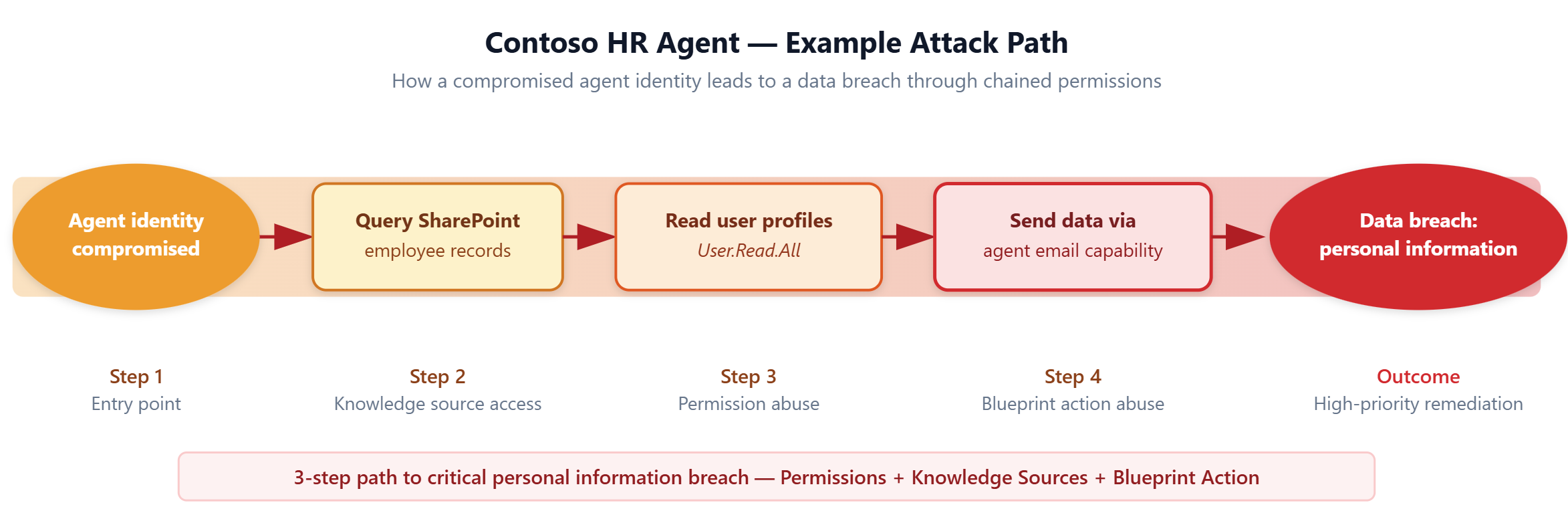
At Contoso, the security team analyzes attack paths for their highest-risk agents. One Microsoft Foundry agent built for HR has SharePoint access to employee records, a Microsoft Graph permission to read all user profiles (User.Read.All), and an action configured to send emails. The attack path shows: (1) attacker compromises agent identity, (2) queries all employee records from SharePoint, (3) reads sensitive user profile data including salary information, (4) sends data to external email address using the agent's send-mail capability. This is a three-step path to a critical data breach involving personal data and compensation data. The security team flags this agent for immediate remediation.
Plan remediation actions
The output of your blast radius and attack path assessment is a prioritized list of agents requiring remediation. This list drives conversations between security engineers, agent owners, and AI developers about how to reduce risk while maintaining agent functionality.
Remediation options fall into four categories. First, remove excess permissions. Many agents are granted broad permissions during development and never scoped down for production. Review each permission and remove any that aren't actively used. Replace broad permissions like Sites.FullControl.All with scoped alternatives like Sites.Selected that grant access only to specific sites. Second, restrict knowledge sources. Remove access to SharePoint sites or databases that aren't necessary for the agent's function. Apply sensitivity labels to knowledge sources and configure the agent to access only labeled content appropriate for its business purpose.
Third, modify blueprint actions. If an agent doesn't need to send external emails or execute code, remove those actions from its configuration. Reducing action capabilities limits what an attacker can do even if they compromise the identity. Fourth, apply Conditional Access policies. Configure policies that restrict agent sign-in based on network location, device compliance, or risk level. Conditional Access provides runtime controls that complement permission and configuration changes.
At Contoso, the HR agent remediation plan includes:
- First: replacing
User.Read.AllwithUser.ReadBasic.Allto limit profile data access - Second: restricting SharePoint access to only the HR records site instead of all employee-related sites
- Third: removing the send-email action and replacing it with a create-task action that queues messages for human review
- Fourth: applying a Conditional Access policy that blocks agent sign-in from outside the corporate network. These changes reduce the agent's blast radius by 80% while maintaining its core HR support functionality.
Important
Always coordinate remediation with agent owners and business stakeholders. Removing permissions or knowledge sources without understanding agent functionality can break production workflows. Document the business justification for each permission before proposing removal.