Identify risks in Copilot and AI app interactions
Every time a user interacts with Microsoft 365 Copilot or another AI application, there's potential for sensitive data to be referenced, generated, or shared in ways that create security risks. Microsoft Purview DSPM for AI captures these interaction events and flags those involving content classified by sensitivity labels. At Contoso Financial Services, a compliance analyst used Copilot to summarize a client financial assessment report labeled "Confidential - Client Data" and pasted the generated summary into an email to an external consultant. DSPM for AI flagged this interaction as a risk because the summary derived from highly sensitive content and was shared outside the organization. Here, you learn how to identify interaction risks, investigate specific events, and prioritize remediation based on severity.
| Risk Type | Description |
|---|---|
| Sensitive data in prompt | User includes content classified with a sensitivity label in a Copilot prompt |
| Sensitive data in response | Copilot returns content that references files classified with sensitivity labels |
| Sensitive data pasted to external AI | User pastes or types labeled content into an external AI site via browser |
| Cross-boundary interaction | Sensitive data moves between different security zones through AI interactions |
What interaction risks reveal
Interaction risks surface instances where AI tools accessed, generated, or returned content that carries a Microsoft Purview sensitivity label. Unlike traditional data loss prevention events that trigger when a user attempts to send an email or share a file, interaction risks occur during the AI generation process itself.
When a user asks Copilot to summarize a document, draft an email, or answer a question, Copilot queries content across Microsoft 365 to ground its response. If any content is labeled "Confidential," "Highly Confidential," or another sensitivity classification, DSPM for AI records the interaction as a potential risk. The risk doesn't necessarily mean a policy violation occurred—it means sensitive data was involved in an AI-generated output that warrants review.
External AI applications create extra risk scenarios. DSPM for AI detects sensitive content when users paste or type it into external generative AI sites—such as ChatGPT consumer or Gemini—through a browser. This detection requires devices to be onboarded to Microsoft Purview and the Microsoft Purview browser extension installed. When these prerequisites are in place, DSPM records an AI website visit event and a Sensitive info types event when sensitive content is detected during the browser interaction.
Navigate the Reports and Activity explorer
The Reports section in the DSPM for AI (classic) dashboard displays AI interaction data summarized by AI app category: Copilot experiences and agents, Enterprise AI apps, and Other AI apps. Use this view for a high-level picture of which AI tools are generating sensitive interaction events and at what volume.
For event-level detail, use Activity explorer. Activity explorer displays a chronological list of AI interaction events. Each entry shows the activity type, the sensitivity label or sensitive information type involved, the user who triggered the event, the AI application, and a timestamp. Activity types include:
- AI interaction - a Copilot or agent interaction where prompts and responses were captured
- AI website visit - a user browsed to an external AI site
- Sensitive info types - sensitive information was detected during an AI interaction
- DLP rule match - a DLP policy matched during an AI interaction
Risk types for Copilot interactions fall into several categories. Prompt-based risks occur when a user includes sensitive content directly in a Copilot prompt—for example, copying text from a confidential document into the Copilot chat window. Response-based risks occur when Copilot generates a response that references or incorporates content from labeled files the user has access to. Browser-based risks occur when a user pastes sensitive content into an external AI site.
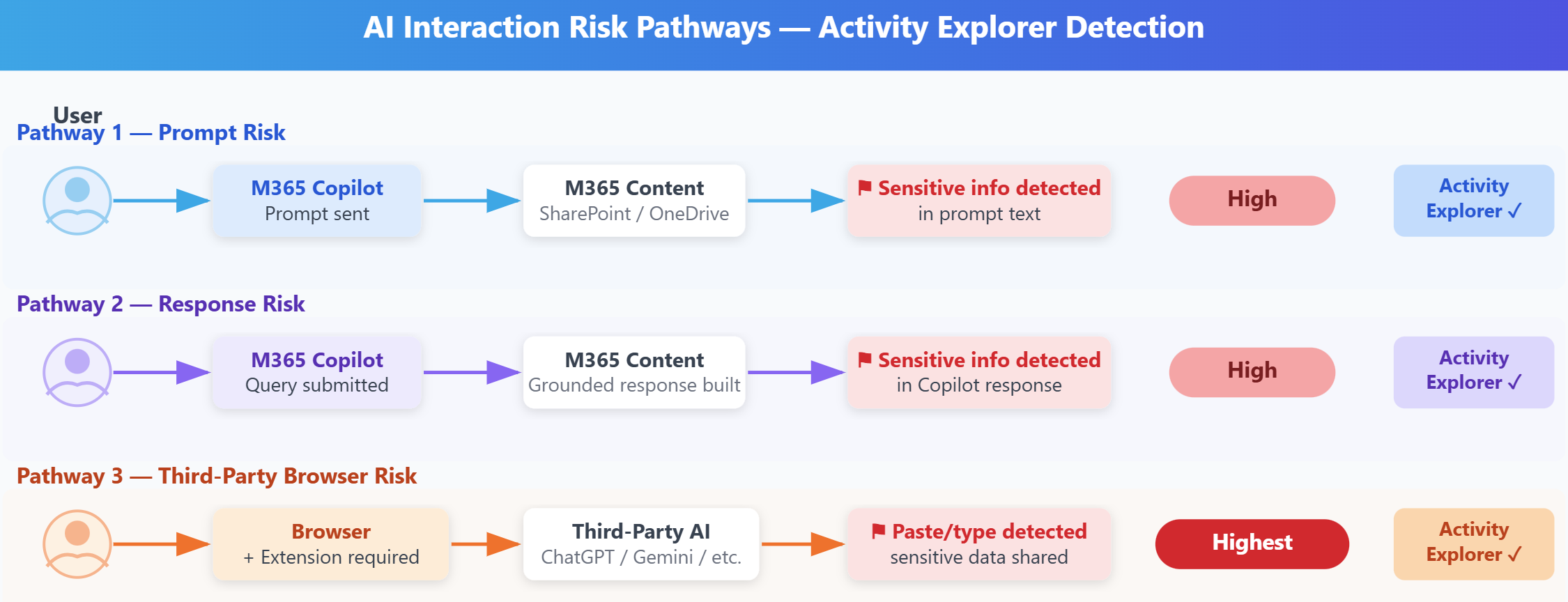
The AI application column in Activity explorer distinguishes between Microsoft 365 Copilot interactions, Copilot Studio agents, ChatGPT Enterprise, and external consumer AI sites.
At Contoso, the security team filters Activity explorer to show only events involving "Confidential" or "Highly Confidential" sensitive info types and interactions with external AI sites. This filter surfaces the highest-priority risks: sensitive data leaving the Microsoft 365 security boundary through external AI tools.
Investigate a specific interaction risk
Selecting an interaction risk from the dashboard opens a detail pane that provides context about what happened during the AI interaction. The detail view shows which specific files or content items were involved and the user account that initiated the interaction. It also displays the full sensitivity label classification, including any sublabels or metadata.
For Copilot interactions, the detail pane indicates whether the sensitive content appeared in the user's prompt, in Copilot's response, or both. If a user asked Copilot "Summarize the Q3 earnings forecast" and Copilot referenced three files labeled "Confidential - Finance" to generate the summary, the detail view lists all three files.
The detail pane also shows the timestamp and duration of the interaction. Longer Copilot sessions that involve multiple back-and-forth prompts and responses appear as separate interaction events if each involves labeled content. This granularity helps you understand whether a user had a single brief interaction with sensitive data or an extended session that repeatedly referenced confidential files.
For external AI site risks, the Activity explorer record identifies which external service was accessed. The event shows the sensitive information types detected, the site visited, and the user—helping you determine whether the interaction represents a one-time event or part of a pattern of regular data sharing with external AI services. DSPM for AI surfaces these events at the sensitive information type level; it doesn't provide file-level metadata such as file name or size for browser-based interactions.
Important
DSPM for AI provides visibility into AI interactions but doesn't automatically block them. To enforce controls that prevent users from uploading sensitive content to external AI apps, configure Microsoft Purview Data Loss Prevention policies targeting those scenarios.
Prioritize high-severity interactions
Not every interaction risk requires immediate action. Security teams must prioritize based on the combination of sensitivity label severity, AI application type, and user context.
Highest priority: Interactions involving "Highly Confidential" labeled content and external AI sites detected via browser. These events represent sensitive data reaching outside your organization's security perimeter and warrant immediate investigation. Determine whether the user had a legitimate business need to use the external AI site and whether sensitive content was pasted intentionally or inadvertently.
High priority: Copilot interactions involving "Highly Confidential" content where the user shared the generated output externally. Even though Copilot itself operates within Microsoft 365's security boundary, if a user copies a Copilot-generated summary of confidential content and emails it to external recipients, a data disclosure risk exists.
Medium priority: Copilot interactions involving "Confidential" labeled content where the output remained within the organization. These interactions can be legitimate uses of Copilot to work with appropriately accessible data, but they warrant review to ensure users understand when they work with sensitive information.
Lower priority: Interactions involving "Internal" labeled content or Copilot sessions where the user has explicit permissions to access all referenced files. These events can reflect normal AI-assisted work and require no remediation.
At Contoso, the security team investigates the compliance analyst's interaction where a Copilot-generated summary of client financial data was shared externally. The investigation reveals the analyst didn't realize the summary derived from confidential source files. The security team provides training on how sensitivity labels apply to AI-generated content and configures a Data Loss Prevention policy to warn users before sending emails containing Copilot-generated summaries of confidential data.
Connect interaction risks to remediation controls
DSPM for AI helps you move from risk identification to risk mitigation by connecting each interaction to relevant Microsoft Purview controls. From an interaction risk detail pane, you can navigate directly to the sensitivity label policy that classifies the content. You can also access the SharePoint site permissions where the source files are stored, or the Data Loss Prevention rules that should prevent similar future interactions.
If an interaction risk stems from a user accessing overly broad SharePoint permissions, navigate to the Data risk assessments section to address the root cause. If the risk involves an external AI site, you create or update a DLP policy to block or warn users before pasting labeled content into that service.
This connected approach ensures DSPM for AI doesn't just generate alerts—it helps you systematically reduce the attack surface for AI-related data risks across your organization.
Tip
Review interaction risks weekly to identify patterns. If the same users repeatedly trigger risks with the same external AI application, consider providing targeted training or implementing application controls.