Map authentication flows and Conditional Access scope
Before applying security controls to agent identities, you need to understand how they authenticate to Microsoft services and where Conditional Access policies intersect with their access patterns. Contoso Financial Services deploys AI agents for compliance automation, and the security team must map authentication flows to identify control points. Here, you learn the three ways agents authenticate and where Conditional Access applies to each pattern.
Agents in Microsoft Entra Agent ID access corporate resources using one of three access patterns. The correct Conditional Access configuration depends on which pattern your agents use:
| Access Pattern | Token subject | CA assignment scope | Interactive controls (MFA, device) |
|---|---|---|---|
| On-behalf-of (OBO) | The signed-in user | Assign to users or groups | Available—user is present |
| Application-only (autonomous) | The agent identity | Assign to agent identities | Not applicable—no users present |
| Agent's user account | The agent's user-type identity | Assign to that user account | Not applicable—non-interactive flow |
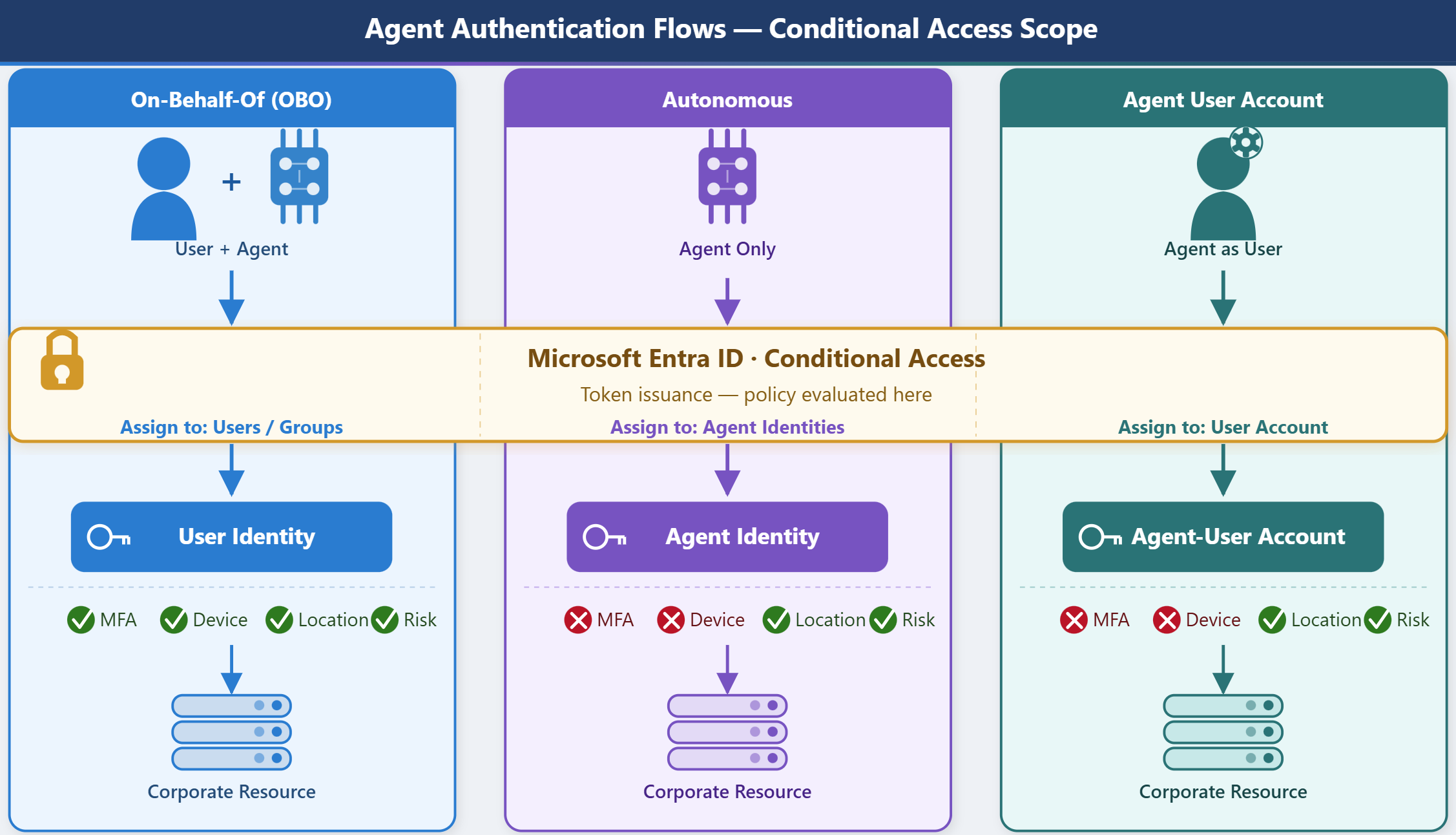
How agent identities authenticate
The on-behalf-of (OBO) flow is the most common access pattern. In this flow, a user signs in to an agent application, and the agent then exchanges the user's token to obtain a separate token scoped to the corporate resource it needs to access. The resource token is issued to the user—the user's identity and permissions constrain what the agent can do. Because the user is the token subject throughout the OBO flow, standard user-targeted Conditional Access policies apply, including MFA requirements, device compliance checks, and sign-in risk conditions.
Autonomous agents operate without a signed-in user. They authenticate directly as their service principal using the OAuth 2.0 client credentials flow—presenting a certificate, managed identity token, or client secret to receive an access token issued to the agent identity itself. This non-interactive flow is efficient for scheduled or event-driven tasks but removes the interactive security checkpoints that user authentication provides. For autonomous agents, the agent identity is the token subject, and CA policies must target the agent service principal directly.
A third pattern applies when an agent operates with its own user-type account—for example, a digital worker with a dedicated mailbox that participates in team workflows. In this case, the agent authenticates as a user, and CA policies target that user account identity using standard user-targeted policy configuration.
The pattern in use determines which assignment scope to configure when you create Conditional Access policies. Applying a user-targeted policy to an autonomous agent misses the enforcement point, and applying an agent-targeted policy to an OBO flow won't intercept the authentication that matters.
Where Conditional Access applies to agents
Conditional Access evaluates policies at token issuance time—before the agent or user receives a token for a resource. The assignment scope in a CA policy determines which authentication events trigger evaluation.
For OBO flows, assign the policy to users or groups. Because the user is the token subject, evaluation happens against the user's context—location, device, and sign-in risk all apply. Target resources should include the corporate resources the agent accesses on the user's behalf, so the policy evaluates every token exchange in the flow.
For autonomous (application-only) flows, assign the policy to agent identities. When you create a Conditional Access policy, select Assignments > Users, agents or workload identities, then select Agents. The option All agent identities covers all agent service principals in your tenant. You can also target specific agent identities or their parent agent identity blueprint to cover all agents derived from that blueprint.
For agent's user account flows, assign the policy to the user account that represents the agent, using standard user-targeted CA configuration.
Scale policy targeting with attributes and blueprints
As your agent population grows, individually listing agent service principals in CA policies becomes operationally unsustainable. Two approaches support scalable targeting.
Attribute-driven targeting uses custom security attributes—business-specific key-value pairs you define and assign to agent identities in Microsoft Entra ID. For example, you can define a DataSensitivity attribute with values like Confidential or Internal, then write a CA policy condition that blocks any agent identity where DataSensitivity = Confidential. The policy applies automatically to agents with that attribute value, including new agents added in the future—no policy update required.
Blueprint-level targeting applies a CA policy to a parent agent identity blueprint, automatically covering all agent identities derived from that blueprint. If multiple agents for a project or product are created from the same blueprint, a single policy enforces consistent controls across the group without listing individual agents.
What Conditional Access enforces for autonomous agents
For both autonomous agent identities and agent user accounts, the non-interactive authentication flow limits, which Conditional Access controls apply. Understanding these boundaries helps you design realistic policies for agents that operate without a user present.
Conditional Access can enforce the following for autonomous agent identities:
- Block sign-in: Prevent the agent identity from authenticating entirely
- Named location conditions: Restrict authentication to specific IP ranges or geographic regions
- Sign-in frequency restrictions: Require token refresh at defined intervals
- Risk-based conditions: Block agents flagged as high-risk by Microsoft Entra ID Protection
Conditional Access cannot enforce the following for autonomous agent identities:
- Multifactor authentication (MFA): There's no user present to complete a prompt
- Device compliance: No physical device is registered to evaluate
- User-based session controls: App-enforced restrictions and similar controls require an interactive user session
These limits apply equally to autonomous agent identities (which use a service principal). And the limits apply to agent user accounts (which use a user-type identity but still authenticate non-interactively). Agents can't respond to an MFA prompt or present a device compliance certificate. For OBO flows these limits don't apply—the full user CA control set is available, including MFA, device compliance, sign-in risk, and session controls, because the human user is the token subject throughout.
Contoso's security team uses named location conditions to enforce a base policy: all autonomous agent identities must authenticate from corporate network IP ranges or designated Azure regions. Agents attempting to authenticate from other locations are blocked automatically.
Now that you understand where Conditional Access intersects with agent authentication, you're ready to configure specific policies scoped to agent identities.