Data loss prevention
In educational environments, protecting student, employee, and organizational data is a major priority. Data loss prevention (DLP) strategies, coupled with effective tools and technologies, play a vital role in ensuring the confidentiality of sensitive information. DLP benefits begin with the ability to classify and monitor your data and include improving your overall visibility and control.
Data classification and sensitivity levels
School data encompasses a wide range of information, from personal identifiers to academic records to financial information, each requiring appropriate handling and protection dependent on its sensitivity level.
Knowing what data you have and how you use it across your digital landscape makes it easier for your organization to identify unauthorized access to data and protect it from misuse. To prevent data loss, school IT teams should classify data into distinct levels based on its sensitivity and importance. Assigning sensitivity levels helps prioritize security measures and determine appropriate access controls and encryption requirements.
Automate data classification
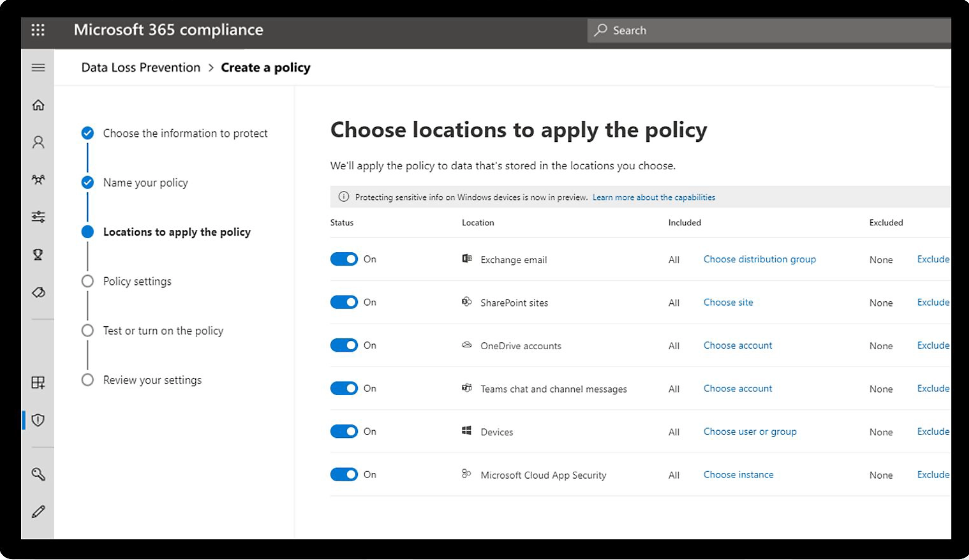
Microsoft Purview Data Loss Prevention helps prevent unauthorized sharing, use, or transfer of sensitive student, staff, and organizational information across apps, services, and devices. You can create, manage, and enforce data loss prevention policies directly from the Microsoft Purview compliance portal. DLP is integrated with Information Protection classification and labeling capabilities, including out-of-the-box, customer, or advanced SITs and trainable classifiers. It also allows you to configure, triage, and track alerts through the DLP alerts page or extend DLP alerts to the Microsoft Defender XDR portal and Microsoft Sentinel.
Additional DLP considerations
In addition to classifying and monitoring your school's data, it's important to consider access, detection, and control to ensure compliance and decrease your risk of data loss.
- Monitor data access and usage: To keep threats at bay, schools need to monitor who has access to what and what they're doing with that access. Prevent insider breaches and fraud by managing the digital identities of students, staff, and guests across your network, apps, and devices. Role-based access control is one example of providing access to only the people who need it to do their jobs.
- Detect and block suspicious activity: Customize your DLP solution to scan all data flowing through your network and block it from leaving the network by email, being copied to USB drives, or other means.
- Maintain regulatory compliance: Every educational organization must adhere to data protection standards, laws, and regulations like HIPAA, FERPA, or COPPA. A DLP solution gives you the reporting capabilities you need to complete compliance audits, which may also include having a data-retention plan and training program for your employees.
- Improve visibility and control: A DLP solution gives you visibility into the sensitive data within your school and helps you discover who might be sending it to unauthorized users. Once you determine the scope of actual and potential issues, further customizations can be made to analyze data and content to strengthen your cybersecurity measures and DLP efforts.
DLP policy
A DLP policy defines how your organization shares and protects data without exposing it to unauthorized users. It helps you comply with government regulations, protect intellectual property, and improve visibility into your data. Use these steps to deploy your DLP policies with Microsoft Purview.
Additional resources
Explore additional resources and discover how Microsoft solutions can empower your institution with robust data loss prevention strategies.
- Microsoft Purview Data Loss Prevention: Learn how to identify inappropriate sharing, transfer, or use of sensitive data on endpoints, apps, and services.
- Data Leak Prevention with Microsoft Intune: Discover how to prevent data leaks on non-managed devices using Microsoft Intune.
- Protect Student Data with School Data Sync: Learn how to implement access limitations and other protections for student personal data using Microsoft's School Data Sync in Office 365 and Microsoft Entra ID.
Next steps
Consider which of these DLP best practices your school currently has in place. Then note any areas of opportunity.
- Identify and classify sensitive data: To protect your data, you need to know what you have. Use your DLP policy to identify sensitive data and label it accordingly.
- Use data encryption: Encrypt data that is at rest or in transit so unauthorized users aren't able to view file content even if they gain access to its location.
- Secure your systems: A network is only as secure as its weakest entry point. Limit access to students or staff who need it to do their jobs or for learning.
- Implement DLP in phases: Know your school's priorities and establish a pilot test. Allow your organization to grow into the solution and all it has to offer.
- Implement a patch management strategy: Test all patches for your infrastructure to ensure there are no vulnerabilities being introduced into your organization.
- Allocate roles: Establish roles and responsibilities to clarify who is accountable for data security.
- Automate: Manual DLP processes are limited in scope and can't scale to meet the future needs of your organization.
- Use anomaly detection: Machine learning and behavioral analytics can be used to identify abnormal behavior that could result in a data leak.
- Educate stakeholders: A DLP policy isn't enough to prevent intentional or accidental incidents; stakeholders and users must know their role in protecting your organization's data.
- Establish metrics: Tracking metrics—like the number of incidents and time-to-response—helps determine the effectiveness of your DLP strategy.