Note
Access to this page requires authorization. You can try signing in or changing directories.
Access to this page requires authorization. You can try changing directories.
Assessments are a combination of .xml and binary files that induce a specific set of states on a computer, measure and record the activity, and preserve the recorded results. The results provide metrics and sometimes recommendations for resolving issues that the assessments found. Assessments help you assess hardware or software that has been added to a computer.
Assessments and the Windows Assessment Console are available as part of the Windows Assessment Toolkit that's available in the Windows Assessment and Deployment Kit (Windows ADK). After you install the Windows Assessment Toolkit, you can use the Windows Assessment Console to create and run a job that includes one or more assessments. You can also package jobs to run them on computers that don't have the Windows Assessment Toolkit installed.
Assessments are also available when you install Windows Assessment Services and the Windows Assessment Services - Client (Windows ASC).
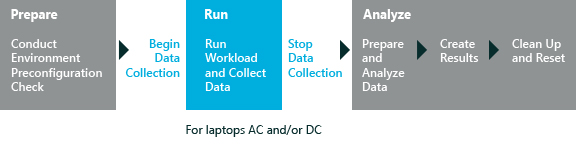
This diagram shows the general workflow for an assessment:
In This Section
| Assessment | Description |
|---|---|
| Modern Standby energy efficiency | This assessment measures the impact of software and devices on the battery life of a system while it is in Modern Standby. The assessment also measures the time spent transitioning into and out of Modern Standby. |
| Energy Efficiency | An Energy Efficiency job provides an automated way to assess energy consumption and measure the battery life of a mobile computer using various workloads. |
| Results for the Idle Energy Efficiency assessment | This assessment measures the power consumption on a laptop while it is idle, and evaluates the energy consumption and the battery life of the mobile computer. |
| Driver Verification | This assessment verifies that an offline Windows image or a running Windows operating system contains the correct set of drivers. |
| Edge Security Software Impact | This assessment measures aspects of Microsoft Edge that are typically impacted by antimalware. The assessment measures the impact on the launch and navigate times of Microsoft Edge. |
| File Handling | This assessment simulates file operations like copying, moving, compressing, uncompressing, and deleting files. It also measures duration and throughput to help you evaluate the computer's performance. |
| Internet Explorer Startup Performance | This assessment measures the time to fully render a blank page in Internet Explorer. This measurement includes the load time of the IExplore.exe process and the frame-creation and tab-creation intervals. It also measures the effect of all extensions, add-ins, and toolbars that are installed on the system. It doesn't measure any network or browsing performance. |
| Internet Explorer Security Software Impact | This assessment measures aspects of Internet Explorer that are typically impacted by antimalware and other browser add-ins. |
| Local Video Playback | This assessment measures the usage rate of a computer's battery during full-screen local video playback. |
| Media Transcoding Performance | This assessment measures the transcode duration and relative speed of changing a video file to a different format or bit rate. |
| Memory Footprint | This assessment creates a snapshot of memory use during a series of system boots. It then helps you identify ways to improve performance and efficiency by optimizing memory use. You can also use this assessment to compare a baseline operating system image against an Original Equipment Manufacturer (OEM) image. |
| Minifilter Diagnostics | Describes the minifilter diagnostic setting that's available in several assessments. You can use the minifilter diagnostic setting to measure the time that the computer spends in minifilter operations and identify minifilter drivers that are inefficient, using too much memory, or not working. |
| On/Off Transition Performance | Describes the system requirements, assessment settings, results, and issues that are associated with the Boot Performance (Fast Startup), Hibernate Performance, and Standby Performance assessments. These assessments measures the transition from various computer states. |
| Out of Box Experience | This assessment measures the duration of key aspects of the first startup experience (OOBE) that are typically impacted by image customizations and software add-ons applied to the Windows retail image. The assessment measures the duration of First Logon as well as specific aspects such as Active Setup and Provisioned App Install. |
| Streaming Media Performance | This assessment streams media in Internet Explorer by using video content that ranges from low resolution to high resolution. It then evaluates video playback quality based on the number of glitches that it detects. |
| Windows Media Player Performance and Quality | This assessment evaluates the performance and quality of Windows Media Player playback and is used in a set of multimedia battery-life assessments. |
| Microsoft Store App Performance | This assessment can help you optimize your app for a better customer experience. |
| Common In-Depth Analysis Issues | Describes common in-depth analysis issues that you can view in the Windows Assessment Console and further analyze in Windows Performance Analyzer (WPA). |
| Troubleshooting Assessments | Describes common problems that cause assessments to fail. |