Note
Access to this page requires authorization. You can try signing in or changing directories.
Access to this page requires authorization. You can try changing directories.
The Authentication methods policy in Microsoft Entra ID is a policy that lets administrators configure authentication methods for users and groups. You can configure methods to meet your organization's goals for user experience and security.
This article covers the core policy and related user authentication information first, including method usability, credential provenance, and identity verification history. The second section covers migration from legacy multifactor authentication (MFA) and self-service password reset (SSPR) policies.
Authentication methods policy
The Authentication methods policy is the recommended way to manage authentication methods, including modern methods like passwordless authentication. Authentication Policy Administrators can edit this policy to enable authentication methods for all users or specific groups.
Methods enabled in the Authentication methods policy can typically be used anywhere in Microsoft Entra ID, for both authentication and password reset scenarios. The exception is that some methods are inherently limited to use in authentication, such as FIDO2 and Windows Hello for Business, and others are limited to use in password reset, such as security questions. For more control over which methods are usable in a given authentication scenario, consider using the Authentication Strengths feature.
Most methods also have configuration parameters to more precisely control how that method can be used. For example, if you enable Voice calls, you can also specify whether an office phone can be used in addition to a mobile phone.
Or let's say you want to enable passwordless authentication with Microsoft Authenticator. You can set extra parameters like showing the user sign-in location or the name of the app being signed into. These options provide more context for users when they sign-in and help prevent accidental MFA approvals.
To manage the Authentication methods policy, sign in to the Microsoft Entra admin center as at least an Authentication Policy Administrator and browse to Entra ID > Authentication methods > Policies.
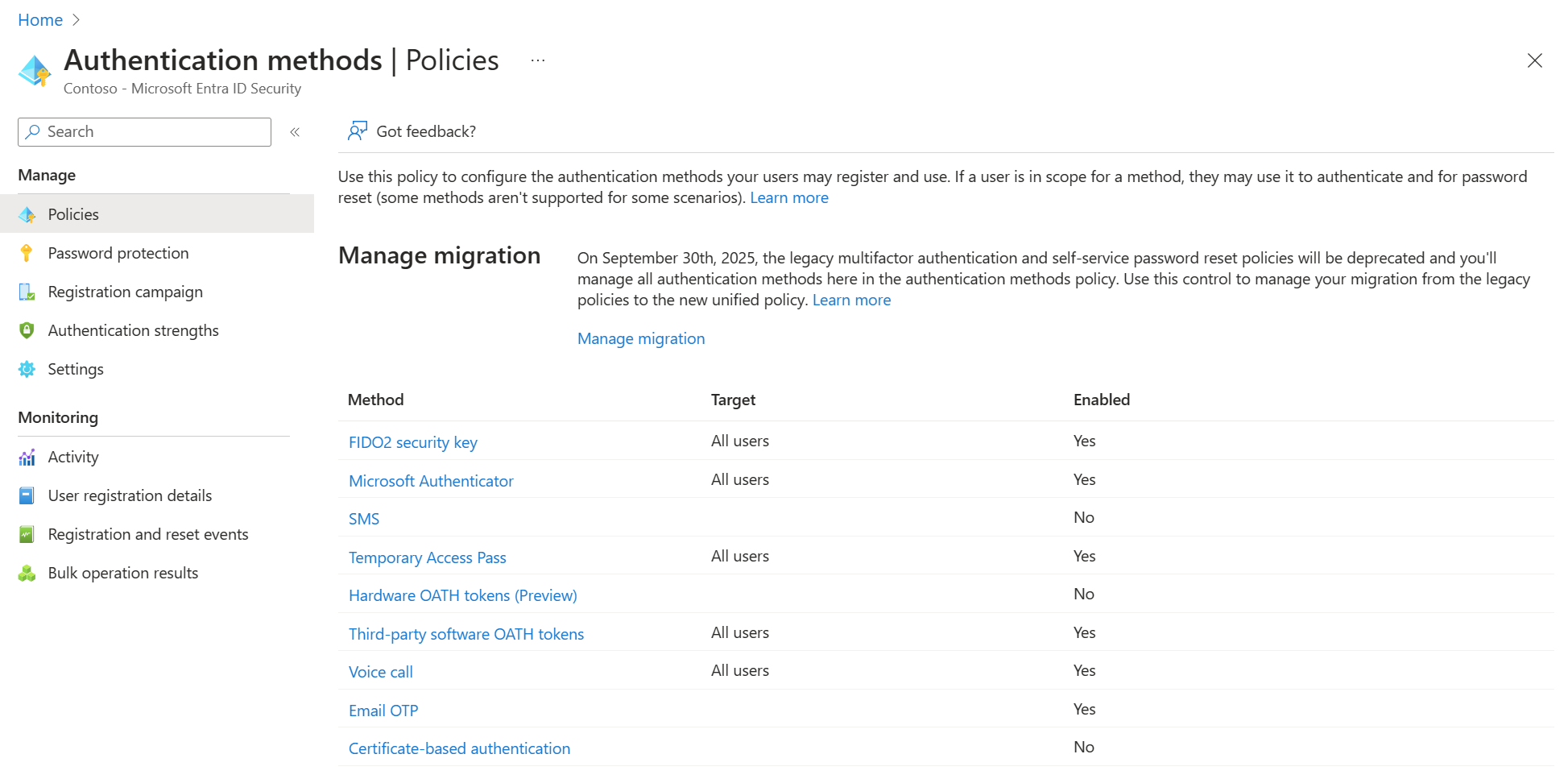
Only the converged registration experience is aware of the Authentication methods policy. Users in scope of the Authentication methods policy but not the converged registration experience won't see the correct methods to register.
Known issues and limitations
In recent updates, we removed the ability to target individual users. Previously targeted users will remain in the policy, but we recommend moving them to a targeted group.
Registration of an authentication method can fail if many groups are included in the Authentication methods policy or a registration campaign. We recommend consolidating multiple groups into a single group for each authentication method. To maintain registration for users during consolidation, add the new group and remove current groups in the same operation.
Note
You might not be able to save updates to the Authentication methods policy if it targets many groups and the policy size exceeds 20 KB. To avoid this limitation, consolidate targeted groups as much as possible.
Usable and non-usable methods for users
Administrators can view user authentication methods in the Microsoft Entra admin center. Usable methods are listed first, followed by non-usable methods.
Each authentication method can become nonusable for different reasons. For example, a Temporary Access Pass might expire, or a FIDO2 security key might fail attestation. The portal gets updated to explain why the method isn't usable.
Authentication methods that are no longer available due to Require re-register multifactor authentication also appear here.
The following illustrative example shows Credential assurance for a passkey on the user's Authentication methods page. Usability and assurance are separate: an assurance label doesn't establish that a method can currently sign in.
For the meanings of Low, Medium, and High, see Credential assurance classification. During preview, credential assurance classification and provenance are available only for passkeys.

Credential provenance (preview)
Credential provenance records how a passkey was established and is separate from the user's account-level identity verification status. During preview, credential provenance is available only for passkeys.
To review credential assurance and provenance, open the user's Authentication methods page and select a passkey to view its details. The method details show Credential assurance, registration history, and Credential provenance. For more information, see Passkey credential provenance.
Identity verification status and history
To view a user's identity verification status and history, use at least the Security Reader role.
Open the user's Identity verification page to review current identity verification status and verification history. This is a separate page in the user's navigation, not part of Authentication methods or an authentication method's details.
The user's Overview also summarizes identity verification status. Select View details in the Identity verification card to review more information.

The Identity verification page shows the current status, verification event count, current event ID, and verification history.
Note
A planned enhancement to source information for identity verification events will identify the verification type: EmployeeID, Tenant Issued, or Identity Verification Partner. These details aren't yet available.
Note
To view status and history, first enable tenant-wide Collect identity verification history. See Identity verification collection prerequisites. Check Identity verification licensing to confirm that reporting is available for your organization. An unavailable view isn't evidence that verification failed.
| View | Question it answers | Interpretation boundary |
|---|---|---|
| Current account verification status | What verification state applies to the account now? | A past successful event doesn't necessarily establish the current effective state. |
| Verification history | Which verification events or changes are recorded for this user? | History isn't a complete audit-retention guarantee or proof that every recorded verification is still valid. |
| Credential provenance | How was this particular passkey established? | Account-level verification doesn't establish the provenance of every credential on the account. |
The first two views are on Identity verification. Credential provenance is in the passkey's details under Authentication methods, not in the account-level verification history.
Current status and historical events describe different points in the verification lifecycle. Credential or document issuance, verification recorded by Microsoft Entra ID, expiration, and later credential presentation aren't the same event. Don't treat a later presentation date as the date of the original identity proofing.
Verification and passkey registration are separate outcomes. Completing verification doesn't establish that onboarding or recovery finished, that every existing method is usable, or that access was granted. For method-level context, see Passkey credential provenance.
For service-level operations and failure investigation, see Verified ID audit activities. Audit events don't replace the account's current verification status or an individual passkey's credential assurance.
For reporting entitlements, see Identity verification licensing.
Manage identity verification for a user
Administrators can overwrite identity verification events and credential provenance to align the recorded information with their organization's verification and credential management processes. This is useful when:
- Your organization performs robust in-person identity verification and needs to reflect that verification in the user's record.
- Your organization uses a credential management service for credential issuance and lifecycle management and needs to reflect that process in the credential's provenance.
Review account-level verification events on the user's Identity verification page and credential-level provenance in the selected passkey's details under Authentication methods. An administrative overwrite isn't evidence that the user completed identity verification.
For operation-specific entitlements, see Identity verification licensing.
Migration from legacy policies
The following sections explain legacy policy settings, how policies work together, and migration states. For automated and manual migration procedures, see Migrate to the Authentication methods policy.
Legacy MFA and SSPR policies
Two other policies, located in Multifactor authentication settings and Password reset settings, provide a legacy way to manage some authentication methods for all users in the tenant. You can't control who uses an enabled authentication method, or how the method can be used.
Important
In March 2023, we announced the deprecation of managing authentication methods in the legacy multifactor authentication and self-service password reset (SSPR) policies. Beginning September 30, 2025, authentication methods can't be managed in these legacy MFA and SSPR policies. We recommend customers use the manual migration control to migrate to the Authentication methods policy by the deprecation date.
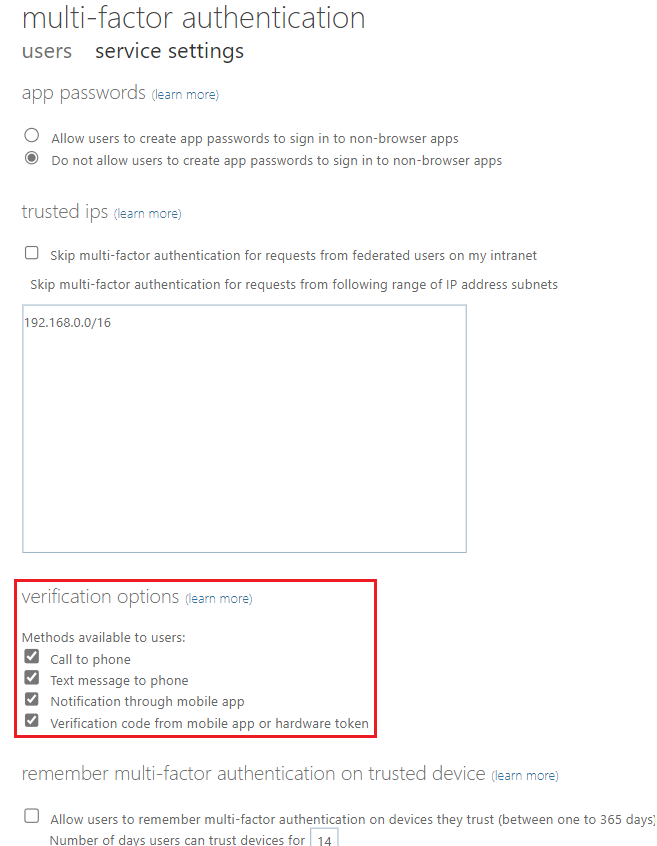
To manage the legacy MFA policy, Browse to Entra ID > Multifactor authentication > Getting started > Configure > Additional cloud-based multifactor authentication settings.
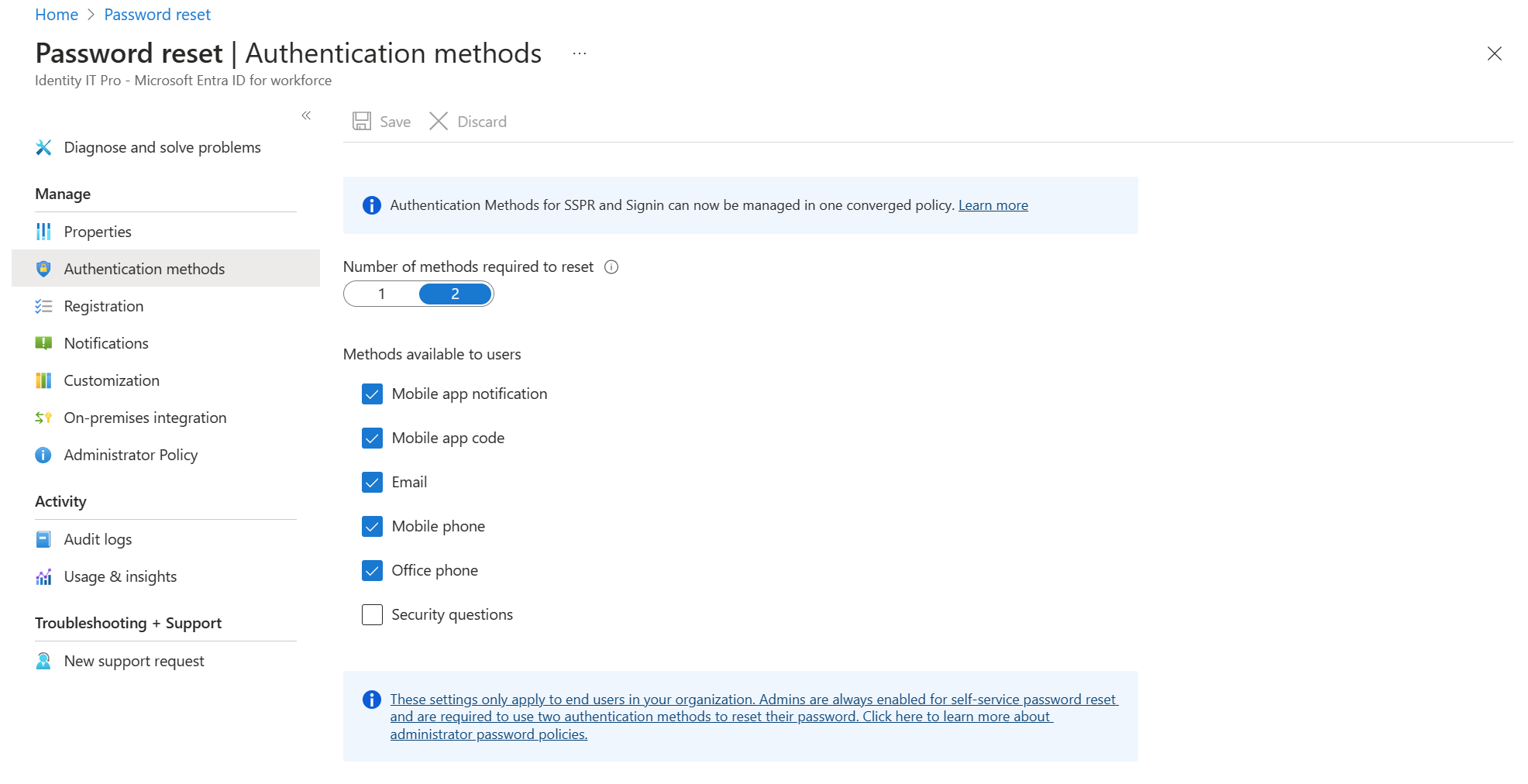
To manage authentication methods for self-service password reset (SSPR), browse to Entra ID > Password reset > Authentication methods. The Mobile phone option in this policy allows either voice calls or text message to be sent to a mobile phone. The Office phone option allows only voice calls.
How policies work together
Settings aren't synchronized between the policies, which allows administrators to manage each policy independently. Microsoft Entra ID respects the settings in all of the policies so a user who is enabled for an authentication method in any policy can register and use that method. To prevent users from using a method, it must be disabled in all policies.
Let's walk through an example where a user who belongs to the Accounting group wants to register Microsoft Authenticator. The registration process first checks the Authentication methods policy. If the Accounting group is enabled for Microsoft Authenticator, the user can register it.
If not, the registration process checks the legacy MFA policy. In that policy, any user can register Microsoft Authenticator if one of these settings is enabled for MFA:
- Notification through mobile app
- Verification code from mobile app or hardware token
If the user can't register Microsoft Authenticator based on either of those policies, the registration process checks the legacy SSPR policy. In that policy too, a user can register Microsoft Authenticator if the user is enabled for SSPR and any of these settings are enabled:
- Mobile app notification
- Mobile app code
For users who are enabled for Mobile phone for SSPR, the independent control between policies can impact sign-in behavior. Where the other policies have separate options for text message and voice calls, the Mobile phone for SSPR enables both options. As a result, anyone who uses Mobile phone for SSPR can also use voice calls for password reset, even if the other policies don't allow voice calls.
Similarly, let's suppose you enable Voice calls for a group. After you enable it, you find that even users who aren't group members can sign-in with a voice call. In this case, it's likely those users are enabled for Mobile phone in the legacy SSPR policy or Call to phone in the legacy MFA policy.
Migration between policies
The Authentication methods policy provides a migration guide to help unify administration of all authentication methods. All desired methods can be enabled in the Authentication methods policy if the policy targets intended user groups, or all users. The authentication methods migration guide automates the steps to audit your current policy settings for MFA and SSPR, and consolidate them in the Authentication methods policy. You can access the guide from the Microsoft Entra admin center by browsing to Entra ID > Authentication methods > Policies.

You can also migrate policy settings manually. The migration has three settings to let you move at your own pace, and avoid problems with sign-in or SSPR during the transition.
After migration is complete, methods in the legacy MFA and SSPR policies can be disabled. You can centralize control over authentication methods for both sign-in and SSPR in a single place, and the legacy MFA and SSPR policies will be disabled.
Note
Security questions can only be enabled today by using the legacy SSPR policy. If you're using security questions, and don't want to disable them, make sure to keep them enabled in the legacy SSPR policy until a migration control is available. You can migrate the remainder of your authentication methods and still manage security questions in the legacy SSPR policy.
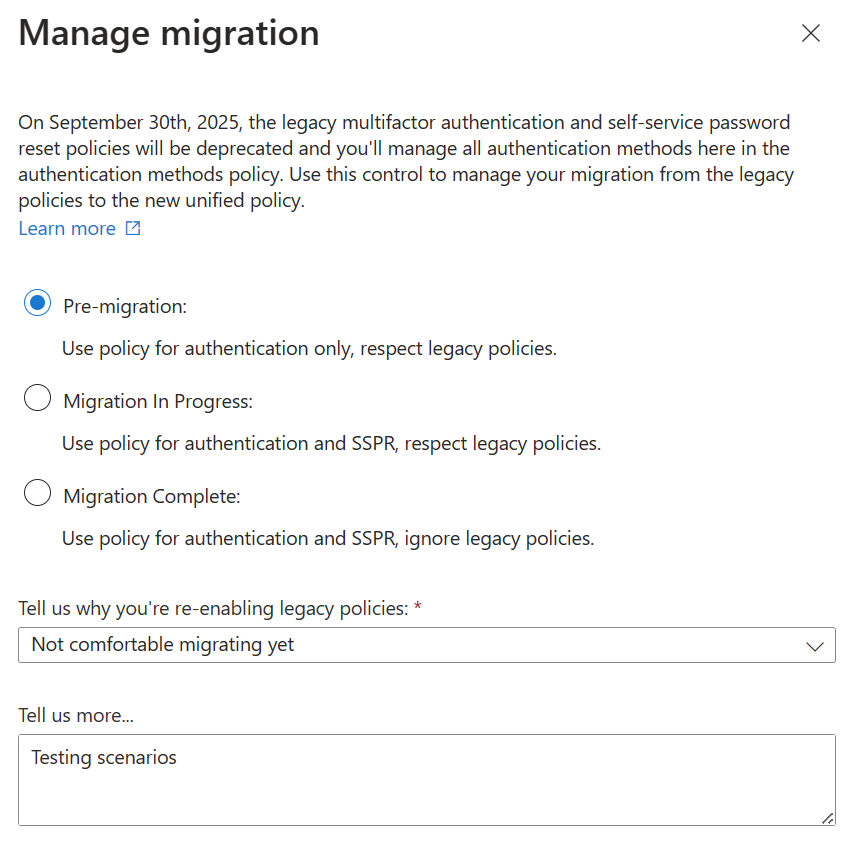
To view the migration options, open the Authentication methods policy and click Manage migration.
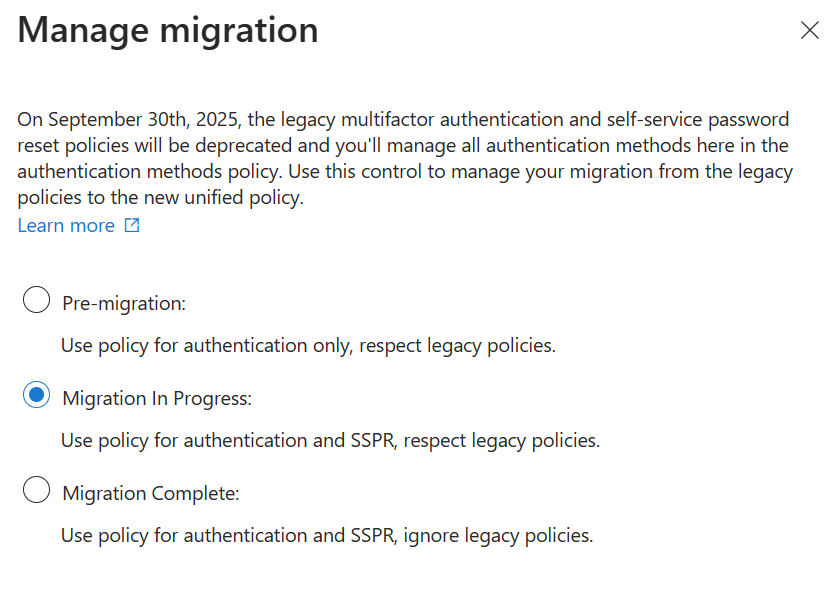
The following table describes each option.
| Option | Description |
|---|---|
| Pre-migration | The Authentication methods policy is used only for authentication. Legacy policy settings are respected. |
| Migration in Progress | The Authentication methods policy is used for authentication and SSPR. Legacy policy settings are respected. |
| Migration Complete | Only the Authentication methods policy is used for authentication and SSPR. Legacy policy settings are ignored. |
Tenants are set to either Pre-migration or Migration in Progress by default, depending on their tenant's current state. If you start in Pre-migration, you can move to any of the states at any time. If you started in Migration in Progress, you can move between Migration in Progress and Migration Complete at any time, but won't be allowed to move to Pre-migration. If you move to Migration Complete, and then choose to roll back to an earlier state, we'll ask why so we can evaluate performance of the product.
Note
After all authentication methods are fully migrated, the following elements of the legacy SSPR policy remain active:
- The Number of methods required to reset control: admins can continue to change how many authentication methods must be verified before a user can perform SSPR.
- The SSPR administrator policy: admins can continue to register and use any methods listed under the legacy SSPR administrator policy or methods they're enabled to use in the Authentication methods policy.
In the future, both of these features will be integrated with the Authentication methods policy.