Nota:
El acceso a esta página requiere autorización. Puede intentar iniciar sesión o cambiar directorios.
El acceso a esta página requiere autorización. Puede intentar cambiar los directorios.
La orquestación de entrega permite a los agentes transferir el control entre sí en función del contexto o la solicitud del usuario. Cada agente puede "entregar" la conversación a otro agente con la experiencia adecuada, asegurándose de que el agente adecuado controla cada parte de la tarea. Esto es especialmente útil en el soporte al cliente, sistemas expertos o cualquier escenario que requiera delegación dinámica.
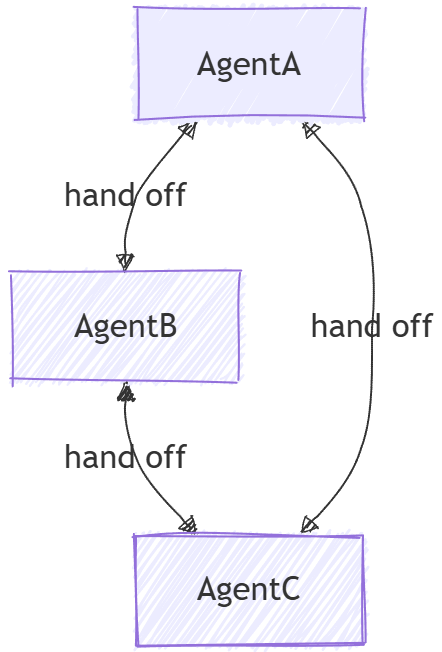
Internamente, la orquestación de entrega se implementa mediante una topología de malla donde los agentes están conectados directamente sin un orquestador. Cada agente puede decidir cuándo entregar la conversación en función de las reglas predefinidas o el contenido de los mensajes.
Nota:
La orquestación de transferencia solo admite Agent y los agentes deben admitir la ejecución de herramientas que se ejecutan localmente.
Diferencias entre transferencia y agentes como herramientas
Aunque un agente como herramienta se considera comúnmente un patrón multiagente y podría parecerse a la transferencia a primera vista, existen diferencias fundamentales entre ambos.
- Flujo de control: en la orquestación de transferencia, el control se pasa explícitamente entre agentes según las reglas definidas. Cada agente puede decidir entregar toda la tarea a otro agente. No hay ninguna autoridad central que administre el flujo de trabajo. En cambio, agent-as-tools implica un agente principal que delega las subtareas a otros agentes y una vez que el agente completa la subtarea, el control vuelve al agente principal.
- Propiedad de la tarea: durante la transferencia, el agente que recibe la transferencia toma completa propiedad de la tarea. En el concepto de "agentes-como-herramientas", el agente principal conserva la responsabilidad general de la tarea, y otros agentes se manejan como herramientas para asistir en tareas específicas.
- Administración de contextos: en la orquestación de entrega, la conversación se entrega a otro agente por completo. El agente receptor tiene todo el contexto de lo que se ha hecho hasta ahora. En agent-as-tools, el agente principal administra el contexto general y podría proporcionar solo información relevante a los agentes de herramientas según sea necesario.
Temas que se abordarán
- Cómo crear agentes especializados para distintos dominios
- Configuración de reglas de entrega entre agentes
- Creación de flujos de trabajo interactivos con enrutamiento dinámico de agentes
- Cómo gestionar conversaciones de múltiples turnos con cambio de agente
- Cómo implementar la aprobación de herramientas para operaciones confidenciales (HITL)
- Uso de puntos de control para flujos de trabajo de entrega duraderos
En la orquestación de traspaso, los agentes pueden transferir el control entre sí según el contexto, lo que permite un enrutamiento dinámico y la gestión de experiencia especializada.
Configuración del cliente de Azure OpenAI
using System;
using System.Collections.Generic;
using System.Threading.Tasks;
using Azure.AI.Projects;
using Azure.Identity;
using Microsoft.Agents.AI.Workflows;
using Microsoft.Extensions.AI;
using Microsoft.Agents.AI;

// 1) Set up the Azure OpenAI client
var endpoint = Environment.GetEnvironmentVariable("AZURE_OPENAI_ENDPOINT") ??
    throw new InvalidOperationException("AZURE_OPENAI_ENDPOINT is not set.");
var deploymentName = Environment.GetEnvironmentVariable("AZURE_OPENAI_DEPLOYMENT_NAME") ?? "gpt-4o-mini";
var client = new AIProjectClient(new Uri(endpoint), new DefaultAzureCredential())
    .GetProjectOpenAIClient()
    .GetProjectResponsesClient()
    .AsIChatClient(deploymentName);
Advertencia
DefaultAzureCredential es conveniente para el desarrollo, pero requiere una consideración cuidadosa en producción. En producción, considere usar una credencial específica (por ejemplo, ManagedIdentityCredential) para evitar problemas de latencia, sondeos de credenciales no deseados y posibles riesgos de seguridad de los mecanismos de respaldo.
Definir los agentes especializados
Cree agentes específicos del dominio y un agente de evaluación de prioridades para el enrutamiento:
// 2) Create specialized agents
ChatClientAgent historyTutor = new(client,
    "You provide assistance with historical queries. Explain important events and context clearly. Only respond about history.",
    "history_tutor",
    "Specialist agent for historical questions");

ChatClientAgent mathTutor = new(client,
    "You provide help with math problems. Explain your reasoning at each step and include examples. Only respond about math.",
    "math_tutor",
    "Specialist agent for math questions");

ChatClientAgent triageAgent = new(client,
    "You determine which agent to use based on the user's homework question. ALWAYS handoff to another agent.",
    "triage_agent",
    "Routes messages to the appropriate specialist agent");
Configurar reglas de entrega
Defina qué agentes pueden entregar a qué otros agentes:
// 3) Build handoff workflow with routing rules
var workflow = AgentWorkflowBuilder.CreateHandoffBuilderWith(triageAgent)
    .WithHandoffs(triageAgent, [mathTutor, historyTutor]) // Triage can route to either specialist
    .WithHandoffs([mathTutor, historyTutor], triageAgent) // Both specialists can return to triage
    .Build();
Ejecutar flujo de trabajo de entrega interactivo
Gestione conversaciones de múltiples turnos con el cambio dinámico de agente.
// 4) Process multi-turn conversations
List<ChatMessage> messages = new();

while (true)
{
    Console.Write("Q: ");
    string userInput = Console.ReadLine()!;
    messages.Add(new(ChatRole.User, userInput));

    // Execute workflow and process events
    await using StreamingRun run = await InProcessExecution.RunStreamingAsync(workflow, messages);
    await run.TrySendMessageAsync(new TurnToken(emitEvents: true));

    string? lastExecutorId = null;
    List<ChatMessage> newMessages = new();
    await foreach (WorkflowEvent evt in run.WatchStreamAsync())
    {
        if (evt is AgentResponseUpdateEvent e)
        {
            if (e.ExecutorId != lastExecutorId)
            {
                lastExecutorId = e.ExecutorId;
                Console.WriteLine();
                Console.WriteLine(e.ExecutorId);
            }

            Console.Write(e.Update.Text);
        }
        else if (evt is WorkflowOutputEvent outputEvt)
        {
            newMessages = outputEvt.As<List<ChatMessage>>()!;
            break;
        }
    }

    // Add new messages to conversation history
    messages.AddRange(newMessages.Skip(messages.Count));
}
Interacción de ejemplo
Q: What is the derivative of x^2?
triage_agent: This is a math question. I'll hand this off to the math tutor.
math_tutor: The derivative of x^2 is 2x. Using the power rule, we bring down the exponent (2) and multiply it by the coefficient (1), then reduce the exponent by 1: d/dx(x^2) = 2x^(2-1) = 2x.

Q: Tell me about World War 2
triage_agent: This is a history question. I'll hand this off to the history tutor.
history_tutor: World War 2 was a global conflict from 1939 to 1945. It began when Germany invaded Poland and involved most of the world's nations. Key events included the Holocaust, Pearl Harbor attack, D-Day invasion, and ended with atomic bombs on Japan.

Q: Can you help me with calculus integration?
triage_agent: This is another math question. I'll route this to the math tutor.
math_tutor: I'd be happy to help with calculus integration! Integration is the reverse of differentiation. The basic power rule for integration is: ∫x^n dx = x^(n+1)/(n+1) + C, where C is the constant of integration.
Definición de algunas herramientas para la demostración
@tool
def process_refund(order_number: Annotated[str, "Order number to process refund for"]) -> str:
    """Simulated function to process a refund for a given order number."""
    return f"Refund processed successfully for order {order_number}."

@tool
def check_order_status(order_number: Annotated[str, "Order number to check status for"]) -> str:
    """Simulated function to check the status of a given order number."""
    return f"Order {order_number} is currently being processed and will ship in 2 business days."

@tool
def process_return(order_number: Annotated[str, "Order number to process return for"]) -> str:
    """Simulated function to process a return for a given order number."""
    return f"Return initiated successfully for order {order_number}. You will receive return instructions via email."
Configurar el cliente de chat
import os

from agent_framework.foundry import FoundryChatClient
from azure.identity import AzureCliCredential

chat_client = FoundryChatClient(
    project_endpoint=os.environ["FOUNDRY_PROJECT_ENDPOINT"],
    model=os.environ["FOUNDRY_MODEL"],
    credential=AzureCliCredential(),
)
Definir los agentes especializados
Cree agentes específicos del dominio con un coordinador para el enrutamiento:
# Create triage/coordinator agent
triage_agent = chat_client.as_agent(
    instructions=(
        "You are frontline support triage. Route customer issues to the appropriate specialist agents "
        "based on the problem described."
    ),
    description="Triage agent that handles general inquiries.",
    name="triage_agent",
)

# Refund specialist: Handles refund requests
refund_agent = chat_client.as_agent(
    instructions="You process refund requests.",
    description="Agent that handles refund requests.",
    name="refund_agent",
    # In a real application, an agent can have multiple tools; here we keep it simple
    tools=[process_refund],
)

# Order/shipping specialist: Resolves delivery issues
order_agent = chat_client.as_agent(
    instructions="You handle order and shipping inquiries.",
    description="Agent that handles order tracking and shipping issues.",
    name="order_agent",
    # In a real application, an agent can have multiple tools; here we keep it simple
    tools=[check_order_status],
)

# Return specialist: Handles return requests
return_agent = chat_client.as_agent(
    instructions="You manage product return requests.",
    description="Agent that handles return processing.",
    name="return_agent",
    # In a real application, an agent can have multiple tools; here we keep it simple
    tools=[process_return],
)
Configurar reglas de entrega
Compile el flujo de trabajo de entrega mediante HandoffBuilder:
from agent_framework.orchestrations import HandoffBuilder

# Build the handoff workflow
workflow = (
    HandoffBuilder(
        name="customer_support_handoff",
        participants=[triage_agent, refund_agent, order_agent, return_agent],
        termination_condition=lambda conversation: len(conversation) > 0 and "welcome" in conversation[-1].text.lower(),
    )
    .with_start_agent(triage_agent) # Triage receives initial user input
    .build()
)
De forma predeterminada, todos los agentes pueden transferirse tareas entre sí. Para un enrutamiento más avanzado, puede configurar transferencias:
workflow = (
    HandoffBuilder(
        name="customer_support_handoff",
        participants=[triage_agent, refund_agent, order_agent, return_agent],
        termination_condition=lambda conversation: len(conversation) > 0 and "welcome" in conversation[-1].text.lower(),
    )
    .with_start_agent(triage_agent) # Triage receives initial user input
    # Triage cannot route directly to refund agent
    .add_handoff(triage_agent, [order_agent, return_agent])
    # Only the return agent can handoff to refund agent - users wanting refunds after returns
    .add_handoff(return_agent, [refund_agent])
    # All specialists can handoff back to triage for further routing
    .add_handoff(order_agent, [triage_agent])
    .add_handoff(return_agent, [triage_agent])
    .add_handoff(refund_agent, [triage_agent])
    .build()
)
Nota:
Incluso con reglas de entrega personalizadas, todos los agentes siguen conectados en una topología de malla. Esto se debe a que los agentes necesitan compartir contexto entre sí para mantener el historial de conversaciones (consulte Sincronización de contexto para obtener más detalles). Las reglas de transferencia solo rigen qué agentes pueden tomar el control de la conversación a continuación.
Ejecutar interacción del agente de entrega
A diferencia de otras orquestaciones, la entrega de control es interactiva porque un agente puede decidir no transferir el control después de cada turno. Si un agente no entrega, se requiere la entrada humana para continuar la conversación. Consulte Modo autónomo para omitir este requisito. En otras orquestaciones, después de que un agente responde, el control pasa al orquestador o al siguiente agente.
Cuando un agente en un flujo de trabajo de transferencia decide no transferir (una transferencia se desencadena mediante una llamada de herramienta especial), el flujo de trabajo emite un WorkflowEvent con type="request_info" y una HandoffAgentUserRequest carga útil que contiene los mensajes más recientes del agente. El usuario debe responder a esta solicitud para continuar con el flujo de trabajo.
from agent_framework import WorkflowEvent
from agent_framework.orchestrations import HandoffAgentUserRequest

# Start workflow with initial user message
events = [event async for event in workflow.run_stream("I need help with my order")]

# Process events and collect pending input requests
pending_requests = []
for event in events:
    if event.type == "request_info" and isinstance(event.data, HandoffAgentUserRequest):
        pending_requests.append(event)
        request_data = event.data
        print(f"Agent {event.executor_id} is awaiting your input")
        # The request contains the most recent messages generated by the
        # agent requesting input
        for msg in request_data.agent_response.messages[-3:]:
            print(f"{msg.author_name}: {msg.text}")

# Interactive loop: respond to requests
while pending_requests:
    user_input = input("You: ")

    # Send responses to all pending requests
    responses = {req.request_id: HandoffAgentUserRequest.create_response(user_input) for req in pending_requests}
    # You can also send a `HandoffAgentUserRequest.terminate()` to end the workflow early
    events = [event async for event in workflow.run(responses=responses)]

    # Process new events
    pending_requests = []
    for event in events:
        # Check for new input requests
Modo autónomo
La orquestación de traslado está diseñada para escenarios interactivos en los que se requiere la intervención humana cuando un agente decide no realizar el traspaso. Sin embargo, como característica experimental, puede habilitar el "modo autónomo" para permitir que el flujo de trabajo continúe sin intervención humana. En este modo, cuando un agente decide no entregar, el flujo de trabajo envía automáticamente una respuesta predeterminada (por ejemploUser did not respond. Continue assisting autonomously., ) al agente, lo que le permite continuar con la conversación.
Sugerencia
¿Por qué la orquestación de entrega es intrínsecamente interactiva? A diferencia de otras orquestaciones en las que solo hay una ruta de acceso que seguir después de que un agente responda (por ejemplo, de vuelta al orquestador o al siguiente agente), en una orquestación de transferencia, el agente tiene la opción de pasar la asistencia a otro agente o continuar ayudando al propio usuario. Y dado que las entregas se logran a través de llamadas a herramientas, si un agente no llama a una herramienta de entrega, sino que genera una respuesta en su lugar, el flujo de trabajo no sabrá qué hacer a continuación, sino delegar de nuevo al usuario para obtener más información. Tampoco es posible forzar a un agente a entregar siempre al requerir que llame a la herramienta de entrega porque el agente no podrá generar respuestas significativas de lo contrario.
El modo autónomo está habilitado mediante una llamada a with_autonomous_mode() en .HandoffBuilder Esto configura el flujo de trabajo para responder automáticamente a las solicitudes de entrada con un mensaje predeterminado, lo que permite al agente continuar sin esperar a la entrada humana.
workflow = (
    HandoffBuilder(
        name="autonomous_customer_support",
        participants=[triage_agent, refund_agent, order_agent, return_agent],
    )
    .with_start_agent(triage_agent)
    .with_autonomous_mode()
    .build()
)
También puede habilitar el modo autónomo en solo un subconjunto de agentes pasando una lista de instancias de agente a with_autonomous_mode().
workflow = (
    HandoffBuilder(
        name="partially_autonomous_support",
        participants=[triage_agent, refund_agent, order_agent, return_agent],
    )
    .with_start_agent(triage_agent)
    .with_autonomous_mode(agents=[triage_agent])  # Only triage_agent runs autonomously
    .build()
)
Puede personalizar el mensaje de respuesta predeterminado.
workflow = (
    HandoffBuilder(
        name="custom_autonomous_support",
        participants=[triage_agent, refund_agent, order_agent, return_agent],
    )
    .with_start_agent(triage_agent)
    .with_autonomous_mode(
        agents=[triage_agent],
        prompts={triage_agent.name: "Continue with your best judgment as the user is unavailable."},
    )
    .build()
)
Puede personalizar el número de turnos que un agente puede ejecutar de forma autónoma antes de requerir la entrada humana. Esto puede impedir que el flujo de trabajo se ejecute indefinidamente sin intervención del usuario.
workflow = (
    HandoffBuilder(
        name="limited_autonomous_support",
        participants=[triage_agent, refund_agent, order_agent, return_agent],
    )
    .with_start_agent(triage_agent)
    .with_autonomous_mode(
        agents=[triage_agent],
        turn_limits={triage_agent.name: 3},  # Max 3 autonomous turns
    )
    .build()
)
Avanzado: Aprobación de herramientas en flujos de trabajo de entrega
Los flujos de trabajo de transferencia pueden incluir agentes con herramientas que requieren aprobación humana antes de su ejecución. Esto resulta útil para operaciones confidenciales, como el procesamiento de reembolsos, la realización de compras o la ejecución de acciones irreversibles.
Definición de herramientas con aprobación requerida
from typing import Annotated
from agent_framework import tool

@tool(approval_mode="always_require")
def process_refund(order_number: Annotated[str, "Order number to process refund for"]) -> str:
    """Simulated function to process a refund for a given order number."""
    return f"Refund processed successfully for order {order_number}."
Crear agentes con herramientas que requieren aprobación
import os
from agent_framework import Agent
from agent_framework.openai import OpenAIChatCompletionClient
from azure.identity import AzureCliCredential

chat_client = OpenAIChatCompletionClient(
    model=os.environ["AZURE_OPENAI_CHAT_COMPLETION_MODEL"],
    azure_endpoint=os.environ["AZURE_OPENAI_ENDPOINT"],
    api_version=os.getenv("AZURE_OPENAI_API_VERSION"),
    credential=AzureCliCredential(),
)

triage_agent = chat_client.as_agent(
    instructions=(
        "You are frontline support triage. Route customer issues to the appropriate specialist agents "
        "based on the problem described."
    ),
    description="Triage agent that handles general inquiries.",
    name="triage_agent",
)

refund_agent = chat_client.as_agent(
    instructions="You process refund requests.",
    description="Agent that handles refund requests.",
    name="refund_agent",
    tools=[process_refund],
)

order_agent = chat_client.as_agent(
    instructions="You handle order and shipping inquiries.",
    description="Agent that handles order tracking and shipping issues.",
    name="order_agent",
    tools=[check_order_status],
)
Gestionar tanto las solicitudes de input de usuario como las solicitudes de aprobación de herramientas
from agent_framework import (
    Content,
    WorkflowEvent,
)
from agent_framework.orchestrations import HandoffBuilder, HandoffAgentUserRequest

workflow = (
    HandoffBuilder(
        name="support_with_approvals",
        participants=[triage_agent, refund_agent, order_agent],
    )
    .with_start_agent(triage_agent)
    .build()
)

pending_requests: list[WorkflowEvent] = []

# Start workflow
async for event in workflow.run_stream("My order 12345 arrived damaged. I need a refund."):
    if event.type == "request_info":
        pending_requests.append(event)

# Process pending requests - could be user input OR tool approval
while pending_requests:
    responses: dict[str, object] = {}

    for request in pending_requests:
        if isinstance(request.data, HandoffAgentUserRequest):
            # Agent needs user input
            print(f"Agent {request.executor_id} asks:")
            for msg in request.data.agent_response.messages[-2:]:
                print(f"  {msg.author_name}: {msg.text}")

            user_input = input("You: ")
            responses[request.request_id] = HandoffAgentUserRequest.create_response(user_input)

        elif isinstance(request.data, Content) and request.data.type == "function_approval_request":
            # Agent wants to call a tool that requires approval
            func_call = request.data.function_call
            args = func_call.parse_arguments() or {}

            print(f"\nTool approval requested: {func_call.name}")
            print(f"Arguments: {args}")

            approval = input("Approve? (y/n): ").strip().lower() == "y"
            responses[request.request_id] = request.data.to_function_approval_response(approved=approval)

    # Send all responses and collect new requests
    pending_requests = []
    async for event in workflow.run(responses=responses):
        if event.type == "request_info":
            pending_requests.append(event)
        elif event.type == "output":
            print("\nWorkflow completed!")
Con puntos de control para flujos de trabajo duraderos
Para los flujos de trabajo de ejecución prolongada en los que las aprobaciones de herramientas puedan ocurrir horas o días después, utilice el checkpoint:
from agent_framework import FileCheckpointStorage

storage = FileCheckpointStorage(storage_path="./checkpoints")

workflow = (
    HandoffBuilder(
        name="durable_support",
        participants=[triage_agent, refund_agent, order_agent],
        checkpoint_storage=storage,
    )
    .with_start_agent(triage_agent)
    .build()
)

# Initial run - workflow pauses when approval is needed
pending_requests = []
async for event in workflow.run_stream("I need a refund for order 12345"):
    if event.type == "request_info":
        pending_requests.append(event)

# Process can exit here - checkpoint is saved automatically

# Later: Resume from checkpoint and provide approval
checkpoints = await storage.list_checkpoints(workflow_name="durable_support")
latest = sorted(checkpoints, key=lambda c: c.timestamp, reverse=True)[0]

# Step 1: Restore checkpoint to reload pending requests
restored_requests = []
async for event in workflow.run_stream(checkpoint_id=latest.checkpoint_id):
    if event.type == "request_info":
        restored_requests.append(event)

# Step 2: Send responses
responses = {}
for req in restored_requests:
    if isinstance(req.data, Content) and req.data.type == "function_approval_request":
        responses[req.request_id] = req.data.to_function_approval_response(approved=True)
    elif isinstance(req.data, HandoffAgentUserRequest):
        responses[req.request_id] = HandoffAgentUserRequest.create_response("Yes, please process the refund.")

async for event in workflow.run(responses=responses):
    if event.type == "output":
        print("Refund workflow completed!")
Interacción de ejemplo
User: I need help with my order

triage_agent: I'd be happy to help you with your order. Could you please provide more details about the issue?

User: My order 1234 arrived damaged

triage_agent: I'm sorry to hear that your order arrived damaged. I will connect you with a specialist.

support_agent: I'm sorry about the damaged order. To assist you better, could you please:
- Describe the damage
- Would you prefer a replacement or refund?

User: I'd like a refund

triage_agent: I'll connect you with the refund specialist.

refund_agent: I'll process your refund for order 1234. Here's what will happen next:
1. Verification of the damaged items
2. Refund request submission
3. Return instructions if needed
4. Refund processing within 5-10 business days

Could you provide photos of the damage to expedite the process?
Sincronización de contexto
Los agentes de Agent Framework se basan en las sesiones del agente (AgentSession) para administrar el contexto. En una orquestación de Handoff, los agentes no comparten la misma instancia de sesión; los participantes son responsables de garantizar la coherencia del contexto. Para lograrlo, los participantes están diseñados para difundir sus respuestas o entradas de usuario recibidas a todos los demás del flujo de trabajo cada vez que generan una respuesta, asegurándose de que todos los participantes tengan el contexto más reciente para su próximo turno.
Nota:
El contenido relacionado con las herramientas, incluidas las llamadas a herramientas de entrega, no se transmite a otros agentes. Solo los mensajes de usuario y agente se sincronizan entre todos los participantes.
Sugerencia
Los agentes no comparten la misma instancia de sesión porque los distintos tipos de agente pueden tener implementaciones diferentes de la AgentSession abstracción. Compartir la misma instancia de sesión podría provocar incoherencias en el modo en que cada agente procesa y mantiene el contexto.
Después de difundir la respuesta, el participante comprueba si necesita entregar la conversación a otro agente. Si es así, envía una solicitud al agente seleccionado para asumir la conversación. De lo contrario, solicita la entrada del usuario o continúa de forma autónoma en función de la configuración del flujo de trabajo.
Conceptos clave
- Enrutamiento dinámico: los agentes pueden decidir qué agente debe controlar la siguiente interacción en función del contexto.
- AgentWorkflowBuilder.CreateHandoffBuilderWith(): define el agente inicial que inicia el flujo de trabajo.
- WithHandoff() y WithHandoffs():configura reglas de entrega entre agentes específicos
- Conservación del contexto: se mantiene el historial de conversaciones completo en todas las transferencias
- Compatibilidad con varios turnos: admite conversaciones en curso con cambio de agente sin problemas
- Experiencia especializada: Cada agente se centra en su dominio mientras colabora a través de transiciones
- Enrutamiento dinámico: los agentes pueden decidir qué agente debe controlar la siguiente interacción en función del contexto.
- HandoffBuilder: crea flujos de trabajo con registro automático de herramientas de entrega
- with_start_agent():define qué agente recibe primero la entrada del usuario.
- add_handoff(): configura relaciones de entrega específicas entre agentes
- Conservación del contexto: se mantiene el historial de conversaciones completo en todas las transferencias
- Ciclo de solicitud y respuesta: el flujo de trabajo solicita la entrada del usuario, procesa las respuestas y continúa hasta que se cumpla la condición de terminación.
-
Aprobación de herramientas: uso
@tool(approval_mode="always_require")para operaciones confidenciales que necesitan aprobación humana -
Control de aprobación de funciones: cuando un agente llama a una herramienta que requiere aprobación, se emite un
Contentobjeto con tipo"function_approval_request"; useto_function_approval_response(approved=...)para responder. -
Puntos de comprobación: pase
checkpoint_storage=aHandoffBuilderpara flujos de trabajo duraderos que puedan pausar y reanudarse en los reinicios del proceso. - Experiencia especializada: Cada agente se centra en su dominio mientras colabora a través de transiciones
El ejecutor del agente de entrega
A diferencia de los flujos de trabajo estándar en los que los agentes se encapsulan en un Ejecutor de agentes de uso general, la orquestación de transferencia usa un objeto especializado HandoffAgentExecutor. Este ejecutor amplía el ejecutor del agente base con funcionalidades específicas de entrega:
- Inserción de herramientas de entrega: registra automáticamente herramientas de entrega en cada agente en función de las reglas de entrega configuradas, por lo que el agente puede invocar una herramienta para transferir el control.
- Detección de funciones de transferencia — inspecciona la respuesta del agente para las llamadas a la herramienta de transferencia y enruta el control al agente de destino.
- Filtrado de llamadas de herramientas: filtra las llamadas de función relacionadas con la transferencia y los resultados de herramientas del historial de conversaciones antes de reenviar al siguiente agente, evitando que la mecánica de flujo de trabajo interna confunda el modelo.