Nota:
El acceso a esta página requiere autorización. Puede intentar iniciar sesión o cambiar directorios.
El acceso a esta página requiere autorización. Puede intentar cambiar los directorios.
Este tutorial le guía sobre cómo publicar datos a los clientes de Socket.IO en modo sin servidor (Serverless) en Python, mediante la creación de una aplicación del índice NASDAQ en tiempo real integrada con Azure Function.
Busque ejemplos de código completos que se usan en este tutorial:
Importante
El modo predeterminado necesita un servidor persistente, no puede integrar Web PubSub para Socket.IO en modo predeterminado con Azure Functions.
Prerrequisitos
- Una cuenta de Azure con una suscripción activa. Si no tiene una, puede crear una cuenta gratuita.
- Herramienta principal de Azure Functions
- Conocimientos de la biblioteca de Socket.IO.
Crear un recurso de Web PubSub para Socket.IO en modo Serverless
Para crear un Web PubSub para Socket.IO, puede usar el siguiente comando de la CLI de Azure :
az webpubsub create -g <resource-group> -n <resource-name>---kind socketio --service-mode serverless --sku Premium_P1
Creación de un proyecto de Azure Functions localmente
Debe seguir los pasos para iniciar un proyecto local de Azure Functions.
Siga estos pasos para instalar la herramienta principal de Azure Functions más reciente.
En la ventana de terminal, o desde un símbolo del sistema, ejecute el siguiente comando para crear un proyecto en la carpeta
SocketIOProject:func init SocketIOProject --worker-runtime pythonEste comando crea un proyecto function basado en Python. E ingrese en la carpeta
SocketIOProjectpara ejecutar los siguientes comandos.Actualmente, el paquete de funciones no incluye la vinculación de funciones Socket.IO, por lo que debe agregar manualmente el paquete.
Para eliminar la referencia de agrupación de funciones, edite el archivo host.json y quite las líneas siguientes.
"extensionBundle": {
    "id": "Microsoft.Azure.Functions.ExtensionBundle",
    "version": "[4.*, 5.0.0)"
}
Ejecuta el comando:
func extensions install -p Microsoft.Azure.WebJobs.Extensions.WebPubSubForSocketIO -v 1.0.0-beta.4
Reemplace el contenido en
function_app.pycon el código.import random import azure.functions as func from azure.functions.decorators.core import DataType from azure.functions import Context import json app = func.FunctionApp() current_index= 14000 @app.timer_trigger(schedule="* * * * * *", arg_name="myTimer", run_on_startup=False, use_monitor=False) @app.generic_output_binding("sio", type="socketio", data_type=DataType.STRING, hub="hub") def publish_data(myTimer: func.TimerRequest, sio: func.Out[str]) -> None: change = round(random.uniform(-10, 10), 2) global current_index current_index = current_index + change sio.set(json.dumps({ 'actionName': 'sendToNamespace', 'namespace': '/', 'eventName': 'update', 'parameters': [ current_index ] })) @app.function_name(name="negotiate") @app.route(auth_level=func.AuthLevel.ANONYMOUS) @app.generic_input_binding("negotiationResult", type="socketionegotiation", hub="hub") def negotiate(req: func.HttpRequest, negotiationResult) -> func.HttpResponse: return func.HttpResponse(negotiationResult) @app.function_name(name="index") @app.route(auth_level=func.AuthLevel.ANONYMOUS) def index(req: func.HttpRequest) -> func.HttpResponse: path = './index.html' with open(path, 'rb') as f: return func.HttpResponse(f.read(), mimetype='text/html')Esta es la explicación de estas funciones:
publish_data: Esta función actualiza el índice NASDAQ cada segundo con un cambio aleatorio y lo difunde a los clientes conectados con la vinculación de salida de Socket.IO.negotiate: Esta función devuelve un resultado de negociación al cliente.index: esta función devuelve una página HTML estática.
A continuación, agregue un
index.htmlarchivoCree el archivo index.html con el contenido:
<!DOCTYPE html>
<html lang="en">
<head>
    <meta charset="UTF-8">
    <meta name="viewport" content="width=device-width, initial-scale=1.0">
    <title>Nasdaq Index</title>
    <style>
        /* Reset some default styles */
        * {
            margin: 0;
            padding: 0;
            box-sizing: border-box;
        }

        body {
            font-family: 'Segoe UI', Tahoma, Geneva, Verdana, sans-serif;
            background: linear-gradient(135deg, #f5f7fa, #c3cfe2);
            height: 100vh;
            display: flex;
            justify-content: center;
            align-items: center;
        }

        .container {
            background-color: white;
            padding: 40px;
            border-radius: 12px;
            box-shadow: 0 4px 6px rgba(0,0,0,0.1);
            text-align: center;
            max-width: 300px;
            width: 100%;
        }

        .nasdaq-title {
            font-size: 2em;
            color: #003087;
            margin-bottom: 20px;
        }

        .index-value {
            font-size: 3em;
            color: #16a34a;
            margin-bottom: 30px;
            transition: color 0.3s ease;
        }

        .update-button {
            padding: 10px 20px;
            font-size: 1em;
            color: white;
            background-color: #003087;
            border: none;
            border-radius: 6px;
            cursor: pointer;
            transition: background-color 0.3s ease;
        }

        .update-button:hover {
            background-color: #002070;
        }
    </style>
</head>
<body>
    <div class="container">
        <div class="nasdaq-title">STOCK INDEX</div>
        <div id="nasdaqIndex" class="index-value">14,000.00</div>
    </div>

    <script src="https://cdn.socket.io/4.7.5/socket.io.min.js"></script>
    <script>
        function updateIndexCore(newIndex) {
            newIndex = parseFloat(newIndex);
            currentIndex = parseFloat(document.getElementById('nasdaqIndex').innerText.replace(/,/g, ''))
            change = newIndex - currentIndex;
            // Update the index value in the DOM
            document.getElementById('nasdaqIndex').innerText = newIndex.toLocaleString('en-US', {minimumFractionDigits: 2, maximumFractionDigits: 2});

            // Optionally, change the color based on increase or decrease
            const indexElement = document.getElementById('nasdaqIndex');
            if (change > 0) {
                indexElement.style.color = '#16a34a'; // Green for increase
            } else if (change < 0) {
                indexElement.style.color = '#dc2626'; // Red for decrease
            } else {
                indexElement.style.color = '#16a34a'; // Neutral color
            }
        }

        async function init() {
            const negotiateResponse = await fetch(`/api/negotiate`);
            if (!negotiateResponse.ok) {
                console.log("Failed to negotiate, status code =", negotiateResponse.status);
                return;
            }
            const negotiateJson = await negotiateResponse.json();
            socket = io(negotiateJson.endpoint, {
                path: negotiateJson.path,
                query: { access_token: negotiateJson.token}
            });

            socket.on('update', (index) => {
                updateIndexCore(index);
            });
        }

        init();
    </script>
</body>
</html>
Parte clave de
index.html:async function init() { const negotiateResponse = await fetch(`/api/negotiate`); if (!negotiateResponse.ok) { console.log("Failed to negotiate, status code =", negotiateResponse.status); return; } const negotiateJson = await negotiateResponse.json(); socket = io(negotiateJson.endpoint, { path: negotiateJson.path, query: { access_token: negotiateJson.token} }); socket.on('update', (index) => { updateIndexCore(index); }); }Primero negocia con Function App para obtener el URI y la ruta de acceso al servicio. Luego registre un callback para actualizar el índice.
Ejecución local de la aplicación
Una vez preparado el código, siga las instrucciones para ejecutar el ejemplo.
Configuración de Azure Storage para Azure Function
Azure Functions requiere que una cuenta de almacenamiento funcione incluso ejecutándose en el entorno local. Elija cualquiera de las dos opciones siguientes:
- Ejecute el emulador de Azurite gratuito.
- Use el servicio Azure Storage. Esto puede incurrir en costos si sigue utilizándolo.
Instalación de Azurite
npm install -g azuriteInicie el emulador de almacenamiento de Azurite:
azurite -l azurite -d azurite\debug.logAsegúrese de que
AzureWebJobsStorageen local.settings.json está configurado aUseDevelopmentStorage=true.
Configuración de Web PubSub para Socket.IO
Agregue una cadena de conexión a Function APP:
func settings add WebPubSubForSocketIOConnectionString "<connection string>"
Ejecutar aplicación de ejemplo
Después de ejecutar la herramienta de túnel, puede ejecutar function App localmente:
func start
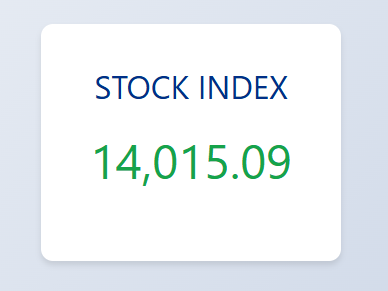
Y visite la página web en http://localhost:7071/api/index.
Pasos siguientes
A continuación, puede intentar usar Bicep para implementar la aplicación en línea con la autenticación basada en identidad: