SE APLICA A: Extensión ml de la CLI de Azure v2 (actual)SDK de Python azure-ai-ml v2 (actual)
En este artículo, aprenderá a conectarse a los servicios de almacenamiento de datos de Azure mediante almacenes de datos de Azure Machine Learning.
Requisitos previos
Sugerencia
Los ejemplos de código del SDK de Python de este artículo usan MLClient.from_config(), que requiere un config.json archivo en el directorio actual o en un directorio primario. Descargue este archivo desde Azure Portal: vaya al área de trabajo y seleccione Información general>Descargar config.json. Como alternativa, puede crear manualmente MLClient :
ml_client = MLClient(
    credential=DefaultAzureCredential(),
    subscription_id="<your-subscription-id>",
    resource_group_name="<your-resource-group>",
    workspace_name="<your-workspace-name>",
)
Nota:
Los almacenes de datos de Machine Learning no crean los recursos de la cuenta de almacenamiento subyacentes. En su lugar, vinculan una cuenta de almacenamiento existente para el uso de Machine Learning.
Cada tipo de almacén de datos (Azure Blob, ADLS Gen2, Azure Files, OneLake) se crea de forma independiente. El orden de las secciones de este artículo no representa una secuencia de pasos necesaria.
Creación de un almacén de datos de Azure Blob
from azure.ai.ml.entities import AzureBlobDatastore
from azure.ai.ml import MLClient
from azure.identity import DefaultAzureCredential

ml_client = MLClient.from_config(credential=DefaultAzureCredential())

store = AzureBlobDatastore(
    name="",
    description="",
    account_name="",
    container_name=""
)

ml_client.create_or_update(store)
from azure.ai.ml.entities import AzureBlobDatastore
from azure.ai.ml.entities import AccountKeyConfiguration
from azure.ai.ml import MLClient
from azure.identity import DefaultAzureCredential

ml_client = MLClient.from_config(credential=DefaultAzureCredential())

store = AzureBlobDatastore(
    name="blob_protocol_example",
    description="Datastore pointing to a blob container using https protocol.",
    account_name="mytestblobstore",
    container_name="data-container",
    protocol="https",
    credentials=AccountKeyConfiguration(
        account_key="aaaaaaaa-0b0b-1c1c-2d2d-333333333333"
    ),
)

ml_client.create_or_update(store)
from azure.ai.ml.entities import AzureBlobDatastore
from azure.ai.ml.entities import SasTokenConfiguration
from azure.ai.ml import MLClient
from azure.identity import DefaultAzureCredential

ml_client = MLClient.from_config(credential=DefaultAzureCredential())

store = AzureBlobDatastore(
    name="blob_sas_example",
    description="Datastore pointing to a blob container using SAS token.",
    account_name="mytestblobstore",
    container_name="data-container",
    credentials=SasTokenConfiguration(
        sas_token= "?xx=A1bC2dE3fH4iJ5kL6mN7oP8qR9sT0u&xx=C2dE3fH4iJ5kL6mN7oP8qR9sT0uV1wx&xx=Ff6Gg~7Hh8.-Ii9Jj0Kk1Ll2Mm3Nn4_Oo5Pp6Qq7&xx=N7oP8qR9sT0uV1wX2yZ3aB4cD5eF6g&xxx=Ee5Ff~6Gg7.-Hh8Ii9Jj0Kk1Ll2Mm3_Nn4Oo5Pp6&xxx=C2dE3fH4iJ5kL6mN7oP8qR9sT0uV1w"
    ),
)

ml_client.create_or_update(store)
Cree el siguiente archivo YAML (actualice los valores adecuados):
# my_blob_datastore.yml
$schema: https://azuremlschemas.azureedge.net/latest/azureBlob.schema.json
name: my_blob_ds # add your datastore name here
type: azure_blob
description: here is a description # add a datastore description here
account_name: my_account_name # add the storage account name here
container_name: my_container_name # add the storage container name here
Cree el almacén de datos de Machine Learning en la CLI de Azure:
az ml datastore create --file my_blob_datastore.yml
Cree este archivo YAML (actualice los valores adecuados):
# my_blob_datastore.yml
$schema: https://azuremlschemas.azureedge.net/latest/azureBlob.schema.json
name: blob_example
type: azure_blob
description: Datastore pointing to a blob container.
account_name: mytestblobstore
container_name: data-container
credentials:
  account_key: aaaaaaaa-0b0b-1c1c-2d2d-333333333333
Cree el almacén de datos de Machine Learning en la CLI:
az ml datastore create --file my_blob_datastore.yml
Cree este archivo YAML (actualice los valores adecuados):
# my_blob_datastore.yml
$schema: https://azuremlschemas.azureedge.net/latest/azureBlob.schema.json
name: blob_sas_example
type: azure_blob
description: Datastore pointing to a blob container using SAS token.
account_name: mytestblobstore
container_name: data-container
credentials:
  sas_token: "?xx=A1bC2dE3fH4iJ5kL6mN7oP8qR9sT0u&xx=C2dE3fH4iJ5kL6mN7oP8qR9sT0uV1wx&xx=Ff6Gg~7Hh8.-Ii9Jj0Kk1Ll2Mm3Nn4_Oo5Pp6Qq7&xx=N7oP8qR9sT0uV1wX2yZ3aB4cD5eF6g&xxx=Ee5Ff~6Gg7.-Hh8Ii9Jj0Kk1Ll2Mm3_Nn4Oo5Pp6&xxx=C2dE3fH4iJ5kL6mN7oP8qR9sT0uV1w"
Cree el almacén de datos de Machine Learning en la CLI:
az ml datastore create --file my_blob_datastore.yml
Creación de un almacén de datos de Azure Data Lake Storage Gen2
from azure.ai.ml.entities import AzureDataLakeGen2Datastore
from azure.ai.ml import MLClient
from azure.identity import DefaultAzureCredential

ml_client = MLClient.from_config(credential=DefaultAzureCredential())

store = AzureDataLakeGen2Datastore(
    name="",
    description="",
    account_name="",
    filesystem=""
)

ml_client.create_or_update(store)
from azure.ai.ml.entities import AzureDataLakeGen2Datastore
from azure.ai.ml.entities._datastore.credentials import ServicePrincipalCredentials

from azure.ai.ml import MLClient
from azure.identity import DefaultAzureCredential

ml_client = MLClient.from_config(credential=DefaultAzureCredential())

store = AzureDataLakeGen2Datastore(
    name="adls_gen2_example",
    description="Datastore pointing to an Azure Data Lake Storage Gen2.",
    account_name="mytestdatalakegen2",
    filesystem="my-gen2-container",
     credentials=ServicePrincipalCredentials(
        tenant_id= "bbbbcccc-1111-dddd-2222-eeee3333ffff",
        client_id= "44445555-eeee-6666-ffff-7777aaaa8888",
        client_secret= "Cc3Dd~4Ee5.-Ff6Gg7Hh8Ii9Jj0Kk1_Ll2Mm3Nn4",
    ),
)

ml_client.create_or_update(store)
Cree este archivo YAML (actualice los valores):
# my_adls_datastore.yml
$schema: https://azuremlschemas.azureedge.net/latest/azureDataLakeGen2.schema.json
name: adls_gen2_credless_example
type: azure_data_lake_gen2
description: Credential-less datastore pointing to an Azure Data Lake Storage Gen2 instance.
account_name: mytestdatalakegen2
filesystem: my-gen2-container
Cree el almacén de datos de Machine Learning en la CLI:
az ml datastore create --file my_adls_datastore.yml
Cree este archivo YAML (actualice los valores):
# my_adls_datastore.yml
$schema: https://azuremlschemas.azureedge.net/latest/azureDataLakeGen2.schema.json
name: adls_gen2_example
type: azure_data_lake_gen2
description: Datastore pointing to an Azure Data Lake Storage Gen2 instance.
account_name: mytestdatalakegen2
filesystem: my-gen2-container
credentials:
  tenant_id: bbbbcccc-1111-dddd-2222-eeee3333ffff
  client_id: 44445555-eeee-6666-ffff-7777aaaa8888
  client_secret: Cc3Dd~4Ee5.-Ff6Gg7Hh8Ii9Jj0Kk1_Ll2Mm3Nn4
Cree el almacén de datos de Machine Learning en la CLI:
az ml datastore create --file my_adls_datastore.yml
Creación de un almacén de datos de Azure Files
from azure.ai.ml.entities import AzureFileDatastore
from azure.ai.ml.entities import AccountKeyConfiguration
from azure.ai.ml import MLClient
from azure.identity import DefaultAzureCredential

ml_client = MLClient.from_config(credential=DefaultAzureCredential())

store = AzureFileDatastore(
    name="file_example",
    description="Datastore pointing to an Azure File Share.",
    account_name="mytestfilestore",
    file_share_name="my-share",
    credentials=AccountKeyConfiguration(
        account_key= "aaaaaaaa-0b0b-1c1c-2d2d-333333333333"
    ),
)

ml_client.create_or_update(store)
from azure.ai.ml.entities import AzureFileDatastore
from azure.ai.ml.entities import SasTokenConfiguration
from azure.ai.ml import MLClient
from azure.identity import DefaultAzureCredential

ml_client = MLClient.from_config(credential=DefaultAzureCredential())

store = AzureFileDatastore(
    name="file_sas_example",
    description="Datastore pointing to an Azure File Share using SAS token.",
    account_name="mytestfilestore",
    file_share_name="my-share",
    credentials=SasTokenConfiguration(
        sas_token="?xx=A1bC2dE3fH4iJ5kL6mN7oP8qR9sT0u&xx=C2dE3fH4iJ5kL6mN7oP8qR9sT0uV1wx&xx=Ff6Gg~7Hh8.-Ii9Jj0Kk1Ll2Mm3Nn4_Oo5Pp6Qq7&xx=N7oP8qR9sT0uV1wX2yZ3aB4cD5eF6g&xxx=Ee5Ff~6Gg7.-Hh8Ii9Jj0Kk1Ll2Mm3_Nn4Oo5Pp6&xxx=C2dE3fH4iJ5kL6mN7oP8qR9sT0uV1w"
    ),
)

ml_client.create_or_update(store)
Cree este archivo YAML (actualice los valores):
# my_files_datastore.yml
$schema: https://azuremlschemas.azureedge.net/latest/azureFile.schema.json
name: file_example
type: azure_file
description: Datastore pointing to an Azure File Share.
account_name: mytestfilestore
file_share_name: my-share
credentials:
  account_key: aaaaaaaa-0b0b-1c1c-2d2d-333333333333
Cree el almacén de datos de Machine Learning en la CLI:
az ml datastore create --file my_files_datastore.yml
Cree este archivo YAML (actualice los valores):
# my_files_datastore.yml
$schema: https://azuremlschemas.azureedge.net/latest/azureFile.schema.json
name: file_sas_example
type: azure_file
description: Datastore pointing to an Azure File Share using a SAS token.
account_name: mytestfilestore
file_share_name: my-share
credentials:
  sas_token: "?xx=A1bC2dE3fH4iJ5kL6mN7oP8qR9sT0u&xx=C2dE3fH4iJ5kL6mN7oP8qR9sT0uV1wx&xx=Ff6Gg~7Hh8.-Ii9Jj0Kk1Ll2Mm3Nn4_Oo5Pp6Qq7&xx=N7oP8qR9sT0uV1wX2yZ3aB4cD5eF6g&xxx=Ee5Ff~6Gg7.-Hh8Ii9Jj0Kk1Ll2Mm3_Nn4Oo5Pp6&xxx=C2dE3fH4iJ5kL6mN7oP8qR9sT0uV1w"
Cree el almacén de datos de Machine Learning en la CLI:
az ml datastore create --file my_files_datastore.yml
Creación de un almacén de datos de Azure Data Lake Storage Gen1
Importante
Azure Data Lake Storage Gen1 se retiró el 29 de febrero de 2024. Ya no se puede crear nuevas cuentas de Gen1 y ya no se puede acceder a los recursos existentes de Gen1. Solo se proporciona el siguiente contenido para referencia. En el caso de los nuevos almacenes de datos, use Azure Data Lake Storage Gen2 en su lugar. Para más información sobre la migración de datos existentes, consulte Migración de Azure Data Lake Storage de Gen1 a Gen2.
from azure.ai.ml.entities import AzureDataLakeGen1Datastore
from azure.ai.ml import MLClient
from azure.identity import DefaultAzureCredential

ml_client = MLClient.from_config(credential=DefaultAzureCredential())

store = AzureDataLakeGen1Datastore(
    name="",
    store_name="",
    description="",
)

ml_client.create_or_update(store)
from azure.ai.ml.entities import AzureDataLakeGen1Datastore
from azure.ai.ml.entities._datastore.credentials import ServicePrincipalCredentials
from azure.ai.ml import MLClient
from azure.identity import DefaultAzureCredential

ml_client = MLClient.from_config(credential=DefaultAzureCredential())

store = AzureDataLakeGen1Datastore(
    name="adls_gen1_example",
    description="Datastore pointing to an Azure Data Lake Storage Gen1.",
    store_name="mytestdatalakegen1",
    credentials=ServicePrincipalCredentials(
        tenant_id= "bbbbcccc-1111-dddd-2222-eeee3333ffff",
        client_id= "44445555-eeee-6666-ffff-7777aaaa8888",
        client_secret= "Cc3Dd~4Ee5.-Ff6Gg7Hh8Ii9Jj0Kk1_Ll2Mm3Nn4",
    ),
)

ml_client.create_or_update(store)
Cree este archivo YAML (actualice los valores):
# my_adls_datastore.yml
$schema: https://azuremlschemas.azureedge.net/latest/azureDataLakeGen1.schema.json
name: alds_gen1_credless_example
type: azure_data_lake_gen1
description: Credential-less datastore pointing to an Azure Data Lake Storage Gen1 instance.
store_name: mytestdatalakegen1
Cree el almacén de datos de Machine Learning en la CLI:
az ml datastore create --file my_adls_datastore.yml
Cree este archivo YAML (actualice los valores):
# my_adls_datastore.yml
$schema: https://azuremlschemas.azureedge.net/latest/azureDataLakeGen1.schema.json
name: adls_gen1_example
type: azure_data_lake_gen1
description: Datastore pointing to an Azure Data Lake Storage Gen1 instance.
store_name: mytestdatalakegen1
credentials:
  tenant_id: bbbbcccc-1111-dddd-2222-eeee3333ffff
  client_id: 44445555-eeee-6666-ffff-7777aaaa8888
  client_secret: Cc3Dd~4Ee5.-Ff6Gg7Hh8Ii9Jj0Kk1_Ll2Mm3Nn4
Cree el almacén de datos de Machine Learning en la CLI:
az ml datastore create --file my_adls_datastore.yml
Creación de un almacén de datos de OneLake (Microsoft Fabric) (versión preliminar)
En esta sección se describen varias opciones para crear un almacén de datos de OneLake. El almacén de datos OneLake forma parte de Microsoft Fabric. En este momento, Machine Learning admite la conexión a artefactos de Microsoft Fabric Lakehouse en la carpeta «Files», que incluyen carpetas o archivos y accesos directos de Amazon S3. Para obtener más información sobre lakehouses, consulte ¿Qué es un lago en Microsoft Fabric?.
La creación del almacén de datos OneLake requiere la siguiente información de la instancia de Microsoft Fabric:
- Punto de conexión
- GUID del área de trabajo
- GUID de artefacto
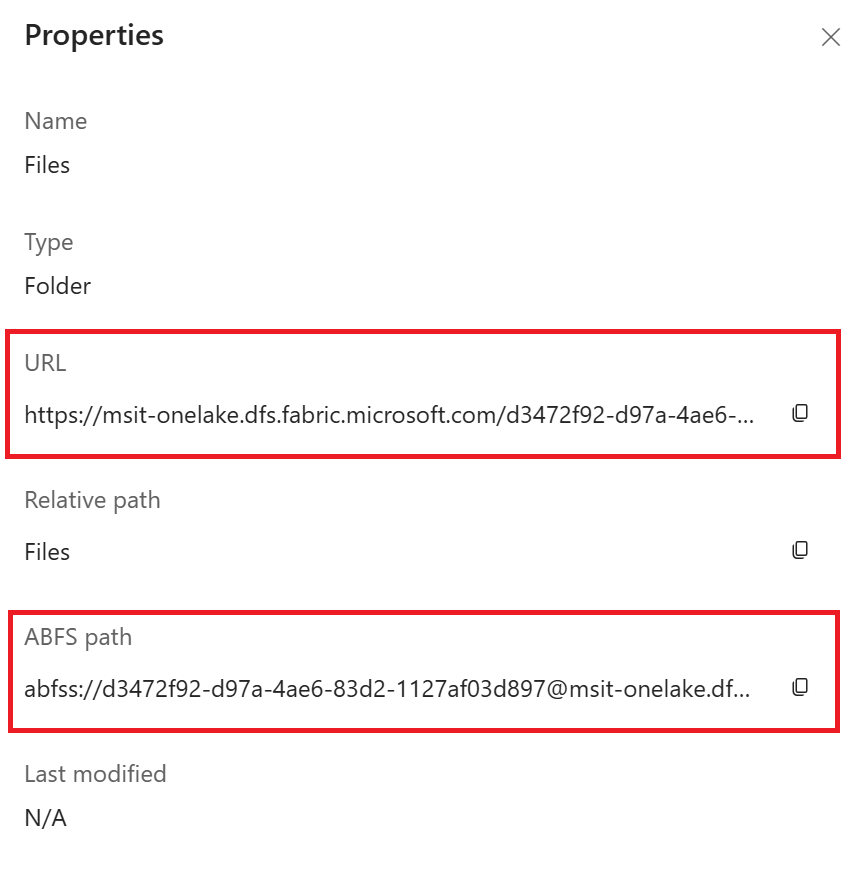
En las capturas de pantalla siguientes se describe cómo recuperar estos recursos de información necesarios de la instancia de Microsoft Fabric.

Puede encontrar el "Punto de conexión", "GUID del área de trabajo" y "GUID del artefacto" en la "URL" y la "ruta de acceso ABFS" desde la página "Propiedades":
-
Formato de dirección URL: https://{your_one_lake_endpoint}/{your_one_lake_workspace_guid}/{your_one_lake_artifact_guid}/Files
-
Formato de ruta de acceso de ABFS: abfss://{your_one_lake_workspace_guid}@{your_one_lake_endpoint}/{your_one_lake_artifact_guid}/Files
Creación de un almacén de datos de OneLake
from azure.ai.ml.entities import OneLakeDatastore, OneLakeArtifact
from azure.ai.ml import MLClient
from azure.identity import DefaultAzureCredential

ml_client = MLClient.from_config(credential=DefaultAzureCredential())

store = OneLakeDatastore(
    name="onelake_example_id",
    description="Datastore pointing to a Microsoft fabric artifact.",
    one_lake_workspace_name="bbbbbbbb-7777-8888-9999-cccccccccccc", #{your_one_lake_workspace_guid}
    endpoint="msit-onelake.dfs.fabric.microsoft.com", #{your_one_lake_endpoint}
    artifact=OneLakeArtifact(
        name="cccccccc-8888-9999-0000-dddddddddddd/Files", #{your_one_lake_artifact_guid}/Files
        type="lake_house"
    )
)

ml_client.create_or_update(store)
from azure.ai.ml.entities import OneLakeDatastore, OneLakeArtifact
from azure.ai.ml.entities._datastore.credentials import ServicePrincipalCredentials
from azure.ai.ml import MLClient
from azure.identity import DefaultAzureCredential

ml_client = MLClient.from_config(credential=DefaultAzureCredential())

store = OneLakeDatastore(
    name="onelake_example_sp",
    description="Datastore pointing to a Microsoft fabric artifact.",
    one_lake_workspace_name="bbbbbbbb-7777-8888-9999-cccccccccccc", #{your_one_lake_workspace_guid}
    endpoint="msit-onelake.dfs.fabric.microsoft.com", #{your_one_lake_endpoint}
    artifact=OneLakeArtifact(
        name="cccccccc-8888-9999-0000-dddddddddddd/Files", #{your_one_lake_artifact_guid}/Files
        type="lake_house"
    ),
    credentials=ServicePrincipalCredentials(
        tenant_id= "bbbbcccc-1111-dddd-2222-eeee3333ffff",
        client_id= "44445555-eeee-6666-ffff-7777aaaa8888",
        client_secret= "Cc3Dd~4Ee5.-Ff6Gg7Hh8Ii9Jj0Kk1_Ll2Mm3Nn4",
    ),
)

ml_client.create_or_update(store)
Cree el siguiente archivo YAML. Actualice los valores:
# my_onelake_datastore.yml
$schema: http://azureml/sdk-2-0/OneLakeDatastore.json
name: onelake_example_id
type: one_lake
description: Credential-less datastore pointing to a OneLake lakehouse.
one_lake_workspace_name: "eeeeffff-4444-aaaa-5555-bbbb6666cccc"
endpoint: "msit-onelake.dfs.fabric.microsoft.com"
artifact:
  type: lake_house
  name: "1111bbbb-22cc-dddd-ee33-ffffff444444/Files"
Cree el almacén de datos de Machine Learning en la CLI:
az ml datastore create --file my_onelake_datastore.yml
Cree el siguiente archivo YAML. Actualice los valores:
# my_onelakesp_datastore.yml
$schema: http://azureml/sdk-2-0/OneLakeDatastore.json
name: onelake_example_id
type: one_lake
description: Credential-less datastore pointing to a OneLake lakehouse.
one_lake_workspace_name: "eeeeffff-4444-aaaa-5555-bbbb6666cccc"
endpoint: "msit-onelake.dfs.fabric.microsoft.com"
artifact:
  type: lake_house
  name: "1111bbbb-22cc-dddd-ee33-ffffff444444/Files"
credentials:
  tenant_id: bbbbcccc-1111-dddd-2222-eeee3333ffff
  client_id: 44445555-eeee-6666-ffff-7777aaaa8888
  client_secret: Cc3Dd~4Ee5.-Ff6Gg7Hh8Ii9Jj0Kk1_Ll2Mm3Nn4
Cree el almacén de datos de Machine Learning en la CLI:
az ml datastore create --file my_onelakesp_datastore.yml
Pasos siguientes

