En este tutorial se ofrecen instrucciones paso a paso para automatizar las tareas de mover empleados mediante las API de flujos de trabajo de ciclo de vida en Microsoft Graph.
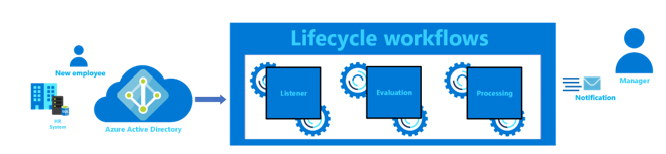
En este tutorial, aprenderá a:
- Configure un flujo de trabajo de ciclo de vida para comprobar si los empleados se trasladan a un nuevo departamento.
- Configure una tarea para notificar al administrador de los usuarios movidos por correo electrónico.
- Supervise el estado del flujo de trabajo y sus tareas asociadas.
Requisitos previos
Para completar este tutorial, necesita los siguientes recursos y privilegios:
Esta característica requiere licencias de Gobierno de Microsoft Entra ID. Para encontrar la licencia adecuada para sus requisitos, consulte Gobierno de Microsoft Entra ID aspectos básicos de las licencias.
Inicie sesión en un cliente de API, como Graph Explorer, para llamar a Microsoft Graph con una cuenta que tenga al menos el rol Microsoft Entra administrador del ciclo de vida.
Concédete el permiso delegado LifecycleWorkflows.ReadWrite.All de Microsoft Graph.
Cree dos cuentas de usuario para usarlas en este tutorial: una para el empleado y otra para su administrador y tenga la siguiente configuración configurada según corresponda.
| User (propiedad) |
Descripción |
Azuzar |
| mail |
Notifica al administrador que el empleado se ha movido al departamento. Tanto el administrador como el empleado deben tener buzones activos para recibir correos electrónicos. |
Empleado, Administrador |
| manager |
La tarea de flujo de trabajo usa este atributo. |
Empleado |
Creación de un flujo de trabajo de mover
Solicitud
La siguiente solicitud crea un flujo de trabajo de mover con la siguiente configuración:
- Se ejecuta según la programación, pero también se puede ejecutar a petición.
- El flujo de trabajo se ejecuta cuando se agrega un empleado al departamento de ventas .
- Solo se ejecuta una tarea integrada en este flujo de trabajo: para enviar un correo electrónico al administrador del empleado que le notifica el traslado. Esta tarea se identifica en los flujos de trabajo del ciclo de vida mediante taskDefinitionId
aab41899-9972-422a-9d97-f626014578b7.
POST https://graph.microsoft.com/v1.0/identityGovernance/lifecycleWorkflows/workflows
Content-type: application/json

{
    "category": "mover",
    "description": "Configure mover tasks for a user moved to the Sales department.",
    "displayName": "Added to Sales department workflow",
    "isEnabled": true,
    "isSchedulingEnabled": true,
    "executionConditions": {
        "@odata.type": "#microsoft.graph.identityGovernance.triggerAndScopeBasedConditions",
        "scope": {
            "@odata.type": "#microsoft.graph.identityGovernance.ruleBasedSubjectSet",
            "rule": "(department eq 'Sales')"
        },
        "trigger": {
            "@odata.type": "#microsoft.graph.identityGovernance.attributeChangeTrigger",
            "triggerAttributes": [
                {
                    "name": "department"
                }
            ]
        }
    },
    "tasks": [
        {
            "continueOnError": false,
            "description": "Send email to moving employee's manager",
            "displayName": "Notify manager of move",
            "isEnabled": true,
            "taskDefinitionId": "aab41899-9972-422a-9d97-f626014578b7",
            "arguments": []
        }
    ]
}
// Code snippets are only available for the latest version. Current version is 5.x

// Dependencies
using Microsoft.Graph.Models.IdentityGovernance;
using Microsoft.Graph.Models;

var requestBody = new Workflow
{
	Category = LifecycleWorkflowCategory.Mover,
	Description = "Configure mover tasks for a user moved to the Sales department.",
	DisplayName = "Added to Sales department workflow",
	IsEnabled = true,
	IsSchedulingEnabled = true,
	ExecutionConditions = new TriggerAndScopeBasedConditions
	{
		OdataType = "#microsoft.graph.identityGovernance.triggerAndScopeBasedConditions",
		Scope = new RuleBasedSubjectSet
		{
			OdataType = "#microsoft.graph.identityGovernance.ruleBasedSubjectSet",
			Rule = "(department eq 'Sales')",
		},
		Trigger = new AttributeChangeTrigger
		{
			OdataType = "#microsoft.graph.identityGovernance.attributeChangeTrigger",
			TriggerAttributes = new List<TriggerAttribute>
			{
				new TriggerAttribute
				{
					Name = "department",
				},
			},
		},
	},
	Tasks = new List<TaskObject>
	{
		new TaskObject
		{
			ContinueOnError = false,
			Description = "Send email to moving employee's manager",
			DisplayName = "Notify manager of move",
			IsEnabled = true,
			TaskDefinitionId = "aab41899-9972-422a-9d97-f626014578b7",
			Arguments = new List<KeyValuePair>
			{
			},
		},
	},
};

// To initialize your graphClient, see https://learn.microsoft.com/en-us/graph/sdks/create-client?from=snippets&tabs=csharp
var result = await graphClient.IdentityGovernance.LifecycleWorkflows.Workflows.PostAsync(requestBody);
Lea la documentación del SDK para obtener más información sobre cómo agregar el SDK al proyecto y crear una instancia de authProvider .
// Code snippets are only available for the latest major version. Current major version is $v1.*

// Dependencies
import (
	  "context"
	  msgraphsdk "github.com/microsoftgraph/msgraph-sdk-go"
	  graphmodelsidentitygovernance "github.com/microsoftgraph/msgraph-sdk-go/models/identitygovernance"
	  graphmodels "github.com/microsoftgraph/msgraph-sdk-go/models"
	  //other-imports
)

requestBody := graphmodelsidentitygovernance.NewWorkflow()
category := graphmodels.MOVER_LIFECYCLEWORKFLOWCATEGORY
requestBody.SetCategory(&category)
description := "Configure mover tasks for a user moved to the Sales department."
requestBody.SetDescription(&description)
displayName := "Added to Sales department workflow"
requestBody.SetDisplayName(&displayName)
isEnabled := true
requestBody.SetIsEnabled(&isEnabled)
isSchedulingEnabled := true
requestBody.SetIsSchedulingEnabled(&isSchedulingEnabled)
executionConditions := graphmodelsidentitygovernance.NewTriggerAndScopeBasedConditions()
scope := graphmodelsidentitygovernance.NewRuleBasedSubjectSet()
rule := "(department eq 'Sales')"
scope.SetRule(&rule)
executionConditions.SetScope(scope)
trigger := graphmodelsidentitygovernance.NewAttributeChangeTrigger()


triggerAttribute := graphmodelsidentitygovernance.NewTriggerAttribute()
name := "department"
triggerAttribute.SetName(&name)

triggerAttributes := []graphmodelsidentitygovernance.TriggerAttributeable {
	triggerAttribute,
}
trigger.SetTriggerAttributes(triggerAttributes)
executionConditions.SetTrigger(trigger)
requestBody.SetExecutionConditions(executionConditions)


task := graphmodelsidentitygovernance.NewTask()
continueOnError := false
task.SetContinueOnError(&continueOnError)
description := "Send email to moving employee's manager"
task.SetDescription(&description)
displayName := "Notify manager of move"
task.SetDisplayName(&displayName)
isEnabled := true
task.SetIsEnabled(&isEnabled)
taskDefinitionId := "aab41899-9972-422a-9d97-f626014578b7"
task.SetTaskDefinitionId(&taskDefinitionId)
arguments := []graphmodels.KeyValuePairable {

}
task.SetArguments(arguments)

tasks := []graphmodelsidentitygovernance.Taskable {
	task,
}
requestBody.SetTasks(tasks)

// To initialize your graphClient, see https://learn.microsoft.com/en-us/graph/sdks/create-client?from=snippets&tabs=go
workflows, err := graphClient.IdentityGovernance().LifecycleWorkflows().Workflows().Post(context.Background(), requestBody, nil)
Lea la documentación del SDK para obtener más información sobre cómo agregar el SDK al proyecto y crear una instancia de authProvider .
// Code snippets are only available for the latest version. Current version is 6.x

GraphServiceClient graphClient = new GraphServiceClient(requestAdapter);

com.microsoft.graph.models.identitygovernance.Workflow workflow = new com.microsoft.graph.models.identitygovernance.Workflow();
workflow.setCategory(com.microsoft.graph.models.identitygovernance.LifecycleWorkflowCategory.Mover);
workflow.setDescription("Configure mover tasks for a user moved to the Sales department.");
workflow.setDisplayName("Added to Sales department workflow");
workflow.setIsEnabled(true);
workflow.setIsSchedulingEnabled(true);
com.microsoft.graph.models.identitygovernance.TriggerAndScopeBasedConditions executionConditions = new com.microsoft.graph.models.identitygovernance.TriggerAndScopeBasedConditions();
executionConditions.setOdataType("#microsoft.graph.identityGovernance.triggerAndScopeBasedConditions");
com.microsoft.graph.models.identitygovernance.RuleBasedSubjectSet scope = new com.microsoft.graph.models.identitygovernance.RuleBasedSubjectSet();
scope.setOdataType("#microsoft.graph.identityGovernance.ruleBasedSubjectSet");
scope.setRule("(department eq 'Sales')");
executionConditions.setScope(scope);
com.microsoft.graph.models.identitygovernance.AttributeChangeTrigger trigger = new com.microsoft.graph.models.identitygovernance.AttributeChangeTrigger();
trigger.setOdataType("#microsoft.graph.identityGovernance.attributeChangeTrigger");
LinkedList<com.microsoft.graph.models.identitygovernance.TriggerAttribute> triggerAttributes = new LinkedList<com.microsoft.graph.models.identitygovernance.TriggerAttribute>();
com.microsoft.graph.models.identitygovernance.TriggerAttribute triggerAttribute = new com.microsoft.graph.models.identitygovernance.TriggerAttribute();
triggerAttribute.setName("department");
triggerAttributes.add(triggerAttribute);
trigger.setTriggerAttributes(triggerAttributes);
executionConditions.setTrigger(trigger);
workflow.setExecutionConditions(executionConditions);
LinkedList<com.microsoft.graph.models.identitygovernance.Task> tasks = new LinkedList<com.microsoft.graph.models.identitygovernance.Task>();
com.microsoft.graph.models.identitygovernance.Task task = new com.microsoft.graph.models.identitygovernance.Task();
task.setContinueOnError(false);
task.setDescription("Send email to moving employee's manager");
task.setDisplayName("Notify manager of move");
task.setIsEnabled(true);
task.setTaskDefinitionId("aab41899-9972-422a-9d97-f626014578b7");
LinkedList<KeyValuePair> arguments = new LinkedList<KeyValuePair>();
task.setArguments(arguments);
tasks.add(task);
workflow.setTasks(tasks);
com.microsoft.graph.models.identitygovernance.Workflow result = graphClient.identityGovernance().lifecycleWorkflows().workflows().post(workflow);
Lea la documentación del SDK para obtener más información sobre cómo agregar el SDK al proyecto y crear una instancia de authProvider .
const options = {
	authProvider,
};

const client = Client.init(options);

const workflow = {
    category: 'mover',
    description: 'Configure mover tasks for a user moved to the Sales department.',
    displayName: 'Added to Sales department workflow',
    isEnabled: true,
    isSchedulingEnabled: true,
    executionConditions: {
        '@odata.type': '#microsoft.graph.identityGovernance.triggerAndScopeBasedConditions',
        scope: {
            '@odata.type': '#microsoft.graph.identityGovernance.ruleBasedSubjectSet',
            rule: '(department eq \'Sales\')'
        },
        trigger: {
            '@odata.type': '#microsoft.graph.identityGovernance.attributeChangeTrigger',
            triggerAttributes: [
                {
                    name: 'department'
                }
            ]
        }
    },
    tasks: [
        {
            continueOnError: false,
            description: 'Send email to moving employee\'s manager',
            displayName: 'Notify manager of move',
            isEnabled: true,
            taskDefinitionId: 'aab41899-9972-422a-9d97-f626014578b7',
            arguments: []
        }
    ]
};

await client.api('/identityGovernance/lifecycleWorkflows/workflows')
	.post(workflow);
Lea la documentación del SDK para obtener más información sobre cómo agregar el SDK al proyecto y crear una instancia de authProvider .
<?php
use Microsoft\Graph\GraphServiceClient;
use Microsoft\Graph\Generated\Models\IdentityGovernance\Workflow;
use Microsoft\Graph\Generated\Models\IdentityGovernance\LifecycleWorkflowCategory;
use Microsoft\Graph\Generated\Models\IdentityGovernance\TriggerAndScopeBasedConditions;
use Microsoft\Graph\Generated\Models\IdentityGovernance\RuleBasedSubjectSet;
use Microsoft\Graph\Generated\Models\IdentityGovernance\AttributeChangeTrigger;
use Microsoft\Graph\Generated\Models\IdentityGovernance\TriggerAttribute;
use Microsoft\Graph\Generated\Models\IdentityGovernance\Task;
use Microsoft\Graph\Generated\Models\KeyValuePair;


$graphServiceClient = new GraphServiceClient($tokenRequestContext, $scopes);

$requestBody = new Workflow();
$requestBody->setCategory(new LifecycleWorkflowCategory('mover'));
$requestBody->setDescription('Configure mover tasks for a user moved to the Sales department.');
$requestBody->setDisplayName('Added to Sales department workflow');
$requestBody->setIsEnabled(true);
$requestBody->setIsSchedulingEnabled(true);
$executionConditions = new TriggerAndScopeBasedConditions();
$executionConditions->setOdataType('#microsoft.graph.identityGovernance.triggerAndScopeBasedConditions');
$executionConditionsScope = new RuleBasedSubjectSet();
$executionConditionsScope->setOdataType('#microsoft.graph.identityGovernance.ruleBasedSubjectSet');
$executionConditionsScope->setRule('(department eq \'Sales\')');
$executionConditions->setScope($executionConditionsScope);
$executionConditionsTrigger = new AttributeChangeTrigger();
$executionConditionsTrigger->setOdataType('#microsoft.graph.identityGovernance.attributeChangeTrigger');
$triggerAttributesTriggerAttribute1 = new TriggerAttribute();
$triggerAttributesTriggerAttribute1->setName('department');
$triggerAttributesArray []= $triggerAttributesTriggerAttribute1;
$executionConditionsTrigger->setTriggerAttributes($triggerAttributesArray);

$executionConditions->setTrigger($executionConditionsTrigger);
$requestBody->setExecutionConditions($executionConditions);
$tasksTask1 = new Task();
$tasksTask1->setContinueOnError(false);
$tasksTask1->setDescription('Send email to moving employee\'s manager');
$tasksTask1->setDisplayName('Notify manager of move');
$tasksTask1->setIsEnabled(true);
$tasksTask1->setTaskDefinitionId('aab41899-9972-422a-9d97-f626014578b7');
$tasksTask1->setArguments([]);
$tasksArray []= $tasksTask1;
$requestBody->setTasks($tasksArray);


$result = $graphServiceClient->identityGovernance()->lifecycleWorkflows()->workflows()->post($requestBody)->wait();
Lea la documentación del SDK para obtener más información sobre cómo agregar el SDK al proyecto y crear una instancia de authProvider .
Import-Module Microsoft.Graph.Identity.Governance

$params = @{
	category = "mover"
	description = "Configure mover tasks for a user moved to the Sales department."
	displayName = "Added to Sales department workflow"
	isEnabled = $true
	isSchedulingEnabled = $true
	executionConditions = @{
		"@odata.type" = "#microsoft.graph.identityGovernance.triggerAndScopeBasedConditions"
		scope = @{
			"@odata.type" = "#microsoft.graph.identityGovernance.ruleBasedSubjectSet"
			rule = "(department eq 'Sales')"
		}
		trigger = @{
			"@odata.type" = "#microsoft.graph.identityGovernance.attributeChangeTrigger"
			triggerAttributes = @(
				@{
					name = "department"
				}
			)
		}
	}
	tasks = @(
		@{
			continueOnError = $false
			description = "Send email to moving employee's manager"
			displayName = "Notify manager of move"
			isEnabled = $true
			taskDefinitionId = "aab41899-9972-422a-9d97-f626014578b7"
			arguments = @(
			)
		}
	)
}

New-MgIdentityGovernanceLifecycleWorkflow -BodyParameter $params
Lea la documentación del SDK para obtener más información sobre cómo agregar el SDK al proyecto y crear una instancia de authProvider .
# Code snippets are only available for the latest version. Current version is 1.x
from msgraph import GraphServiceClient
from msgraph.generated.models.identity_governance.workflow import Workflow
from msgraph.generated.models.lifecycle_workflow_category import LifecycleWorkflowCategory
from msgraph.generated.models.identity_governance.trigger_and_scope_based_conditions import TriggerAndScopeBasedConditions
from msgraph.generated.models.identity_governance.rule_based_subject_set import RuleBasedSubjectSet
from msgraph.generated.models.identity_governance.attribute_change_trigger import AttributeChangeTrigger
from msgraph.generated.models.identity_governance.trigger_attribute import TriggerAttribute
from msgraph.generated.models.identity_governance.task import Task
from msgraph.generated.models.key_value_pair import KeyValuePair
# To initialize your graph_client, see https://learn.microsoft.com/en-us/graph/sdks/create-client?from=snippets&tabs=python
request_body = Workflow(
	category = LifecycleWorkflowCategory.Mover,
	description = "Configure mover tasks for a user moved to the Sales department.",
	display_name = "Added to Sales department workflow",
	is_enabled = True,
	is_scheduling_enabled = True,
	execution_conditions = TriggerAndScopeBasedConditions(
		odata_type = "#microsoft.graph.identityGovernance.triggerAndScopeBasedConditions",
		scope = RuleBasedSubjectSet(
			odata_type = "#microsoft.graph.identityGovernance.ruleBasedSubjectSet",
			rule = "(department eq 'Sales')",
		),
		trigger = AttributeChangeTrigger(
			odata_type = "#microsoft.graph.identityGovernance.attributeChangeTrigger",
			trigger_attributes = [
				TriggerAttribute(
					name = "department",
				),
			],
		),
	),
	tasks = [
		Task(
			continue_on_error = False,
			description = "Send email to moving employee's manager",
			display_name = "Notify manager of move",
			is_enabled = True,
			task_definition_id = "aab41899-9972-422a-9d97-f626014578b7",
			arguments = [
			],
		),
	],
)

result = await graph_client.identity_governance.lifecycle_workflows.workflows.post(request_body)
Lea la documentación del SDK para obtener más información sobre cómo agregar el SDK al proyecto y crear una instancia de authProvider .
Respuesta
En el ejemplo siguiente se muestra la respuesta.
HTTP/1.1 201 Created
Content-Type: application/json

{
    "@odata.context": "https://graph.microsoft.com/v1.0/$metadata#identityGovernance/lifecycleWorkflows/workflows/$entity",
    "category": "mover",
    "description": "Configure mover tasks for a user moved to the Sales department.",
    "displayName": "Added to Sales department workflow",
    "isEnabled": true,
    "isSchedulingEnabled": true,
    "lastModifiedDateTime": "2024-03-28T12:46:10.0505943Z",
    "createdDateTime": "2024-03-28T12:46:10.0505809Z",
    "deletedDateTime": null,
    "id": "2bb05c85-556a-429a-8c16-16f6be5ef880",
    "nextScheduleRunDateTime": "2024-03-28T13:37:08Z",
    "version": 1,
    "executionConditions": {
        "@odata.type": "#microsoft.graph.identityGovernance.triggerAndScopeBasedConditions",
        "scope": {
            "@odata.type": "#microsoft.graph.identityGovernance.ruleBasedSubjectSet",
            "rule": "(department eq 'Sales')"
        },
        "trigger": {
            "@odata.type": "#microsoft.graph.identityGovernance.attributeChangeTrigger",
            "triggerAttributes": [
                {
                    "name": "department"
                }
            ]
        }
    }
}
Comprobación del ámbito del flujo de trabajo
Ahora que se crea el flujo de trabajo, tome nota del identificador de flujo de trabajo y agregue el usuario en el que desea probar el flujo de trabajo al departamento de ventas . Después de entre 15 y 30 minutos, puede determinar si el usuario está en cola para que el flujo de trabajo se ejecute para ellos comprobando el ámbito de ejecución del flujo de trabajo. Para determinar si un usuario está en cola para que se ejecute el flujo de trabajo para ellos, use la siguiente solicitud.
POST https://graph.microsoft.com/v1.0/identityGovernance/lifecycleWorkflows/workflows/2bb05c85-556a-429a-8c16-16f6be5ef880/executionScope
Respuesta
En el ejemplo siguiente se muestra la respuesta.
HTTP/1.1 200 OK
Content-Type: application/json

{
    "@odata.context": "https://graph.microsoft.com/v1.0/$metadata#Collection(microsoft.graph.identityGovernance.userProcessingResult)",
    "@microsoft.graph.tips": "Use $select to choose only the properties your app needs, as this can lead to performance improvements. For example: GET identityGovernance/lifecycleWorkflows/workflows('<guid>')/executionScope?$select=completedDateTime,failedTasksCount",
    "value": [
        {
            "id": "2bb05c85-556a-429a-8c16-16f6be5ef880_1_2bb05c85-556a-429a-8c16-16f6be5ef880_638472334281668424_6324d383-5034-49dc-a62d-30d61e01b613",
            "completedDateTime": null,
            "failedTasksCount": 0,
            "processingStatus": "queued",
            "scheduledDateTime": "2024-03-28T14:37:08.1668424Z",
            "startedDateTime": null,
            "totalTasksCount": 1,
            "totalUnprocessedTasksCount": 1,
            "workflowExecutionType": "scheduled",
            "workflowVersion": 1,
            "subject": {
                "id": "6324d383-5034-49dc-a62d-30d61e01b613"
            }
        }
    ]
}
Comprobación de las tareas y el estado del flujo de trabajo
En cualquier momento, puede supervisar el estado de los flujos de trabajo y sus tareas asociadas en tres niveles.
- Supervisión de tareas en el nivel de usuario.
- Supervise el resumen agregado de alto nivel de los resultados de nivel de usuario para un flujo de trabajo, dentro de un período especificado.
- Recupere el registro detallado de todas las tareas que se ejecutaron para un usuario específico en el flujo de trabajo.
Opción 1: Supervisar las tareas de un flujo de trabajo en el nivel de usuario
Solicitud
En el ejemplo siguiente se muestra la solicitud.
GET https://graph.microsoft.com/v1.0/identityGovernance/lifecycleWorkflows/workflows/2bb05c85-556a-429a-8c16-16f6be5ef880/userProcessingResults
// Code snippets are only available for the latest version. Current version is 5.x

// To initialize your graphClient, see https://learn.microsoft.com/en-us/graph/sdks/create-client?from=snippets&tabs=csharp
var result = await graphClient.IdentityGovernance.LifecycleWorkflows.Workflows["{workflow-id}"].UserProcessingResults.GetAsync();
Lea la documentación del SDK para obtener más información sobre cómo agregar el SDK al proyecto y crear una instancia de authProvider .
// Code snippets are only available for the latest major version. Current major version is $v1.*

// Dependencies
import (
	  "context"
	  msgraphsdk "github.com/microsoftgraph/msgraph-sdk-go"
	  //other-imports
)


// To initialize your graphClient, see https://learn.microsoft.com/en-us/graph/sdks/create-client?from=snippets&tabs=go
userProcessingResults, err := graphClient.IdentityGovernance().LifecycleWorkflows().Workflows().ByWorkflowId("workflow-id").UserProcessingResults().Get(context.Background(), nil)
Lea la documentación del SDK para obtener más información sobre cómo agregar el SDK al proyecto y crear una instancia de authProvider .
// Code snippets are only available for the latest version. Current version is 6.x

GraphServiceClient graphClient = new GraphServiceClient(requestAdapter);

com.microsoft.graph.models.identitygovernance.UserProcessingResultCollectionResponse result = graphClient.identityGovernance().lifecycleWorkflows().workflows().byWorkflowId("{workflow-id}").userProcessingResults().get();
Lea la documentación del SDK para obtener más información sobre cómo agregar el SDK al proyecto y crear una instancia de authProvider .
const options = {
	authProvider,
};

const client = Client.init(options);

let userProcessingResults = await client.api('/identityGovernance/lifecycleWorkflows/workflows/2bb05c85-556a-429a-8c16-16f6be5ef880/userProcessingResults')
	.get();
Lea la documentación del SDK para obtener más información sobre cómo agregar el SDK al proyecto y crear una instancia de authProvider .
<?php
use Microsoft\Graph\GraphServiceClient;


$graphServiceClient = new GraphServiceClient($tokenRequestContext, $scopes);


$result = $graphServiceClient->identityGovernance()->lifecycleWorkflows()->workflows()->byWorkflowId('workflow-id')->userProcessingResults()->get()->wait();
Lea la documentación del SDK para obtener más información sobre cómo agregar el SDK al proyecto y crear una instancia de authProvider .
# Code snippets are only available for the latest version. Current version is 1.x
from msgraph import GraphServiceClient
# To initialize your graph_client, see https://learn.microsoft.com/en-us/graph/sdks/create-client?from=snippets&tabs=python

result = await graph_client.identity_governance.lifecycle_workflows.workflows.by_workflow_id('workflow-id').user_processing_results.get()
Lea la documentación del SDK para obtener más información sobre cómo agregar el SDK al proyecto y crear una instancia de authProvider .
Respuesta
En el ejemplo siguiente se muestra la respuesta.
HTTP/1.1 200 OK
Content-Type: application/json

{
    "@odata.context": "https://graph.microsoft.com/v1.0/$metadata#identityGovernance/lifecycleWorkflows/workflows('2bb05c85-556a-429a-8c16-16f6be5ef880')/userProcessingResults",
    "@microsoft.graph.tips": "Use $select to choose only the properties your app needs, as this can lead to performance improvements. For example: GET identityGovernance/lifecycleWorkflows/workflows('<guid>')/userProcessingResults?$select=completedDateTime,failedTasksCount",
    "value": [
        {
            "id": "2bb05c85-556a-429a-8c16-16f6be5ef880_1_2bb05c85-556a-429a-8c16-16f6be5ef880_638470955486351520_6324d383-5034-49dc-a62d-30d61e01b613",
            "completedDateTime": "2024-03-27T00:19:22.5753749Z",
            "failedTasksCount": 1,
            "processingStatus": "completedWithErrors",
            "scheduledDateTime": "2024-03-27T00:19:08.635152Z",
            "startedDateTime": "2024-03-27T00:19:17.1696067Z",
            "totalTasksCount": 1,
            "totalUnprocessedTasksCount": 0,
            "workflowExecutionType": "onDemand",
            "workflowVersion": 1,
            "subject": {
                "id": "6324d383-5034-49dc-a62d-30d61e01b613"
            }
        }
    ]
}
Opción 2: Obtener el resumen agregado de alto nivel de los resultados de nivel de usuario para un flujo de trabajo, dentro de un período especificado
Solicitud
En el ejemplo siguiente se muestra la solicitud.
GET https://graph.microsoft.com/v1.0/identityGovernance/lifecycleWorkflows/workflows/2bb05c85-556a-429a-8c16-16f6be5ef880/userProcessingResults/summary(startDateTime=2024-03-01T00:00:00Z,endDateTime=2024-03-30T00:00:00Z)
// Code snippets are only available for the latest version. Current version is 5.x

// To initialize your graphClient, see https://learn.microsoft.com/en-us/graph/sdks/create-client?from=snippets&tabs=csharp
var result = await graphClient.IdentityGovernance.LifecycleWorkflows.Workflows["{workflow-id}"].UserProcessingResults.MicrosoftGraphIdentityGovernanceSummaryWithStartDateTimeWithEndDateTime(DateTimeOffset.Parse("{endDateTime}"),DateTimeOffset.Parse("{startDateTime}")).GetAsync();
Lea la documentación del SDK para obtener más información sobre cómo agregar el SDK al proyecto y crear una instancia de authProvider .
// Code snippets are only available for the latest major version. Current major version is $v1.*

// Dependencies
import (
	  "context"
	  msgraphsdk "github.com/microsoftgraph/msgraph-sdk-go"
	  //other-imports
)


// To initialize your graphClient, see https://learn.microsoft.com/en-us/graph/sdks/create-client?from=snippets&tabs=go
startDateTime , err := time.Parse(time.RFC3339, "{startDateTime}")
endDateTime , err := time.Parse(time.RFC3339, "{endDateTime}")
microsoftGraphIdentityGovernanceSummary, err := graphClient.IdentityGovernance().LifecycleWorkflows().Workflows().ByWorkflowId("workflow-id").UserProcessingResults().MicrosoftGraphIdentityGovernanceSummaryWithStartDateTimeWithEndDateTime(&startDateTime, &endDateTime).Get(context.Background(), nil)
Lea la documentación del SDK para obtener más información sobre cómo agregar el SDK al proyecto y crear una instancia de authProvider .
// Code snippets are only available for the latest version. Current version is 6.x

GraphServiceClient graphClient = new GraphServiceClient(requestAdapter);

var result = graphClient.identityGovernance().lifecycleWorkflows().workflows().byWorkflowId("{workflow-id}").userProcessingResults().microsoftGraphIdentityGovernanceSummaryWithStartDateTimeWithEndDateTime(OffsetDateTime.parse("{endDateTime}"), OffsetDateTime.parse("{startDateTime}")).get();
Lea la documentación del SDK para obtener más información sobre cómo agregar el SDK al proyecto y crear una instancia de authProvider .
const options = {
	authProvider,
};

const client = Client.init(options);

let userSummary = await client.api('/identityGovernance/lifecycleWorkflows/workflows/2bb05c85-556a-429a-8c16-16f6be5ef880/userProcessingResults/summary(startDateTime=2024-03-01T00:00:00Z,endDateTime=2024-03-30T00:00:00Z)')
	.get();
Lea la documentación del SDK para obtener más información sobre cómo agregar el SDK al proyecto y crear una instancia de authProvider .
<?php
use Microsoft\Graph\GraphServiceClient;


$graphServiceClient = new GraphServiceClient($tokenRequestContext, $scopes);


$result = $graphServiceClient->identityGovernance()->lifecycleWorkflows()->workflows()->byWorkflowId('workflow-id')->userProcessingResults()->microsoftGraphIdentityGovernanceSummaryWithStartDateTimeWithEndDateTime(new \DateTime('{endDateTime}'),new \DateTime('{startDateTime}'))->get()->wait();
Lea la documentación del SDK para obtener más información sobre cómo agregar el SDK al proyecto y crear una instancia de authProvider .
# Code snippets are only available for the latest version. Current version is 1.x
from msgraph import GraphServiceClient
# To initialize your graph_client, see https://learn.microsoft.com/en-us/graph/sdks/create-client?from=snippets&tabs=python

result = await graph_client.identity_governance.lifecycle_workflows.workflows.by_workflow_id('workflow-id').user_processing_results.microsoft_graph_identity_governance_summary_with_start_date_time_with_end_date_time("{endDateTime}","{startDateTime}").get()
Lea la documentación del SDK para obtener más información sobre cómo agregar el SDK al proyecto y crear una instancia de authProvider .
Respuesta
En el ejemplo siguiente se muestra la respuesta.
HTTP/1.1 200 OK
Content-Type: application/json

{
    "@odata.context": "https://graph.microsoft.com/v1.0/$metadata#microsoft.graph.identityGovernance.userSummary",
    "failedTasks": 2,
    "failedUsers": 2,
    "successfulUsers": 10,
    "totalTasks": 12,
    "totalUsers": 12
}
Contenido relacionado
