Nota:
El acceso a esta página requiere autorización. Puede intentar iniciar sesión o cambiar directorios.
El acceso a esta página requiere autorización. Puede intentar cambiar los directorios.
Introducción a la creación de un recurso de DSC basado en clases para administrar un archivo de configuración con la característica de configuración de la máquina de Azure Automanage. Al completar este tutorial se proporciona un recurso de DSC basado en clases compatible con la configuración de la máquina en un módulo que puede usar para obtener más aprendizaje y personalización.
En este tutorial, aprenderá a:
- Aplicar scaffolding a un módulo de recursos de DSC
- Adición de un recurso de DSC basado en clases
- Definición de propiedades de recursos de DSC
- Implementación de los métodos de recursos de DSC
- Exportación de un recurso de DSC en un manifiesto de módulo
- Prueba manual de un recurso de DSC
Nota
La salida de ejemplo de este tutorial coincide con PowerShell 7.2 en un equipo Windows. El tutorial es válido con Windows PowerShell y con PowerShell en un equipo Linux o macOS. Solo la salida es específica para ejecutar los comandos en PowerShell en un equipo Windows.
Requisitos previos
- PowerShell o Windows PowerShell 5.1
- VS Code con la extensión de PowerShell
1- Aplicar scaffolding a un módulo de recursos de DSC
Los recursos de DSC deben definirse en un módulo de PowerShell.
Creación de la carpeta del módulo
Cree una carpeta denominada ExampleResources. Esta carpeta se usa como carpeta raíz para el módulo y todo el código de este tutorial.
New-Item -Path './ExampleResources' -ItemType Directory
    Directory: C:\code\dsc

Mode                 LastWriteTime         Length Name
----                 -------------         ------ ----
d----            9/8/2022 12:54 PM                ExampleResources
Uso de VS Code para crear el módulo
Abra la carpeta ExampleResources en VS Code. Abra el terminal integrado en VS Code. Asegúrese de que el terminal ejecuta PowerShell o Windows PowerShell.
Importante
En el resto de este tutorial, ejecute los comandos especificados en el terminal integrado en la raíz de la carpeta del módulo. Este es el directorio de trabajo predeterminado en VS Code.
Creación de los archivos de módulo
Cree el manifiesto del módulo con el New-ModuleManifest cmdlet . Use ./ExampleResources.psd1 como ruta de acceso. Especifique RootModule como ExampleResources.psm1 y DscResourcesToExport como Tailspin.
$ModuleSettings = @{
    RootModule           = 'ExampleResources.psm1'
    DscResourcesToExport = 'Tailspin'
}

New-ModuleManifest -Path ./ExampleResources.psd1 @ModuleSettings
Get-Module -ListAvailable -Name ./ExampleResources.psd1 | Format-List
Name              : ExampleResources
Path              : C:\code\dsc\ExampleResources\ExampleResources.psd1
Description       :
ModuleType        : Script
Version           : 0.0.1
PreRelease        :
NestedModules     : {}
ExportedFunctions :
ExportedCmdlets   :
ExportedVariables :
ExportedAliases   :
Cree el archivo del módulo raíz como ExampleResources.psm1.
New-Item -Path ./ExampleResources.psm1
    Directory: C:\code\dsc\ExampleResources

Mode                 LastWriteTime         Length Name
----                 -------------         ------ ----
-a---            9/8/2022  1:57 PM              0 ExampleResources.psm1
Cree un archivo de script denominado Helpers.ps1.
New-Item -Path ./Helpers.ps1
    Directory: C:\code\dsc\ExampleResources

Mode                 LastWriteTime         Length Name
----                 -------------         ------ ----
-a---            9/8/2022  1:58 PM              0 Helpers.ps1
Abra Helpers.ps1 en VS Code. Agregue la línea siguiente.
$env:PSModulePath += "$([System.IO.Path]::PathSeparator)$pwd"
Abra ExampleResources.psm1 en VS Code. El módulo ahora tiene scaffolding y está listo para crear un recurso de DSC.
2- Agregar un recurso de DSC basado en clases
Para definir un recurso de DSC basado en clases, se escribe una clase de PowerShell en un archivo de módulo y se agrega el atributo DscResource .
Definición de la clase
En ExampleResources.psm1, agregue el código siguiente:
[DscResource()]
class Tailspin {

}
Este código agrega Tailspin como un recurso de DSC basado en clases al módulo ExampleResources .
Mantenga el puntero sobre [DscResource()] y lea las advertencias.
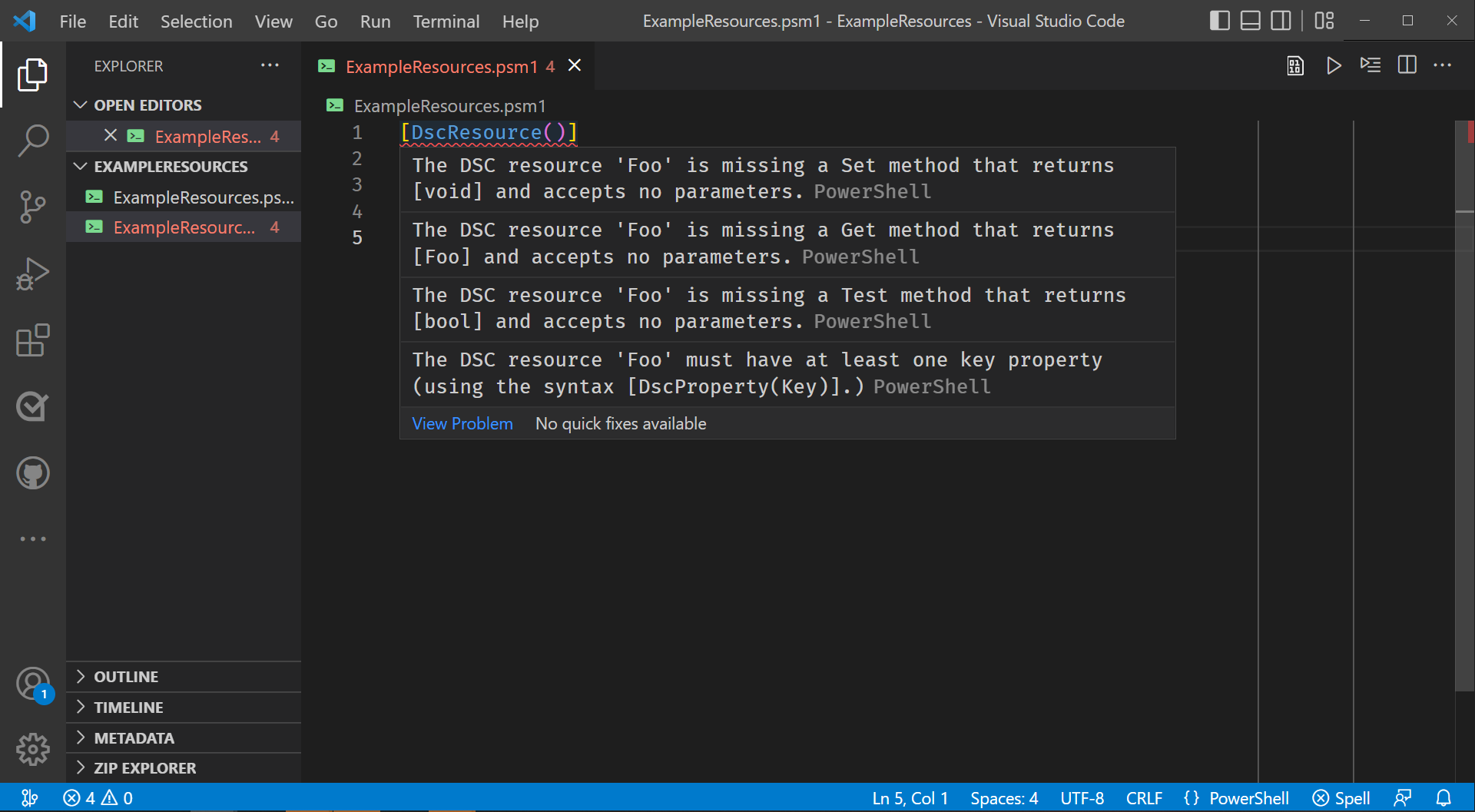
Al mantener el puntero sobre el atributo DSCResource se muestran cuatro advertencias. 1. Falta un método 'Tailspin' del recurso de DSC que devuelve '[void]' y no acepta parámetros. 2. Falta un método "Get()" del recurso DSC "Tailspin" que devuelve "[Tailspin]" y no acepta ningún parámetro. 3. Falta un método "Test()" del recurso de DSC "Tailspin" que devuelve "[bool]" y no acepta ningún parámetro. 4. El recurso de DSC 'Tailspin' debe tener al menos una propiedad de clave (mediante la sintaxis '[DscProperty(Key)]').
Estas advertencias enumeran los requisitos para que la clase sea un recurso de DSC válido.
Implementación mínima de métodos necesarios
Agregue una implementación mínima de los Get()métodos , Test()y Set() a la clase .
class Tailspin {
    [Tailspin] Get() {
        $CurrentState = [Tailspin]::new()
        return $CurrentState
    }

    [bool] Test() {
        return $true
    }

    [void] Set() {}
}
Con los métodos agregados, el atributo DscResource solo advierte sobre la clase que no tiene una propiedad Key .
3: Definición de propiedades de recursos de DSC
Debe definir las propiedades del recurso de DSC antes de los métodos. Las propiedades definen la configuración administrable para el recurso de DSC. Se usan en los métodos .
Descripción de la aplicación TSToy
Para poder definir las propiedades del recurso de DSC, debe comprender qué configuración desea administrar.
En este tutorial, vamos a definir un recurso de DSC para administrar la configuración de la aplicación ficticia TSToy a través de su archivo de configuración. TSToy es una aplicación que tiene la configuración en los niveles de usuario y equipo. El recurso de DSC debe ser capaz de configurar cualquiera de los archivos.
El recurso de DSC debe permitir a los usuarios definir:
- El ámbito de la configuración que administran, ya sea
MachineoUser - Si el archivo de configuración debe existir
- Si TSToy debe actualizarse automáticamente
- Frecuencia con la que TSToy debe comprobar si hay actualizaciones, entre 1 y 90 días
Adición de la propiedad ConfigurationScope
Para administrar el Machine archivo de configuración o User , debe definir una propiedad del recurso de DSC. Para definir la $ConfigurationScope propiedad en el recurso, agregue el código siguiente en la clase antes de los métodos:
[DscProperty(Key)] [TailspinScope]
$ConfigurationScope
Este código define $ConfigurationScope como una propiedad Key del recurso DSC. Una propiedad Key se usa para identificar de forma única una instancia del recurso de DSC. Al agregar esta propiedad, se cumple uno de los requisitos del atributo DscResource que se advierte al aplicar scaffolding a la clase .
También especifica que $ConfigurationScopeel tipo es TailspinScope. Para definir el tipo TailspinScope , agregue la siguiente enumeración TailspinScope después de la definición de clase en ExampleResources.psm1:
enum TailspinScope {
    Machine
    User
}
Esta enumeración convierte Machine y User los únicos valores válidos para la $ConfigurationScope propiedad del recurso de DSC.
Adición de la propiedad Ensure
Se recomienda definir una $Ensure propiedad para controlar si existe una instancia de un recurso de DSC. Normalmente, una $Ensure propiedad tiene dos valores válidos y AbsentPresent.
- Si
$Ensurese especifica comoPresent, el recurso de DSC crea el elemento si no existe. - Si
$EnsureesAbsent, el recurso de DSC elimina el elemento si existe.
Para el recurso de DSC de Tailspin , el elemento que se va a crear o eliminar es el archivo de configuración del especificado $ConfigurationScope.
Defina TailspinEnsure como una enumeración después de TailspinScope. Debe tener los valores Absent y Present.
enum TailspinEnsure {
    Absent
    Present
}
A continuación, agregue la $Ensure propiedad en la clase después de la $ConfigurationScope propiedad . Debe tener un atributo DscProperty vacío y su tipo debe ser TailspinEnsure. Debe tener Presentcomo valor predeterminado .
[DscProperty()] [TailspinEnsure]
$Ensure = [TailspinEnsure]::Present
Agregar la propiedad UpdateAutomatically
Para administrar las actualizaciones automáticas, defina la $UpdateAutomatically propiedad en la clase después de la $Ensure propiedad . Su atributo DscProperty debe indicar que es obligatorio y su tipo debe ser booleano.
[DscProperty(Mandatory)] [bool]
$UpdateAutomatically
Adición de la propiedad UpdateFrequency
Para administrar la frecuencia con la que TSToy debe comprobar si hay actualizaciones, agregue la $UpdateFrequency propiedad en la clase después de la $UpdateAutomatically propiedad . Debe tener un atributo DscProperty vacío y su tipo debe ser int. Use el atributo ValidateRange para limitar los valores válidos de a $UpdateFrequency entre 1 y 90.
[DscProperty()] [int] [ValidateRange(1, 90)]
$UpdateFrequency
Agregar la propiedad Reasons
Dado que este recurso de DSC está pensado para su uso con la característica de configuración de máquina de Azure Automanage, debe tener la propiedad Reasons que cumpla los siguientes requisitos:
- Debe declararse con la propiedad NotConfigurable en el atributo DscProperty .
- Debe ser una matriz de objetos que tengan una propiedad String denominada Code, una propiedad String denominada Phrase y ninguna otra propiedad.
La configuración de la máquina usa la propiedad Reasons para estandarizar cómo se presenta la información de cumplimiento. Cada objeto devuelto por el Get() método para la propiedad Reasons identifica cómo y por qué una instancia del recurso de DSC no es compatible.
La configuración de la máquina usa la propiedad Reasons para estandarizar cómo se presenta la información de cumplimiento. Cada objeto devuelto por el Get() método para la propiedad Reasons identifica una de las propiedades del recurso de DSC, su estado deseado y su estado real.
Para definir la propiedad Reasons , debe definir una clase para ella. Defina la clase ExampleResourcesReason después de la enumeración TailspinEnsure . Debe tener las propiedades Código y Frase como cadenas. Ambas propiedades deben tener el atributo DscProperty .
Para que las razones se muestren de forma más legible durante las pruebas manuales, defina el ToString() método en la clase ExampleResourcesReason , tal como se muestra en el fragmento de código.
class ExampleResourcesReason {
    [DscProperty()]
    [string] $Code

    [DscProperty()]
    [string] $Phrase

    [string] ToString() {
        return "`n$($this.Code):`n`t$($this.Phrase)`n"
    }
}
A continuación, agregue la $Reasons propiedad en la clase del recurso de DSC después de la $UpdateFrequency propiedad . Debe tener el atributo DscProperty especificado con la NotConfigurable opción y su tipo debe ser ExampleResourcesReason[].
[DscProperty(NotConfigurable)] [ExampleResourcesReason[]]
$Reasons
Agregar propiedades de caché ocultas
A continuación, agregue dos propiedades ocultas para almacenar en caché el estado actual del recurso: $CachedCurrentState y $CachedData. Establezca el tipo de $CachedCurrentState en Tailspin, igual que la clase y el tipo de valor devuelto para el Get() método . Establezca el tipo de $CachedData en PSCustomObject. Prefijo ambas propiedades con la hidden palabra clave . No especifique el atributo DscProperty para ninguno de ellos.
hidden [Tailspin] $CachedCurrentState
hidden [PSCustomObject] $CachedData
Estas propiedades ocultas se usan en los Get() métodos y Set() que se definen más adelante.
Revisión del archivo del módulo
En este momento, ExampleResources.psm1 debe definir:
- Clase Tailspin con las propiedades
$ConfigurationScope,$Ensure,$UpdateAutomaticallyy$UpdateFrequency - Enumeración TailspinScope con los valores
MachineyUser - Enumeración TailspinEnsure con los valores
PresentyAbsent - Implementaciones mínimas de los
Get()métodos ,Test()ySet().
[DscResource()]
class Tailspin {
    [DscProperty(Key)] [TailspinScope]
    $ConfigurationScope

    [DscProperty()] [TailspinEnsure]
    $Ensure = [TailspinEnsure]::Present

    [DscProperty(Mandatory)] [bool]
    $UpdateAutomatically

    [DscProperty()] [int] [ValidateRange(1,90)]
    $UpdateFrequency

    [DscProperty(NotConfigurable)] [ExampleResourcesReason[]]
    $Reasons

    hidden [Tailspin] $CachedCurrentState
    hidden [PSCustomObject] $CachedData

    [Tailspin] Get() {
        $CurrentState = [Tailspin]::new()
        return $CurrentState
    }

    [bool] Test() {
        $InDesiredState = $true
        return $InDesiredState
    }

    [void] Set() {}
}

enum TailspinScope {
    Machine
    User
}

enum TailspinEnsure {
    Absent
    Present
}

class ExampleResourcesReason {
    [DscProperty()]
    [string] $Code

    [DscProperty()]
    [string] $Phrase

    [string] ToString() {
        return "`n$($this.Code):`n`t$($this.Phrase)`n"
    }
}
Ahora que el recurso de DSC cumple los requisitos, puede usarlo Get-DscResource para verlo. En VS Code, abra un nuevo terminal de PowerShell.
. ./Helpers.ps1
Get-DscResource -Name Tailspin -Module ExampleResources | Format-List
Get-DscResource -Name Tailspin -Module ExampleResources -Syntax
ImplementationDetail : ClassBased
ResourceType         : Tailspin
Name                 : Tailspin
FriendlyName         :
Module               : ExampleResources
ModuleName           : ExampleResources
Version              : 0.0.1
Path                 : C:\code\dsc\ExampleResources\ExampleResources.psd1
ParentPath           : C:\code\dsc\ExampleResources
ImplementedAs        : PowerShell
CompanyName          : Unknown
Properties           : {ConfigurationScope, UpdateAutomatically, DependsOn, Ensure…}

Tailspin [String] #ResourceName
{
    ConfigurationScope = [string]{ Machine | User }
    UpdateAutomatically = [bool]
    [DependsOn = [string[]]]
    [Ensure = [string]{ Absent | Present }]
    [PsDscRunAsCredential = [PSCredential]]
    [UpdateFrequency = [Int32]]
}
4- Implementación de los métodos de recursos de DSC
Los métodos del recurso de DSC definen cómo recuperar el estado actual de un recurso de DSC, validarlo con el estado deseado y aplicar el estado deseado.
El método Get
El Get() método recupera el estado actual del recurso de DSC. Se usa para inspeccionar manualmente un recurso de DSC y lo llama el Test() método .
El Get() método no tiene parámetros y devuelve una instancia de la clase como salida. Para el Tailspin recurso de DSC, la implementación mínima tiene el siguiente aspecto:
[Tailspin] Get() {
    $CurrentState = [Tailspin]::new()
    return $CurrentState
}
Lo único que hace esta implementación es crear una instancia de la clase Tailspin y devolverla. Puede llamar al método con Invoke-DscResource para ver este comportamiento.
Invoke-DscResource -Name Tailspin -Module ExampleResources -Method Get -Property @{
    ConfigurationScope  = 'User'
    UpdateAutomatically = $true
}
ConfigurationScope  Ensure UpdateAutomatically UpdateFrequency
------------------  ------ ------------------- ---------------
           Machine Present               False               0
Las propiedades del objeto devuelto se establecen en su valor predeterminado. El valor de $ConfigurationScope siempre debe ser el valor proporcionado por el usuario. Para que el Get() método sea útil, debe devolver el estado real del recurso de DSC.
[Tailspin] Get() {
    $CurrentState = [Tailspin]::new()

    $CurrentState.ConfigurationScope = $this.ConfigurationScope

    $this.CachedCurrentState = $CurrentState

    return $CurrentState
}
La $this variable hace referencia a la instancia de trabajo del recurso de DSC. Ahora, si usa Invoke-DscResource de nuevo, $ConfigurationScope tiene el valor correcto.
Invoke-DscResource -Name Tailspin -Module ExampleResources -Method Get -Property @{
    ConfigurationScope  = 'User'
    UpdateAutomatically = $true
}
ConfigurationScope  Ensure UpdateAutomatically UpdateFrequency
------------------  ------ ------------------- ---------------
              User Present               False               0
A continuación, el recurso de DSC debe determinar si el archivo de configuración existe. Si lo hace, $Ensure debe ser Present. Si no es así, $Ensure debe ser Absent.
La ubicación de los archivos de configuración de TSToy depende del sistema operativo y del ámbito de configuración:
- Para máquinas Windows:
- El
Machinearchivo de configuración es%PROGRAMDATA%\TailSpinToys\tstoy\tstoy.config.json - El
Userarchivo de configuración es%APPDATA%\TailSpinToys\tstoy\tstoy.config.json
- El
- Para máquinas Linux:
- El
Machinearchivo de configuración es/etc/xdg/TailSpinToys/tstoy/tstoy.config.json - El
Userarchivo de configuración es~/.config/TailSpinToys/tstoy/tstoy.config.json
- El
- Para máquinas macOS:
- El
Machinearchivo de configuración es/Library/Preferences/TailSpinToys/tstoy/tstoy.config.json - El
Userarchivo de configuración es~/Library/Preferences/TailSpinToys/tstoy/tstoy.config.json
- El
Para controlar estas rutas de acceso, debe crear un método auxiliar, GetConfigurationFile().
[string] GetConfigurationFile() {
    $FilePaths = @{
        Linux = @{
            Machine   = '/etc/xdg/TailSpinToys/tstoy/tstoy.config.json'
            User      = '~/.config/TailSpinToys/tstoy/tstoy.config.json'
        }
        MacOS = @{
            Machine   = '/Library/Preferences/TailSpinToys/tstoy/tstoy.config.json'
            User      = '~/Library/Preferences/TailSpinToys/tstoy/tstoy.config.json'
        }
        Windows = @{
            Machine = "$env:ProgramData\TailSpinToys\tstoy\tstoy.config.json"
            User    = "$env:APPDATA\TailSpinToys\tstoy\tstoy.config.json"
        }
    }

    $Scope = $this.ConfigurationScope.ToString()

    if ($Global:PSVersionTable.PSVersion.Major -lt 6 -or $Global:IsWindows) {
        return $FilePaths.Windows.$Scope
    } elseif ($Global:IsLinux) {
        return $FilePaths.Linux.$Scope
    } else {
        return $FilePaths.MacOS.$Scope
    }
}
Para probar este nuevo método, ejecute la using instrucción para cargar las clases y enumeraciones del módulo ExampleResources en la sesión actual.
using module ./ExampleResources.psd1
$Example = [Tailspin]::new()
$Example
$Example.GetConfigurationFile()
$Example.ConfigurationScope = 'User'
$Example.GetConfigurationFile()
Ensure  ConfigurationScope UpdateAutomatically UpdateFrequency
------- ------------------ ------------------- ---------------
Present            Machine               False               0

C:\ProgramData\TailSpinToys\tstoy\tstoy.config.json

C:\Users\mikey\AppData\Roaming\TailSpinToys\tstoy\tstoy.config.json
Abra Helpers.ps1 en VS Code. Copie y pegue las rutas de acceso de los archivos de configuración en el script, asígnelas a $TSToyMachinePath y $TSToyUserPath. El archivo debería tener este aspecto:
$env:PSModulePath += "<separator>$pwd"
$TSToyMachinePath = '<machine configuration file path>'
$TSToyUserPath = '<user configuration file path>'
Salga del terminal en VS Code y abra un nuevo terminal. Dot-source Helpers.ps1.
. ./Helpers.ps1
Ahora puede escribir el resto del Get() método.
[Tailspin] Get() {
    $CurrentState = [Tailspin]::new()

    $CurrentState.ConfigurationScope = $this.ConfigurationScope

    $FilePath = $this.GetConfigurationFile()

    if (!(Test-Path -Path $FilePath)) {
        $CurrentState.Ensure = [TailspinEnsure]::Absent

        $this.CachedCurrentState = $CurrentState

        return $CurrentState
    }

    $Data = Get-Content -Raw -Path $FilePath |
        ConvertFrom-Json -ErrorAction Stop

    $this.CachedData = $Data

    if ($null -ne $Data.Updates.Automatic) {
        $CurrentState.UpdateAutomatically = $Data.Updates.Automatic
    }

    if ($null -ne $Data.Updates.CheckFrequency) {
        $CurrentState.UpdateFrequency = $Data.Updates.CheckFrequency
    }

    $this.CachedCurrentState = $CurrentState

    return $CurrentState
}
Después de establecer y $ConfigurationScope determinar la ruta de acceso del archivo de configuración, el método comprueba si el archivo existe. Si no existe, establecer $Ensure en Absent y devolver el resultado es todo lo necesario.
Si el archivo existe, el método debe convertir el contenido de JSON para crear el estado actual de la configuración. A continuación, el método comprueba si las claves tienen algún valor antes de asignarlas a las propiedades del estado actual. Si no se especifican, el recurso de DSC debe considerarlos sin establecer y en su estado predeterminado.
En este momento, el recurso de DSC almacena en caché los datos. El almacenamiento en caché de los datos permite inspeccionar los datos durante el desarrollo y resulta útil al implementar el Set() método .
Puede comprobar este comportamiento localmente.
$GetParameters = @{
    Name     = 'Tailspin'
    Module   = 'ExampleResources'
    Method   = 'Get'
    Property = @{
        ConfigurationScope = 'User'
    }
}

Invoke-DscResource @GetParameters
New-Item -Path $TSToyUserPath -Force
Invoke-DscResource @GetParameters
ConfigurationScope Ensure UpdateAutomatically UpdateFrequency
------------------ ------ ------------------- ---------------
              User Absent               False               0

    Directory: C:\Users\mikey\AppData\Roaming\TailSpinToys\tstoy

Mode                 LastWriteTime         Length Name
----                 -------------         ------ ----
-a---           9/15/2022  3:43 PM              0 tstoy.config.json

ConfigurationScope  Ensure UpdateAutomatically UpdateFrequency
------------------  ------ ------------------- ---------------
              User Present               False               0
Abra el archivo de configuración de User ámbito en VS Code.
code $TSToyUserPath
Copie esta configuración JSON en el archivo y guárdela.
{
    "unmanaged_key": true,
    "updates": {
        "automatic": true,
        "checkFrequency": 30
    }
}
Vuelva a llamar a Invoke-DscResource y vea los valores reflejados en los resultados.
Invoke-DscResource @GetParameters
ConfigurationScope  Ensure UpdateAutomatically UpdateFrequency
------------------  ------ ------------------- ---------------
              User Present                True              30
El Get() método ahora devuelve información precisa sobre el estado actual del recurso de DSC.
Motivos de control
Para recursos de DSC compatibles con la configuración de la máquina, el Get() método también debe rellenar la propiedad Reasons . Para ello, cree el GetReasons() método . Debe devolver una matriz de objetos ExampleResourcesReason y tomar un único objeto Tailspin como entrada.
[ExampleResourcesReason[]] GetReasons([Tailspin]$CurrentState) {
    [ExampleResourcesReason[]]$DefinedReasons = @()

    return $DefinedReasons
}
A continuación, el método debe comprobar la validez de cada configuración configurable. Para cada configuración, el método debe devolver un ExampleResourcesReason que identifique y describa el estado.
La primera configuración que se va a comprobar es la $Ensure propiedad . Si $Ensure está fuera de estado, todas las demás propiedades serán incorrectas, ya que el archivo de configuración existe cuando no debe o no existe cuando debería.
El método debe definir un motivo con el código correcto y una frase razonable. El código siempre tiene el formato <ResourceName>.<ResourceName>.<PropertyName>. La frase siempre es una frase que describe la comprobación, seguida de oraciones que describen el estado esperado y el estado real.
[ExampleResourcesReason[]] GetReasons([Tailspin]$CurrentState) {
    [ExampleResourcesReason[]]$DefinedReasons = @()

    $FilePath = $this.GetConfigurationFile()

    if ($this.Ensure -eq [TailspinEnsure]::Present) {
        $Expected = "Expected configuration file to exist at '$FilePath'."
    } else {
        $Expected = "Expected configuration file not to exist at '$FilePath'."
    }

    if ($CurrentState.Ensure -eq [TailspinEnsure]::Present) {
        $Actual = "The configuration file exists at '$FilePath'."
    } else {
        $Actual = "The configuration file was not found at '$FilePath'."
    }

    $DefinedReasons += [ExampleResourcesReason]@{
        Code   = "Tailspin.Tailspin.Ensure"
        Phrase = @(
            "Checked existence of the TSToy configuration file in the $($this.ConfigurationScope) scope."
            $Expected
            $Actual
        ) -join "`n`t"
    }

    if ($CurrentState.Ensure -ne $this.Ensure) {
        return $DefinedReasons
    }

    return $DefinedReasons
}
Si $Ensure no está fuera de estado, el método debe comprobar si el estado deseado es Absent. Si es así, no hay otras propiedades que puedan estar fuera del estado porque el archivo de configuración no existe y no debería existir.
[ExampleResourcesReason[]] GetReasons([Tailspin]$CurrentState) {
    [ExampleResourcesReason[]]$DefinedReasons = @()

    $FilePath = $this.GetConfigurationFile()

    if ($this.Ensure -eq [TailspinEnsure]::Present) {
        $Expected = "Expected configuration file to exist at '$FilePath'."
    } else {
        $Expected = "Expected configuration file not to exist at '$FilePath'."
    }

    if ($CurrentState.Ensure -eq [TailspinEnsure]::Present) {
        $Actual = "The configuration file exists at '$FilePath'."
    } else {
        $Actual = "The configuration file was not found at '$FilePath'."
    }

    $DefinedReasons += [ExampleResourcesReason]@{
        Code   = "Tailspin.Tailspin.Ensure"
        Phrase = @(
            "Checked existence of the TSToy configuration file in the $($this.ConfigurationScope) scope."
            $Expected
            $Actual
        ) -join "`n`t"
    }

    if ($CurrentState.Ensure -ne $this.Ensure) {
        return $DefinedReasons
    }

    if ($CurrentState.Ensure -eq [TailspinEnsure]::Absent) {
        return $DefinedReasons
    }

    return $DefinedReasons
}
Si $Ensure es Present y el archivo existe, el método debe comprobar las propiedades configurables restantes.
Comprobar la $UpdateAutomatically propiedad es sencilla, ya que es un valor obligatorio y booleano.
[ExampleResourcesReason[]] GetReasons([Tailspin]$CurrentState) {
    [ExampleResourcesReason[]]$DefinedReasons = @()

    $FilePath = $this.GetConfigurationFile()

    if ($this.Ensure -eq [TailspinEnsure]::Present) {
        $Expected = "Expected configuration file to exist at '$FilePath'."
    } else {
        $Expected = "Expected configuration file not to exist at '$FilePath'."
    }

    if ($CurrentState.Ensure -eq [TailspinEnsure]::Present) {
        $Actual = "The configuration file exists at '$FilePath'."
    } else {
        $Actual = "The configuration file was not found at '$FilePath'."
    }

    $DefinedReasons += [ExampleResourcesReason]@{
        Code   = "Tailspin.Tailspin.Ensure"
        Phrase = @(
            "Checked existence of the TSToy configuration file in the $($this.ConfigurationScope) scope."
            $Expected
            $Actual
        ) -join "`n`t"
    }

    if ($CurrentState.Ensure -ne $this.Ensure) {
        return $DefinedReasons
    }

    if ($CurrentState.Ensure -eq [TailspinEnsure]::Absent) {
        return $DefinedReasons
    }

    $DefinedReasons += [ExampleResourcesReason]@{
        Code   = "Tailspin.Tailspin.UpdateAutomatically"
        Phrase = (@(
                "Checked value of the 'updates.automatic' key in the TSToy configuration file."
                "Expected boolean value of '$($this.UpdateAutomatically)'"
                "Actual boolean value of '$($CurrentState.UpdateAutomatically)'"
            ) -join "`n`t")
    }

    return $DefinedReasons
}
La última propiedad que se va a comprobar es $UpdateFrequency. Esta comprobación se puede cortocircuitar si el valor de la propiedad es 0. Si se especifica la propiedad, siempre estará entre 1 y 90, lo que significa que un valor de 0 indica que la propiedad no se está administrando.
[ExampleResourcesReason[]] GetReasons([Tailspin]$CurrentState) {
    [ExampleResourcesReason[]]$DefinedReasons = @()

    $FilePath = $this.GetConfigurationFile()

    if ($this.Ensure -eq [TailspinEnsure]::Present) {
        $Expected = "Expected configuration file to exist at '$FilePath'."
    } else {
        $Expected = "Expected configuration file not to exist at '$FilePath'."
    }

    if ($CurrentState.Ensure -eq [TailspinEnsure]::Present) {
        $Actual = "The configuration file exists at '$FilePath'."
    } else {
        $Actual = "The configuration file was not found at '$FilePath'."
    }

    $DefinedReasons += [ExampleResourcesReason]@{
        Code   = "Tailspin.Tailspin.Ensure"
        Phrase = @(
            "Checked existence of the TSToy configuration file in the $($this.ConfigurationScope) scope."
            $Expected
            $Actual
        ) -join "`n`t"
    }

    if ($CurrentState.Ensure -ne $this.Ensure) {
        return $DefinedReasons
    }

    if ($CurrentState.Ensure -eq [TailspinEnsure]::Absent) {
        return $DefinedReasons
    }

    $DefinedReasons += [ExampleResourcesReason]@{
        Code   = "Tailspin.Tailspin.UpdateAutomatically"
        Phrase = (@(
                "Checked value of the 'updates.automatic' key in the TSToy configuration file."
                "Expected boolean value of '$($this.UpdateAutomatically)'"
                "Actual boolean value of '$($CurrentState.UpdateAutomatically)'"
            ) -join "`n`t")
    }

    return $DefinedReasons

    # Short-circuit the check; UpdateFrequency isn't defined by caller
    if ($this.UpdateFrequency -eq 0) {
        return $DefinedReasons
    }
}
Por último, el método debe comparar los estados deseados y actuales de la $UpdateFrequency propiedad y definir un motivo si están fuera de estado.
[ExampleResourcesReason[]] GetReasons([Tailspin]$CurrentState) {
    [ExampleResourcesReason[]]$DefinedReasons = @()

    $FilePath = $this.GetConfigurationFile()

    if ($this.Ensure -eq [TailspinEnsure]::Present) {
        $Expected = "Expected configuration file to exist at '$FilePath'."
    } else {
        $Expected = "Expected configuration file not to exist at '$FilePath'."
    }

    if ($CurrentState.Ensure -eq [TailspinEnsure]::Present) {
        $Actual = "The configuration file exists at '$FilePath'."
    } else {
        $Actual = "The configuration file was not found at '$FilePath'."
    }

    $DefinedReasons += [ExampleResourcesReason]@{
        Code   = "Tailspin.Tailspin.Ensure"
        Phrase = @(
            "Checked existence of the TSToy configuration file in the $($this.ConfigurationScope) scope."
            $Expected
            $Actual
        ) -join "`n`t"
    }

    if ($CurrentState.Ensure -ne $this.Ensure) {
        return $DefinedReasons
    }

    if ($CurrentState.Ensure -eq [TailspinEnsure]::Absent) {
        return $DefinedReasons
    }

    $DefinedReasons += [ExampleResourcesReason]@{
        Code   = "Tailspin.Tailspin.UpdateAutomatically"
        Phrase = (@(
                "Checked value of the 'updates.automatic' key in the TSToy configuration file."
                "Expected boolean value of '$($this.UpdateAutomatically)'"
                "Actual boolean value of '$($CurrentState.UpdateAutomatically)'"
            ) -join "`n`t")
    }

    # Short-circuit the check; UpdateFrequency isn't defined by caller
    if ($this.UpdateFrequency -eq 0) {
        return $DefinedReasons
    }

    $DefinedReasons += [ExampleResourcesReason]@{
        Code   = "Tailspin.Tailspin.UpdateFrequency"
        Phrase = (@(
                "Checked value of the 'updates.checkFrequency' key in the TSToy configuration file."
                "Expected integer value of '$($this.UpdateFrequency)'."
                "Actual integer value of '$($CurrentState.UpdateFrequency)'."
            ) -join "`n`t")
    }

    return $DefinedReasons
}
Con el GetReasons() método implementado, el Get() método debe actualizarse para llamarlo antes de devolver el estado actual.
[Tailspin] Get() {
    $CurrentState = [Tailspin]::new()

    $CurrentState.ConfigurationScope = $this.ConfigurationScope

    $FilePath = $this.GetConfigurationFile()

    if (!(Test-Path -Path $FilePath)) {
        $CurrentState.Ensure = [TailspinEnsure]::Absent
        $CurrentState.Reasons = $this.GetReasons($CurrentState)

        $this.CachedCurrentState = $CurrentState

        return $CurrentState
    }

    $Data = Get-Content -Raw -Path $FilePath |
    ConvertFrom-Json -ErrorAction Stop

    $this.CachedData = $Data

    if ($null -ne $Data.Updates.Automatic) {
        $CurrentState.UpdateAutomatically = $Data.Updates.Automatic
    }

    if ($null -ne $Data.Updates.CheckFrequency) {
        $CurrentState.UpdateFrequency = $Data.Updates.CheckFrequency
    }

    $CurrentState.Reasons = $this.GetReasons($CurrentState)

    $this.CachedCurrentState = $CurrentState

    return $CurrentState
}
Con la implementación actualizada, puede comprobar el comportamiento y ver que se notifican los motivos:
$SharedParameters = @{
    Name     = 'Tailspin'
    Module   = 'ExampleResources'
    Property = @{
        ConfigurationScope  = 'User'
        Ensure              = 'Present'
        UpdateAutomatically = $false
    }
}

Invoke-DscResource -Method Get @SharedParameters

$SharedParameters.Property.UpdateAutomatically = $true
Invoke-DscResource -Method Get @SharedParameters

$SharedParameters.Property.UpdateFrequency = 1
Invoke-DscResource -Method Get @SharedParameters
ConfigurationScope  : User
Ensure              : Present
UpdateAutomatically : True
UpdateFrequency     : 1
Reasons             : {
                      Tailspin.Tailspin.Ensure:
                        Checked existence of the TSToy configuration file in
                      the User scope.
                        Expected configuration file to exist at 'C:\Users\mlomba
                      rdi\AppData\Roaming\TailSpinToys\tstoy\tstoy.config.json'
                      .
                        The configuration file exists at 'C:\Users\mlombardi\App
                      Data\Roaming\TailSpinToys\tstoy\tstoy.config.json'.
                      ,
                      Tailspin.Tailspin.UpdateAutomatically:
                        Checked value of the 'updates.automatic' key in the
                      TSToy configuration file.
                        Expected boolean value of 'False'
                        Actual boolean value of 'True'
                      }

ConfigurationScope  : User
Ensure              : Present
UpdateAutomatically : True
UpdateFrequency     : 1
Reasons             : {
                      Tailspin.Tailspin.Ensure:
                        Checked existence of the TSToy configuration file in
                      the User scope.
                        Expected configuration file to exist at 'C:\Users\mlomba
                      rdi\AppData\Roaming\TailSpinToys\tstoy\tstoy.config.json'
                      .
                        The configuration file exists at 'C:\Users\mlombardi\App
                      Data\Roaming\TailSpinToys\tstoy\tstoy.config.json'.
                      ,
                      Tailspin.Tailspin.UpdateAutomatically:
                        Checked value of the 'updates.automatic' key in the
                      TSToy configuration file.
                        Expected boolean value of 'True'
                        Actual boolean value of 'True'
                      }

ConfigurationScope  : User
Ensure              : Present
UpdateAutomatically : True
UpdateFrequency     : 1
Reasons             : {
                      Tailspin.Tailspin.Ensure:
                        Checked existence of the TSToy configuration file in
                      the User scope.
                        Expected configuration file to exist at 'C:\Users\mlomba
                      rdi\AppData\Roaming\TailSpinToys\tstoy\tstoy.config.json'
                      .
                        The configuration file exists at 'C:\Users\mlombardi\App
                      Data\Roaming\TailSpinToys\tstoy\tstoy.config.json'.
                      ,
                      Tailspin.Tailspin.UpdateAutomatically:
                        Checked value of the 'updates.automatic' key in the
                      TSToy configuration file.
                        Expected boolean value of 'True'
                        Actual boolean value of 'True'
                      ,
                      Tailspin.Tailspin.UpdateFrequency:
                        Checked value of the 'updates.checkFrequency' key in
                      the TSToy configuration file.
                        Expected integer value of '1'.
                        Actual integer value of '1'.
                      }
El método Test
Con el Get() método implementado, puede comprobar si el estado actual es compatible con el estado deseado.
Los Test() métodos de implementación mínima siempre devuelven $true.
[bool] Test() {
    return $true
}
Para confirmarlo, ejecute Invoke-DscResource.
$SharedParameters = @{
    Name     = 'Tailspin'
    Module   = 'ExampleResources'
    Property = @{
        ConfigurationScope = 'User'
        UpdateAutomatically = $false
    }
}

Invoke-DscResource -Method Get @SharedParameters
Invoke-DscResource -Method Test @SharedParameters
ConfigurationScope  Ensure UpdateAutomatically UpdateFrequency
------------------  ------ ------------------- ---------------
              User Present                True              30

InDesiredState
--------------
          True
Debe hacer que el Test() método refleje con precisión si el recurso de DSC está en el estado deseado. El Test() método siempre debe llamar al Get() método para que tenga el estado actual para compararlo con el estado deseado. A continuación, compruebe si la $Ensure propiedad es correcta. Si no es así, vuelva $false inmediatamente. No se requieren más comprobaciones si la $Ensure propiedad está fuera del estado deseado.
[bool] Test() {
    $CurrentState = $this.Get()

    if ($CurrentState.Ensure -ne $this.Ensure) {
        return $false
    }

    return $true
}
Ahora puede comprobar el comportamiento actualizado.
$TestParameters = @{
    Name     = 'Tailspin'
    Module   = 'ExampleResources'
    Property = @{
        ConfigurationScope  = 'User'
        UpdateAutomatically = $false
        Ensure              = 'Absent'
    }
}

Invoke-DscResource -Method Test @TestParameters

$TestParameters.Property.Ensure = 'Present'

Invoke-DscResource -Method Test @TestParameters
InDesiredState
--------------
         False

InDesiredState
--------------
          True
A continuación, compruebe si el valor de $Ensure es Absent. Si el archivo de configuración no existe y no debe existir, no hay ningún motivo para comprobar las propiedades restantes.
[bool] Test() {
    $CurrentState = $this.Get()

    if ($CurrentState.Ensure -ne $this.Ensure) {
        return $false
    }

    if ($CurrentState.Ensure -eq [TailspinEnsure]::Absent) {
        return $true
    }

    return $true
}
A continuación, el método debe comparar el estado actual de las propiedades que administran el comportamiento de actualización de TSToy. En primer lugar, compruebe si la $UpdateAutomatically propiedad está en el estado correcto. Si no es así, devuelva $false.
[bool] Test() {
    $CurrentState = $this.Get()

    if ($CurrentState.Ensure -ne $this.Ensure) {
        return $false
    }

    if ($CurrentState.Ensure -eq [TailspinEnsure]::Absent) {
        return $true
    }

    if ($CurrentState.UpdateAutomatically -ne $this.UpdateAutomatically) {
        return $false
    }

    return $true
}
Para comparar $UpdateFrequency, es necesario determinar si el usuario especificó el valor. Dado $UpdateFrequency que se inicializa en 0 y el atributo ValidateRange de la propiedad especifica que debe estar entre 1 y 90, sabemos que un valor de 0 indica que la propiedad no se especificó.
Con esa información, el Test() método debe:
- Devuelve
$truesi el usuario no especificó$UpdateFrequency - Devuelve
$falsesi el usuario ha especificado$UpdateFrequencyy el valor del sistema no es igual al valor especificado por el usuario. - Devuelve
$truesi no se cumple ninguna de las condiciones anteriores
[bool] Test() {
    $CurrentState = $this.Get()

    if ($CurrentState.Ensure -ne $this.Ensure) {
        return $false
    }

    if ($CurrentState.Ensure -eq [TailspinEnsure]::Absent) {
        return $true
    }

    if ($CurrentState.UpdateAutomatically -ne $this.UpdateAutomatically) {
        return $false
    }

    if ($this.UpdateFrequency -eq 0) {
        return $true
    }

    if ($CurrentState.UpdateFrequency -ne $this.UpdateFrequency) {
        return $false
    }

    return $true
}
Ahora, el Test() método usa el siguiente orden de operaciones:
- Recupere el estado actual de la configuración de TSToy.
- Devuelve
$falsesi la configuración existe cuando no debe o no existe cuando debería. - Devuelve
$truesi la configuración no existe y no debe existir. - Devuelve
$falsesi la configuración de actualización automática de la configuración no coincide con la deseada. - Devuelve
$truesi el usuario no especificó un valor para la configuración de frecuencia de actualización. - Devuelve
$falsesi el valor especificado del usuario para la configuración de frecuencia de actualización no coincide con la configuración de la configuración. - Devuelve
$truesi no se cumple ninguna de las condiciones anteriores.
Puede comprobar el Test() método localmente:
$SharedParameters = @{
    Name     = 'Tailspin'
    Module   = 'ExampleResources'
    Property = @{
        ConfigurationScope  = 'User'
        Ensure              = 'Present'
        UpdateAutomatically = $false
    }
}

Invoke-DscResource -Method Get @SharedParameters

Invoke-DscResource -Method Test @SharedParameters

$SharedParameters.Property.UpdateAutomatically = $true
Invoke-DscResource -Method Test @SharedParameters

$SharedParameters.Property.UpdateFrequency = 1
Invoke-DscResource -Method Test @SharedParameters
ConfigurationScope  Ensure UpdateAutomatically UpdateFrequency
------------------  ------ ------------------- ---------------
              User Present                True              30

InDesiredState
--------------
         False

InDesiredState
--------------
          True

InDesiredState
--------------
         False
Con este código, el Test() método puede determinar con precisión si el archivo de configuración está en el estado deseado.
El método Set
Ahora que los Get() métodos y Test() funcionan de forma confiable, puede definir el Set() método para aplicar realmente el estado deseado.
En la implementación mínima, el Set() método no hace nada.
[void] Set() {}
En primer lugar, Set() debe determinar si el recurso de DSC debe crearse, actualizarse o quitarse.
[void] Set() {
    if ($this.Test()) {
            return
    }

    $CurrentState = $this.CachedCurrentState

    $IsAbsent = $CurrentState.Ensure -eq [TailspinEnsure]::Absent
    $ShouldBeAbsent = $this.Ensure -eq [TailspinEnsure]::Absent

    if ($IsAbsent) {
        # Create
    } elseif ($ShouldBeAbsent) {
        # Remove
    } else {
        # Update
    }
}
Set() primero llama al Test() método para determinar si hay algo que realmente debe realizarse. Algunas herramientas como, por ejemplo, la característica de configuración de la máquina de Azure Automanage, asegúrese de que solo se llame al Set() método después del Test() método . Sin embargo, no hay ninguna garantía de este tipo al usar el Invoke-DscResource cmdlet .
Dado que el Test() método llama a Get(), que almacena en caché el estado actual, el recurso de DSC puede acceder al estado actual almacenado en caché sin tener que llamar al Get() método de nuevo.
A continuación, el recurso de DSC debe distinguir entre los comportamientos de creación, eliminación y actualización del archivo de configuración. Si el archivo de configuración no existe, sabemos que debe crearse. Si el archivo de configuración existe y no debe, sabemos que debe quitarse. Si el archivo de configuración existe y debe existir, sabemos que debe actualizarse.
Cree tres nuevos métodos para controlar estas operaciones y llamarlas en el Set() método según sea necesario.
El tipo de valor devuelto de los tres debe ser void.
[void] Set() {
    if ($this.Test()) {
            return
    }

    $CurrentState = $this.CachedCurrentState

    $IsAbsent = $CurrentState.Ensure -eq [TailspinEnsure]::Absent
    $ShouldBeAbsent = $this.Ensure -eq [TailspinEnsure]::Absent

    if ($IsAbsent) {
        $this.Create()
    } elseif ($ShouldBeAbsent) {
        $this.Remove()
    } else {
        $this.Update()
    }
}

[void] Create() {}
[void] Remove() {}
[void] Update() {}
Además, cree un nuevo método denominado ToConfigJson(). Su tipo de valor devuelto debe ser string. Este método convierte el recurso de DSC en el JSON que espera el archivo de configuración. Puede empezar con la siguiente implementación mínima:
[string] ToConfigJson() {
    $config = @{}

    return ($config | ConvertTo-Json)
}
El método ToConfigJson
La implementación mínima devuelve un objeto JSON vacío como una cadena. Para que sea útil, debe devolver la representación JSON real de la configuración en el archivo de configuración de TSToy.
En primer lugar, rellene previamente la $config tabla hash con la configuración de actualizaciones automáticas obligatorias agregando la updates clave con su valor como tabla hash. La tabla hash debe tener la automatic clave . Asigne el valor de la propiedad de $UpdateAutomatically la clase a la automatic clave.
[string] ToConfigJson() {
    $config = @{
        updates = @{
            automatic = $this.UpdateAutomatically
        }
    }

    return ($config | ConvertTo-Json)
}
Este código traduce la representación del recurso de DSC de la configuración de TSToy en la estructura que espera el archivo de configuración de TSToy.
A continuación, el método debe comprobar si la clase ha almacenado en caché los datos de un archivo de configuración existente. Los datos almacenados en caché permiten que el recurso de DSC administre la configuración definida sin sobrescribir ni quitar la configuración no administrada.
[string] ToConfigJson() {
    $config = @{
        updates = @{
            automatic = $this.UpdateAutomatically
        }
    }

    if ($this.CachedData) {
        # Copy unmanaged settings without changing the cached values
        $this.CachedData |
            Get-Member -MemberType NoteProperty |
            Where-Object -Property Name -NE -Value 'updates' |
            ForEach-Object -Process {
                $setting = $_.Name
                $config.$setting = $this.CachedData.$setting
            }

        # Add the checkFrequency to the hashtable if it is set in the cache
        if ($frequency = $this.CachedData.updates.checkFrequency) {
            $config.updates.checkFrequency = $frequency
        }
    }

    # If the user specified an UpdateFrequency, use that value
    if ($this.UpdateFrequency -ne 0) {
        $config.updates.checkFrequency = $this.UpdateFrequency
    }

    return ($config | ConvertTo-Json)
}
Si la clase ha almacenado en caché la configuración de una configuración existente, es:
Inspecciona las propiedades de los datos almacenados en caché y busca las propiedades que no administra el recurso de DSC. Si encuentra alguna, el método inserta esas propiedades no administradas en la
$configtabla hash.Dado que el recurso de DSC solo administra la configuración de actualización, todas las opciones excepto para
updatesse insertan.Comprueba si la
checkFrequencyconfiguración deupdatesestá establecida. Si se establece, el método inserta este valor en la$configtabla hash.Esta operación permite que el recurso de DSC omita la
$UpdateFrequencypropiedad si el usuario no la especifica.Por último, el método debe comprobar si el usuario especificó la
$UpdateFrequencypropiedad e insertarla en la$configtabla hash si lo hizo.
Con este código, el ToConfigJson() método :
- Devuelve una representación JSON precisa del estado deseado que la aplicación TSToy espera en su archivo de configuración.
- Respeta la configuración de TSToy que el recurso de DSC no administra explícitamente.
- Respeta el valor existente para la frecuencia de actualización de TSToy si el usuario no especificó uno, incluido dejarlo sin definir en el archivo de configuración.
Para probar este nuevo método, cierre el terminal de VS Code y abra uno nuevo. Ejecute la using instrucción para cargar las clases y enumeraciones del módulo ExampleResources en la sesión actual y dot-source del helpers.ps1 script.
using module ./ExampleResources.psd1
. ./Helpers.ps1
$Example = [Tailspin]::new()
Get-Content -Path $TSToyUserPath
$Example.ConfigurationScope = 'User'
$Example.ToConfigJson()
Antes de llamar al Get() método , el único valor de la salida del método ToJsonConfig es el valor convertido de la $UpdateAutomatically propiedad .
{
    "unmanaged_key": true,
    "updates": {
        "automatic": false,
        "checkFrequency": 30
    }
}

{
  "updates": {
    "automatic": false
  }
}
$Example.Get()
$Example.ToConfigJson()
Después de llamar a Get(), la salida incluye una clave de nivel superior no administrada, unmanaged_key. También incluye la configuración existente en el archivo de configuración para $UpdateFrequency , ya que no se estableció explícitamente en el recurso de DSC.
ConfigurationScope  : User
Ensure              : Present
UpdateAutomatically : False
UpdateFrequency     : 30
Reasons             : {}

{
  "unmanaged_key": true,
  "updates": {
    "automatic": false,
    "checkFrequency": 30
  }
}
$Example.UpdateFrequency = 7
$Example.ToConfigJson()
Después $UpdateFrequency de establecerse, la salida refleja el valor especificado.
{
  "unmanaged_key": true,
  "updates": {
    "automatic": false,
    "checkFrequency": 7
  }
}
El método Create
Para implementar el Create() método , es necesario convertir las propiedades especificadas por el usuario para el recurso de DSC en el JSON que TSToy espera en su archivo de configuración y escribirlo en ese archivo.
[void] Create() {
    $ErrorActionPreference = 'Stop'

    $Json = $this.ToConfigJson()

    $FilePath   = $this.GetConfigurationFile()
    $FolderPath = Split-Path -Path $FilePath

    if (!(Test-Path -Path $FolderPath)) {
        New-Item -Path $FolderPath -ItemType Directory -Force
    }

    Set-Content -Path $FilePath -Value $Json -Encoding utf8 -Force
}
El método usa el ToConfigJson() método para obtener el json del archivo de configuración. Comprueba si la carpeta del archivo de configuración existe y la crea si es necesario. Por último, crea el archivo de configuración y escribe el JSON en él.
Método Remove
El Remove() método tiene el comportamiento más sencillo. Si el archivo de configuración existe, elimínelo.
[void] Remove() {
    Remove-Item -Path $this.GetConfigurationFile() -Force -ErrorAction Stop
}
El método Update
La Update() implementación del método es similar al método Create . Debe convertir las propiedades especificadas por el usuario para el recurso de DSC en el JSON que TSToy espera en su archivo de configuración y reemplazar la configuración de ese archivo.
[void] Update() {
    $ErrorActionPreference = 'Stop'

    $Json = $this.ToConfigJson()
    $FilePath   = $this.GetConfigurationFile()

    Set-Content -Path $FilePath -Value $Json -Encoding utf8 -Force
}
5- Prueba manual de un recurso de DSC
Con el recurso de DSC totalmente implementado, ahora puede probar su comportamiento.
Antes de realizar las pruebas, cierre el terminal de VS Code y abra uno nuevo. Origen de puntos en el Helpers.ps1 script.
Para cada escenario de prueba, cree la $DesiredState tabla hash que contiene los parámetros compartidos y llame a los métodos en el orden siguiente:
-
Get(), para recuperar el estado inicial del recurso de DSC -
Test(), para ver si el recurso de DSC considera que está en el estado deseado. -
Set(), para aplicar el estado deseado -
Test(), para ver si el recurso de DSC considera que se ha establecido correctamente. -
Get(), para confirmar el estado final del recurso de DSC
Escenario: TSToy no debe actualizarse automáticamente en el ámbito del usuario
En este escenario, la configuración existente en el ámbito de usuario debe configurarse para no actualizarse automáticamente. Todas las demás configuraciones deben dejarse intactas.
. ./Helpers.ps1

$DesiredState = @{
    Name     = 'Tailspin'
    Module   = 'ExampleResources'
    Property = @{
        ConfigurationScope  = 'User'
        UpdateAutomatically = $false
        Ensure              = 'Present'
    }
}

Get-Content -Path $TSToyUserPath

Invoke-DscResource @DesiredState -Method Get
Invoke-DscResource @DesiredState -Method Test
Invoke-DscResource @DesiredState -Method Set
Invoke-DscResource @DesiredState -Method Test
Invoke-DscResource @DesiredState -Method Get

Get-Content -Path $TSToyUserPath
{
    "unmanaged_key": true,
    "updates": {
        "automatic": true,
        "checkFrequency": 30
    }
}

ConfigurationScope  : User
Ensure              : Present
UpdateAutomatically : True
UpdateFrequency     : 30
Reasons             : {
                      Tailspin.Tailspin.Ensure:
                        Checked existence of the TSToy configuration file in
                      the User scope.
                        Expected configuration file to exist at 'C:\Users\mlomba
                      rdi\AppData\Roaming\TailSpinToys\tstoy\tstoy.config.json'
                      .
                        The configuration file exists at 'C:\Users\mlombardi\App
                      Data\Roaming\TailSpinToys\tstoy\tstoy.config.json'.
                      ,
                      Tailspin.Tailspin.UpdateAutomatically:
                        Checked value of the 'updates.automatic' key in the
                      TSToy configuration file.
                        Expected boolean value of 'False'
                        Actual boolean value of 'True'
                      }

InDesiredState : False

RebootRequired : False

InDesiredState : True

ConfigurationScope  : User
Ensure              : Present
UpdateAutomatically : False
UpdateFrequency     : 30
Reasons             : {
                      Tailspin.Tailspin.Ensure:
                        Checked existence of the TSToy configuration file in
                      the User scope.
                        Expected configuration file to exist at 'C:\Users\mlomba
                      rdi\AppData\Roaming\TailSpinToys\tstoy\tstoy.config.json'
                      .
                        The configuration file exists at 'C:\Users\mlombardi\App
                      Data\Roaming\TailSpinToys\tstoy\tstoy.config.json'.
                      ,
                      Tailspin.Tailspin.UpdateAutomatically:
                        Checked value of the 'updates.automatic' key in the
                      TSToy configuration file.
                        Expected boolean value of 'False'
                        Actual boolean value of 'False'
                      }

{
  "unmanaged_key": true,
  "updates": {
    "automatic": false,
    "checkFrequency": 30
  }
}
Escenario: Tailspin debe actualizarse automáticamente según cualquier programación en el ámbito del usuario
En este escenario, la configuración existente en el ámbito de usuario debe configurarse para actualizarse automáticamente. Todas las demás configuraciones deben dejarse intactas.
. ./Helpers.ps1

$DesiredState = @{
    Name     = 'Tailspin'
    Module   = 'ExampleResources'
    Property = @{
        ConfigurationScope  = 'User'
        UpdateAutomatically = $true
        Ensure              = 'Present'
    }
}

Get-Content -Path $TSToyUserPath

Invoke-DscResource @DesiredState -Method Get
Invoke-DscResource @DesiredState -Method Test
Invoke-DscResource @DesiredState -Method Set
Invoke-DscResource @DesiredState -Method Test
Invoke-DscResource @DesiredState -Method Get

Get-Content -Path $TSToyUserPath
{
  "unmanaged_key": true,
  "updates": {
    "automatic": false,
    "checkFrequency": 30
  }
}

ConfigurationScope  : User
Ensure              : Present
UpdateAutomatically : False
UpdateFrequency     : 30
Reasons             : {
                      Tailspin.Tailspin.Ensure:
                        Checked existence of the TSToy configuration file in
                      the User scope.
                        Expected configuration file to exist at 'C:\Users\mlomba
                      rdi\AppData\Roaming\TailSpinToys\tstoy\tstoy.config.json'
                      .
                        The configuration file exists at 'C:\Users\mlombardi\App
                      Data\Roaming\TailSpinToys\tstoy\tstoy.config.json'.
                      ,
                      Tailspin.Tailspin.UpdateAutomatically:
                        Checked value of the 'updates.automatic' key in the
                      TSToy configuration file.
                        Expected boolean value of 'True'
                        Actual boolean value of 'False'
                      }

InDesiredState : False

RebootRequired : False

InDesiredState : True

ConfigurationScope  : User
Ensure              : Present
UpdateAutomatically : True
UpdateFrequency     : 30
Reasons             : {
                      Tailspin.Tailspin.Ensure:
                        Checked existence of the TSToy configuration file in
                      the User scope.
                        Expected configuration file to exist at 'C:\Users\mlomba
                      rdi\AppData\Roaming\TailSpinToys\tstoy\tstoy.config.json'
                      .
                        The configuration file exists at 'C:\Users\mlombardi\App
                      Data\Roaming\TailSpinToys\tstoy\tstoy.config.json'.
                      ,
                      Tailspin.Tailspin.UpdateAutomatically:
                        Checked value of the 'updates.automatic' key in the
                      TSToy configuration file.
                        Expected boolean value of 'True'
                        Actual boolean value of 'True'
                      }

{
  "unmanaged_key": true,
  "updates": {
    "automatic": true,
    "checkFrequency": 30
  }
}
Escenario: TSToy debe actualizarse automáticamente todos los días en el ámbito del usuario
En este escenario, la configuración existente en el ámbito de usuario debe configurarse para actualizarse automáticamente y diariamente. Todas las demás configuraciones deben dejarse intactas.
. ./Helpers.ps1

$DesiredState = @{
    Name     = 'Tailspin'
    Module   = 'ExampleResources'
    Property = @{
        ConfigurationScope  = 'User'
        UpdateAutomatically = $true
        UpdateFrequency     = 1
        Ensure              = 'Present'
    }
}

Get-Content -Path $TSToyUserPath

Invoke-DscResource @DesiredState -Method Get
Invoke-DscResource @DesiredState -Method Test
Invoke-DscResource @DesiredState -Method Set
Invoke-DscResource @DesiredState -Method Test
Invoke-DscResource @DesiredState -Method Get

Get-Content -Path $TSToyUserPath
{
  "unmanaged_key": true,
  "updates": {
    "automatic": true,
    "checkFrequency": 30
  }
}

ConfigurationScope  : User
Ensure              : Present
UpdateAutomatically : True
UpdateFrequency     : 30
Reasons             : {
                      Tailspin.Tailspin.Ensure:
                        Checked existence of the TSToy configuration file in
                      the User scope.
                        Expected configuration file to exist at 'C:\Users\mlomba
                      rdi\AppData\Roaming\TailSpinToys\tstoy\tstoy.config.json'
                      .
                        The configuration file exists at 'C:\Users\mlombardi\App
                      Data\Roaming\TailSpinToys\tstoy\tstoy.config.json'.
                      ,
                      Tailspin.Tailspin.UpdateAutomatically:
                        Checked value of the 'updates.automatic' key in the
                      TSToy configuration file.
                        Expected boolean value of 'True'
                        Actual boolean value of 'True'
                      ,
                      Tailspin.Tailspin.UpdateFrequency:
                        Checked value of the 'updates.checkFrequency' key in
                      the TSToy configuration file.
                        Expected integer value of '1'.
                        Actual integer value of '30'.
                      }

InDesiredState : False

RebootRequired : False

InDesiredState : True

ConfigurationScope  : User
Ensure              : Present
UpdateAutomatically : True
UpdateFrequency     : 1
Reasons             : {
                      Tailspin.Tailspin.Ensure:
                        Checked existence of the TSToy configuration file in
                      the User scope.
                        Expected configuration file to exist at 'C:\Users\mlomba
                      rdi\AppData\Roaming\TailSpinToys\tstoy\tstoy.config.json'
                      .
                        The configuration file exists at 'C:\Users\mlombardi\App
                      Data\Roaming\TailSpinToys\tstoy\tstoy.config.json'.
                      ,
                      Tailspin.Tailspin.UpdateAutomatically:
                        Checked value of the 'updates.automatic' key in the
                      TSToy configuration file.
                        Expected boolean value of 'True'
                        Actual boolean value of 'True'
                      ,
                      Tailspin.Tailspin.UpdateFrequency:
                        Checked value of the 'updates.checkFrequency' key in
                      the TSToy configuration file.
                        Expected integer value of '1'.
                        Actual integer value of '1'.
                      }

{
  "unmanaged_key": true,
  "updates": {
    "checkFrequency": 1,
    "automatic": true
  }
}
Escenario: TSToy no debe tener una configuración de ámbito de usuario
En este escenario, el archivo de configuración de TSToy en el ámbito de usuario no debe existir. Si es así, el recurso de DSC debe eliminar el archivo.
. ./Helpers.ps1

$DesiredState = @{
    Name     = 'Tailspin'
    Module   = 'ExampleResources'
    Property = @{
        ConfigurationScope  = 'User'
        UpdateAutomatically = $false
        Ensure              = 'Absent'
    }
}

Get-Content -Path $TSToyUserPath

Invoke-DscResource @DesiredState -Method Get
Invoke-DscResource @DesiredState -Method Test
Invoke-DscResource @DesiredState -Method Set
Invoke-DscResource @DesiredState -Method Test
Invoke-DscResource @DesiredState -Method Get

Test-Path -Path $TSToyUserPath
{
  "unmanaged_key": true,
  "updates": {
    "checkFrequency": 1,
    "automatic": true
  }
}

ConfigurationScope  : User
Ensure              : Present
UpdateAutomatically : True
UpdateFrequency     : 1
Reasons             : {
                      Tailspin.Tailspin.Ensure:
                        Checked existence of the TSToy configuration file in
                      the User scope.
                        Expected configuration file not to exist at 'C:\Users\ml
                      ombardi\AppData\Roaming\TailSpinToys\tstoy\tstoy.config.j
                      son'.
                        The configuration file exists at 'C:\Users\mlombardi\App
                      Data\Roaming\TailSpinToys\tstoy\tstoy.config.json'.
                      }

InDesiredState : False

RebootRequired : False

InDesiredState : True

ConfigurationScope  : User
Ensure              : Absent
UpdateAutomatically : False
UpdateFrequency     : 0
Reasons             : {
                      Tailspin.Tailspin.Ensure:
                        Checked existence of the TSToy configuration file in
                      the User scope.
                        Expected configuration file not to exist at 'C:\Users\ml
                      ombardi\AppData\Roaming\TailSpinToys\tstoy\tstoy.config.j
                      son'.
                        The configuration file was not found at 'C:\Users\mlomba
                      rdi\AppData\Roaming\TailSpinToys\tstoy\tstoy.config.json'
                      .
                      }

False
Escenario: TSToy debe actualizarse automáticamente cada semana en el ámbito de la máquina
En este escenario, no hay ninguna configuración definida en el ámbito de la máquina. El ámbito de la máquina debe configurarse para actualizarse automáticamente y diariamente. El recurso de DSC debe crear el archivo y las carpetas primarias según sea necesario.
. ./Helpers.ps1

$DesiredState = @{
    Name     = 'Tailspin'
    Module   = 'ExampleResources'
    Property = @{
        ConfigurationScope  = 'Machine'
        UpdateAutomatically = $true
        Ensure              = 'Present'
    }
}

Test-Path -Path $TSToyMachinePath, (Split-Path -Path $TSToyMachinePath)

Invoke-DscResource @DesiredState -Method Get
Invoke-DscResource @DesiredState -Method Test
Invoke-DscResource @DesiredState -Method Set
Invoke-DscResource @DesiredState -Method Test
Invoke-DscResource @DesiredState -Method Get

Get-Content -Path $TSToyMachinePath
False
False

ConfigurationScope  : Machine
Ensure              : Absent
UpdateAutomatically : False
UpdateFrequency     : 0
Reasons             : {
                      Tailspin.Tailspin.Ensure:
                        Checked existence of the TSToy configuration file in
                      the Machine scope.
                        Expected configuration file to exist at
                      'C:\ProgramData\TailSpinToys\tstoy\tstoy.config.json'.
                        The configuration file was not found at
                      'C:\ProgramData\TailSpinToys\tstoy\tstoy.config.json'.
                      }

InDesiredState : False

RebootRequired : False

InDesiredState : True

ConfigurationScope  : Machine
Ensure              : Present
UpdateAutomatically : True
UpdateFrequency     : 0
Reasons             : {
                      Tailspin.Tailspin.Ensure:
                        Checked existence of the TSToy configuration file in
                      the Machine scope.
                        Expected configuration file to exist at
                      'C:\ProgramData\TailSpinToys\tstoy\tstoy.config.json'.
                        The configuration file exists at
                      'C:\ProgramData\TailSpinToys\tstoy\tstoy.config.json'.
                      ,
                      Tailspin.Tailspin.UpdateAutomatically:
                        Checked value of the 'updates.automatic' key in the
                      TSToy configuration file.
                        Expected boolean value of 'True'
                        Actual boolean value of 'True'
                      }

{
  "updates": {
    "automatic": true
  }
}
Revisar
En este tutorial ha:
- Aplicar scaffolding a un módulo de PowerShell e implementar el
Tailspinrecurso de DSC basado en clases - Define las propiedades del recurso de DSC para administrar el comportamiento de actualización de la aplicación TSToy en el equipo y los ámbitos de usuario con validación para esas propiedades.
- Enumeraciones implementadas para las
$Ensurepropiedades y$ConfigurationScope - Se implementó la
ExampleResourcesReasonclase para informar de cómo un recurso está fuera de estado en la configuración de la máquina - Se implementó el
GetConfigurationFile()método auxiliar para detectar de forma confiable la ubicación de la configuración de la aplicación de TSToy en el equipo y los ámbitos de usuario entre plataformas. - Se implementó el
Get()método para recuperar el estado actual del recurso de DSC y almacenarlo en caché para su uso en losTest()métodos ySet() - Se implementó el
GetReasons()método auxiliar para validar si el recurso de DSC está en el estado deseado y, si no es así, enumerando cómo está fuera de estado. - Se implementó el
Test()método para validar el estado actual del comportamiento de actualización de TSToy en un ámbito específico en el estado deseado. - Se implementó el método ToConfigJson para convertir el estado deseado del recurso de DSC en el objeto JSON que requiere la aplicación TSToy para su archivo de configuración, respetando la configuración no administrada.
- Implementó el
Set()método y los métodos auxiliares Create, Remove y Update para exigir de forma idempotente el estado deseado para el comportamiento de actualización de TSToy en un ámbito específico, lo que garantiza que el recurso de DSC no tiene efectos secundarios no deseados. - Escenarios de uso comunes probados manualmente para el recurso de DSC
Al final de la implementación, la definición del módulo tiene este aspecto:
[DscResource()]
class Tailspin {
    [DscProperty(Key)] [TailspinScope]
    $ConfigurationScope

    [DscProperty()] [TailspinEnsure]
    $Ensure = [TailspinEnsure]::Present

    [DscProperty(Mandatory)] [bool]
    $UpdateAutomatically

    [DscProperty()] [int] [ValidateRange(1, 90)]
    $UpdateFrequency

    [DscProperty(NotConfigurable)] [ExampleResourcesReason[]]
    $Reasons

    hidden [Tailspin] $CachedCurrentState
    hidden [PSCustomObject] $CachedData

    [Tailspin] Get() {
        $CurrentState = [Tailspin]::new()

        $CurrentState.ConfigurationScope = $this.ConfigurationScope

        $FilePath = $this.GetConfigurationFile()

        if (!(Test-Path -Path $FilePath)) {
            $CurrentState.Ensure = [TailspinEnsure]::Absent
            $CurrentState.Reasons = $this.GetReasons($CurrentState)

            $this.CachedCurrentState = $CurrentState

            return $CurrentState
        }

        $Data = Get-Content -Raw -Path $FilePath |
        ConvertFrom-Json -ErrorAction Stop

        $this.CachedData = $Data

        if ($null -ne $Data.Updates.Automatic) {
            $CurrentState.UpdateAutomatically = $Data.Updates.Automatic
        }

        if ($null -ne $Data.Updates.CheckFrequency) {
            $CurrentState.UpdateFrequency = $Data.Updates.CheckFrequency
        }

        $CurrentState.Reasons = $this.GetReasons($CurrentState)

        $this.CachedCurrentState = $CurrentState

        return $CurrentState
    }

    [bool] Test() {
        $CurrentState = $this.Get()

        if ($CurrentState.Ensure -ne $this.Ensure) {
            return $false
        }

        if ($CurrentState.UpdateAutomatically -ne $this.UpdateAutomatically) {
            return $false
        }

        if ($this.UpdateFrequency -eq 0) {
            return $true
        }

        if ($CurrentState.UpdateFrequency -ne $this.UpdateFrequency) {
            return $false
        }

        return $true
    }

    [void] Set() {
        if ($this.Test()) {
            return
        }

        $CurrentState = $this.CachedCurrentState

        $IsAbsent = $CurrentState.Ensure -eq [TailspinEnsure]::Absent
        $ShouldBeAbsent = $this.Ensure -eq [TailspinEnsure]::Absent

        if ($IsAbsent) {
            $this.Create()
        }
        elseif ($ShouldBeAbsent) {
            $this.Remove()
        }
        else {
            $this.Update()
        }
    }

    [string] GetConfigurationFile() {
        $FilePaths = @{
            Linux   = @{
                Machine = '/etc/xdg/TailSpinToys/tstoy/tstoy.config.json'
                User    = '~/.config/TailSpinToys/tstoy/tstoy.config.json'
            }
            MacOS   = @{
                Machine = '/Library/Preferences/TailSpinToys/tstoy/tstoy.config.json'
                User    = '~/Library/Preferences/TailSpinToys/tstoy/tstoy.config.json'
            }
            Windows = @{
                Machine = "$env:ProgramData\TailSpinToys\tstoy\tstoy.config.json"
                User    = "$env:APPDATA\TailSpinToys\tstoy\tstoy.config.json"
            }
        }

        $Scope = $this.ConfigurationScope.ToString()

        if ($Global:PSVersionTable.PSVersion.Major -lt 6 -or $Global:IsWindows) {
            return $FilePaths.Windows.$Scope
        }
        elseif ($Global:IsLinux) {
            return $FilePaths.Linux.$Scope
        }
        else {
            return $FilePaths.MacOS.$Scope
        }
    }

    [ExampleResourcesReason[]] GetReasons([Tailspin]$CurrentState) {
        [ExampleResourcesReason[]]$DefinedReasons = @()

        $FilePath = $this.GetConfigurationFile()

        if ($this.Ensure -eq [TailspinEnsure]::Present) {
            $Expected = "Expected configuration file to exist at '$FilePath'."
        } else {
            $Expected = "Expected configuration file not to exist at '$FilePath'."
        }

        if ($CurrentState.Ensure -eq [TailspinEnsure]::Present) {
            $Actual = "The configuration file exists at '$FilePath'."
        } else {
            $Actual = "The configuration file was not found at '$FilePath'."
        }

        $DefinedReasons += [ExampleResourcesReason]@{
            Code   = "Tailspin.Tailspin.Ensure"
            Phrase = @(
                "Checked existence of the TSToy configuration file in the $($this.ConfigurationScope) scope."
                $Expected
                $Actual
            ) -join "`n`t"
        }

        if ($CurrentState.Ensure -ne $this.Ensure) {
            return $DefinedReasons
        }

        if ($CurrentState.Ensure -eq [TailspinEnsure]::Absent) {
            return $DefinedReasons
        }

        $DefinedReasons += [ExampleResourcesReason]@{
            Code   = "Tailspin.Tailspin.UpdateAutomatically"
            Phrase = (@(
                    "Checked value of the 'updates.automatic' key in the TSToy configuration file."
                    "Expected boolean value of '$($this.UpdateAutomatically)'"
                    "Actual boolean value of '$($CurrentState.UpdateAutomatically)'"
                ) -join "`n`t")
        }

        # Short-circuit the check; UpdateFrequency isn't defined by caller
        if ($this.UpdateFrequency -eq 0) {
            return $DefinedReasons
        }

        $DefinedReasons += [ExampleResourcesReason]@{
            Code   = "Tailspin.Tailspin.UpdateFrequency"
            Phrase = (@(
                    "Checked value of the 'updates.checkFrequency' key in the TSToy configuration file."
                    "Expected integer value of '$($this.UpdateFrequency)'."
                    "Actual integer value of '$($CurrentState.UpdateFrequency)'."
                ) -join "`n`t")
        }

        return $DefinedReasons
    }

    [void] Create() {
        $ErrorActionPreference = 'Stop'

        $Json = $this.ToConfigJson()

        $FilePath = $this.GetConfigurationFile()

        $FolderPath = Split-Path -Path $FilePath

        if (!(Test-Path -Path $FolderPath)) {
            New-Item -Path $FolderPath -ItemType Directory -Force
        }

        Set-Content -Path $FilePath -Value $Json -Encoding utf8 -Force
    }

    [void] Remove() {
        Remove-Item -Path $this.GetConfigurationFile() -Force -ErrorAction Stop
    }

    [void] Update() {
        $ErrorActionPreference = 'Stop'

        $Json = $this.ToConfigJson()
        $FilePath = $this.GetConfigurationFile()

        Set-Content -Path $FilePath -Value $Json -Encoding utf8 -Force
    }

    [string] ToConfigJson() {
        $config = @{
            updates = @{
                automatic = $this.UpdateAutomatically
            }
        }

        if ($this.CachedData) {
            $this.CachedData |
                Get-Member -MemberType NoteProperty |
                Where-Object -Property Name -NE -Value 'updates' |
                ForEach-Object -Process {
                    $setting = $_.Name
                    $config.$setting = $this.CachedData.$setting
                }

            if ($frequency = $this.CachedData.updates.CheckFrequency) {
                $config.updates.checkFrequency = $frequency
            }
        }

        if ($this.UpdateFrequency -ne 0) {
            $config.updates.checkFrequency = $this.UpdateFrequency
        }

        return ($config | ConvertTo-Json)
    }
}

enum TailspinScope {
    Machine
    User
}

enum TailspinEnsure {
    Absent
    Present
}

class ExampleResourcesReason {
    [DscProperty()]
    [string] $Code

    [DscProperty()]
    [string] $Phrase

    [string] ToString() {
        return "`n$($this.Code):`n`t$($this.Phrase)`n"
    }
}
Limpieza
Si no va a seguir usando este módulo, elimine la ExampleResources carpeta y los archivos en él.
Pasos siguientes
- Obtenga información sobre los recursos de DSC basados en clases, obtenga información sobre cómo funcionan y considere por qué el recurso de DSC de este tutorial se implementa de esta manera.
- Obtenga información sobre la característica de configuración de la máquina de Azure Automanage para comprender cómo puede usarla para auditar y configurar los sistemas.
- Tenga en cuenta cómo se puede mejorar este recurso de DSC. ¿Hay casos perimetrales o características que no controle? Actualice la implementación para controlarlas.
Colaborar con nosotros en GitHub
El origen de este contenido se puede encontrar en GitHub, donde también puede crear y revisar problemas y solicitudes de incorporación de cambios. Para más información, consulte nuestra guía para colaboradores.
